Our Top Picks
 Razer Orochi V2 Wireless Gaming Mouse4.26 x 1.52 inch (Pack of 1)4.26 x 1.52 x 2.47 inches0.13 poundsCheck on Amazon
 Razer Basilisk V3 X HyperSpeed Customizable Wireless GamingStandard5.12 x 2.96 x 1.67 inches0.2 poundsCheck on Amazon
Choosing a casual gaming mouse is really a decision about friction: how much setup, charging, software and cable drag stands between sitting down and actually playing. A mouse built for tournament play can feel like homework at a relaxed desk, with aggressive shapes, constant recharging and settings menus you never asked for. The right casual pick disappears into short evening sessions, shared family PCs and laptops that move between rooms.
This guide is for players who game a few nights a week rather than grind ranked ladders, for households sharing one mouse between work and play, and for laptop owners who want one wireless mouse that travels. Every pick below was chosen from the name and specifications stated on its Amazon listing, and each one is a gaming mouse as that listing presents it.
Quick Picks
As an Amazon Associate we earn from qualifying purchases
| Product | Best for | Key spec from title |
|---|---|---|
| Logitech G305 LIGHTSPEED (Black) | Simple wireless play on one AA battery | 12,000 DPI, 250h Battery Life |
| Razer Orochi V2 (Classic Black) | Laptop bags and small desks | Up to 950hrs Battery Life |
| Corsair KATAR PRO Wireless | A compact mouse that also pairs over Bluetooth | 10,000 DPI |
| HyperX Pulsefire Haste 2 Wireless (Black) | Lightweight play without a honeycomb-only feel | 61g, 100 Hour Battery Life |
| Razer Basilisk V3 X HyperSpeed (Classic Black) | Palm-grip comfort with extra controls | 9 Programmable Controls, 535 Hr Battery |
How to Choose
Battery habits matter more than charging speed
Casual play punishes mice that need constant attention. A mouse that runs for months on a replaceable AA cell, like the G305 and the KATAR PRO Wireless in this guide, suits a shared desk where nobody remembers to plug anything in. Rechargeable models remove battery swaps but add a cable ritual after long sessions. Check which system the listing states, how many hours it claims, and whether a dead mouse on game night would mean swapping a cell in seconds or waiting by a cable.
Pick the shape your hand already uses
Relaxed sessions are usually palm or relaxed claw sessions, so shell shape decides comfort more than sensor numbers do. A taller ergonomic shell such as the Basilisk V3 X HyperSpeed supports a resting palm, while the low, symmetrical Orochi V2 and KATAR PRO Wireless suit smaller hands and fingertip movement at a laptop. Measure your current mouse before ordering, compare its height with the listing dimensions where stated, and be honest about grip: a shape that forces your fingers into a competitive claw will tire a casual hand quickly.
Wireless mode decides where the mouse can live
Most casual desks are also work desks, and the connection type decides how easily one mouse serves both. A 2.4GHz receiver gives the low-latency link games want, while Bluetooth pairing, stated on the Orochi V2, KATAR PRO Wireless, Pulsefire Haste 2 Wireless and Basilisk V3 X HyperSpeed listings, lets the same mouse connect to a laptop or tablet without moving a dongle. If your PC lacks Bluetooth, the receiver route is the safe default. If you switch machines daily, dual-mode listings remove the unplugging routine entirely.
Keep buttons and software at a level you will use
Extra buttons only help if you actually map them. Six programmable buttons, as stated for the G305 and the original Haste class of designs, cover a push-to-talk key and a couple of game shortcuts without turning the side of the mouse into a keypad. Nine controls, as on the Basilisk V3 X HyperSpeed, suit players who enjoy binding media and game commands alike. Decide before buying whether you will install the maker’s software at all, because several listings tie button mapping and DPI steps to that software.
The 5 Best Options
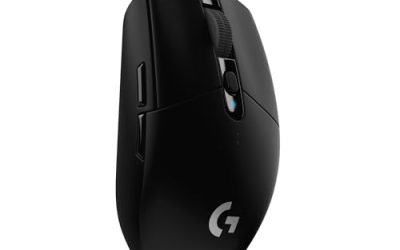
Logitech G305 LIGHTSPEED (Black)

The G305 is the default recommendation for casual play because it removes nearly every chore around a gaming mouse. One AA battery, a receiver that stores inside the shell, and a compact symmetrical shape mean it can live on a family PC, move to a laptop for a weekend, and come back without cables, docks or pairing rituals. Its HERO sensor ceiling is far beyond what relaxed play needs, so the real appeal is the combination of LIGHTSPEED wireless, long battery life and a shape that asks nothing unusual of your hand.
Specs
- Brand: Logitech G
- Sensor: HERO 12K optical sensor, up to 12,000 DPI
- Connection: LIGHTSPEED wireless via USB receiver, 1ms report rate
- Buttons: 6 programmable buttons
- Battery: Up to 250 hours on a single AA battery
- Weight: 99 grams
- Features: On-board memory, built-in receiver storage, PC and Mac
Best for: Households and laptop players who want one simple wireless gaming mouse that rarely needs attention.
Watch out for: There is no Bluetooth mode, so receiver-free pairing with a tablet or work laptop is not an option.
ASIN: B07CMS5Q6P
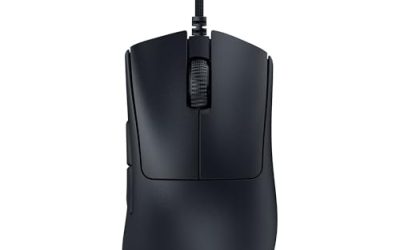
Razer Orochi V2 (Classic Black)
The Orochi V2 is the pick for casual gaming that happens away from a main desk: kitchen-table laptops, small apartment setups and travel bags. Its listing frames it as a mobile wireless mouse, with two wireless modes so it can use its receiver for play and Bluetooth for everyday laptop work. The headline battery figure is the longest in this guide, which suits players who game in short bursts across a week and do not want charging to become part of the routine. The small shell favours fingertip and claw grips over a full resting palm.
Specs
- Brand: Razer
- Sensor: 5G Advanced optical sensor, 18K DPI
- Connection: 2 wireless modes, HyperSpeed wireless and Bluetooth
- Switches: Mechanical mouse switches
- Battery: Up to 950 hours, as stated in the listing title
- Design: Ultra lightweight mobile gaming mouse
- Colour: Classic Black
- Model: RZ01-03730100-R3U1
Best for: Laptop players and small-desk setups who want a tiny wireless mouse with very long stated battery life.
Watch out for: The compact shell can feel cramped for large hands or full palm grip, so check the size against your current mouse.
ASIN: B0916N2LPZ
Corsair KATAR PRO Wireless
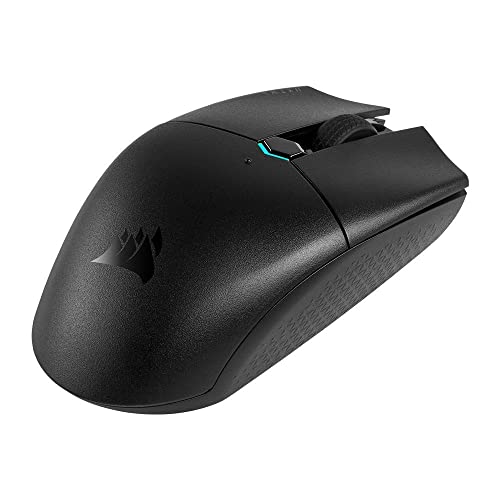
The KATAR PRO Wireless keeps the casual formula deliberately plain: a compact symmetric shell, two ways to connect, and a single AA battery instead of a charging cable. Its listing highlights SLIPSTREAM wireless for gaming and Bluetooth for pairing with a wider range of devices, which makes it an easy second mouse for a living-room PC or a laptop that doubles as a work machine. At 96 grams it is light without chasing the extreme low weights of esports shells, and the shape suits claw and fingertip grips during shorter, relaxed sessions.
Specs
- Brand: Corsair
- Sensor: Optical sensor, up to 10,000 DPI
- Connection: SLIPSTREAM wireless and Bluetooth
- Battery: Up to 135 hours on a single AA battery
- Weight: 96 grams
- Shape: Compact symmetric shape
- Use framing in listing: FPS and MOBA gaming mouse
Best for: Players who want one compact mouse that games over its receiver and pairs over Bluetooth for everyday tasks.
Watch out for: Battery life is the shortest claimed in this guide, so heavy daily use means swapping the AA cell more often.
ASIN: B08JDVR3GZ
HyperX Pulsefire Haste 2 Wireless (Black)

The Pulsefire Haste 2 Wireless suits casual players who still like a light, quick-feeling mouse but play in relaxed sessions rather than tournaments. At 61 grams as listed, it moves with very little effort, which helps during longer strategy or adventure sessions where constant small movements add up. Dual wireless connectivity lets it stay paired to a gaming PC over 2.4GHz and still connect to a laptop over Bluetooth, and the stated battery life covers many evenings of play between charges. The solid shell keeps the design simple compared with open honeycomb bodies.
Specs
- Brand: HyperX
- Sensor: HyperX 26K sensor, up to 26,000 DPI
- Connection: Dual wireless, 2.4GHz and Bluetooth
- Battery: Up to 100 hours
- Weight: 61 grams, ultra lightweight
- Design: Lightweight solid-shell gaming mouse
- Colour: Black
Best for: Casual players who want the lightest mouse in this guide for long, low-effort sessions across two machines.
Watch out for: It uses a rechargeable battery rather than a replaceable cell, so a flat mouse means a wired charging pause.
ASIN: B0BX52C4LN
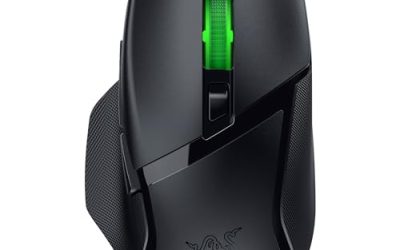
Razer Basilisk V3 X HyperSpeed (Classic Black)
The Basilisk V3 X HyperSpeed is the comfort-first option here, built around an ergonomic right-handed shell for players whose casual sessions still run long. Nine programmable controls give relaxed players room for media keys, push-to-talk and game shortcuts without reaching for the keyboard, and the listing’s battery figure is the second longest in this guide. HyperSpeed wireless covers play while Bluetooth covers the workday, so it can stay on one desk and serve both roles. It is the largest commitment in size, so it rewards a palm grip rather than fingertip movement.
Specs
- Brand: Razer
- Sensor: 5G Advanced 18K optical sensor
- Connection: HyperSpeed wireless and Bluetooth
- Controls: 9 programmable controls
- Switches: Mechanical switches, Gen-2
- Battery: Up to 535 hours, as stated in the listing title
- Lighting: Chroma RGB
- Colour: Classic Black
- Model: RZ01-04870100-R3U1
Best for: Palm-grip players who want an ergonomic mouse with extra controls for both games and everyday shortcuts.
Watch out for: The right-handed ergonomic shape does not suit left-handed use, and its size is less travel-friendly than the Orochi V2.
ASIN: B0BXBC26X8
Which One Fits Your Situation
You game on the family PC a few nights a week
Choose the Logitech G305 LIGHTSPEED. A shared computer needs a mouse that is simply ready: the AA battery lasts through months of short sessions, the receiver stays in one USB port, and nobody has to manage pairing or charging. Its six buttons cover the shortcuts most casual players actually use, and the compact shape works for different hand sizes around the house.
Your gaming happens on a laptop, often away from your desk
Choose the Razer Orochi V2. Its mobile framing, small shell and two wireless modes fit a laptop bag routine, and the long stated battery life means it can travel for weeks of short sessions. Players with larger hands who rest a full palm should instead look at the Basilisk V3 X HyperSpeed for home use and keep the Orochi shape in mind only if a compact mouse already feels natural.
You want one mouse for work calls and evening play
Choose the Corsair KATAR PRO Wireless or the HyperX Pulsefire Haste 2 Wireless. Both listings state Bluetooth alongside a gaming wireless mode, so one mouse can stay paired to a work laptop and still connect properly for games. Pick the KATAR PRO Wireless if you prefer swapping an AA cell instantly, and the Haste 2 Wireless if you would rather recharge occasionally and enjoy the lighter 61 gram shell.
Your sessions are long, relaxed and palm-grip
Choose the Razer Basilisk V3 X HyperSpeed. Story games, simulators and long strategy evenings reward a shell that supports the whole hand, and its nine controls let you park volume, screenshots and push-to-talk under your fingers. The long stated battery life also fits a mouse that stays on one desk, where its larger ergonomic shape is an advantage rather than a packing problem.
Common Mistakes
- Buying an esports-shaped mouse for relaxed play, then finding the forced claw grip tiring during long, slow sessions.
- Ignoring the battery system: choosing a rechargeable mouse for a shared desk where nobody plugs it in, or a cell-powered mouse when you hate keeping spares.
- Assuming every wireless gaming mouse has Bluetooth, when some listings, like the G305, offer a USB receiver only.
- Chasing the highest DPI figure in a title instead of checking weight, shape and button count, which shape daily comfort far more.
- Forgetting hand size and handedness, especially with compact mobile shells and right-handed ergonomic designs.
Frequently Asked Questions
Is wireless reliable enough for casual gaming?
Yes, for the kind of play this guide covers. The listings here state gaming wireless systems such as LIGHTSPEED, HyperSpeed and SLIPSTREAM, each presented by its maker for gaming use with low-latency links. For relaxed sessions at a normal desk distance, the practical difference versus a cable is the freedom from drag, not a compromise you are likely to notice.
How many buttons does a casual player actually need?
Six buttons cover most casual setups comfortably: the two main clicks, a wheel click, a DPI button and two side buttons for push-to-talk or a favourite game action. The Basilisk V3 X HyperSpeed and its nine controls make sense when you also want media and desktop shortcuts on the mouse. More buttons only help if you will genuinely map and remember them.
Should I choose a replaceable battery or a rechargeable mouse?
Choose replaceable AA power, as on the G305, Orochi V2 and KATAR PRO Wireless, if the mouse lives on a shared desk or travels, because a spare cell restores play in seconds. Choose a rechargeable model such as the Pulsefire Haste 2 Wireless if you prefer a lighter sealed design and you are comfortable plugging in between sessions when the battery runs low.
Can one of these mice also handle everyday work?
That is exactly the use several of these listings anticipate. Models stating Bluetooth as a second mode can pair with a work laptop without moving a receiver, while receiver-only models still handle everyday pointing perfectly well on one main computer. The gaming framing in each listing adds sensor range and programmable buttons, but nothing about these mice prevents normal desktop use.
FAQ
Is wireless reliable enough for casual gaming?
How many buttons does a casual player actually need?
Should I choose a replaceable battery or a rechargeable mouse?
Can one of these mice also handle everyday work?
More from Amazon
Programs that pair well with the guide above. Offers and eligibility are set by Amazon and may change.
Free shipping on eligible items, Prime Video and more. Eligible new members can start with a free trial.
Start a Prime free trialAd-free music streaming. Eligible new subscribers can start with a free trial.
Try Music Unlimited freeA Prime membership for ages 18-24 with a trial period. Eligibility is set by Amazon.
See Prime for Young AdultsAudiobooks and podcasts to listen to on the go. Eligible new members can start with a free trial.
Try Audible freeAs an Amazon Associate we earn from qualifying purchases.