Key takeaways
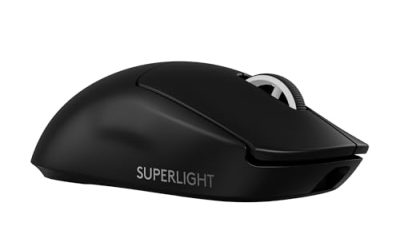
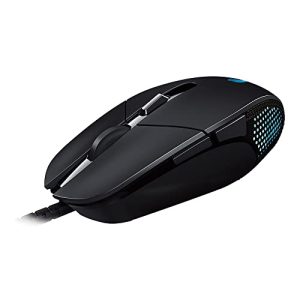
- Best 30 gaming mouse guide: how to pick a comfortable, responsive gaming mouse on a tight budget, what specs matter, and which shape fits your hand and grip.
As an Amazon Associate we earn from qualifying purchases.
Shopping for the best 30 gaming mouse means making one clear decision: which trade-offs are worth accepting when the budget is fixed. A tight spending limit does not have to mean a sluggish sensor or a shape that cramps your hand after an hour, but it does mean that every feature on the box deserves a second look before you commit.
This guide is written for first-time PC gamers building a setup on limited funds, for students replacing a worn-out office mouse, for parents buying a first gaming mouse for a teenager, and for anyone upgrading a shared family computer without overspending. It explains how to judge a gaming mouse by its sensor, shape, buttons, and connection, so you can spend a fixed budget on the things that change how games feel.
What Matters Most on a Tight Budget
A fixed budget forces a clear order of priorities, and the sensor sits at the top of that order. A mouse that tracks cleanly at the sensitivity you actually use will feel better in every game than a mouse with flashy lighting and a sensor that skips during fast flicks. Look for a listing that states its maximum sensitivity plainly and pairs it with a named optical sensor family, then check that the sensitivity range covers the level you play at rather than chasing the biggest number on the page.
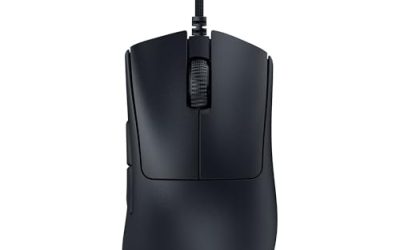
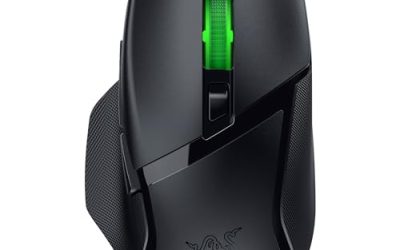
Shape comes next, because no sensor can rescue a mouse that fights your hand. A tall, right-handed shell with a gentle hump supports a palm grip, while a low, narrow, symmetrical shell suits fingertip players who lift and reposition often. Measure your hand from wrist to middle fingertip and compare it with the length stated on the listing, and remember that a mouse which looks compact in a photo can still feel long once your fingers rest on its buttons.
Buttons and build quality decide whether a mouse stays pleasant after months of daily use. Two well-placed side buttons beat a crowded row of small ones that you press by accident, and a scroll wheel with distinct, even steps helps you switch weapons without overshooting. A braided cable resists tangling on a desk edge, while a plain rubber cable is lighter and easier to ignore. Read the listing for the switch type and the cable description, and treat vague wording about durability as a reason to keep looking rather than a reason to trust the claim.
Wired or Wireless on a Tight Budget
A wired mouse is usually the safer pick when funds are limited, because the cable removes two worries at once: there is no battery to run flat mid-match, and there is no wireless link to drop at the worst moment. Modern wired mice also tend to weigh less than wireless models at the same spending level, since there is no battery cell inside the shell. The cable itself is the only real drawback, and a simple bungee, a clip, or a little slack routed behind the monitor keeps it out of the way for most desk setups.
Wireless mice have become far more practical than they once were, and a single receiver model can be a good fit for a laptop that moves between a desk and a sofa. Battery life matters more than any other wireless figure, so look for a stated hour count and a clear note about whether the mouse runs on a rechargeable cell or a replaceable one. A rechargeable mouse that charges over a standard cable is easier to live with, while a mouse that needs a fresh cell every few weeks adds a small running cost that a tight budget should account for.
Tri-mode mice that switch between a cable, a receiver, and Bluetooth sound flexible, and they can be, but flexibility sometimes hides a weaker sensor or a heavier shell. Judge a tri-mode mouse on the same points as any other mouse first, then treat the extra connection modes as a bonus rather than the reason to buy. If the sensor figures and the shape are right, the extra modes are genuinely useful; if they are not, no amount of switching will make the mouse feel better in a match.
How to Choose
Sensor Sensitivity and Tracking Stability
A gaming sensor is judged by how steadily it follows your hand, not by the largest sensitivity figure printed on the box. Most players settle somewhere in the low to middle part of a sensor’s range, so a mouse that tracks cleanly at everyday settings matters far more than one that advertises an extreme ceiling you will never select. Check the listing for the sensor name and the sensitivity steps it supports, and prefer a mouse that lets you change sensitivity in small, predictable jumps. A sensor that holds its line during fast swipes and stops cleanly when your hand stops will feel accurate in shooters, strategy games, and everyday desktop work alike.
Shape, Size, and Grip Style
Your grip decides which shell will feel natural, so start by noticing how your hand rests on your current mouse. Palm players spread their whole hand across the shell and need length plus a supportive hump under the palm, claw players arch their fingers and need a shorter body with a defined rear edge, and fingertip players touch only the buttons and need a light, narrow shape they can lift freely. Compare the stated length and width with a ruler beside your hand, and think about whether your fingers reach the side buttons without stretching. A mouse that matches your grip will feel invisible within a day, while a mismatched one will remind you of its presence in every match.
Buttons, Scroll Wheel, and Software
Buttons earn their place by being easy to find without looking, so count how many you will genuinely use rather than how many the listing boasts about. Two side buttons cover forward and back in most games, a dedicated sensitivity button behind the wheel helps you switch aim settings quickly, and extra buttons only help if your thumb can reach them without shifting your grip. The scroll wheel should turn in clear steps with a firm middle click, since a loose wheel makes weapon switching unreliable. Software matters too: a simple program that saves your settings to the mouse itself means your sensitivity and lighting travel with the device to another computer.
Weight, Cable, and Build Quality
Weight changes how a mouse feels during long sessions, and lighter mice suit players who lift and flick often, while a slightly heavier mouse can feel steadier for slow, deliberate aiming. A honeycomb shell cuts weight but lets dust inside, a solid shell stays cleaner yet weighs a little more, and either choice works if the balance feels even from front to back. The cable deserves the same attention: a light, flexible cord drags less across the desk than a stiff one, and a mouse with a detachable cable is easier to pack for travel. Squeeze the sides gently in a store display if you can, and listen for creaks or rattles that hint at loose panels.
Which One Fits Your Situation
First Gaming Mouse for a New PC Player
A new player needs a simple, forgiving mouse, so a wired model with six buttons and a comfortable, medium-sized shell is the sensible starting point. Skip extra side buttons and complex software at first, and focus on a shape that fits your hand and a sensor that tracks smoothly at a middle sensitivity. That combination keeps the learning curve short and leaves room for a decent mousepad, which improves tracking more than any lighting effect.
Competitive Shooter Player on a Fixed Budget
Shooter players should put the sensor and the weight first, because fast flicks and steady tracking decide more rounds than any extra feature. A light, wired mouse with a clean sensor and a shape that supports your grip will serve better than a heavier mouse packed with buttons you never press. Set the sensitivity so a full sweep of your mousepad turns your view about once, then practise with that single setting instead of changing it every match.
MMO and Strategy Player Who Needs More Buttons
Players who juggle abilities, items, and camera controls benefit from a mouse with a generous set of side buttons, so look for at least four thumb buttons in a row you can learn by touch. A larger, ergonomic shell supports the hand during long sessions, and software that saves assignments to the mouse keeps your setup intact on any computer. Test the layout mentally: if you cannot picture which button casts each ability, the layout is too crowded.
Laptop Gamer Who Plays in Different Places
A laptop gamer needs a mouse that travels well, so a wireless model with a small receiver that stores inside the shell is worth prioritising. Battery life matters more than maximum sensitivity here, and a mouse that runs for weeks on one charge avoids a dead battery away from home. A symmetrical shape works well on a train tray or a sofa arm, and a mouse that also works over a cable covers the days the battery runs low.
Common Mistakes
- Chasing the highest sensitivity number on the listing instead of checking whether the sensor tracks cleanly at the level you actually play at.
- Picking a mouse for its lighting or its looks before checking whether its length and hump suit your hand and grip style.
- Filling the side of the mouse with buttons you will never press, then hitting the wrong one in the middle of a match.
- Ignoring the cable, the weight, and the scroll wheel, even though those three details shape how the mouse feels every single day.
- Changing sensitivity settings after every bad round instead of practising with one steady setting until your aim becomes consistent.
Frequently Asked Questions
What sensitivity should a new gaming mouse owner start with?
Start in the middle of the sensor’s range, then adjust in small steps until a sweep of your mousepad turns your view once in-game. A middle setting keeps fine aiming controllable while letting you turn quickly, and it avoids the jitter that can appear at extreme settings. Give each new setting a few matches before changing it again, since your hand needs time to learn the new feel.
Is a wired mouse better than a wireless mouse on a tight budget?
A wired mouse is usually the better value when funds are limited, because the cable removes battery worries and the money goes toward the sensor and the shell instead of a wireless radio. Wireless mice suit laptops and tidy desks, but a good wireless sensor at a low spending level is harder to find. If you play mostly at one desk, choose wired; if you move around often, choose wireless.
How many buttons does a gaming mouse really need?
Most players need six buttons: two main clicks, a clickable scroll wheel, a sensitivity switch, and two side buttons for forward and back. That layout covers shooters, strategy games, and everyday browsing without cluttering the shell. Players who cast many abilities may want four or more side buttons, but only if each one sits where the thumb can find it without shifting the grip.
Does mouse weight make a real difference in games?
Weight makes a noticeable difference, especially for players who lift the mouse often or flick quickly between targets. A lighter mouse changes direction with less effort and causes less wrist fatigue over long sessions, while a heavier mouse can feel steadier for slow, careful aiming. Neither is better for everyone, so try to handle the mouse before buying, or pick a weight close to a mouse you already find comfortable.
FAQ
What sensitivity should a new gaming mouse owner start with?
Is a wired mouse better than a wireless mouse on a tight budget?
How many buttons does a gaming mouse really need?
Does mouse weight make a real difference in games?
More from Amazon
Programs that pair well with the guide above. Offers and eligibility are set by Amazon and may change.
Free shipping on eligible items, Prime Video and more. Eligible new members can start with a free trial.
Start a Prime free trialAd-free music streaming. Eligible new subscribers can start with a free trial.
Try Music Unlimited freeA Prime membership for ages 18-24 with a trial period. Eligibility is set by Amazon.
See Prime for Young AdultsAudiobooks and podcasts to listen to on the go. Eligible new members can start with a free trial.
Try Audible freeAs an Amazon Associate we earn from qualifying purchases.