Key takeaways
- Searching for the best gaming mouse of all time? This guide compares legendary shapes, sensors and grips to show which classic deserves a place on your desk.
As an Amazon Associate we earn from qualifying purchases.
Naming the best gaming mouse of all time sounds simple until you actually have to choose one. Does the title belong to the mouse that won the most tournaments, the one that sold in the largest numbers, or the one that still feels right after a decade of daily use? No single model wins on every measure, because the greats earned their reputations in different ways. Some pushed sensor accuracy forward, others nailed a shape so well that rivals still copy it, and a few simply refused to break.
This guide is for competitive FPS players chasing consistent aim, MMO and strategy players who need dependable buttons, palm-grip players who value comfort over long sessions, and collectors who want to understand why certain classics never faded. The legendary mice below were selected from their lasting tournament history, their influence on later designs, and their published specifications, so you can judge each one on what it actually did rather than on nostalgia alone.
How to Choose
Shape Comes Before Sensor
A mouse lives in your hand for hours at a time, so its outline matters more than any number on the box. Long, low shells suit palm grips, narrow waists suit claw grips, and short, light shells suit fingertip players who lift constantly. Before falling for a famous name, compare the length and hump position with the mouse you already use, because a beloved classic that fights your grip will feel wrong within a week. Ergonomic right-handed shapes forgive a relaxed hand, while symmetrical shells give left-handed players and claw grippers more freedom. If possible, hold the shape first, since comfort decides whether a legend stays on your desk or ends up in a drawer.
Sensor Consistency Beats Peak Numbers
Marketing loves enormous DPI figures, but the mice that earned all-time status did so by tracking cleanly at the sensitivities people really use. A trustworthy sensor holds its aim through fast flicks, stops without drift, and behaves the same on a cloth pad after months of wear. Look for a proven optical sensor with a flawless tracking reputation rather than the highest number on the specification sheet, and remember that most competitive players settle between low and medium sensitivity. Lift-off distance matters too: a sensor that keeps tracking while you reposition the mouse will send your crosshair wandering. The legends below stayed relevant because their sensors were predictable, not because they chased records.
Weight, Balance and Cable Feel
The classic era was full of heavy mice, yet the ones people still praise balanced their weight around the palm instead of loading it toward the front or tail. A mouse near one hundred grams can feel nimble when its centre of gravity sits under your grip, while a lighter shell with a rear-heavy balance can feel awkward. Check where the weight sits, whether the cable drags across the pad, and whether the feet glide smoothly after months of use. These details decide how a mouse feels in the tenth hour, when the greats separate themselves from the merely good.
Buttons, Scroll Wheel and Software
Clicks are the part of a mouse you feel thousands of times a day, so crisp, consistent switches matter as much as the sensor. The all-time greats used main buttons with a short, definite travel and side buttons placed where a thumb rests naturally, without accidental presses during tense moments. A scroll wheel should step cleanly for weapon swaps and browsing, with a middle click that does not require a hard press. Software also counts: a clean companion app lets you set sensitivity steps, polling behaviour and lighting once, then forget about it. Beware of mice that demand a bloated suite running constantly, since the best classics earned their place by working well with minimal fuss.
Legendary Mice That Defined the Genre
Every era of competitive gaming has a mouse that other makers measured themselves against. The models below did more than sell well: they set the shape, sensor or feature standard that later mice inherited. Some remain practical daily drivers, while others matter chiefly as the design ancestors of the mice on shelves today.
Microsoft IntelliMouse Explorer 3.0
Released when optical sensors were still proving themselves, the IntelliMouse Explorer 3.0 gave a generation of players their first taste of tracking without a ball. Its broad, right-handed shell with a gentle thumb rest fitted large hands beautifully, and its side buttons arrived at a time when most mice offered none at all. Tournament players adopted it for first-person shooters, and its outline became a template that other brands copied for years. Later revivals kept the shape alive because no redesign could improve on how naturally it sat in the hand. It remains the clearest example of a mouse remembered for comfort and reliability rather than raw numbers.
Logitech MX518
The MX518 arrived as the successor to the beloved MX510 and quickly became the default competitive mouse of its era. Its sculpted right-handed body gave palm and claw players a secure grip, while its optical sensor delivered the steady tracking that tournament play demanded. What made it special was balance: nothing about it felt extreme, yet every part worked exactly as expected, from the well-placed side buttons to the textured grip zones. Logitech later revived the design as the G MX518, a rare admission that the original shape had never been beaten. For many players, it is the benchmark every new mouse is silently compared with.
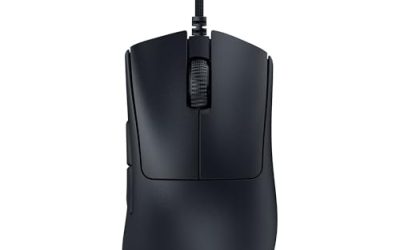
Razer DeathAdder
Few mice have stayed in production as long as the DeathAdder, and its longevity is the strongest argument for its place among the greats. Its tall, ergonomic right-handed shell suits medium and large hands, with a thumb rest that supports long sessions without strain. Across many revisions, Razer kept the outline almost untouched while updating the sensor and switches inside, a sign that the shape itself was already right. Esports players adopted it across shooters and MOBAs alike, and its silhouette is now one of the most copied in gaming. If one mouse deserves the title on sheer staying power, the DeathAdder is the strongest candidate.
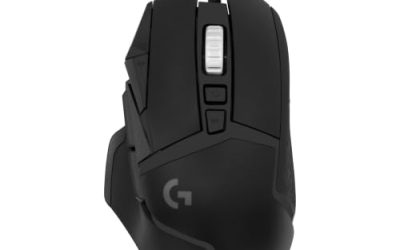
Logitech G502
The G502 took a different path to greatness by refusing to be a single-purpose tool. Its aggressive right-handed shape packs a free-spinning scroll wheel, adjustable weights, a sniper button for temporary sensitivity drops, and more programmable buttons than most rivals. Shooters, MMO players and strategy fans all found something to love, which is why it became one of the best-selling gaming mice ever made. Later versions trimmed weight and added wireless options while keeping the same confident layout. The G502 proves that an all-time great does not have to be minimal: it can also be the mouse that tries to do everything and succeeds at most of it.
SteelSeries Sensei
The Sensei showed that an ambidextrous mouse could compete with ergonomic flagships on comfort and performance. Its symmetrical, low-profile shell suited claw and fingertip players, while its metal coating and understated styling stood apart from the aggressive designs around it. Inside, it paired a strong optical sensor with on-board memory and a small display for sensitivity settings, features that felt futuristic when it launched. Professional players picked it up because it worked the same in either hand and travelled well between tournaments. The Sensei shaped a whole generation of symmetrical esports mice, and its influence is still visible in the lightweight ambidextrous designs sold today.
Which One Fits Your Situation
You Play Competitive FPS Every Night
Pick the legend whose shape matches your grip and whose sensor tracks flawlessly at your sensitivity. The IntelliMouse Explorer 3.0 and the MX518 reward palm players who value stability, while the DeathAdder suits those who want a taller shell for long matches. Keep your sensitivity consistent, give yourself a week to adjust, and judge the mouse on your flick accuracy and comfort after long sessions rather than on its first impression.
You Want One Mouse for Work and Play
Choose a classic with enough buttons for shortcuts and a shape that stays comfortable through a full workday. The G502 stands out here, since its extra buttons handle productivity tasks while its scroll wheel speeds through long documents. The DeathAdder also works well, offering a calm, ergonomic shell that never looks out of place in an office. Avoid ultra-light fingertip shells for this role, because they can tire your hand during long non-gaming stretches.
You Have Large Hands and a Palm Grip
Look for a long shell with a high hump and a proper thumb rest, because short mice force large hands into a cramped claw. The IntelliMouse Explorer 3.0 was built for exactly this hand, and the DeathAdder and G502 both give large palms room to rest fully. Measure your hand against the mouse dimensions before buying, and favour models with a wide base that keeps your ring finger from dragging on the pad.
You Love Classics and Collect Gaming History
Start with the mice that changed the genre, even if they are no longer your daily driver. The IntelliMouse Explorer 3.0 and the MX518 represent the moment optical gaming mice became serious, while the Sensei captures the rise of the ambidextrous esports shape. Check that older models are complete with their original feet and cables, and remember that a collector’s piece earns its shelf space through its story, not through matching a modern flagship feature for feature.
Common Mistakes
- Choosing a famous mouse that does not fit your hand, then blaming your aim instead of the shape.
- Chasing the highest DPI number on the box when you will actually play at a far lower sensitivity.
- Ignoring cable drag and worn mouse feet, which ruin the feel of an otherwise excellent classic.
- Buying an old model without checking that its switches still click cleanly and its sensor still tracks.
- Copying a professional player’s exact mouse and settings instead of finding the shape and sensitivity that suit your own grip.
Frequently Asked Questions
What is the best gaming mouse of all time?
There is no single winner, because the title depends on what you value. The DeathAdder leads on longevity and tournament use, the MX518 on balanced competitive design, and the IntelliMouse Explorer 3.0 on comfort and influence. The best choice for you is the legend whose shape fits your grip and whose sensor stays consistent at your sensitivity, so treat the shortlist above as a starting point, not a final verdict.
Is an old gaming mouse still good for competitive play?
Yes, provided its sensor tracks cleanly and its switches still work properly. Many classics use optical sensors that remain accurate at common competitive sensitivities, and their shapes were refined over years of tournament feedback. The trade-offs are weight, older cables and fewer modern features, so a classic suits players who value comfort and consistency over the lightest shell or the newest wireless technology.
Should I buy a classic mouse or a modern lightweight mouse?
Buy a classic if you love its shape and play at moderate sensitivity, since the greats earned their status through proven ergonomics. Choose a modern lightweight mouse if you play fast-paced shooters with a fingertip or claw grip and lift the mouse constantly. Many players keep both: a classic for relaxed sessions and a light modern shell for ranked nights when every gram counts.
What grip style matters most when choosing a legendary mouse?
Your grip decides which legends will feel right, so identify it before you buy. Palm players need a long shell with a high hump, like the DeathAdder or IntelliMouse Explorer 3.0, while claw players suit the MX518 or G502. Fingertip players should look at the Sensei and other symmetrical shells, since low, narrow bodies give their fingers freedom to move without dragging.
FAQ
What is the best gaming mouse of all time?
Is an old gaming mouse still good for competitive play?
Should I buy a classic mouse or a modern lightweight mouse?
What grip style matters most when choosing a legendary mouse?
More from Amazon
Programs that pair well with the guide above. Offers and eligibility are set by Amazon and may change.
Free shipping on eligible items, Prime Video and more. Eligible new members can start with a free trial.
Start a Prime free trialAd-free music streaming. Eligible new subscribers can start with a free trial.
Try Music Unlimited freeA Prime membership for ages 18-24 with a trial period. Eligibility is set by Amazon.
See Prime for Young AdultsAudiobooks and podcasts to listen to on the go. Eligible new members can start with a free trial.
Try Audible freeAs an Amazon Associate we earn from qualifying purchases.