Our Top Picks
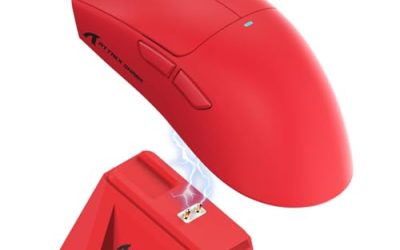
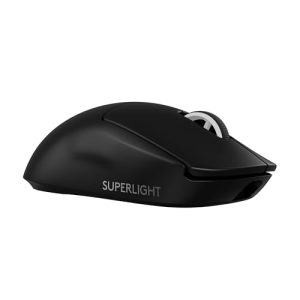
 Logitech G Pro X Superlight 2 Lightspeed WirelessClassic1.57 x 2.5 x 4.92 inches0.1 poundsCheck on Amazon
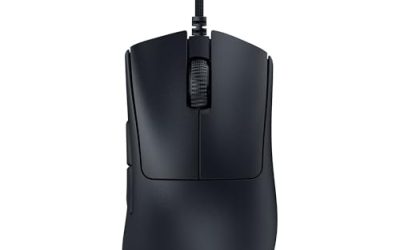
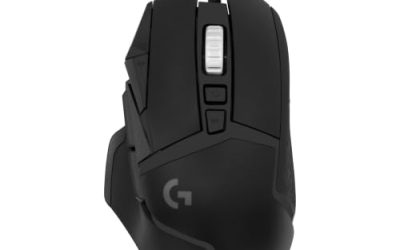
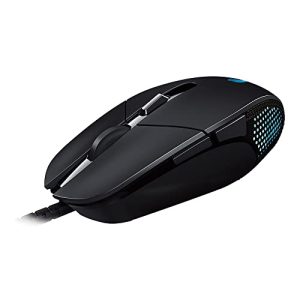
 Razer DeathAdder V2 Gaming Mouse: 20K DPI OpticalMouse2.87 x 5 x 1.69 inches0.4 poundsCheck on Amazon
Sweaty palms can turn a long gaming session into a fight with your own mouse. A smooth plastic shell that feels fine for the first ten minutes can turn slick once your hands warm up, and a mouse that slides around in your palm makes every flick and micro-adjustment harder to land. The best gaming mouse for sweaty hands is not about one magic feature. It is about a shell that works with moisture instead of against it, a shape that lets you hold the mouse lightly, and a weight that keeps your hand from tiring out and heating up even more.
This guide covers five mice that fight slip in different ways. Some use a matte micro-textured coating that grips harder as your skin gets damp. Some use a honeycomb shell that lets air reach your palm so sweat can dry instead of pooling. Others rely on rubber side grips, or include grip tape in the box so you can add texture exactly where your fingers sit. Every pick below is a gaming mouse with a real sensor and real switches, and each one earns its place for a different hand size, grip style, and connection preference.
What to Look For
Shell finish. Matte and micro-textured coatings hold their grip far longer than glossy plastic once moisture builds up. A fine grit on the shell gives your skin something to catch on, while a smooth gloss turns into a slide the moment your palm gets damp. Rubberized side panels can help too, though rubber can go sticky with age, so a matte hard coat is the safer long-term bet.
Ventilation. A honeycomb shell lets air reach your palm, which keeps the surface cooler and lets sweat evaporate instead of pooling under your hand. Open holes also mean dust can get in, so look for a mouse with a coated circuit board inside if you go this route. Ventilation matters most if your hands get genuinely wet, not just tacky.
Weight. A lighter mouse means less muscle effort, and less effort means less heat. Mice in the 60 to 85 gram range let you move with your fingers and wrist instead of muscling the whole shell around, which keeps your hand cooler over a long session. Heavy mice force a tighter hold, and a tighter hold means more sweat.
Grip style fit. Palm, claw, and fingertip grips put your hand on different parts of the shell. A palm grip needs a long, tall body with side support. A claw grip needs a hump under the palm and room for arched fingers. A fingertip grip needs a short, light body you can lift easily. The wrong shape will slip no matter how good the coating is, so match the shape to your hand first.
Side grips and tape. Textured rubber on the thumb rest and finger side gives your grip a second anchor point when the top shell gets damp. Some mice ship with grip tape in the box, which lets you add texture exactly where you hold the mouse and swap it out when it wears down. Tape is a useful extra, but it works best on a shell that already grips well on its own.
Sensor and switches. Sweat should not cost you aim. Look for a modern optical sensor with a high maximum sensitivity and no smoothing or acceleration, plus switches with a crisp, consistent click. A sensor that tracks cleanly on cloth pads even when moisture builds up keeps your aim steady when the match heats up.
Connection. Wireless mice cut the cable drag that can fight your hand during fast moves, and a long battery life means fewer charging breaks. Wired mice never run out of charge and tend to weigh less. Either can work for sweaty hands, but a wireless mouse with a USB-C charging port and a dongle that stores inside the body is the most convenient setup for long sessions.
Size. Measure your hand before you buy. A mouse that is too small forces a cramped hold that builds heat, while a mouse that is too large makes you stretch and squeeze to reach the buttons. Length, width, and hump height all matter, and a few millimeters in any direction can change how secure the mouse feels when your palm is damp.
Top Picks
1. Logitech G PRO X Superlight 2
The Logitech G PRO X Superlight 2 is the pick to start with if your hands sweat during long sessions. It weighs just 60 grams, and that low weight is the first line of defense: a lighter mouse asks less of your hand, so your palm stays cooler and drier for longer. The shell uses a hybrid matte coating with a fine texture that holds its grip as your skin gets damp, and Logitech includes grip tape in the box so you can add extra texture to the sides and buttons if you want it. The symmetrical shape suits palm, claw, and fingertip grips, which matters because sweaty-handed players often shift their hold during a match.
Inside, the HERO 2 sensor tracks at up to 44,000 DPI with no smoothing, acceleration, or filtering, and the LIGHTFORCE hybrid optical-mechanical switches give a crisp click that stays consistent across long sessions. The mouse runs on LIGHTSPEED wireless with a USB-C charging port and up to 95 hours of battery life, so it keeps going through a full week of evening sessions without a charge. It also supports 8 kHz polling with the included receiver, and it works with POWERPLAY charging mats if you already own one. There is no Bluetooth and no dedicated DPI button, so you change sensitivity through Logitech G Hub software or the on-board memory. The scroll wheel deserves a check in your first week, since some owners note that it can feel loose or reverse direction, and catching that early makes an exchange simple. For most sweaty-handed players, though, the combination of low weight, matte texture, and included grip tape makes this the most complete answer on this list.
2. Cooler Master MM711 Matte Black
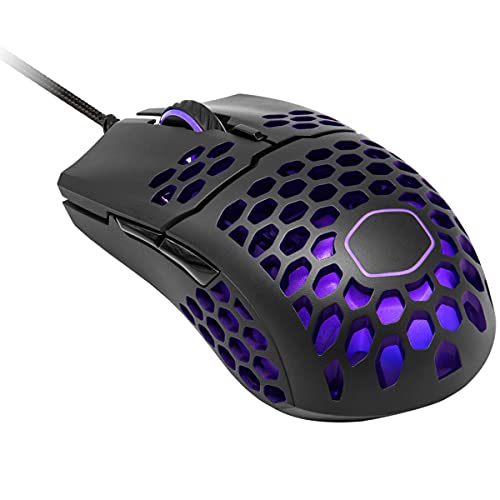
If your palms get genuinely wet rather than just tacky, ventilation beats texture, and the Cooler Master MM711 is the best ventilated mouse on this list. Its fully perforated honeycomb shell lets air reach your palm so sweat can evaporate instead of pooling under your hand, and Cooler Master coats the internal circuit board to resist dust and moisture, so the open holes do not become a weakness. At 60 grams it is one of the lightest mice you can buy, which keeps hand fatigue low and helps your palm stay cooler during long sessions.
The PixArt PMW3389 optical sensor tracks at up to 16,000 DPI with a 1,000 Hz polling rate and a lift-off distance under 2 mm, which is more than enough for fast flicks and precise tracking on a cloth pad. Omron switches under the main buttons are rated for more than 20 million clicks, and the PTFE feet glide smoothly with very little drag. The ambidextrous shape suits right-handed and left-handed players, with two side buttons on the left side for right-handed use. It is a wired mouse, so there is no battery to charge and no wireless lag to think about, and the matte black finish keeps the shell from looking shiny after months of use. The cable is flexible enough that it does not fight your hand during fast moves. For players whose hands run hot and wet, the MM711 is the simplest and most direct fix: air in, sweat out, and a shell that never gets slick.
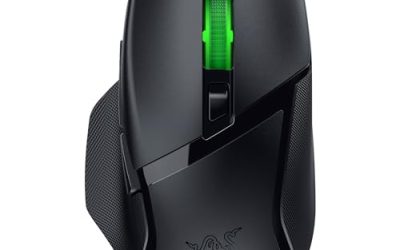
3. Razer Viper V3 HyperSpeed

The Razer Viper V3 HyperSpeed takes a different approach to sweaty hands. Instead of a vented shell, it pairs a smooth sealed top with aggressively textured rubber side grips, so your thumb and ring finger always have something to hold even when your palm is damp. The symmetrical shape is built for claw and fingertip grips, and at 82 grams it is light enough to flick quickly without tiring your hand. The Focus Pro 30K optical sensor tracks at up to 30,000 DPI with no smoothing, and the Gen-2 mechanical switches give a crisp, consistent click with a long lifespan.
Battery life is a strong point here. A single AA battery powers the mouse for up to 280 hours of play, so you can go weeks without thinking about charging, and the HyperSpeed wireless connection keeps latency low enough for competitive play. The mouse also supports 8,000 Hz polling with an optional dongle, which tightens response further for fast-paced games. There are eight programmable controls, and Razer Synapse software lets you remap buttons, adjust sensitivity, and save profiles to the on-board memory. The smooth top shell will not suit players who want texture under the palm itself, so if your whole hand sweats rather than just your fingers, a honeycomb or matte shell may serve you better. For claw and fingertip players who want a wireless mouse with strong side grip and a battery that seems to last forever, the Viper V3 HyperSpeed is hard to beat.
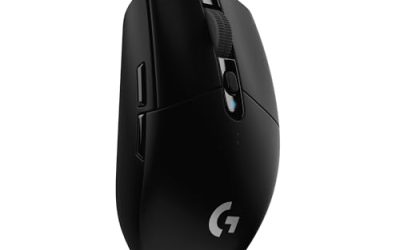
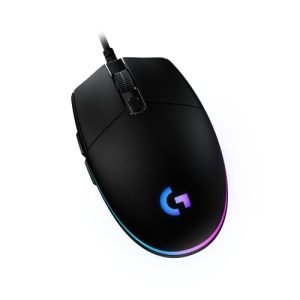
4. Logitech G203 Lightsync Black

The Logitech G203 Lightsync is the budget pick on this list, and it earns its place with a grippy matte finish that works far better than its modest size suggests. The shell has a soft matte texture that holds up well when your hands get damp, and the compact 85-gram body suits smaller hands and claw grips. It is a wired mouse, so there is no battery to manage, and the cable is light enough that it does not drag during fast moves.
The sensor tracks at up to 8,000 DPI, which covers casual and competitive play alike, and the six programmable buttons give you room for extra commands without reaching for the keyboard. LIGHTSYNC RGB runs along the side stripe and the logo, and Logitech G Hub software lets you tune the lighting, remap buttons, and store up to five sensitivity presets in the on-board memory. The classic shape is comfortable for long sessions, and the matte finish resists the shiny wear that smooth shells develop over time. It lacks the ventilation of a honeycomb shell and the ultra-light weight of the flagship mice on this list, so very sweaty hands may still want grip tape on the sides. For the money, though, the G203 is the cheapest mouse here that still solves the core problem: a matte shell that stays grippy when your palm heats up.
5. Razer DeathAdder V2
The Razer DeathAdder V2 is the palm-grip pick on this list, and its ergonomic shape is the reason it works so well for sweaty hands. The right-handed body is long and tall, with a thumb rest and rubberized side grips that give your hand a secure hold even when moisture builds up. The top shell has a smooth matte finish that resists slip better than glossy plastic, and the shape lets your palm rest on the mouse instead of squeezing it, which keeps your hand cooler during long sessions.
The Focus+ 20K optical sensor tracks at up to 20,000 DPI with 650 IPS tracking speed, and the optical switches actuate with a crisp, fast click that stays consistent over millions of presses. Eight programmable buttons give you plenty of room for macros and extra commands, and Chroma RGB lighting runs through the scroll wheel, logo, and side strips. The Speedflex cable is soft and flexible, so it does not tug at the mouse during fast flicks, and the on-board memory stores your settings when you move between computers. At 82 grams it is light for an ergonomic mouse, though heavier than the symmetrical picks on this list. If you use a palm grip and your hands sweat, the DeathAdder V2 is the most comfortable answer here: a shape that holds your hand, side grips that hold your thumb, and a sensor that keeps up with fast play.
Comparison at a Glance
| Mouse | Weight | Anti-Sweat Feature | Connection | Best For |
|---|---|---|---|---|
| Logitech G PRO X Superlight 2 | 60 g | Matte micro-texture, grip tape included | Wireless | Most sweaty hands |
| Cooler Master MM711 | 60 g | Honeycomb shell, coated circuit board | Wired | Very wet palms |
| Razer Viper V3 HyperSpeed | 82 g | Textured rubber side grips | Wireless | Claw and fingertip grips |
| Logitech G203 Lightsync | 85 g | Grippy matte finish | Wired | Smaller hands, tight budgets |
| Razer DeathAdder V2 | 82 g | Rubberized side grips, ergonomic shape | Wired | Palm grip, larger hands |
FAQ
Why does my gaming mouse get slippery when my hands sweat?
Most gaming mice use smooth plastic shells, and sweat plus skin oil turns that surface into a slide. Matte and micro-textured coatings give your skin something to catch on, while honeycomb shells let air reach your palm so moisture can dry. A lighter mouse also helps, since a looser hold builds less heat.
Do honeycomb mice really help with sweaty hands?
Yes, for hands that get genuinely wet. The open shell lets air flow across your palm, which keeps the surface cooler and lets sweat evaporate instead of pooling. The trade-off is dust getting in through the holes, so look for a mouse with a coated circuit board inside, like the MM711 on this list.
Is grip tape worth using on a gaming mouse?
Grip tape adds texture exactly where your fingers sit, and it can turn a slippery mouse into a secure one. It works best as an extra on a shell that already grips well, and you should swap it out when it wears down or starts peeling. Some mice, like the Superlight 2, include tape in the box.
Should I choose a wireless or wired mouse for sweaty hands?
Both can work. Wireless mice remove cable drag, which helps during fast moves, and a long battery life means fewer breaks. Wired mice never need charging and tend to weigh less. Pick the connection you prefer and focus on shell finish, weight, and shape first, since those matter more for grip.
Conclusion
Sweaty hands do not need a special mouse so much as a mouse that respects how moisture changes grip. A matte micro-textured shell, a honeycomb body that breathes, or rubber side grips that hold your thumb all solve the same problem in different ways, and the right answer depends on how wet your hands get and how you hold the mouse. The Superlight 2 covers the most players with its light weight and included grip tape, the MM711 wins for the wettest palms, and the Viper V3 HyperSpeed, G203 Lightsync, and DeathAdder V2 each serve a different grip and budget. Match the shape to your hand, pick the anti-sweat feature that fits your sessions, and your mouse will stay put when the match heats up.
Disclosure: As an Amazon Associate, geekgamingtricks.com earns from qualifying purchases.
More from Amazon
Programs that pair well with the guide above. Offers and eligibility are set by Amazon and may change.
Free shipping on eligible items, Prime Video and more. Eligible new members can start with a free trial.
Start a Prime free trialAd-free music streaming. Eligible new subscribers can start with a free trial.
Try Music Unlimited freeA Prime membership for ages 18-24 with a trial period. Eligibility is set by Amazon.
See Prime for Young AdultsAudiobooks and podcasts to listen to on the go. Eligible new members can start with a free trial.
Try Audible freeAs an Amazon Associate we earn from qualifying purchases.