Our Top Picks
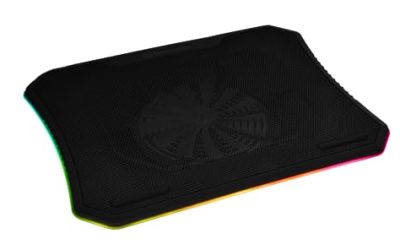
 TopMate C5 12-15.6 inch Gaming Laptop Cooler Cooling5 Fans1 x 12 x 14 inches2.09 poundsCheck on Amazon
An external fan for a gaming laptop is not really a purchase about airflow numbers. It is a decision about where your machine pulls its air from and whether the pad underneath can actually feed those intakes during a long session. A sealed turbo pad pressurises the underside, while an open mesh deck simply floods the base with moving air, and the two approaches suit different laptops, desks and noise tolerances.
This roundup is for players whose fans roar through every match, owners of larger 17-inch machines that run warm at the base, and anyone whose laptop sits flat on a desk with its intakes half-starved. Every pick is an external laptop cooling fan or pad framed for gaming in its own listing, selected from the product name and specifications stated on its Amazon product page.
Quick Picks
As an Amazon Associate we earn from qualifying purchases
| Product | Best for | Key spec from title |
|---|---|---|
| IETS GT500 | Hard-running gaming laptops that need sealed, directed airflow | Turbo-Fan (5000 RPM) with seal foam |
| KLIM Wind | Players who want four fans and a proven, simple deck | 4 fans at 1200 RPM |
| Cooler Master NotePal X3 | Big-screen gaming laptops up to 17 inches | 200mm fan with blue LED light |
| TopMate C5 | Smaller gaming laptops with on-pad fan controls | 5 quiet fans and LCD screen, 2500 RPM |
| havit HV-F2056 | Slim, light cooling for 15.6 to 17 inch laptops | 3 fans, USB powered |
How to Choose
Sealed turbo pressure versus open mesh airflow
The first fork in this category is how air reaches the laptop. Sealed pads such as the IETS GT500 use a foam edge to form a chamber under the machine and a turbo fan to push air straight at the intake vents, which suits gaming laptops that draw air from the base. Open mesh decks like the KLIM Wind and the NotePal X3 spread air across the whole underside instead. Neither design helps if the foam seal or the fan positions miss your vents, so match the layout to where your laptop actually breathes before anything else.
Fan count, fan size and speed range
Listings sell fan layouts in very different ways. The TopMate C5 spreads five smaller fans across the deck, the NotePal X3 relies on one 200mm fan, and the GT500 uses a single turbo fan listed at 5000 RPM with infinitely variable speed. A higher RPM figure in a title does not automatically mean more air reaches your intakes; placement matters as much as speed. Prefer a pad whose fan positions sit under your vents, and treat a speed control as essential, because the setting that works mid-match is rarely the one you want while browsing.
Size fit and the front stopper
Cooling pads are sold against screen sizes, and the ranges differ: the TopMate C5 covers 12 to 15.6 inches, the havit HV-F2056 covers 15.6 to 17 inches, and the GT500 covers 13 to 17.3 inches. Screen size is only a proxy, though, since two 15.6-inch laptops can have different footprints. Compare the pad dimensions in the listing with your chassis, and check the front lip or stopper height. On an angled pad, that small flap is all that stops a heavy gaming laptop sliding forward during play.
Power source, ports and height settings
Most open decks run from a laptop USB port, and several give one back: the havit lists two USB ports and the KLIM Wind lists two USB ports as well. Sealed turbo pads draw more power, so check whether the listing includes its own power supply before assuming a spare USB socket is enough. Height settings are the other daily detail. The GT500 lists seven height levels and the TopMate C5 five, which changes both wrist angle and how the laptop sits against the seal or stoppers, so count the settings rather than assuming any tilt will do.
The 5 Best Options
IETS GT500

For a gaming laptop that pulls air through its base and still throttles in long sessions, the GT500 takes the most direct route on this list. Its foam seal closes the gap around the underside so the turbo fan’s output goes toward the intake vents instead of spilling out sideways. The listing frames it for rapid cooling of gaming laptops, adds a dust filter to protect the machine, and gives infinitely variable speed, so you can back the fan off between matches rather than living at full blast.
Specs
- Turbo fan listed at 5000 RPM with infinitely variable speed
- Seal foam for rapid cooling of gaming laptops
- Dust filter included to protect the laptop
- Fits laptops from 13 to 17.3 inches
- RGB lighting on this version
Best for: Owners of hot-running 15.6 to 17.3 inch gaming laptops with bottom intake vents.
Watch out for: The seal only works when the foam matches your laptop’s footprint, so check the size range against your chassis before ordering.
ASIN: B09FJ961PG
KLIM Wind

The KLIM Wind is the straightforward multi-fan answer for players who do not want a sealed chamber or a power brick. Four fans spin at 1200 RPM under a metal grid, and the listing pitches the pad at gaming, editing and heavy multitasking, with compatibility running from small notebooks up to large 19-inch machines on some versions. It is USB powered with two USB ports, so the socket it borrows is partly repaid. For a desk-bound gaming laptop that just needs steady air across the whole base, this is the low-fuss layout.
Specs
- 4 fans spinning at 1200 RPM
- Laptop stand with metal grid surface
- USB powered cooler with 2 USB ports
- Listed compatibility from 11 inch laptops upward, version dependent
- Also listed for use with PS5 and PS4 consoles
Best for: Gamers who want broad, even airflow under a mid-size or large laptop without a sealed design.
Watch out for: Fan positions are fixed, so confirm the four fans sit somewhere near your laptop’s intake vents rather than under solid base panels.
ASIN: B019IU5HI2
Cooler Master NotePal X3

Cooler Master built the NotePal X3 openly around gaming: the listing describes a high-performance 200mm fan with blue LED light for dissipating extreme heat from gaming laptops, and a front vent that sends a light breeze toward your hands while you play. One large fan covers the centre of the base rather than scattering smaller fans around it, and a dial wheel controller lets you trim speed without reaching for software. The heavy-duty profile and metal mesh surface make it a desk fixture for laptops up to 17 inches rather than a bag accessory.
Specs
- Single 200mm fan with blue LED light
- Metal mesh surface and heavy-duty profile
- Built-in fan speed controller dial
- Front vent directs a breeze toward the hands
- Two height settings
- Supports laptops up to 17 inches
Best for: Players with 15 to 17 inch gaming laptops who want one big fan, a speed dial and a sturdier desk pad.
Watch out for: The listing gives two height settings only, so if you rely on a steep stand angle for posture, compare that with the taller multi-level pads here.
ASIN: B0079T2KHG
TopMate C5
The C5 is the control-freak option for smaller gaming laptops. Its title promises five quiet fans and an LCD screen, with strong wind up to 2500 RPM, designed for gamers and office use across 12 to 15.6 inch machines. The LCD panel is the point: it shows and changes fan speed and mode from the pad itself, so you can run the centre fan, the outer fans or everything together depending on where your laptop’s vents sit. Five height settings and a non-slip flap round out a pad aimed at compact rigs.
Specs
- 5 fans: four outer fans and one large centre fan
- Fan speed up to 2500 RPM
- LCD screen with multiple fan speeds and modes
- 5 adjustable height settings
- Blue LED lighting
- Fits 12 to 15.6 inch laptops
Best for: Owners of 14 to 15.6 inch gaming laptops who want to switch fan zones from an on-pad display.
Watch out for: The size range stops at 15.6 inches, so a 17-inch gaming laptop will overhang the deck and miss the outer fans.
ASIN: B01J18006K
havit HV-F2056

The HV-F2056 is the slim, carry-it-anywhere entry here. Three 110mm fans sit under a metal mesh surface in a pad barely over an inch thick and listed at about a pound and a half, sized for 15.6 to 17 inch laptops. Havit pitches it as giving your laptop and yourself a better gaming or typing environment, and the two adjustable height settings let it double as a light stand. A built-in dual-USB hub returns the port the pad uses, which matters on gaming laptops where every socket is already spoken for.
Specs
- 3 fans at 110mm, spinning at just over 1,000 RPM
- Air flow listed at 65 CFM
- Dimensions 380mm x 280mm x 28mm; weight about 1.5 lb
- Metal mesh surface with HIPS body
- 2 USB ports; powered over USB at 5V DC
- Two adjustable height settings
- Fits 15.6 to 17 inch laptops
Best for: Players who move between desks and want a thin, light pad under a 15.6 or 17 inch laptop.
Watch out for: The packaged cable is USB to USB, so a laptop with only USB-C ports needs an adapter that is not in the box.
ASIN: B00NNMB3KS
Which One Fits Your Situation
Your gaming laptop throttles in long sessions
Start with the IETS GT500. If your machine draws air through its base, the foam seal and 5000 RPM turbo fan push air at those intakes instead of across the desk, and the variable speed lets you run it hard only while the game demands it. Check the 13 to 17.3 inch fit range against your chassis first, because the seal is the whole mechanism.
You play on a 17-inch laptop at a fixed desk
The Cooler Master NotePal X3 suits a permanent setup: one 200mm fan, a sturdy profile, support up to 17 inches and a dial you can reach mid-game. If your 17-inch machine is slimmer and you would rather keep some portability, the havit HV-F2056 covers the same screen sizes in a pad about an inch thick, at the cost of smaller fans.
Your laptop is 15.6 inches or smaller and you like control
Pick the TopMate C5. Its LCD panel switches fan speeds and modes, so the centre fan, the outer four or all five can be matched to your vent layout, and five height settings help posture during long sessions. The KLIM Wind is the alternative if you prefer four always-on fans and no display to manage.
You carry your cooling pad with the laptop
The havit HV-F2056 is the travel pick here: slim at 28mm, light at about a pound and a half, and powered from the laptop’s own USB port, with a second port built in so you are not down a socket at a friend’s desk or in a dorm room. The sealed GT500 and the heavier NotePal X3 are better left plugged in at home.
Common Mistakes
- Buying by screen size alone, then finding the pad is narrower than the laptop’s chassis and the outer fans blow at the desk.
- Ignoring vent position: a multi-fan deck only helps where its fans line up with the laptop’s intake vents.
- Choosing a sealed turbo pad for a laptop that draws air from the sides or keyboard deck, where the foam chamber adds little.
- Forgetting the power draw: assuming a high-speed turbo pad runs happily from any USB port without checking what the listing includes.
- Leaving the pad flat on a soft surface such as a bed, which blocks the pad’s own underside intake and starves both fans and laptop.
Frequently Asked Questions
Do external cooling fans actually help a gaming laptop?
They help when the pad’s airflow reaches the laptop’s intake vents, because the internal fans then get cooler, denser air to work with. A pad whose fans sit under solid base panels mostly cools the chassis shell. Match fan layout and size to your machine first; the listings above state fit ranges and fan positions for exactly that check.
Is a sealed turbo pad better than an open mesh pad?
For a gaming laptop that breathes through its base, a sealed pad such as the GT500 directs more of its air into the intakes. An open mesh pad spreads air widely and is simpler, lighter and usually quieter to live with. The better choice depends on your vent layout and how much fan noise you accept during play.
Will one of these pads fit a 17-inch gaming laptop?
Some will. The NotePal X3 supports laptops up to 17 inches, the havit HV-F2056 covers 15.6 to 17 inches and the GT500 covers 13 to 17.3 inches. The TopMate C5 stops at 15.6 inches. Always compare the pad’s listed dimensions with your chassis, since screen size and footprint do not grow in lockstep.
How do these pads get power?
Most open decks here run from a USB port on the laptop, and the havit and KLIM Wind each list two USB ports so one is effectively returned. High-speed turbo pads draw more, so read the listing for what is in the box and what it expects to plug into before assuming a spare laptop port is enough.
FAQ
Do external cooling fans actually help a gaming laptop?
Is a sealed turbo pad better than an open mesh pad?
Will one of these pads fit a 17-inch gaming laptop?
How do these pads get power?
More from Amazon
Programs that pair well with the guide above. Offers and eligibility are set by Amazon and may change.
Free shipping on eligible items, Prime Video and more. Eligible new members can start with a free trial.
Start a Prime free trialAd-free music streaming. Eligible new subscribers can start with a free trial.
Try Music Unlimited freeA Prime membership for ages 18-24 with a trial period. Eligibility is set by Amazon.
See Prime for Young AdultsAudiobooks and podcasts to listen to on the go. Eligible new members can start with a free trial.
Try Audible freeAs an Amazon Associate we earn from qualifying purchases.