Our Top Picks
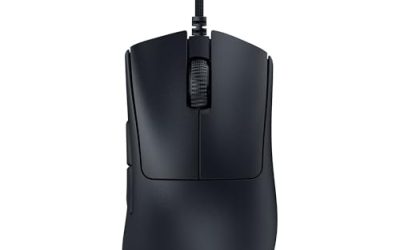
 Razer DeathAdder Essential Ergonomic Wired Gaming Mouse5.01 x 2.86 x 1.69 inches0.3 poundsCheck on Amazon

A gaming mouse earns the bang-for-your-buck label when it gives you a reliable sensor, a comfortable shell, and durable switches without charging extra for features you will never use. The real decision is not finding the most expensive mouse, but finding the point where spending more stops improving your aim. Above that point you are paying for lighter materials, higher polling rates, and brand polish that most players never notice in a match.
This guide covers first-time buyers, competitive shooter players, and MMO players who need extra buttons, plus anyone replacing a worn office mouse with something built for games. Each pick below was chosen from the name and specifications shown on its Amazon listing, so you can compare sensor, weight, buttons, and connection type against the way you actually play.
Quick Picks
As an Amazon Associate we earn from qualifying purchases
| Product | Best for | Key spec from title |
|---|---|---|
| Logitech G305 LIGHTSPEED Wireless Gaming Mouse, HERO 12K Sensor, 12,000 DPI | Wireless play on a modest budget | HERO 12K sensor with up to 12,000 DPI |
| Logitech G502 HERO High Performance Wired Gaming Mouse, HERO 25K Sensor, 25,600 DPI | Button-heavy games and one mouse for work and play | HERO 25K sensor with up to 25,600 DPI |
| Razer DeathAdder Essential Gaming Mouse, 6400 DPI Optical Sensor | The cheapest solid start in PC gaming | 6,400 DPI optical sensor with 5 programmable buttons |
How to Choose
Start with the sensor, not the DPI number on the box
Every modern gaming sensor tracks accurately enough for ranked play, so the headline DPI figure tells you less than the sensor family does. Look for a named optical sensor with a clear tracking speed and acceleration rating, and check that it holds its aim during fast flicks instead of spinning out. A sensor that tracks cleanly at your usual sensitivity matters far more than a ceiling of twenty thousand DPI that you will never set. All three mice in this guide use proven optical sensors from major brands, which is why they still show up in value roundups years after launch.
Let weight and shape decide comfort before anything else
A mouse that fights your hand will cost you more aim than any sensor upgrade can give back. Light mice around one hundred grams suit fast flicks and frequent lifting, while heavier mice feel planted and steady for players who rest their whole palm on the shell. Shape matters just as much: a low, symmetrical shell suits claw and fingertip grips, and a taller, right-handed shell suits palm grips and long sessions. Measure your hand, note whether your palm touches the mouse or floats above it, and pick the shell that matches that grip rather than the one with the longest feature list.
Count the buttons you will actually press
Extra buttons only add value when they sit where your thumb can reach them without shifting your grip. Shooter players usually need two side buttons for melee and reload, while MMO and strategy players benefit from a wider cluster they can map to abilities and items. Programmable buttons stored in onboard memory let you carry your layout to another computer without reinstalling software. Check the switch rating too, since a mouse with durable mechanical switches keeps its click feel long after a cheaper switch starts to double-click.
Weigh wireless freedom against wired simplicity
Wireless mice remove cable drag and travel well, but they add a battery or a charging routine to your setup. A mouse that runs for months on a single replaceable battery is easy to live with, while one that needs charging every few days is not. Wired mice never run flat mid-match and usually cost less for the same sensor, which is why they still dominate value lists. Choose wireless when cable drag genuinely bothers you or you move your setup often, and choose wired when you play at one desk and would rather spend the difference on a better sensor or more buttons.
The 3 Best Options
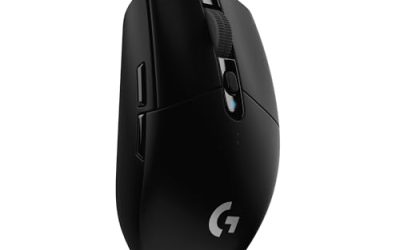
Logitech G305 LIGHTSPEED Wireless Gaming Mouse

The G305 is the wireless value pick because it pairs a capable HERO sensor with a simple, proven design and no features you have to pay for twice. Its compact, symmetrical shell weighs 99 grams and suits claw and fingertip grips, while the LIGHTSPEED connection reports at one millisecond, so the cursor feels as responsive as a wired mouse. Six programmable buttons cover the essentials, onboard memory keeps your settings when you switch computers, and a single AA battery lasts up to 250 hours, which means months of play between battery swaps for most players.
Specs
- Sensor: HERO 12K optical sensor, up to 12,000 DPI
- Weight: 99 grams
- Buttons: 6 programmable buttons
- Connection: LIGHTSPEED wireless with 1 ms report rate
- Battery: Up to 250 hours on one AA battery
- Memory: On-board memory for settings
Best for: Players who want wireless freedom without paying flagship prices.
Watch out for: The compact shell can feel small for large hands, and the AA battery adds weight at the rear.
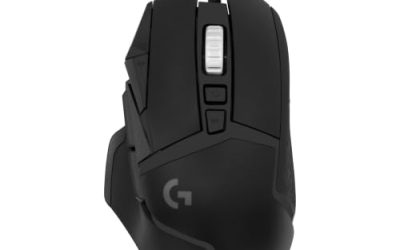
Logitech G502 HERO High Performance Wired Gaming Mouse

The G502 HERO is the value pick for players who want one mouse to do everything, because its eleven programmable buttons and tunable weight system cover shooters, MMOs, and everyday work in a single shell. The HERO 25K sensor tracks up to 25,600 DPI with no smoothing, filtering, or acceleration, and the dual-mode scroll wheel switches between precise clicks and free spinning for long documents. Five removable 3.6-gram weights let you tune the balance from 121 grams upward, and onboard memory stores up to five profiles, so your setup follows the mouse to any computer.
Specs
- Sensor: HERO 25K optical sensor, up to 25,600 DPI
- Weight: 121 grams, plus five removable 3.6-gram weights
- Buttons: 11 programmable buttons
- Scroll wheel: Dual-mode hyper-fast scroll wheel
- Lighting: Customizable RGB lighting
- Memory: On-board memory for up to five profiles
Best for: MMO and strategy players who want many programmable buttons in one mouse.
Watch out for: At 121 grams before weights it is heavy for fast flick shooters, and the right-handed shape does not suit left-handed players.
Razer DeathAdder Essential Gaming Mouse
The DeathAdder Essential is the entry point for anyone moving from an office mouse to a real gaming mouse, because it brings a trusted ergonomic shape and a solid optical sensor at the lowest cost of the three picks. Its right-handed shell has been refined across many DeathAdder generations, with a raised rear that supports the palm during long sessions and two thumb buttons placed where they fall naturally under your grip. The 6,400 DPI optical sensor handles everyday sensitivity settings with room to spare, and mechanical switches rated for ten million clicks keep the main buttons feeling consistent through years of use.
Specs
- Sensor: 6,400 DPI optical sensor
- Buttons: 5 programmable buttons
- Switches: Razer Mechanical Switches rated for up to 10 million clicks
- Polling rate: 1000 Hz Ultrapolling
- Tracking: Up to 220 IPS and 30 G acceleration
- Connection: Wired USB, right-handed ergonomic design
- Model number: RZ01-03850100-R3U1
Best for: First-time buyers who want a proven ergonomic shape at the lowest cost.
Watch out for: The 6,400 DPI ceiling and five-button layout leave less headroom than the other two picks if your needs grow.
Which One Fits Your Situation
You want the cheapest solid start in PC gaming
Pick the DeathAdder Essential when you are buying your first gaming mouse and want a proven shape without learning a new grip. Its ergonomic right-handed shell, dependable sensor, and five programmable buttons cover shooters, strategy games, and everyday browsing in one purchase. You give up the higher sensor ceilings and extra buttons of the other two picks, but you get a mouse that has survived years of owner feedback and still holds up as a first step into PC gaming.
You want wireless without paying flagship prices
Pick the G305 when cable drag bothers you or you move your setup between a desk and a laptop. Its LIGHTSPEED connection keeps latency low, the 99-gram shell feels quick during flicks, and a single AA battery lasts for months, so wireless never becomes a chore. The compact shape suits claw and fingertip grips best, and onboard memory means your button layout and sensitivity travel with the mouse when you plug it into another computer.
You play MMOs or bind many keys to your mouse
Pick the G502 HERO when your games reward a thumb full of abilities, items, and macros. Eleven programmable buttons and five onboard profiles let you build a layout per game and keep it on the mouse, while the tunable weights let you set the balance that feels right for your hand. The wired connection never needs charging, and the dual-mode scroll wheel adds another input for cycling weapons or scrolling long pages between matches.
You want one mouse for gaming and everyday work
Pick the G502 HERO when a single mouse has to cover ranked matches in the evening and spreadsheets during the day. Its button layout maps well to shortcuts and macros, the free-spinning scroll wheel moves through long documents quickly, and the RGB lighting can be dimmed or disabled for the office. The heavier shell feels steady and planted for precision work, and the wired connection means it is always ready with nothing to charge.
Common Mistakes
- Chasing the highest DPI number instead of checking tracking speed, acceleration, and how the sensor behaves at your real sensitivity.
- Buying a mouse shaped for someone else’s grip, then blaming the sensor when your hand cramps after an hour.
- Paying for wireless when you play at one desk and never notice cable drag, leaving less budget for a better sensor or more buttons.
- Ignoring switch durability and button placement, which decide how the mouse feels after a year far more than launch-day specs do.
- Skipping onboard memory and discovering your button layout disappears the first time you plug the mouse into another computer.
Frequently Asked Questions
What makes a gaming mouse good value for money?
A good value mouse gives you a reliable optical sensor, a comfortable shell, and durable switches at a cost that leaves room for the rest of your setup. Check the sensor family, the weight, the number of reachable buttons, and whether settings live in onboard memory. The best value pick is the one that matches the games you play, not the one with the longest feature list.
Is a wireless gaming mouse worth it on a budget?
Wireless is worth it when cable drag genuinely bothers you or you move your setup often, and the G305 shows why: a low-latency connection, months of battery life, and a light shell at a modest cost. If you play at one desk and never notice the cable, a wired mouse usually gives you the same sensor or more buttons for less, so spend the difference where it helps your aim.
How many buttons does a gaming mouse need?
Most shooter players do fine with two side buttons for melee or reload, while MMO and strategy players benefit from a wider cluster they can map to abilities and items. Buttons only help when your thumb can reach them without shifting your grip, so count the ones you will press in a match rather than the total on the box. Five buttons cover most players, and eleven suit ability-heavy games.
Does a higher DPI sensor make you aim better?
A higher DPI ceiling does not improve aim, because most players use a sensitivity far below the maximum any sensor reaches. What matters is clean tracking at your chosen sensitivity, with no acceleration, smoothing, or spin-outs during fast flicks. A mid-range sensor that tracks reliably beats a high-ceiling sensor that loses the cursor, so judge the sensor by how it behaves in play, not by its headline number.
FAQ
What makes a gaming mouse good value for money?
Is a wireless gaming mouse worth it on a budget?
How many buttons does a gaming mouse need?
Does a higher DPI sensor make you aim better?
More from Amazon
Programs that pair well with the guide above. Offers and eligibility are set by Amazon and may change.
Free shipping on eligible items, Prime Video and more. Eligible new members can start with a free trial.
Start a Prime free trialAd-free music streaming. Eligible new subscribers can start with a free trial.
Try Music Unlimited freeA Prime membership for ages 18-24 with a trial period. Eligibility is set by Amazon.
See Prime for Young AdultsAudiobooks and podcasts to listen to on the go. Eligible new members can start with a free trial.
Try Audible freeAs an Amazon Associate we earn from qualifying purchases.