Key takeaways
- Multiple approaches: portable extenders, docks, and stands cover every working style.
- Portability options: clip-on panels add a second screen anywhere you go.
- Big-screen support: docks like the Plugable drive full-size external monitors.
- Ergonomic organization: combo stands tidy up a laptop-plus-monitor desk.
Adding a second monitor to your laptop is one of the fastest ways to boost productivity, but you don’t have to be tethered to a desk to do it. From clip-on portable panels that fold flat for travel to docking stations that drive full-size external displays, there are several ways to run a dual-monitor setup with a laptop, each suited to a different working style.
This review covers the best dual-monitor solutions for laptops in 2026, comparing portable screen extenders, monitor stands, and docking stations, so you can find the approach that fits your desk and your bag.
Our top picks





As an Amazon Associate we earn from qualifying purchases at no extra cost to you. Ratings are shown as listed on Amazon.
🎮 Get More From Your Setup — Free
Prime Gaming gives you free PC games every month, in-game loot, and a free Twitch channel sub — plus fast free shipping on all the gear above. New members get a 30-day free trial.
Watch: Dual Monitor Laptop: Review & Buyer’s Guide — Video Review
Design & Build
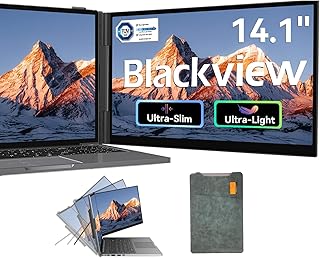
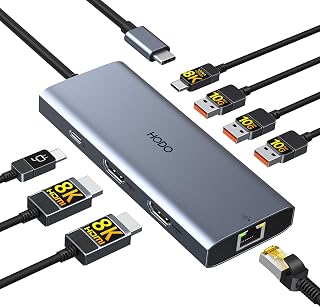
Dual-monitor laptop solutions fall into three camps. Portable clip-on extenders, like the 14- and 15.6-inch models from KYY, CIDETTY, and Blackview, attach a second slim IPS panel directly to your laptop lid and fold away for travel, ideal for working on the move. Docking stations such as the Plugable dual-display dock take the desk-based route, connecting your laptop to two full-size external monitors over USB. And combo stands like the VIVO free-standing unit hold a monitor and laptop together in one tidy arrangement. The portable extenders prioritize slim, lightweight travel, while docks and stands are built for a permanent, larger workspace.
Performance
Each approach has strengths. The portable extenders are 1080p FHD IPS panels at 60Hz, tuned for productivity and media, and connect over USB-C or HDMI, with some single-cable models requiring a driver. They’re excellent for adding a screen anywhere, though they lean on your laptop’s USB-C bandwidth. The Plugable dock, by contrast, uses DisplayLink to drive two large external monitors at higher resolutions, making it the better choice for a full desk setup, though it requires driver installation. The VIVO stand doesn’t add a screen itself but organizes a monitor and laptop ergonomically. Your ideal pick depends on whether you want portability, maximum screen size, or a clean desk arrangement.
Pros & Cons
- Multiple approaches: portable extenders, docks, and stands cover every working style.
- Portability options: clip-on panels add a second screen anywhere you go.
- Big-screen support: docks like the Plugable drive full-size external monitors.
- Ergonomic organization: combo stands tidy up a laptop-plus-monitor desk.
- Driver requirements: DisplayLink docks and some extenders need software.
- Bandwidth limits: driving extra screens depends on your laptop’s USB-C capability.
- 60Hz on portables: clip-on panels aren’t built for fast gaming.
Alternatives to Consider
If you want the simplest desk setup, a single large ultrawide monitor can replace two screens and reduce cable clutter. Those who travel constantly might prefer a single lightweight portable panel over a full dual arrangement. And gamers chasing high refresh should pair their laptop with a dedicated gaming monitor rather than a 60Hz extender. Match the tool to whether your dual-monitor setup lives on a desk or in a backpack.
Frequently Asked Questions
What’s the easiest way to add a second monitor to a laptop?
For portability, a clip-on extender like the KYY or Blackview panel is the simplest, attaching over USB-C and folding away for travel. For a desk, a docking station or simply plugging a monitor into your laptop’s HDMI or USB-C port works well.
Do I need a docking station for dual monitors?
Not always. If you only need one extra screen, a direct HDMI or USB-C connection often suffices. A dock like the Plugable becomes valuable when you want to drive two large external monitors at once and connect multiple peripherals through a single cable.
Can my laptop handle two external monitors?
Many modern laptops can drive two displays through a combination of native ports and a DisplayLink dock. Check your laptop’s graphics capabilities and port support; a dock like the Plugable adds display outputs even when your laptop lacks enough ports natively.
Are portable extenders good for gaming?
They’re fine for casual and productivity use at 60Hz, but not ideal for fast competitive gaming. For serious gaming on a second screen, connect your laptop to a dedicated high-refresh gaming monitor instead of a portable extender.
Verdict
The best dual-monitor laptop solution depends on where you work. For portability, the KYY, CIDETTY, and Blackview clip-on extenders add a second screen anywhere, while the Plugable docking station is the pick for driving full-size monitors at a desk. Add a VIVO stand to keep everything organized. Decide between travel flexibility and desk-based screen size, and the right choice becomes clear.