Key takeaways
- Exact usable platform: Measure between posts, brackets, rail lips, and shelf edges—not only the dimensions printed in the listing. Allow space for both support feet.
- Rear clearance: Measure from the console’s rear vents to the wall or another obstruction. A wall-mount bracket’s stand-off is not automatically the console’s exhaust clearance.
- Overhead clearance: Measure above the console after fitting the correct horizontal feet. Prefer an open top platform if a fixed interior tier is borderline.
- Stable loading: Check the shelf’s load rating for the configuration you are actually using. Seville’s capacity on wheels differs drastically from the rating on leveling feet.
- Wall or tip safety: Buy suitable rated anchors for wall shelves, and install anti-tip restraints where a manufacturer calls for them. Avoid improvising mounts into unknown drywall.
- Cable bends: Leave room for HDMI, AC, LAN, and USB connections without folding cables sharply or pushing the machine backward toward the wall.
- Disc drive and stand: Account for the correct Sony horizontal feet for the model and disc-drive configuration. A separate vertical stand requires its own width and stability assessment.
- Room environment: Avoid deep-pile carpet under low installations, heat sources, direct sun where practical, and piles of cloth or dust near vents.
- Price and retailer: Treat US prices as same-day snapshots, check the model or SKU, and verify actual delivery availability using your ZIP code before paying.
The best PS5 Pro ventilation shelves are open, sturdy, and large enough to leave the console breathing room—not necessarily shelves with a built-in USB fan. For a living-room entertainment center, the Mount-It! MI-8670 four-tier stand is the most balanced starting point because its shelves are roughly 23.75 inches wide and 16.5 inches deep, with exposed sides and easy cable access. The Seville Classics WEB674 is a better value when an industrial-style wire rack fits the room, while Shelving Inc.’s 24-inch-deep wall-mounted kit makes more sense when floor space is scarce and the wall can support a properly engineered installation.
These choices are based on actual manufacturer dimensions, construction, and retailer listings—not temperature tests performed by Geek Gaming Tricks. Sony lists the PS5 Pro at approximately 388 × 89 × 216 mm, or 15.3 × 3.5 × 8.5 inches, before accounting for positioning feet and cable bends. Sony also recommends at least 10 cm (approximately four inches) of free space around the console and warns against blocked vents and cramped cabinets. This means a shelf that merely supports the console’s weight or has the word “PS5” in its description can still be a poor purchase.
Quick verdict: which shelf should you buy?
Best overall for a living room — Mount-It! MI-8670: A four-level tempered-glass AV stand with open sides, a useful platform footprint, and a clean appearance. Use the exposed upper shelf when possible; the 7.9-inch published gaps between lower shelves leave limited overhead margin once the console’s feet are attached. Best value for maximum adjustability — Seville Classics WEB674: A 30-by-14-inch wire shelving rack with height settings at one-inch intervals, useful when a practical gaming station matters more than living-room furniture styling.
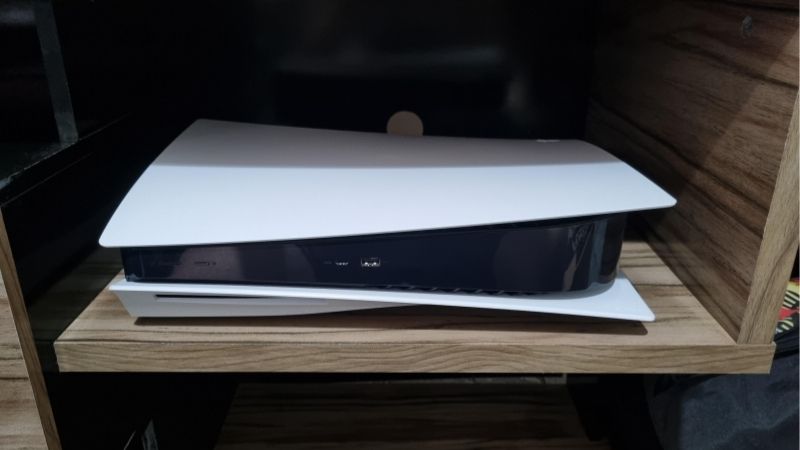
Best dedicated wall shelf — Shelving Inc. 24-inch-deep one-shelf wall kit: A vented wire shelf with a 24-inch nominal depth and an adjustable mounting system. It requires the right wall anchors and considerable installation planning. Best premium mixed AV rack — Pangea Audio Vulcan four-shelf: Large 23.75-by-18-inch shelves and a modular frame for users who also own amplifiers or other full-size components. Best garage-style media corner — IKEA BROR 33.5-inch-wide shelving unit: A deep, adaptable metal rack, provided it is anchored against tipping and local inventory is confirmed. Best when you need five components on separate levels — Mount-It! MI-8671: Similar open AV design with five shelves instead of four; check individual shelf clearance rather than assuming every tier is ideal for the console.
PS5 Pro ventilation shelf comparison
US seller snapshots were reviewed on October 27, 2026. Dimensions are manufacturer-listed external or shelf dimensions and are not promises of usable clearance once posts, mounting hardware, TV furniture, cables, and surrounding walls are considered. A listing marked “in stock” can change by delivery ZIP code. For variable-configurable kits, a starting price is not an exact quote for every size or mounting configuration.
| Product / choice | Verified footprint or key dimension | PS5 Pro use case | US seller price (checked Oct. 27, 2026) | Stock status (Oct. 27) | Main drawback |
|---|---|---|---|---|---|
| Mount-It! MI-8670 | 23.75 W × 16.5 D in; 7.9-in shelf gaps | Best living-room AV stand | $160.99, Mount-It! | In stock (Mount-It! listing) | Glass surfaces; limited clearance on internal tiers |
| Seville Classics WEB674 | 30 W × 14 D × 49.5 H in; adjustable wire tiers | Best value and configurable rack | $69.99, Seville Classics | Orderable (manufacturer Add to Cart); ZIP not confirmed | Tall utility-rack appearance; wheel-rating caveat |
| Shelving Inc. 24 D wall-mounted one-shelf kit | 24 D × 24 nominal W in; 23.625-in actual width for 24-in selection | Best deep, open wall shelf | From $91.36, Shelving Inc.; exact option price not verified | Orderable; seller lists next-business-day shipping | Anchors sold separately; professional mounting may be appropriate |
| Pangea Audio Vulcan four-shelf, carbon-fiber finish | 23.75 W × 18 D in shelf; 75 lb per shelf | Best premium audio and console rack | $249.95, Audio Advisor | In stock (Audio Advisor) | Expensive; some interior clearances are too tight for ideal airflow |
| IKEA BROR 392.726.55 | 33.5 W × 21.625 D × 43.25 H in | Best roomy utility setup | $105.00, IKEA US | Unclear until store or ZIP selected | Must be wall-anchored; metal industrial design |
| Mount-It! MI-8671 | 23.6 W × 15.7 D in; 7.9-in shelf gaps | Best five-tier AV option | $160.99, Mount-It! | In stock in Mount-It! catalog; B&H special-order listing | More levels do not create more clearance per level |
How we selected these shelves
We started with Sony’s published PS5 Pro chassis size, setup instructions, and ventilation guidance. Next we excluded miniature streaming-device perches, narrow wall mounts that support the console without giving it a stable shelf, and inexpensive floating glass units whose working platforms are narrower than the console itself. This is a ventilation-shelf buying guide, not a rebranded list of PS5 Pro wall brackets or aftermarket cooling fans. The six remaining products are identifiable models or defined manufacturer shelf-kit configurations with published dimensions and separate reasons to buy them.
Our criteria were support-area fit, unobstructed air paths, stable placement, measured height options, proper load capacity, cable reach, installation complexity, appearance, and availability from a US retailer. We also favored shelves that can work with a disc-drive-equipped PS5 Pro without promising clearance for every accessory or stand. Weight capacity was treated as a safety prerequisite, not a cooling-performance ranking. A 200-pound-rated metal shelf does not ventilate twice as well as a 100-pound-rated shelf. The amount of open air surrounding the actual vents matters much more than the label’s maximum load.
There are no published, comparable PS5 Pro temperature measurements for these six shelf setups, and our site has not performed thermal-camera, sound-level, or performance-throttling tests on them. Accordingly, “best” describes the most practical verified geometry and features for each buyer profile. A rack with shelves you can reposition can provide a better real-life environment than a product advertised as a console “cooler” while trapping the warm exhaust behind a TV cabinet.
Best PS5 Pro ventilation shelves reviewed
Mount-It! MI-8670 — best overall open AV stand
Mount-It!’s MI-8670 is the easiest recommendation for someone who wants a dedicated entertainment-center rack without installing a shelf on the wall. The manufacturer specifies an overall footprint of 23.75 inches wide, 16.5 inches deep, and 28.4 inches tall. It has four tempered-glass levels separated by a stated 7.9 inches, with a total 187-pound load rating and a manufacturer description of up to 88 pounds on the top tier and 33 pounds on each other tier. That is far beyond the PS5 Pro’s approximate 6.8-pound bare chassis weight, but this does not remove the need to level the stand or keep it where it cannot be knocked over.
The meaningful buying advantage is the open-frame layout. You can place the console on a level surface with its included horizontal feet, run HDMI and power cables rearward without cutting cabinetry, and give exhaust air somewhere to go. The width provides approximately 8.5 inches beyond the console’s published length; when centered, that is a little over four inches on each end before accounting for any support-post intrusion. Its 16.5-inch depth also allows a better front-and-rear placement compromise than a ten-inch component shelf. Those figures are planning calculations from published dimensions, not direct interior-space measurements.
The caution is overhead space. Subtracting the listed 3.5-inch chassis height from a 7.9-inch nominal vertical gap suggests roughly 4.4 inches remain, but the feet, shelf thickness, brackets, and exact usable opening can reduce that. Sony’s guidance is not an excuse to count a barely acceptable calculation as guaranteed ventilation. Choose the top shelf if the TV layout, child safety, and cable lengths allow it; otherwise measure the actual underside-to-top clearance after assembly and reject any tier that crowds the case.
Pros: Large media-friendly platforms, an exposed back, no wall drilling, conventional AV appearance, and current direct-store availability. Cons: Tempered glass needs care during assembly; the internal gaps can be close to Sony’s recommended free-space target; this is much bulkier than a tiny under-TV shelf. Who should buy it: Players with a living-room TV or projector and three or four substantial AV devices who can give the PS5 Pro the most open tier. Who should skip it: Anyone expecting a full four inches of overhead clearance on every shelf without taking measurements.
Seville Classics WEB674 — best value for adjustable wire shelving
The Seville Classics WEB674 is a very different answer to the same thermal problem. The manufacturer lists a 30-inch-wide, 14-inch-deep, 49.5-inch-tall four-tier steel-wire unit. Shelf heights adjust at one-inch increments, so the owner can increase the distance above the console rather than hoping a fixed-height cubby is tall enough. Open wire surfaces avoid enclosing the PS5 Pro in a cabinet, and a buyer can reserve one broad tier entirely for the console while putting controllers, chargers, games, or network accessories elsewhere.
The price checked directly at Seville Classics was $69.99, and the manufacturer product page displayed an Add to Cart purchase path. This is a much lower entry point than the larger specialist AV racks. But it is essential to read the product’s loading distinctions: the stated 300-pound per-shelf capacity applies on leveling feet, whereas the wheeled configuration is rated at 27.5 pounds per shelf and 110 pounds for the unit. A single PS5 Pro is under either advertised shelf limit, but a loaded rack and rolling movement create additional stability concerns. Whenever possible, use the included leveling feet for a fixed gaming station.
At 14 inches deep, WEB674 is adequately deeper than the console’s 8.5-inch published chassis depth, but only about 5.5 inches remains to distribute between rear ventilation distance and front-edge margin. A back-of-shelf position may leave the rear exhaust too close to a wall; pushing it fully forward can put cables or the console near the front edge. A sensible setup moves the rack away from the wall, reserves room for the HDMI and power bends, and places the console securely on the tier so the feet rest evenly. The wire gaps deserve inspection because the PS5 Pro’s small plastic feet must not hang over unsupported openings.
Pros: Wide open construction, height-adjustable tiers, comparatively low manufacturer price, easy wire routing, and flexible reconfiguration. Cons: Tall industrial look, nontrivial tip and wheel considerations, narrow depth margin if flush against a wall, and possible need for a stable compatible support surface beneath the feet. Best for: A gaming room, bedroom corner, or multipurpose electronics workspace where function matters more than polished AV furniture. It is not a recommendation to roll a powered console around or leave the tall rack unrestrained around pets and small children.
Shelving Inc. 24-inch-deep one-shelf wall kit — best for floor-space savings
If your goal is to preserve the floor beneath a wall-mounted TV, the 24-inch-deep wall-mounted single-shelf kit from Shelving Inc. is substantially more useful than compact floating shelves designed for streaming sticks or lightweight media boxes. The selected 24-inch nominal-width configuration has a manufacturer-listed actual width of 23.625 inches, and its 24-inch depth provides flexibility to move the console forward while preserving space behind the rear exhaust. The wall-mounted wire platform is rated by the seller for 200 pounds of evenly distributed load when correctly installed, and the adjustable shelf kit is described as shipping the next business day.
Unlike a small decorative wall shelf, this is a piece of storage hardware. The 14-inch wall-post kit uses wall-mounted posts, brackets, shelf clips, and an open chrome wire shelf. It is configurable in one-inch shelf-height increments. The listing says the unit sits three inches from the wall, but that is a property of the mounting system and should never be substituted for Sony’s ventilation allowance measured at the actual console. Position the console on the platform so its rear vents—not merely the back of a support bracket—have at least the recommended open distance from the wall. A 24-inch-deep platform gives far more flexibility here than an 11-inch or 12-inch shelf.
Seller pricing began at $91.36 on October 27, 2026, but this is a starting price across width choices, not a fully verified delivered quote for every mounting selection. The manufacturer explicitly says wall anchors are not included. Installation must account for the wall material, stud positions, bracket spacing, load path, fasteners, and the weight of every item added later. A shelf rated for a large static load is not automatically safe with arbitrary drywall anchors. If you do not know what is behind the wall, a qualified installer is a better investment than guessing at the mounting hardware.
Pros: Deep wire platform, open underside, no AV stand on the floor, and generous ability to position the console relative to the wall. Cons: Visible industrial brackets, potentially expensive installation, anchor selection outside the kit, and no factory-built restraint that makes a console impossible to slide. Who should buy it: A homeowner or experienced installer who wants a dedicated shelf below or beside a wall TV and can verify studs and actual placement. Who should skip it: Renters without permission to drill, anyone mounting to unknown plaster or damaged drywall, or buyers who expect a wall shelf to be secure merely because the product photo shows it holding heavy objects.
Pangea Audio Vulcan four-shelf rack — best premium system rack
The Pangea Audio Vulcan is aimed at full-sized audio components, but that makes it an appealing premium home for a PS5 Pro paired with a receiver, media player, or networking equipment. For the carbon-fiber-finish four-shelf version checked at Audio Advisor, each platform measures 23.75 inches wide by 18 inches deep and is rated for 75 pounds. Its open-frame posts and rear access support tidy cabling and leave the console visible rather than boxed into a TV cabinet. Audio Advisor listed this specific finish at $249.95 and marked it in stock, with shipment described as one to three business days.
The deeper platform is a concrete advantage. With an 8.5-inch chassis depth, it is easier to leave space both behind and in front of the unit while respecting cable bends. The premium price buys a sturdier-feeling component system and future options, not evidence of lower PS5 Pro operating temperature. The rack is also modular: Audio Advisor describes compatibility with add-on shelves and taller posts, which could help if the overall equipment stack changes later. Optional components cost extra and should not be presumed included in the base four-shelf kit.
There is an important airflow limit in the specifications. Audio Advisor lists 8.75 inches of vertical room above the lowest tier but 7.25 inches between the upper interior shelves. Subtracting the console’s approximate 3.5-inch height leaves less than four inches above it on those upper interior levels even before its horizontal feet are included. The rack also has a 19.4-inch clear width between side supports; that is enough for the chassis but not a promise of four inches of unobstructed space to every post. Our choice would be the completely open top tier, or the lower position only after a tape-measure check and careful assessment of obstructions.
Pros: Wide and deep equipment shelves, open rear, premium modular design, strong published per-shelf rating, and clearly confirmed retailer stock. Cons: Much more expensive than wire racks, solid MDF platforms do not themselves vent through the shelf surface, included floor spikes need the supplied protective pucks on hard floors, and narrow internal vertical gaps prevent blanket recommendations for all tiers. Best for: Players building a combined gaming and hi-fi system who value a long-lived furniture platform and have the space to place the PS5 Pro on an exposed level. This is not necessary for a minimal one-console setup.
IKEA BROR 392.726.55 — best roomy utility-media corner
The BROR black shelving unit identified by IKEA as combination 392.726.55 is 33.5 inches wide, 21.625 inches deep, and 43.25 inches high. It gives the PS5 Pro considerably more planar room than many products marketed as dedicated console shelves. Its metal posts and shelves are designed to be rearranged, so a user can leave a taller open slot specifically for the console. IKEA listed a $105.00 price on its US page. However, a store location or delivery ZIP is required to determine actual orderability; the product page did not establish universal live stock for this session.
BROR is particularly compelling for a utility room, basement gaming corner, or storage-heavy setup because its depth makes it straightforward to route cables behind the device without crowding the rear vent. It is not intrinsically a cooling accessory: the surfaces are sturdy powder-coated metal and much of the benefit comes from the generous surrounding air rather than a mesh floor. Use the included horizontal console feet and keep other boxes, books, or decorative bins away from the PS5 Pro’s air intakes and exhaust. Adjust the shelf above high enough that the available free space is measured, rather than inferred from the outside dimensions of the complete unit.
IKEA includes a clear warning that the BROR unit must be securely anchored due to tipping risk. That warning matters more than the published high loading capability when a console, extra controllers, and other expensive hardware sit on an elevated shelf. Do not install the unit without the specified wall-restraint approach, and check the correct hardware for your wall construction. A metal rack that wobbles or stands on uneven flooring creates a risk no nominal airflow specification can offset.
Pros: Very generous width and depth, flexible shelving height, a moderate US list price, and space for other electronics. Cons: Tipping hazard requiring wall anchoring, large floor footprint, warehouse aesthetic, and availability determined by local IKEA stock. Best for: A permanent gaming corner that doubles as organized electronics storage. Not for: Someone seeking a small discrete shelf to sit directly beneath a narrow TV.
Mount-It! MI-8671 — best five-tier stand for extra devices
The MI-8671 has one additional shelf compared with the MI-8670, making it worth considering for players who need separate levels for a PS5 Pro, receiver, game accessories, and other components. Mount-It! specifies external dimensions of 23.6 inches wide, 15.7 inches deep, and 31 inches high, with a total 220-pound load capacity. Its published vertical separation is 7.9 inches between shelves, and the description identifies a 33-pound rating on most levels and an 88-pound top-shelf allowance. Mount-It!’s US component-stand catalog showed the model in stock at $160.99.
The practical upside is equipment separation. Smaller AV boxes can live on their own tiers, and rear cabling stays accessible. But do not interpret “five levels” as “five acceptable PS5 Pro locations.” With the same 7.9-inch stated gap as the shorter stand, there is limited headroom for the console on internal levels, and cables or an accessory disc drive may change where it is comfortable to place. The top platform remains the simplest way to give the case an unobstructed upward and rear air path if your room allows it.
Availability deserves attention. The Mount-It! catalog listed the MI-8671 as in stock, whereas a B&H page described the exact model as a special-order item with a multiweek expected lead time. The article’s price and availability row therefore names Mount-It! specifically, rather than pretending the two retailers offer the same checkout terms. If shopping at B&H, do not rely on a direct-store stock flag to infer B&H has the unit on a warehouse shelf.
Pros: Dedicated levels for multiple electronics, an open back, substantial published load capacity, and a compact conventional AV look. Cons: Tall 31-inch stand, the same internal clearance constraints as the four-tier version, more glass surfaces to clean, and retailer-by-retailer shipping differences. Best for: A relatively busy media setup where the extra tier has a purpose. Skip it: If your entire setup is only one console and a TV, or if you need deeper shelf surfaces more than additional shelf count.
How much space does a PS5 Pro actually need?
Start with the published chassis measurements: approximately 15.3 inches long, 3.5 inches high, and 8.5 inches deep in a horizontal orientation. These values are rounded conversions of Sony’s 388 × 89 × 216 mm dimensions. They do not include the space occupied by the included horizontal feet, the extra envelope of a fitted disc drive, cable connectors projecting from the back, or any protective margin needed to stop the unit sliding off a shelf. Sony recommends roughly four inches of free space around the console, and its engineering explanation of PS5 Pro airflow emphasizes the rear and lower regions as well as the body design.
A shelf only 16 inches wide may technically hold the approximately 15.3-inch-long chassis yet have almost no margin to its sides. This is acceptable only if the surrounding space is fully open and no post, cabinet panel, or TV leg obstructs the vents. Conversely, a 24-inch-wide shelf could be an excellent fit in open air but become a poor environment if placed deep inside a closed entertainment console. Do not use shelf dimensions to claim a scientifically established temperature drop; they are a compatibility-screening tool.
Depth is frequently the limiting dimension. The PS5 Pro measures about 8.5 inches front to back, and a strict four-inch gap behind it would use roughly 12.5 inches before you have any room for stability at the front edge or bends in rear-connected cables. This is why very shallow 9-to-12-inch AV perches are hard to recommend for horizontal PS5 Pro placement. A 14-inch surface can work when the entire stand can be moved away from the wall. A 16-to-24-inch surface makes it easier to preserve a rear gap without putting the front edge of the machine in a precarious position.
Headroom must be checked at the actual installed shelf, especially on the lower level of a fixed rack. The nominal “space between shelves” on a sales page may not be the same as the unobstructed space available above the tallest part of the console once the feet, shelf clips, rails, or overhead cross-bracing are present. For a complicated setup, trace a four-inch clearance boundary around the machine after it is assembled, then identify every solid surface that crosses that boundary. If the geometry is too tight, use the completely open top shelf or reconfigure an adjustable rack.
Ventilated wire shelving versus solid glass or metal shelves
Wire shelves have an intuitive appeal because gaps between wires let air move and do not create a fully solid under-platform. They also tend to be lightweight, modular, and easier to dust. However, airflow beneath the shelf does not excuse supporting the console incorrectly. A narrow wire grid can fail to support both factory feet evenly; if a foot sinks into a gap, the chassis may tilt. Do not remove Sony’s feet or prop the console on unstable household objects to address this issue. Either position the included feet over securely supported wires or use an appropriate level, rigid platform that does not touch or cover vents.
Solid tempered glass is not an inherently unsuitable surface. Sony expects the PS5 Pro to rest on a stable flat support with its feet in the horizontal orientation. Glass AV shelves can be appropriate when there is free air to the sides and back and no cabinet walls forcing hot air into a pocket. Their downsides are handling and impact risk, fingerprints, and possible differences between advertised overall rack dimensions and interior usable dimensions. A solid surface also does not magically improve heat transfer simply because it is heavy or feels cool to the touch.
Solid steel BROR shelves sit somewhere between these categories. They resist ordinary media-room wear and provide a stable base but do not allow airflow straight through the shelf surface. The console still needs unimpeded vents around its body. The choice between wire, glass, and steel should therefore depend on stability, usable clearance, construction, installation, and how the room is organized. There is no controlled evidence in the material we verified that one of these six products lowers PS5 Pro silicon temperature by a specific number of degrees.
Buying checklist: what to measure before ordering
- Exact usable platform: Measure between posts, brackets, rail lips, and shelf edges—not only the dimensions printed in the listing. Allow space for both support feet.
- Rear clearance: Measure from the console’s rear vents to the wall or another obstruction. A wall-mount bracket’s stand-off is not automatically the console’s exhaust clearance.
- Overhead clearance: Measure above the console after fitting the correct horizontal feet. Prefer an open top platform if a fixed interior tier is borderline.
- Stable loading: Check the shelf’s load rating for the configuration you are actually using. Seville’s capacity on wheels differs drastically from the rating on leveling feet.
- Wall or tip safety: Buy suitable rated anchors for wall shelves, and install anti-tip restraints where a manufacturer calls for them. Avoid improvising mounts into unknown drywall.
- Cable bends: Leave room for HDMI, AC, LAN, and USB connections without folding cables sharply or pushing the machine backward toward the wall.
- Disc drive and stand: Account for the correct Sony horizontal feet for the model and disc-drive configuration. A separate vertical stand requires its own width and stability assessment.
- Room environment: Avoid deep-pile carpet under low installations, heat sources, direct sun where practical, and piles of cloth or dust near vents.
- Price and retailer: Treat US prices as same-day snapshots, check the model or SKU, and verify actual delivery availability using your ZIP code before paying.
How to install a ventilation shelf safely
Setting up a freestanding AV rack
Assemble the rack exactly as the manufacturer directs, then level all supports before adding equipment. Put heavy AV components on low tiers if that placement is compatible with the rack instructions, and avoid a tall, unrestrained center of gravity. For a glass-stand design, inspect every glass panel and bracket for damage before loading it. Do not substitute unrelated bolts or omit protective bushings that the instruction manual specifies. Secure the PS5 Pro’s included horizontal feet according to Sony’s setup guide before placing the console on a clean, flat shelf.
With the console powered off and unplugged, position it so the rear vents face an open path and the rear cables do not press against the wall. Keep the unit clear of other electronics’ hot exhaust. A separate receiver that vents upward should not sit directly below a tightly spaced PS5 Pro tier if heat from the receiver collects beneath the console. Make sure game discs can be inserted or removed safely if an optional drive is attached. Finally, gently check whether the shelf rocks or the console feet shift when a connected cable is moved; correct the rack’s placement before turning on the console.
Installing a wall-mounted wire shelf
First identify the wall structure and decide whether you need professional assistance. Shelving Inc. notes that anchors are not included with its kit, so choose fixings appropriate to the actual wall and the shelf manufacturer’s installation instructions. Stud-supported fasteners, suitable masonry anchors, and hollow-wall systems are not interchangeable. Never use ordinary picture-hanging hardware or assume a label advertising a 200-pound shelf capacity covers a weak anchor in damaged plasterboard. If you rent, get permission before drilling.
Install and level the rails, posts, and shelf clips, then load-test conservatively within the manufacturer’s permitted instructions before placing expensive electronics on top. Keep the console far enough forward that the rear exhaust has clear air, but not so far forward that it risks being bumped or pulled down by a cable. Consider cable clips secured to the wall separately from the shelf; bundling cables into tight loops behind the exhaust can block the very airflow you are trying to preserve. Retest the stability after a week and whenever you move heavy items on the shelf.
Verifying airflow after installation
Visual clearance inspection is more useful than guessing whether a rack “runs cool.” Start by checking that no Sony vents are hidden by bookends, solid cabinet panels, wall art, cable bundles, or cloth. Make sure the included feet are properly seated and that the machine rests level. During normal play, the cooling fan may vary in speed with workload; Sony explains that louder fan operation during some games can be normal. Fan noise alone does not prove overheating, and a warmer room or different game can change it even if the shelf has not moved.
If the console shows an overheating warning, shut down according to the on-screen guidance and allow it to cool. Recheck vent clearance, remove visible dust safely with the power disconnected, and compare with Sony’s current support advice. Never place a wet cloth or ice pack near the unit and never attach unapproved fans so that they blow directly into an exhaust outlet. If warnings persist in a properly ventilated setup, seek PlayStation support rather than assuming another more expensive shelf will repair a hardware problem.
Common mistakes that make a good shelf perform badly
The first mistake is pushing the console against the back of a TV cabinet because the rack has a large enough shelf surface. A 24-inch-deep shelf loses its thermal advantage if the case is wedged against a wall. The second is stacking a cable box or router above the machine to “save space.” Electronics can have their own exhaust paths; crowding devices into one hot air pocket is counterproductive. The third is trusting advertised weight capacity while ignoring wobble, wall construction, and small support feet. Mechanical stability and ventilation are separate requirements.
Another frequent mistake is confusing an open TV stand with a vented enclosure. If you install a three-sided decorative surround around the rack after buying it, you may lose the very open airflow you paid for. Likewise, making a wire shelf more attractive with solid fabric bins behind the console can block exhaust. Aesthetics do matter in a living room, but keep storage baskets and decorations on different tiers and away from the airflow path.
Finally, buyers sometimes assume an accessory sold for a standard launch PS5 automatically supports the PS5 Pro. Several console mounts and narrow vertical cradles have shape-specific contact points and should not be treated as universal shelving. This roundup deliberately focuses on general open platforms and racks for which dimensional suitability can be reasoned about, rather than claiming first-party Sony approval or a proprietary fit. When placing a PS5 Pro with its separately installed disc drive, remeasure the working footprint and use the correct factory feet.
Frequently asked questions
Can I put the PS5 Pro on a glass shelf?
Yes, provided the glass shelf is undamaged, level, rated for the load, and large enough to support the console with its installed feet while leaving unobstructed ventilation. Solid tempered glass does not automatically cause overheating. The more important question is whether side panels, a low overhead shelf, or the rear wall prevent warm air from escaping. The Mount-It! AV stands in this guide have open frames, but their internal shelf gaps still require a real clearance check.
Does a mesh or wire rack cool the PS5 Pro better than wood?
A wire rack makes an open storage layout easy, but no reliable head-to-head thermal measurement for these exact six products was available during research. A stable solid shelf with ample clear air can be more appropriate than a wire grid on which the factory feet do not sit securely. Do not use the mesh construction itself as a reason to ignore Sony’s four-inch ventilation recommendation or to cover the console’s body.
How wide should a PS5 Pro shelf be?
Its published horizontal chassis length is roughly 15.3 inches. A shelf around 24 inches wide gives useful flexibility, but do not mistake a nominal 24-inch outer width for the unobstructed clear span between posts. Position the console away from obstacles and measure the actual installation. A narrower open platform can physically work in some layouts; it simply offers less tolerance for supports, cable pulls, or decorative objects.
Is it safe to put the PS5 Pro on a shelf mounted directly against the wall?
Only if the console itself can still maintain the necessary rear and surrounding ventilation space and the mounting system is correctly rated and installed. A three-inch bracket stand-off does not mean the console automatically has a four-inch exhaust gap. Deep wall shelves are easier to configure safely because they allow the console to sit farther forward without balancing near the edge. Mounting adequacy should be established separately from airflow.
Should I buy an active cooling stand instead of a ventilation shelf?
Not as the first response to a normal PS5 Pro setup. Sony’s cooling system is designed to move air through its own vents, and a properly open placement is the sensible baseline. External fan accessories can add noise, power draw, cable clutter, and their own fit questions without proven benefits for your specific room. If the machine is giving a temperature warning despite proper placement and safe cleaning, follow Sony support rather than relying on an unverified fan claim.
What if I have the optional PS5 Pro disc drive?
Use the correct horizontal stand feet for the console and drive configuration, then measure the actual installed unit rather than relying exclusively on the base chassis dimensions. The disc-drive attachment changes the shape and may change where the feet or clearance boundaries fall. Prioritize a broad shelf with open air and easy access to the disc slot. Do not wedge the additional assembly into a narrow mount designed only for the disc-free console.
Can I put the PS5 Pro on the lower tier of a rack?
Yes when that exact opening has enough unobstructed space around the console and your cables. But the lower tiers on fixed AV stands often have just enough vertical room for some electronics, not a generous full console clearance. On the Pangea Vulcan, the 7.25-inch upper-tier gap is an obvious concern; on the Mount-It! units, the quoted 7.9-inch separation also needs real checking. An adjustable wire shelf or open top surface is often simpler.
How do I know whether the shelf is too small?
Place a tape measure or cardboard outline of the console footprint on the shelf before buying or assembly. Confirm that the factory feet can rest fully and securely, the chassis does not touch brackets or decorative rails, and no solid surfaces intrude into the clearance zone around the vents. Also simulate where cables exit the rear and where hands will reach for the power button or disc slot. A shelf that leaves the unit hanging over the front edge is not an acceptable compromise just to preserve a nominal rear air gap.
Final thoughts
For a neat TV area, start with the Mount-It! MI-8670 and reserve its most open tier for the PS5 Pro. For a flexible low-cost utility setup, choose the Seville Classics WEB674 and adjust shelf spacing generously. For a permanent wall installation, the deep Shelving Inc. wire-shelf kit provides room to position the console safely, but only with correctly chosen anchors and verified wall construction. Buyers combining gaming with full-size audio equipment can justify the Pangea Audio Vulcan; IKEA BROR is another roomy choice once its mandatory anti-tip installation and local stock are confirmed.
Before you order anything, measure the intended shelf’s clear width, depth, height, and distance from the nearest wall. That simple check matters more than a marketing promise of “extra cooling.” A stable open shelf that respects Sony’s placement guidance is the goal—not a claim that the rack itself makes the PS5 Pro run a measured number of degrees cooler.