The best handheld gaming lap desks give you a stable place to rest your hands, park your console between matches, and keep a charger or compact keyboard within reach. For most couch players, the LapGear Home Office Lap Desk is our best overall recommendation because its 21.1-by-12-inch top combines a supportive cushion, a device ledge, and space for a mouse or small accessories. If you need a roomier surface for a handheld plus keyboard, the HUANUO 22-inch Extra-Large Surface Lap Desk is a stronger fit. Prefer a lightweight, inexpensive platform? Start with the LapGear Original.
These are multipurpose lap desks, not officially licensed Steam Deck, ROG Ally, or Nintendo Switch accessories. Their usefulness depends on how you sit, where you place your hands, and whether you hold your handheld or set it in a separate stand. We checked six identifiable products against manufacturer specifications and live US purchase pages. Geek Gaming Tricks has not measured their stability with a gaming handheld, tested comfort across different body sizes, or conducted heat testing. The comparisons below separate documented features from practical recommendations you should verify in your own setup.
Quick verdict: which lap desk fits your gaming setup?
Best overall — LapGear Home Office Lap Desk, model 91588: Choose it for a straightforward cushioned lap platform with a 21.1-by-12-inch top, a built-in mouse area, a phone slot, and a small ledge. It makes the most sense for handheld gaming that alternates between controller-style play and brief mouse or keyboard use. The manufacturer designed the ledge for laptops, not for securing a handheld console upright.
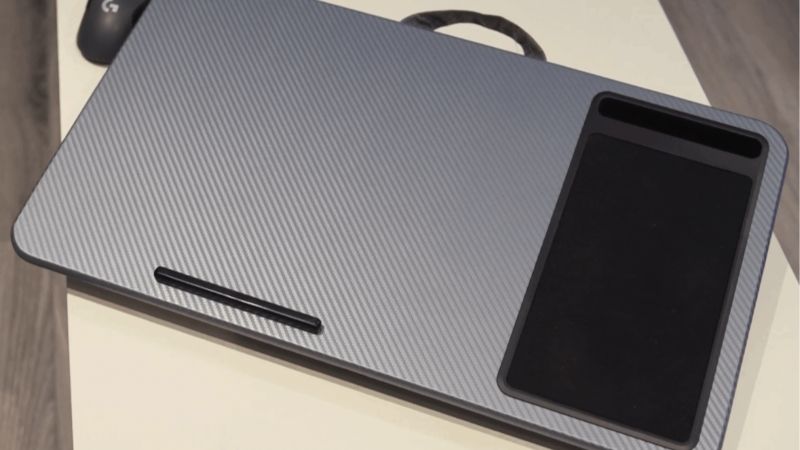
Best larger workspace — HUANUO 22-inch Extra-Large Surface Lap Desk, HNLD5: Choose it when you need more accessory room, an integrated mouse pad, and separate slots for a phone or tablet. It is more desk-like than a simple support cushion and may feel oversized for someone who only plays with the console held in both hands.
Best budget and lightweight option — LapGear Original Lap Desk, model 45148: The 17.9-by-13-inch top, device ledge, cushion, and carrying handle give handheld players the essential platform without dedicated mouse-pad real estate. It is particularly sensible when a charging cable, controller, or folded stand is all you need nearby.
Best for mouse-oriented handheld PC sessions — HUANUO 17-inch Detachable Mouse Pad Lap Desk, HNLD11-1-US: Its mouse tray can be mounted on either side, and its six tilt positions are useful for different working angles. The adjustable slope can be counterproductive when a freestanding handheld stand lacks a secure base; test the setup at its lowest angle first.
Best for adjustable viewing — HUANUO 5-in-1 Multi-Mode Lap Desk, HNLS12DB-US: Its five-angle adjustment and removable cushion offer more positions than a basic lap board. It is a better option for a handheld placed securely on a purpose-built stand than for a loose console balanced on an incline.
Best cushioned wrist surface — LapGear Home Office Pro Lap Desk, model 91598: Its wide, deep top and foam wrist rest favor a compact keyboard-and-mouse setup on the couch. For someone gripping a Steam Deck directly, the extra wrist pad and larger footprint may add bulk without meaningfully changing how the handheld feels.
Comparison: six handheld-friendly lap desks
The listed US prices were read directly from the named manufacturer or retailer pages on October 28, 2026. An Add to cart control supports an “orderable” label, not a guarantee that every color, delivery ZIP code, or checkout session has stock. Prices exclude tax and any destination-specific shipping. We intentionally use a specific color or model when the seller lists variant-dependent prices.
| Lap desk and best use | Verified details | Price (seller; checked Oct. 28, 2026) | Stock status (Oct. 28) | Main trade-off |
|---|---|---|---|---|
| LapGear Home Office 91588 — best overall couch setup | 21.1 × 12-inch top; 5 × 9-inch mouse pad; dual-bolster cushion; device ledge | $36.99 — Best Buy, Black Carbon 91588 | Orderable on listed product page; ZIP-dependent | Ledge is not a certified handheld stand |
| HUANUO Extra-Large HNLD5 — spacious accessory layout | 22-inch-class top; mouse pad; dual tablet/phone slots; dual-cushion base | $59.99 — HUANUO US, Black Woodgrain HNLD5 | Orderable on direct US page; color-dependent | Bulky for handheld-only play |
| LapGear Original 45148 — budget, portable support | 17.9 × 13-inch top; dual-bolster cushion; device ledge; carrying handle | $24.99 — Best Buy, Black 45148 | Orderable for shipping; pickup unavailable on checked page | No built-in mouse pad or angle adjustment |
| HUANUO Detachable Mouse Pad HNLD11-1-US — left- or right-hand mouse use | Six tilt angles; reversible detachable mouse pad; 3.08 lb stated weight | $53.99 — HUANUO US, HNLD11-1-US | Orderable on direct US page | Tilting can destabilize a separate handheld stand |
| HUANUO 5-in-1 Multi-Mode HNLS12DB-US — adjustable stand | Five-angle adjustment; dual-use cushion; up to 17-inch laptop support claim | $55.99 — HUANUO US, Midnight Blue HNLS12DB-US | Orderable on direct US page | Magnetic feature is not verified for console mounting |
| LapGear Home Office Pro 91598 — mouse and keyboard comfort | 21.1 × 14.1-inch top; built-in mouse pad; cushioned wrist rest; phone slot | $49.99 — Best Buy, Black Carbon 91598 | Orderable on selected product page; ZIP-dependent | More size and weight than simple handheld play needs |
How we selected and verified these lap desks
We began with the handheld player’s actual job: creating a predictable, comfortable surface while seated on a couch, in bed, or in a reclining chair. We did not count a regular laptop desk as “Steam Deck compatible” merely because it is larger than a Steam Deck. Instead, we required a documented flat surface or clearly described adjustable support, a plausible stable base, a current US storefront listing, and a practical reason that one model would be preferable to another. Six products met those basic editorial requirements.
We cross-checked manufacturer dimensions and accessory features against the specific seller listings where possible. LapGear provides original product descriptions, while Best Buy supplies model-specific purchase pages; HUANUO sells the identified models through its US storefront. This approach matters because family names such as “Home Office” and “adjustable lap desk” can refer to different depths, cushions, mouse pads, and accessory slots. A price from one color or variant should not be presented as the price of every version.
For ergonomic framing, we used OSHA’s computer-workstation guidance as general posture context, not as a clinical study of handheld consoles or as proof that any particular desk prevents pain. OSHA emphasizes neutral wrists, relaxed shoulders, adequate support, and changing an awkward setup to fit the individual. Those principles offer a more defensible way to evaluate lap desks than unexplained claims about “maximum comfort.” Your chair, body proportions, device weight, and how long you play all matter.
Valve lists the Steam Deck OLED at approximately 298 × 117 × 49 millimeters and about 640 grams. That relatively compact footprint does not mean a 12-inch-wide board can automatically hold a keyboard, mouse, charger, and handheld at once. The tabletop has to accommodate all the things you actually plan to use, leaving room for hands and cables. We did not treat manufacturer claims about laptop fit as endorsements for running a hot handheld PC with its air intake covered.
Our rankings reflect the intended job and available evidence, not hands-on benchmarks. A wide mouse pad can make a mini-keyboard setup easier; a small, lighter lap board may be superior when playing entirely with built-in game controls. No product here includes a manufacturer-verified Steam Deck OLED holder as standard, and a phone or tablet slot should not be assumed safe for a heavier handheld gaming PC. If you need an upright screen, look for a separate stand specifically rated for your console’s geometry and weight.
The six best handheld gaming lap desks reviewed
LapGear Home Office Lap Desk — best overall for couch gaming
The LapGear Home Office Lap Desk is a balanced choice precisely because it does not try to turn your couch into a full workstation. Its 21.1-by-12-inch work surface is large enough for a handheld, a small controller, and a few everyday accessories, while remaining more manageable than the biggest lap boards. LapGear’s manufacturer specifications identify a dual-bolster cushion, phone slot, device ledge, and an integrated mouse area. The Best Buy listing for Black Carbon model 91588 confirms a 5-by-9-inch mouse pad and shows an orderable listing.
For a Steam Deck owner, the useful configuration is to hold the Deck normally and allow the front of your forearms to rest naturally near the edge of the board if that position feels comfortable. When pausing, put the console on a stable, flat part of the surface or into a dedicated stand. If you switch into SteamOS Desktop Mode with a Bluetooth mouse, the built-in mouse area can be useful; however, its location may favor one hand. Check the layout before buying if you use your mouse left-handed.
The dual-bolster cushion is a meaningful difference from a rigid board pressed directly against the thighs. It helps distribute contact, but it cannot fix an overly low screen or a deeply bent neck. If you tend to recline, the board may shift with your legs, and the device ledge is not an anchored retaining mechanism for a free-standing handheld. Avoid resting the console on the top in a way that obstructs its cooling vents or presses on thumbsticks.
Why choose it: a useful combination of size, accessory storage, cushion, and current availability without an extravagant gaming-specific premium. Who should skip it: players who only need arm support, want a true height-adjustable console mount, or need generous room for a full-sized keyboard and large mouse sweeps. What to verify: top depth, preferred mouse-hand side, delivery availability, and how the cushion settles on your couch.
HUANUO 22-inch Extra-Large Surface Lap Desk — best for peripherals
HUANUO’s Extra-Large Surface Lap Desk, identified on its official store as model HNLD5, is an appropriate step up for someone who uses a handheld PC almost like a portable workstation. Its listing describes a 22-inch-class surface, a built-in PU mouse pad, a thicker dual-cushion base, and two separate device slots measuring 11.8 and 4.7 inches in length, with a stated 0.7-inch slot depth. A separate tablet or phone can live in one of those slots while the main worktop remains available for gaming accessories.
That extra organization can matter for a docked or semi-docked ROG Ally or Steam Deck setup: you may need a compact keyboard, mouse, power adapter cable, and room to set the console down safely. When the handheld stays in both hands, though, the additional real estate is not automatically an ergonomic gain. A large lap desk can press against sofa armrests or become awkward when you get up frequently. Measure the seating space before purchasing, not merely the width of the console.
Be careful about the word “slot.” HUANUO describes the integrated openings for tablets and phones, not as certified holders for handheld gaming PCs. Steam Deck’s thickness, center of gravity, triggers, and ventilation differ from a phone or thin tablet. A slot may hold an accessory or a slim screen, but you should not assume that it safely balances the console. For hands-free screen viewing, put the Deck in an appropriate stand on the main flat surface and confirm it cannot tip during button presses or cable movement.
The manufacturer’s US page listed the HNLD5 Black Woodgrain variant at $59.99 with an Add to cart control. That is a substantially bigger purchase than a basic lap board and should be justified by how often you actually use the mouse surface and device slots. Best for: players with a handheld PC, compact keyboard, and peripherals to organize. Main drawback: a larger board can feel excessive for casual, controller-only play. Important check: make sure the worktop fits between the armrests and still permits relaxed elbows.
LapGear Original Lap Desk — best budget pick
The LapGear Original, Black model 45148, makes the strongest case for spending less. LapGear describes an uncomplicated 17.9-by-13-inch work surface, dual-bolster microbead cushions, device ledge, pencil tray, and carrying handle. Its manufacturer weight specification is 1.34 pounds. The exact Black variant at Best Buy showed a $24.99 price and an Add to cart control for shipping at the time of our check. That is useful purchasing evidence without claiming every store has it for immediate pickup.
Its plain surface is the advantage. You can lay down a handheld during a break, arrange a cable, or give your arms a firm place to rest without paying for features you may never use. The absence of a dedicated mouse pad means it is less attractive if you frequently play PC games with mouse aiming. The simple board also lacks an adjustable elevation system, so the handheld screen will remain wherever your hands or a separate stand position it.
It is especially sensible for Nintendo Switch players who often use detachable controllers, for Steam Deck owners who play in short sessions, or for someone who wants a lap platform that is easy to put away. A cushioned base improves the board’s contact with the legs but cannot guarantee complete stability when a player crosses their knees or shifts posture. Test the balance with an inexpensive, non-breakable object before leaving an expensive console unsupported.
The device ledge should not be treated as an upright mounting rail. It is useful for preventing an object from sliding off the lower edge of a tilted board, but the Original is not a vertical handheld holder. Best for: budget-conscious players who need a compact surface. Main drawback: no dedicated mouse space or angle adjustment. Buy it over the Home Office: when a lighter, simpler board matters more than the integrated mouse pad and phone organization.
HUANUO 17-inch Detachable Mouse Pad Lap Desk — best for either mouse hand
HUANUO’s Detachable Mouse Pad Lap Desk, model HNLD11-1-US, provides a very different kind of flexibility. The company specifies six adjustable tilt positions, a detachable sliding mouse-pad module that can be installed on the left or right, a carrying handle, and a stated product weight of 3.08 pounds. Its US storefront displayed $53.99 with an Add to cart option. Compared with a fixed mouse pad, the reversible attachment directly addresses a frustration for left-handed players who otherwise have to reach across their body.
For handheld PC users who regularly switch into desktop software, web browsers, launchers, or games requiring a cursor, that mouse arrangement may be worth more than another phone slot. It keeps the pointing device next to the main workspace instead of forcing it onto a soft cushion or the sofa. The detachable nature also lets you remove an unneeded extension when playing an action game with the handheld in both hands.
The adjustable top needs more care than a fixed flat board. A tilt that helps a laptop screen become easier to see does not necessarily help a small handheld balanced on a stand. As the work surface angles upward, a loose console, charger, or accessory could move toward the lower edge; a cable can also tug the device sideways. Always use a secure stop or a compatible console stand, and begin at the lowest practical angle. Never rest the console loosely on a steeply tilted surface.
The 3.08-pound listed weight is a consideration if your goal is to reduce the total burden on your thighs. A more complex frame also has more places for accidental movement than a one-piece board. Best for: people using a compact mouse with a Steam Deck or Windows handheld, especially left-handed users. Main drawback: extra setup and instability risk when tilted. What to verify: which side the tray attaches to in your preferred seating position and whether the accessory reaches beyond your couch armrest.
HUANUO 5-in-1 Multi-Mode Lap Desk — best adjustable platform
The HUANUO 5-in-1 Multi-Mode Lap Desk, model HNLS12DB-US in Midnight Blue, is best seen as a configurable mini-workstation rather than a simple cushion. Its official listing describes five viewing positions, a cushion that supports lap-desk use, and a stand structure designed to support laptops up to 17 inches. The page also advertises magnetic attachment functionality. That last claim is about the product’s own supported modular components; it is not evidence that a Steam Deck, Ally, Legion Go, or Switch can attach directly to a magnetic surface.
This model is useful when the same surface serves several tasks: gaming with an external controller, working with a keyboard, watching a guide on a second display, and using a tablet between sessions. A player who wants to keep the console upright while operating an external gamepad may prefer an adjustable platform over a flat lap board. The proper setup still requires a separate stand that supports the console and leaves its vents and buttons unobstructed. Never rely on unspecified magnets to hold the gaming PC.
The trade-off is mechanical complexity. With any articulated support, the lowest and most secure position is a better starting point than the tallest one, especially if you are reclining or moving your legs. Verify that both the cushion and frame sit flat, that the table does not tilt sideways when you use its edge, and that cables have slack. Do not place a heavy handheld at the edge of the platform simply because a laptop weight claim sounds reassuring; the point of loading matters.
HUANUO’s US storefront displayed $55.99 for the named configuration with an Add to cart button. The manufacturer’s larger-laptop fit claim is useful for understanding the intended equipment class, but does not substitute for a per-console stability test. Best for: people changing between multiple screen and controller positions. Main drawback: its versatility is wasted if you only need a stable flat tray. Buying check: inspect the actual angle and support surfaces, and decide which one of the five modes you expect to use regularly.
LapGear Home Office Pro Lap Desk — best for keyboard and mouse breaks
The LapGear Home Office Pro, Black Carbon model 91598, combines a broader 21.1-by-14.1-inch platform with a built-in mouse area, phone slot, cushioned wrist rest, and dual-bolster cushions. LapGear’s corresponding product specifications state a 2.8-pound weight. Best Buy showed the named model at $49.99 and offered Add to cart on the checked product page. This is a distinct model from the standard Home Office desk, so its deeper top and wrist support should not be mixed into the standard model’s specifications or price.
The practical audience is the player who uses a Steam Deck or ROG Ally as a miniature PC. You might check cloud saves, chat with friends, tweak game settings, or use a compact keyboard and mouse when the handheld is in desktop mode. The deeper top gives more room to place devices without crowding the front edge, and a cushioned wrist area can feel less sharp than resting the base of the palm against a hard lip. It does not eliminate the need for neutral wrists or breaks from repetitive tasks.
For a handheld held entirely in both hands, some of those benefits disappear. Your wrists are already attached to the controller-like device, and a built-in wrist rest can shift where your forearms sit in an uncomfortable way if the screen is too low. The wider surface also takes up more couch width and adds weight. There is no need to buy the Pro merely because its name sounds more gaming-oriented; its real advantage is the mouse-and-keyboard workspace.
Best for: handheld PC owners who regularly use a mouse and keyboard while seated. Main drawback: additional bulk compared with LapGear Original or the standard Home Office. What to verify: the side and dimensions of the integrated mouse area, whether the wrist cushion aligns with your posture, and which 91598 variant is available from the seller. If you mostly press the built-in controller buttons, choose the simpler standard model instead.
Which lap desk design works for different handhelds?
Steam Deck LCD and OLED
Valve’s Steam Deck OLED has a broad body with controls on either side, a rear fan opening, and top-edge power and USB-C connections. If you use the integrated controls, a lap desk is most helpful as a place to rest your forearms or temporarily set down the device, not as a replacement for a rigid case or stand. Keep your forearms close to your torso, and avoid tipping the top edge toward a low surface that blocks air movement. When the Deck is resting on the board, position it so the back vent and top exhaust are not pressed against fabric, padded cases, or other objects.
A console mounted on a freestanding kickstand benefits from a large, flat section of tabletop. Choose the standard LapGear Home Office or HUANUO Extra-Large for flat support rather than a steep-angle device. Using a wired mouse or compact keyboard in Desktop Mode may justify a dedicated mouse pad; simply streaming a game or reading a menu usually will not. Valve has not certified these lap desks for compatibility, so treat fit as a seating and stand question rather than a product-level console feature.
ROG Ally, ROG Ally X, and other Windows handheld PCs
Windows handhelds are attractive for couch PC workflows because you may frequently open a launcher, use the desktop, or handle game settings that work better with a pointer. The HUANUO detachable mouse-pad design earns a specific recommendation here: it gives you a side tray without needing a full-size desk, including an option for left-handed use. A deeper Home Office Pro may be preferable when you type longer messages or use a small external keyboard. Check the placement of charging and peripheral cables, since they can catch against the edge as you change position.
Do not assume accessories or device footprints are interchangeable among an Ally, Ally X, Legion Go, MSI Claw, or other models. Their dimensions, kickstands, grips, cooling paths, and weight balance can differ substantially. The desk is a generic surface; the console stand, cable orientation, and available worktop space still require a model-specific check. If your handheld’s built-in kickstand leaves the center of mass near the board’s front edge, move it rearward or use a wider stable support.
Nintendo Switch and Switch 2
A Switch-style setup presents two different jobs. If you play in your hands, a lightweight lap desk may add little beyond a place to put controllers and charging accessories. If you use tabletop mode with detachable controllers, a firm, stable surface is more useful: it keeps the display at a predictable position and provides room for the Joy-Con controllers. LapGear Original is sufficient for that uncomplicated task, while a wider desk is more attractive if you want a phone, controller case, and small speaker beside the system.
Do not infer that the tablet or phone slot on any lap desk is shaped to accommodate a Switch 2, and do not force the console into a narrow cavity. Confirm stability using the console’s own supported kickstand or an appropriately sized stand. Keep the bottom and rear ventilation areas free and take care that a charge cable or attached accessory does not pull the console off the platform when you stand up.
What matters when buying a handheld gaming lap desk?
Support for your arms matters more than a label saying ergonomic
Holding a handheld game console means your thumbs and fingers move while your arms maintain the device’s position. A lap desk can provide a nearby surface, but it is not inherently a forearm support. If the board is too high, it pushes your shoulders upward. If it is too low, you may curl your neck forward to see the display. Start with your back supported and your elbows relaxed close to your sides; then decide where the board can sit without creating a new problem.
OSHA’s workstation guidance recommends neutral wrists and shoulders, a supported back, and changing uncomfortable working positions. It is workstation guidance, not proof that these products treat or prevent pain. If a lap desk makes you hunch more, a firmer chair cushion or better forearm support may be the better first adjustment. If you experience persistent pain, numbness, or tingling, reduce the activity that provokes it and seek appropriate medical guidance rather than treating a desk purchase as a remedy.
Measure usable tabletop space, not the advertised laptop size
A manufacturer statement that a lap desk “fits a 15.6-inch laptop” usually refers to a laptop category, not a guarantee that you can fit a handheld, controller, mouse, keyboard, and charger simultaneously. Map the objects you use on a piece of paper or an existing table, then measure the resulting rectangle. Add room for your fingers to reach the controls and for the cable to bend without being forced. Put frequently used items close to you; a wide surface can still be uncomfortable if you have to reach far sideways.
Also measure the seating area between couch armrests. A very wide HUANUO board can be convenient on a large sofa and frustrating in a narrow recliner. If you often move between bed and couch, measure both locations. A device ledge at the front can protect against a small laptop sliding, but it may interfere with a handheld’s protruding lower grip or external stand. The placement of the ledge matters more than the headline width alone.
Understand the difference between a soft cushion and a legged bed tray
All six selected products use a cushion or lap-oriented support arrangement. That gives them a different feel from a foldout breakfast tray resting on the bed. Cushions follow the thighs and can make the board comfortable to carry, but they also move as you shift your knees. A bed tray with rigid legs may remain more independent of your thighs, yet it needs a flat mattress and sufficient clearance. Neither format is universally stable on a deeply padded couch, and no lap desk should be used with an unsecured hot drink beside expensive electronics.
For a person who moves frequently, a lighter single-piece board is easier to lift safely without leaving cables connected. For a stationary setup, extra weight and a larger top may be worthwhile. Choose stability for your actual seating style over a product’s claimed all-day comfort. The best solution may be to position a small side table next to your seat and skip a lap desk entirely if your arms already have adequate support.
Mouse pad location and wrist support can change the purchase decision
Built-in mouse pads add value only if you use a mouse. A fixed pad can be a poor fit for left-handed users; the detachable HUANUO design addresses that more directly than buying a larger board. A wrist rest is also not always a positive. Its height and firmness must fit your hand position without encouraging your wrist to bend upward. When the handheld is controlled through its integrated gamepad buttons, keep the wrist-rest feature low in your priorities and focus on a surface that does not interfere with your grip.
Check mouse-tray clearance before ordering. A mouse tray extending beyond the side can collide with a chair arm or with a pet jumping onto the couch. Think about where the power cable travels, too. Wired mice, keyboard dongles, and USB-C hub cables should not hang from the console in a way that causes torsion at the port or drags the device toward an edge.
Cooling clearance is nonnegotiable
A solid lap desk is generally a better place for a powered gaming PC than thick bedding, but it is not a cooling system. A desk does not add verified airflow performance simply because the seller calls it heat-dissipating. Do not obstruct the console’s intake or exhaust, press a fan opening against your thigh, or enclose the handheld in a bag or foam cushion while gaming. When you use a console stand, look at the actual vent locations before concluding that it is safe.
For Steam Deck OLED, Valve’s diagrams and technical specifications provide the device layout. Other handhelds should be checked against their own manufacturer’s support material. A raised board might improve the space below your arms, but temperature improvements are not established without controlled measurements. Never claim that a lap desk prevents throttling, reduces fan noise, or increases frames per second unless there is actual applicable test data.
How to set up a lap desk for handheld gaming safely
Start with the seat rather than the accessory. Sit where your back has support and where your shoulders can relax. Put the empty board on your thighs and verify it remains reasonably level when you move your knees a little. If the cushion slides, changes position, or traps your forearms at an awkward angle, adjust your seat before adding the console. The goal is a repeatable playing position, not forcing your posture around a board.
Build the lightest setup first. Place only your handheld and the controller or stand you actually need. If you want tabletop mode, check the stand on a flat surface with the power disconnected, then verify the console cannot tip with gentle normal control movement. Do not grip the desk by a handle while the handheld is sitting loose on top, and do not stand up with a powered console balanced on the board.
Route cables away from your knees. Keep the charging lead loose enough that shifting position does not pull on the USB-C port. Where possible, route the cord toward the back or side of the lap desk, clear of a person’s feet or sofa mechanism. Avoid pinching cables in a reclining chair. A charging adapter and hub should rest on stable surfaces, not hang by their connectors from the handheld.
Test your hand position for five minutes. Check whether your shoulders rise, your wrists bend, or your neck stays pointed sharply down. If so, change the screen height or support. A lap board cannot bring a handheld screen to eye level while still letting you comfortably use attached controls in every posture. Alternating short handheld sessions with tabletop/controller use or simply putting the console down may work better than chasing one permanent position.
Stop when the arrangement becomes unstable. Extra gadgets, an external mouse tray, steep incline settings, and loose charging cables increase failure points. Use only the equipment you can keep secure. Move water bottles or other spill risks to a side table. If you share the couch with children or pets, keep the handheld on a dedicated, protected surface whenever you leave the seat.
Common buying mistakes to avoid
Assuming laptop compatibility means handheld compatibility: A 17-inch laptop claim says something about surface size, but not about the geometry of a Steam Deck stand or the safely supported position of a Switch. Treat laptop-fit labels as rough tabletop guidance, not formal console compatibility certification.
Paying for an adjustable platform you never adjust: A five-position lap desk is more useful for someone who changes screen configuration than for a person who wants to set down a handheld beside them. For simple play, a nonadjustable board may be lighter, cheaper, and easier to use.
Buying too large for the sofa: The widest worktop may not fit naturally between narrow chair arms. Measure that opening before ordering a 21- or 22-inch-class top. It is often easier to make one compact controller and mouse arrangement work than to carry an oversized board around the house.
Ignoring mouse handedness: Fixed-position mouse pads tend to assume one layout. A reversible tray can matter more than cushion thickness if you use a mouse with the left hand. Check the actual attachment side and the chair clearance.
Confusing cushion ventilation with console ventilation: A manufacturer may describe a dual-bolster base as promoting comfort or cooling between the board and your lap. That does not establish better cooling for a handheld sitting above the board. Console vent clearance remains a separate safety requirement.
Treating sale prices as permanent: Direct retailer prices can change by variant and ZIP code. The figures in the table are time-stamped snapshots. Check the seller’s current cart, shipping charge, return policy, and exact model number before ordering.
Frequently asked questions
Do I really need a lap desk for Steam Deck or ROG Ally?
No. If you comfortably hold the device with back and arm support and can set it down on a nearby table, there may be little reason to buy one. A lap desk becomes more useful when you also need a stable place for accessories or a handheld stand, or when a compact keyboard-and-mouse configuration is part of your normal routine.
Which option is best for playing handheld games in bed?
For a simple flat cushioned surface, LapGear Original is the lowest-priced verified option in this comparison. However, a deeply soft mattress and reclined legs can make any lap desk unstable. If you mainly want a raised screen that stays independent of your legs, a properly designed over-bed table or legged tray may be better than these cushioned models.
Can a lap desk hold a Steam Deck upright by itself?
Do not assume so. Device ledges and phone slots are not certified Steam Deck holders. Use the console’s own compatible support mechanism or a model-specific stand on a stable, flat part of the desk. Check that controls, USB-C access, and cooling openings remain unobstructed and that the stand will not slip when a cable moves.
Is a mouse pad necessary for handheld PC gaming?
Only if you actually use a mouse. Steam Deck and Windows handheld games often work with integrated controls, so a mouse pad can become unused space. If you use desktop applications, launchers, or mouse-centric games, a fixed or reversible mouse surface becomes a meaningful feature; left-handed players should prioritize the HUANUO reversible design.
Will any of these lap desks improve game performance or reduce temperatures?
None has verified performance or thermal gains for the handhelds discussed here. A stable surface may help prevent you from accidentally pressing a vent into fabric, but actual temperature and fan behavior depend on the console, workload, ambient conditions, and vent clearance. Do not buy a lap desk expecting higher FPS or a guaranteed reduction in throttling.
Which model works best with an external keyboard and mouse?
The LapGear Home Office Pro is a useful compromise because it offers a deep worktop, a built-in mouse area, and cushioned wrist support. HUANUO Extra-Large gives more organizational options, while HUANUO’s detachable mouse-tray model is better when left/right flexibility is the deciding factor. Measure the footprint of your particular keyboard before buying.
Are the prices and stock levels guaranteed?
No. The listed US dollar prices were checked on October 28, 2026, from the named direct stores or Best Buy product pages. Orderability was based on visible purchase controls, not an actual checkout to every ZIP code. Shipping, discounts, and variant availability may differ when you shop.
What is the safest way to use a lap desk with a charging cable?
Route a relaxed cable toward the side or rear where it will not catch in a recliner or around your legs. Avoid suspending a heavy charger, hub, or adapter by the handheld’s USB-C connector. Keep the console on a firm, ventilated surface and unplug it before carrying the board to another room.
Should I buy a lap desk or a grip case first?
If your main complaint is that the handheld feels slippery or difficult to hold, a compatible grip case is more targeted. If your complaint is lack of a stable surface for the console, mouse, charger, or controller, a lap desk solves a different problem. Neither purchase substitutes for appropriate posture or short breaks from a tiring position.
Final thoughts
For most players who want a practical couch accessory without building a full PC station, the LapGear Home Office 91588 is the best handheld gaming lap desk in this comparison. Choose LapGear Original if you mainly need an affordable, portable resting surface; step up to HUANUO’s Extra-Large HNLD5 when keyboards and accessories need dedicated space. If your sessions involve frequent mouse use, the HUANUO detachable-tray model or LapGear Home Office Pro is more relevant than an elaborate height-adjustment system. Before buying, measure your seat width, decide whether you actually use a mouse, and confirm that your handheld and stand can sit securely without blocking vents.