The best 2.5GbE switches for gamers expand fast wired connections between a gaming PC, router, NAS, and other multigig devices without the cost or complexity of a large managed network. For most multi-device setups, the eight-port TP-Link TL-SG108-M2 is the straightforward choice; for a smaller desk, the five-port TL-SG105-M2 is easier to justify. A 2.5GbE switch improves local transfer capacity only when the connected endpoints and upstream links can use it. It is not a cure for Internet lag, packet loss on an ISP route, or an overloaded router. This roundup focuses on physical switches, not gaming routers, Wi-Fi mesh systems, or ways to optimize WAN queue management.
Quick verdict: which 2.5GbE switch should you buy?
Best overall for a gaming room: TP-Link TL-SG108-M2. Eight 2.5GbE RJ45 ports, a fanless metal enclosure, and unmanaged operation make it a practical hub for a PC, a 2.5G NAS, a fast wireless access point, and several other wired devices. The main trade-off is the absence of a dedicated 10G uplink or configurable network segmentation.
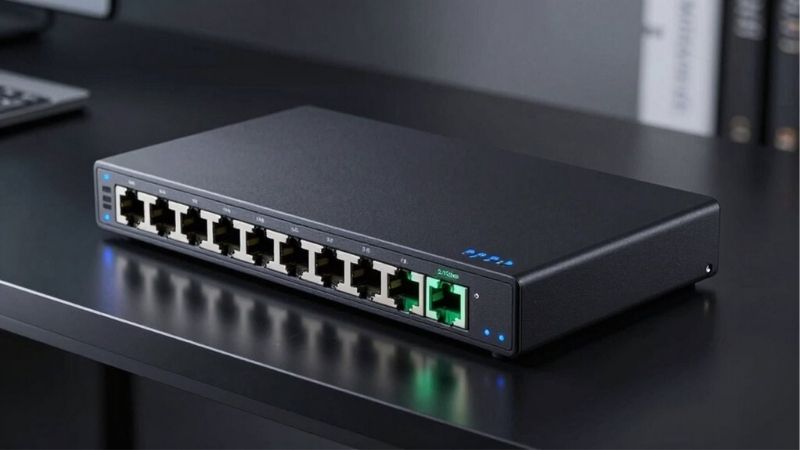
Best value for a smaller setup: TP-Link TL-SG105-M2. Its five 2.5GbE RJ45 ports suit a router plus a handful of devices, with few settings to get wrong. The important limitation is port count: once a router uses one port, four remain for endpoints.
Best if you will add 10G storage: Zyxel XMG-108. Eight 2.5GbE copper ports plus one 1G/10G SFP+ slot create an expansion route for a suitable NAS or upstream switch. The SFP+ slot is not an extra ordinary RJ45 port; your other device and compatible module or direct-attach cable determine how it is used.
Best with basic network controls: NETGEAR MS305E. Five 2.5GbE ports plus web management, VLANs, QoS and monitoring make it useful if you know what traffic separation you need. It is less attractive for anyone who only wants to plug in cables and play.
Best simple metal alternative: NETGEAR MS305. This fanless five-port unmanaged switch prioritizes straightforward installation and mounting flexibility, but does not provide the MS305E’s web controls.
Best compact wall-mounted alternative: TRENDnet TEG-S350. Five 2.5GbE ports and a fanless metal housing are the draw. Check the hardware revision on the listing and package because TRENDnet has published materially different specifications for earlier and current TEG-S350 versions.
All prices below are observed US online listing prices checked October 29, 2026, not guaranteed checkout totals or stable MSRP. Stock badges indicate a seller’s listing at check time, not ZIP-specific inventory or reserved units.
Compare the six best 2.5GbE switches for gamers
| Switch and best use | Verified connectivity | Setup and major limitation | Observed US listing price (seller; Oct. 29, 2026) | Stock status (Oct. 29, 2026) |
|---|---|---|---|---|
| TP-Link TL-SG108-M2 — best overall | 8 × 2.5GbE RJ45; fanless | Unmanaged; no dedicated 10G uplink | $79.99, B&H | In stock, B&H listing |
| TP-Link TL-SG105-M2 — best value | 5 × 2.5GbE RJ45; fanless | Unmanaged; only 4 endpoint ports after one router uplink | $39.99, B&H | In stock, B&H listing |
| Zyxel XMG-108 — best 10G expansion | 8 × 2.5GbE RJ45 plus 1 × 1G/10G SFP+; fanless | Unmanaged; SFP+ needs compatible gear/cabling | $89.99, Zyxel US Store | In stock, Zyxel US Store |
| NETGEAR MS305E — best for VLAN/QoS control | 5 × 2.5GbE RJ45; fanless | Web-managed; additional setup and no separate 10G port | $129.99, B&H | In stock, B&H listing |
| NETGEAR MS305 — best no-fuss alternative | 5 × 2.5GbE RJ45; fanless | Unmanaged; no user-configurable VLANs | $99.99, B&H | In stock, B&H listing |
| TRENDnet TEG-S350 — best mounting alternative | 5 × 2.5GbE RJ45; fanless | Unmanaged; revision-specific specs require care | $49.49, B&H | In stock, B&H listing |
A switch’s switching capacity is an aggregate fabric specification, not a single-port Internet speed. A 40Gbps fabric on an eight-port, full-duplex 2.5GbE switch does not make any one computer connect at 40Gbps. Similarly, a network interface linked at 2.5Gbps does not guarantee 2.5Gbps useful file-copy throughput because protocol overhead, storage performance, server CPU, and other links all matter.
TP-Link TL-SG108-M2: best overall for a multigig gaming room
The TL-SG108-M2 solves the problem gamers actually run into after replacing a router: the router has only one or two 2.5G LAN ports, while a PC, a home NAS, and an access point all need multigig connections. With eight auto-negotiating 100Mbps/1Gbps/2.5Gbps Ethernet ports, this switch provides a simple place to aggregate those devices. The vendor specifies a 40Gbps switching capacity, a fanless design and desktop or wall mounting for the US-listed model family. Physical hardware revision can change secondary details, so check the label if power supply requirements or operating environment are important.
A realistic use case is a gaming desktop with a 2.5GbE motherboard NIC, a NAS with a 2.5GbE port and a Wi-Fi access point that can use a 2.5GbE wired backhaul. Connect the switch to a 2.5G-capable LAN port on the router. Connect the PC and NAS to separate switch ports. The two local devices can then exchange traffic without being forced through a single gigabit switch port. The router is still responsible for NAT, firewall rules, Internet routing and any WAN quality-of-service policy; the switch does not take over those jobs.
The strongest reason to choose eight ports is headroom. One port commonly serves the router or upstream switch. A networked PC, two consoles, a NAS, a work laptop dock, and an access point can consume the rest faster than expected. Buying the smaller box to save money may lead to a second switch later, more power adapters and a confusing cable path. On the other hand, if you currently need only two endpoints and expect no expansion, the TL-SG105-M2 is the more economical decision.
What works well: silent operation, clearly specified 2.5G access ports, 8-port capacity and no setup application. What to watch: no built-in per-port traffic charts, no configurable VLAN interface and no dedicated faster uplink for a future 10G NAS. Manufacturer references to traffic prioritization should not be read as a promise that a user can log in and allocate Internet bandwidth; this is an unmanaged device.
Buy it if: you want several 2.5G copper connections in one room and favor simplicity. Skip it if: you need an actual 10G SFP+ aggregation link, PoE to power an access point, or switch-managed VLAN configuration.
TP-Link TL-SG105-M2: best value for a PC, NAS and router
The five-port TL-SG105-M2 offers the same basic promise with fewer sockets: five 100Mbps/1Gbps/2.5Gbps RJ45 ports, an unmanaged design, a metal housing, and fanless cooling. The vendor specifies 25Gbps switching capacity. This is a very sensible starting point for a single high-end PC and one or two fast local devices, provided the router or upstream connection has the required link speed.
Picture a three-device network: one cable from a 2.5G router LAN port, one cable to the gaming PC, one to a NAS, and one to a multigig-equipped workstation. Four ports are already in use, leaving just one for future expansion. If instead the fifth port feeds another switch, remember that the additional downstream devices share that single 2.5G uplink whenever they communicate beyond their local segment. A port-count calculation now prevents a disappointing upgrade later.
The price attraction is not a claim that cheaper network hardware makes online games faster. It is the ability to build a compact multigig LAN without paying for extra ports that would sit unused. The model also supports ordinary gigabit devices, so connecting a PS5 or other gigabit-only console is allowed; it simply negotiates at the console’s supported rate, not 2.5G. Do not buy it to “unlock” a faster Ethernet port on a console that does not have one.
One technical caveat matters when comparing old and new documentation. TP-Link has published hardware-version-specific materials for this product with differences in power ratings and features such as loop prevention. The essential five-port 2.5GbE capability is consistent, but you should use the specification for the exact hardware version shipped when checking those secondary features. We do not treat those revision-dependent features as universally present.
What works well: manageable footprint, fanless operation, easy expansion to a few wired endpoints, and an observed price materially below larger models. What to watch: an occupied upstream port leaves four available device ports; there is no separate 10G or SFP+ uplink and no web controls.
Buy it if: you have one 2.5G gaming PC and a small home network. Skip it if: a multigig NAS, several desktop PCs, access points and consoles will soon fill five ports.
Zyxel XMG-108: best for an eventual 10G uplink
The XMG-108 is unusual at this price level because it has eight 2.5GbE RJ45 ports plus one 1G/10G SFP+ port, rather than only copper access ports. Zyxel describes it as an unmanaged switch and specifies fanless operation and a 60Gbps switching capacity. The separate SFP+ connection can make sense if you already have a switch with an SFP+ interface, or a NAS with the appropriate network card. That is an option for network topology, not a blanket promise of faster gaming.
Consider a household where several 2.5G gaming PCs need to access one central fast NAS. If the NAS has a compatible 10G SFP+ path, the higher-capacity uplink avoids immediately constraining all of those clients behind a single 2.5G NAS connection. It does not turn each client into a 10G client, and total throughput remains subject to the NAS disks, interface, and traffic patterns. If the NAS only has 2.5GbE, the extra SFP+ socket may provide no immediate benefit.
Be very exact about the connector. SFP+ is a module or cable interface, not a standard copper Ethernet jack. A direct-attach copper cable may be appropriate when both devices have compatible SFP+ cages within cable reach. Fiber optics require compatible modules and fiber. An RJ45 SFP+ transceiver introduces separate heat, power and interoperability concerns, and should not be assumed supported at all speeds unless the device documentation confirms it. This is one reason not to buy an SFP+ switch merely to replace a simple 2.5GbE router cable.
The Zyxel US Store showed SKU XMG-108-ZZ0101F at $89.99 and labeled it in stock when checked. That is a listing-price snapshot before shipping and applicable taxes. Compare the full cost including the correct uplink module or cable against the cost of a simpler all-RJ45 switch; the apparent bargain can disappear if you must purchase an uncommon transceiver.
What works well: eight copper multigig ports, a distinctly useful SFP+ expansion path, and no fan noise. What to watch: it remains unmanaged, it provides no PoE power, and SFP+ equipment compatibility must be planned rather than guessed.
Buy it if: you have a concrete 10G-capable NAS or aggregation-switch plan. Skip it if: your network ends at a 1G router and a single PC, or your only objective is lowering multiplayer ping.
NETGEAR MS305E: best when VLANs and traffic controls matter
The MS305E is the specialist pick in this list. It includes five 2.5G Ethernet ports but adds a browser-managed interface for functions such as VLAN segmentation, traffic prioritization, network monitoring and cable diagnosis. NETGEAR distinguishes these Plus switches from fully unmanaged models. That distinction is meaningful for a gaming desk doubling as a streaming studio, test lab or home office where you want control over how local equipment communicates.
For example, a home with a gaming PC, a lab machine and an IP camera may want to separate certain local devices using VLANs. The switch can participate in that design, but a VLAN-capable router or firewall and correct upstream port tagging are needed for the complete segmentation policy. It is not secure just because the VLAN menu is present. Similarly, switch-level QoS can prioritize traffic across a congested switch port; it is not equivalent to Smart Queue Management at the Internet router. If bufferbloat occurs while someone uploads a large file over a limited WAN link, a router-based queue-management solution is usually the relevant place to act.
Configuration carries trade-offs. A misconfigured VLAN or tagged port can block access to a device that worked fine before. Start with the default simple topology, record the current configuration, and change one setting at a time. Verify normal DHCP access and game connectivity before implementing more elaborate segmentation. Keep the administrative interface restricted to your trusted network; consult NETGEAR’s documentation for the correct firmware and management procedure rather than using an assumed menu path.
The observed B&H listing was for US model MS305E-100NAS, in stock at $129.99. Do not confuse it with the plain MS305, which has a different configuration scope even though both use five 2.5G RJ45 ports. When comparing prices, remember that the MS305E premium buys manageability, not a higher per-port link speed.
What works well: configurable local network features and five multigig ports in a silent desktop unit. What to watch: no dedicated 10G uplink, limited five-port headroom, management complexity and the possibility of self-inflicted connectivity issues.
Buy it if: you can name a VLAN, monitoring or port-policy requirement before checking out. Skip it if: you simply want to wire a PC to the router without changing network behavior.
NETGEAR MS305: a straightforward five-port alternative
NETGEAR’s MS305 is an unmanaged five-port, 2.5GbE switch with a metal housing, fanless operation and desktop or wall-mount positioning. Manufacturer documentation lists support for 100Mbps, 1Gbps and 2.5Gbps connections on its five copper ports, plus a 25Gbps aggregate switching fabric. Those facts, rather than the brand name alone, are the reasons it qualifies as a full multigig alternative to the TP-Link and TRENDnet options.
The practical appeal is installation simplicity. You can set it on a shelf beside the gaming router, connect power, attach one LAN cable from the router and connect up to four local devices. It performs Ethernet switching without requiring an account, cloud app or VLAN design. The lack of management features is a benefit when the network is small and a liability when you want diagnostics or different local traffic policies.
NETGEAR’s specifications also document packet-buffer and prioritization mechanisms, but those figures should not be mistaken for end-to-end gaming benchmarks. A microsecond-scale switching statistic measured under a vendor’s laboratory conditions does not mean a game server will respond that much faster. Internet route length, game server processing, Wi-Fi interference elsewhere and WAN congestion generally dominate the human-visible latency story.
The US B&H listing for MS305-100NAS was in stock at $99.99 in the checked page. This is noticeably above some five-port alternatives at their observed listing prices, but the exact value proposition depends on which supplier you prefer and current deals. Verify the warranty for your region and seller rather than applying one region’s manufacturer support language to every US purchase.
What works well: five true 2.5GbE ports, quiet operation, solid physical construction and minimal upkeep. What to watch: five ports only, no SFP+ uplink and no configurable web-based network controls.
Buy it if: you prefer a basic NETGEAR switch and value an uncomplicated setup. Skip it if: the current US price is materially higher than a comparable verified model and you have no need for this specific option.
TRENDnet TEG-S350: best if mounting flexibility matters
The TEG-S350 is a compact five-port 2.5GbE unmanaged switch with a fanless metal enclosure designed for desk, under-desk or wall placement. TRENDnet’s current Version V2 product description lists five 2.5G RJ45 connections, 25Gbps switching capacity, VLAN tag passthrough and 802.1p class-of-service passthrough. That last point must not be confused with a fully managed interface: passing tagged Ethernet traffic through the switch is different from creating and administering VLAN membership on the switch itself.
This can be a good secondary purchase for a gaming room where a metal box needs to disappear beneath a desk, while a PC, NAS and two other devices need a local 2.5G path. Its small footprint and lack of fans make it easy to place without introducing acoustic noise close to a microphone. It is not a PoE switch and will not power an access point from an Ethernet cable, so budget for the access point’s own adapter or compatible injector if that is part of the plan.
Check the version, not just the name. TRENDnet has separate pages for an earlier TEG-S350 hardware version that is explicitly marked discontinued and for current Version V2, with some differences in listed secondary specifications. The retailer listing identifies the model but may not expose the exact V2 hardware revision. We therefore rely here on only the overlapping, decision-critical properties—five 2.5G ports, unmanaged operation and fanless metal design—and treat specific revision-only values as something the buyer should verify from the unit label and matching manual.
The observed B&H listing showed the TEG-S350 in stock at $49.49 on the check date. This is a useful comparison point, but shipping costs, time-limited pricing and warranty terms can alter total value. A discounted price should not be assumed permanent.
What works well: compact, wall-mountable metal enclosure, five multigig ports and silent operation. What to watch: limited expansion capacity, no switch configuration interface, and possible hardware-revision ambiguity on third-party listings.
Buy it if: you need a simple five-port multigig switch that fits neatly out of sight. Skip it if: your build requires 10G aggregation, advanced controls or additional ports soon.
How we selected these switches
This is a research-based buying guide, not a hands-on benchmark. Products were screened for genuine model identifiers, manufacturer-documented 2.5GbE RJ45 access ports, US-facing retail availability, clear configuration type, and at least one practical gaming-network use case. Critical specifications were compared with manufacturer documentation rather than inherited from retailer promotional language. We opened US seller product listings to capture specific asking prices and stock badges for each model. We did not measure noise, temperatures, actual latency, packet loss, throughput, or long-term reliability on physical samples.
We preferred six products that address different buying decisions over six cosmetic rebrands or an indiscriminate list of cheap generic switches. Eight-port capacity, five-port value, 10G uplink expansion, management controls and physical mounting all solve identifiable problems. We deliberately excluded gigabit-only models with similar-looking names, switches with ambiguous 2.5G port counts, and devices marketed as “gaming accelerators” without a mechanism relevant to this use case.
The selection is not a statement that every listed product will be best for every household. A 1G-only network can be perfectly fine for online play. A router with built-in 2.5G LAN ports may remove the need for an external switch. Where the network’s bottleneck is on the WAN, the right remedy is generally upstream of this hardware category.
Do you actually need a 2.5GbE switch for gaming?
Start by separating multiplayer latency from wired throughput. The bandwidth needed for moment-to-moment game packets is normally much lower than 1Gbps. Switching from a functional 1G Ethernet link to 2.5G therefore does not inherently reduce time to a distant game server. Most improvement opportunities for a player who sees severe ping spikes lie in Wi-Fi stability, saturated Internet upload, router queues, ISP routing, or the game server.
A 2.5G switch matters more when you move large files around a local network: capturing footage to a NAS, transferring edited video between workstations, copying game-install archives to an authorized home server, or feeding multiple fast devices into a multigig access point. It can also prevent a 1G access-switch port from becoming a bottleneck when you pay for Internet above 1Gbps, but only if the WAN modem, router WAN/LAN port, internal Ethernet path and client all support the higher speed. Connecting a 2.5G switch to a router’s 1G LAN port preserves a 1G limit on traffic that must cross that link.
The port-count test
Count all physical connections including the router uplink. A five-port switch with one uplink provides four remaining direct connections. An eight-port model provides seven. If you need a 2.5G gaming PC, 2.5G NAS, 2.5G access point, another desktop and a router feed, you already use five ports. A five-port model gives no future growth. If you sometimes connect a work laptop or another gaming system, choose eight ports rather than chaining another switch simply because the product title says “gaming.”
The end-to-end speed test
For a local 2.5G transfer, both source and destination must have compatible multigig NICs, the switch ports must negotiate at 2.5Gbps and all cables in that path must be adequate. If one endpoint is 1Gbps-only, that link remains the limiter. Many gaming consoles have gigabit Ethernet despite supporting high-resolution games. A switch cannot change their onboard NIC speed. Check the exact console or motherboard manufacturer’s technical specification before buying a network upgrade to support it.
The upstream topology test
For local traffic between two devices on the same switch and network, the switch can forward frames directly without an Internet round trip. For traffic between VLANs, a configured router or layer-three device may have to route between networks. For Internet gaming, packets travel to the router and onward across your ISP. This means a fast local switch is only one section of a longer path. Treat a claimed 25Gbps or 40Gbps “switching capacity” as an internal aggregate design metric, not a prediction of a download speed test.
What matters when comparing 2.5GbE gaming switches
Unmanaged versus managed features
An unmanaged switch is often the right home choice because there is nothing to configure. You do not need a login simply to attach a PC and NAS to the same router. Some unmanaged models can recognize standardized priority tags or pass VLAN tags, but that does not give you a web panel to allocate per-device bandwidth. A managed or Plus switch makes sense when you require VLANs, local traffic counters, port mirroring or diagnostics, and can maintain those settings. It still cannot create additional ISP upload bandwidth.
Five ports versus eight ports
Buy for today’s cabling and the next planned devices, not an arbitrary future-proofing score. Five ports fit a single room with one uplink and a few endpoints. Eight ports are often the natural choice if you also own an NAS, two computers and a Wi-Fi access point. The cost difference should be compared against avoiding a second switch, a second power supply and an extra upstream link. If you need substantially more than eight connections, consider a larger carefully specified switch rather than endless daisy chains.
10G SFP+ uplinks and uplink bottlenecks
A dedicated 10G SFP+ link can make an eight-port 2.5G switch more adaptable to a fast server or central switch. It does not improve a 1Gbps cable modem or make ordinary copper endpoints run at 10Gbps. Check what is on the far end of the fiber or direct-attach cable. Some modules are proprietary or restricted by power and thermal limits; a generic RJ45 transceiver is not automatically a safe or supported replacement.
Fanless operation, metal case and heat
All six selections are advertised as fanless, but no fans does not mean zero heat. Place the switch where air can circulate around its vents. Do not wrap it in foam, bury it under warm electronics, or assume that a metal case needs no ventilation. If mounted to a wall or under a desk, use the manufacturer’s installation instructions and power adapter for the hardware revision. Fanless units are appealing in streaming and recording areas because they do not add fan noise to the room; whether their electrical components make audible coil noise was not measured here.
Cables: Cat5e can be sufficient
The 2.5GBASE-T standard is designed to work over appropriate Cat5e cabling, and these manufacturers specifically advertise operation over Cat5e under stated conditions. A well-terminated Cat5e run in good condition is usually worth trying before buying all-new Cat6a cables. If the link trains at 1Gbps, inspect the entire run—including wall jacks, couplers and patch cords—rather than assuming the switch is defective. Length, cable damage, poor termination and EMI can matter. A cable’s printed category alone is not a complete quality test.
PoE, VLANs and QoS marketing
None of the six selected models should be bought as a PoE power source for an access point. Port speed and PoE are separate product features. Likewise, “QoS” on a datasheet may mean that a switch handles existing priority tags rather than letting you set up elaborate per-game rules. If your real complaint is bufferbloat during household uploads, investigate a router that can manage WAN queues, often with SQM. Do not confuse LAN priority mechanisms with Internet latency guarantees.
Example layouts for real gaming setups
One gaming PC and one NAS
Use a five-port unmanaged model if both the PC and NAS genuinely support 2.5GbE and you can connect them to the same switch. Connect the router to another switch port for Internet access. Local transfers may benefit from the faster path even if the router has only a 1G port, provided the PC and NAS remain on the same local switched segment. However, Internet traffic crossing the 1G router uplink will still be limited to that link’s rate. For this setup, the TL-SG105-M2 is sufficient; spend on a reliable NAS disk or correct network adapter first if those are the actual bottleneck.
Two PCs, streaming workstation and access point
Plan your switch around the real count: router uplink, primary gaming PC, streaming/production PC, second household PC, NAS and wired access point already use six ports. An eight-port switch avoids immediate crowding. The TL-SG108-M2 is the simple pick if everything uses copper 2.5G. If several local clients will routinely share a fast NAS that has a 10G SFP+ connection, the Zyxel XMG-108 presents a more purposeful next-step topology.
A shared gaming desk with lab gear
If you run a game server for authorized local testing, smart-home equipment or work devices that should not share a flat broadcast domain, the MS305E’s VLAN and basic administration features may be relevant. But do not create VLANs before you know which router interface will route or isolate their traffic. Test management access from a trusted machine first and keep a recovery path. For a simple streamer who only needs more Ethernet jacks, the unmanaged TL-SG108-M2 is less work and often the better buy.
One console and ordinary gigabit broadband
If you have a gigabit-only console, 500Mbps Internet service and no multigig NAS or PC, keep a functioning gigabit switch or connect directly to your router. You should not expect a 2.5G switch to change a gigabit-only Ethernet interface, the distance to the game server or the ISP’s queueing behavior. That is a strong skip case, not a missed upgrade opportunity.
How to install a 2.5GbE switch and verify that it is helping
An unmanaged switch requires no application, but a short validation process prevents you from interpreting a lit LED as proof that everything is running at 2.5G.
- Confirm the topology. Identify the router LAN port’s actual speed and the exact Ethernet specification on the PC, NAS and access point. Mark which path will carry local transfers and which will carry Internet traffic. Do not connect two cables between the same unmanaged devices unless the manufacturer explicitly supports the intended aggregation and loop protection topology.
- Disconnect and position the equipment safely. Use the supplied power adapter and the ventilation clearances in the correct model manual. Install the switch on a stable surface or the supported mount. If replacing another switch, label the cables before unplugging them.
- Connect one router LAN uplink. Run an Ethernet cable from a router LAN port to any ordinary switch port. These unmanaged models have auto-negotiating Ethernet ports rather than a magic dedicated “gaming port.” The router remains the DHCP server and Internet gateway unless your network is configured differently.
- Attach endpoints one at a time. Add the PC and NAS, then any access point or other computer. Look at each device’s reported Ethernet link speed and confirm connectivity to the router. A 2.5G-capable switch may correctly show 1G for a console with a 1G NIC.
- Check the Windows interface. On Windows 11, start at Settings > Network & internet > Ethernet to confirm the wired connection is active; the exact speed field can vary by Windows build and adapter. For an additional direct check, open PowerShell and run
Get-NetAdapter | Select-Object Name, Status, LinkSpeed, then identify the Ethernet adapter in use. This reports negotiated link speed, not application throughput. - Measure local throughput only if you have two suitable computers. Install an official copy of
iperf3through a trusted OS package channel on both test endpoints. On the server runiperf3 -s; on the client runiperf3 -c SERVER_IPwith the server’s actual LAN IP address. Compare measured TCP throughput with expected overhead, host performance and the negotiated links. This is a measurement of that LAN path, not of game latency or Internet download speed. - Verify the gaming experience separately. Run a short stable game session, monitor ping and packet loss in the game’s own tools if available, then repeat under your household’s normal Internet load. If ping spikes are tied to uploading, investigate router WAN queues rather than buying another LAN switch.
If the switch causes a connectivity issue, undo the change safely: remove the switch, reconnect the PC directly to the known-working router LAN cable, and confirm that the original network still works. This isolates the issue without resetting your router, changing firewall rules, or flashing firmware. For a managed MS305E, revert the specific VLAN or port setting you changed and consult its official manual before a factory reset.
Common mistakes that waste money
Counting ports without the router connection. Many users call a five-port model “five gaming devices” while forgetting that one port is required to connect back to the router or larger LAN. Make a cable plan before paying.
Assuming a 2.5G switch upgrades every attached device. Auto-negotiation selects the highest shared rate supported by both ends of each link. A 1G-only console will remain a 1G client, even next to a 2.5G gaming PC.
Buying SFP+ without a compatible second endpoint. A 10G SFP+ uplink can be valuable but does not plug directly into a standard RJ45 jack. Budget for supported cables or modules and check whether the network topology actually needs the extra bandwidth.
Equating switch QoS with Internet SQM. Tags and local queue behavior can help with contention on certain LAN links. They do not substitute for queue management where the Internet connection is congested.
Comparing sale badges as permanent value. Seller promotions, manufacturer list prices and checkout totals are different things. The price table is a dated observation, not a prediction of next week’s cost. Recheck the exact SKU and its stock status before purchasing.
Ignoring hardware revisions. The same marketing model can gain new features or power requirements across revisions. In particular, check TP-Link’s version-specific documents and TRENDnet’s TEG-S350 version selector. Do not apply an older manual’s power adapter specification to a new unit.
Frequently asked questions
Will a 2.5GbE switch lower gaming ping?
Not by itself. A higher-capacity local link helps only when a slower LAN connection is an actual source of contention or throughput limitation. Most game latency is determined elsewhere in the route. If ping increases when the household saturates Internet upload, assess router queue management and upstream bandwidth before buying a switch.
Is a 2.5GbE switch worth buying for a PS5 or Xbox?
Only if the wider network also needs the switch. A gigabit-only Ethernet interface does not turn into a multigig interface when connected to a 2.5G port. Verify the Ethernet specification for the exact console revision, then consider whether other 2.5G PCs, access points or NAS devices make the purchase useful.
Can I use a 2.5GbE switch with a 1Gbps router?
Yes. Ordinary 1G router ports can connect through auto-negotiation, but any traffic across that connection is limited to the negotiated 1G link. Two compatible 2.5G devices on the same switch can still communicate over their local switched links at rates above 1Gbps where the rest of the system permits.
Do I need Cat6 or Cat6a for 2.5GbE?
Not automatically. Manufacturers of the switches in this comparison support 2.5GbE over suitable existing Cat5e installations. A short, good-quality Cat5e patch lead can be adequate. If links fail to negotiate at 2.5G or suffer errors, test another cable and inspect wall wiring before replacing every run.
Is an eight-port switch better for competitive gaming?
It is better if you need the extra connections, not because eight ports make individual gaming packets intrinsically faster than five ports. The TL-SG108-M2 is the overall pick for a crowded gaming room; the TL-SG105-M2 is the more sensible purchase if four endpoint ports after the uplink will remain enough.
Do I need a managed 2.5G switch or can I buy an unmanaged one?
Most households need unmanaged. Choose the MS305E if you have a documented use for VLANs, configurable local prioritization or port-level monitoring, and can manage the configuration. For basic wired connectivity, the unmanaged choices avoid unnecessary complexity.
Does the Zyxel XMG-108 deliver 10Gbps on every Ethernet port?
No. Its eight copper RJ45 ports each support up to 2.5GbE. The separate SFP+ slot supports a faster 10G-capable uplink when you provide compatible hardware at both ends. The 60Gbps aggregate switching capacity is not a single-port bandwidth claim.
Can these switches power a Wi-Fi access point over Ethernet?
Not as listed. The selected models are not PoE power-sourcing switches. A Wi-Fi access point requiring PoE needs a compatible injector or a separate switch that explicitly provides the necessary PoE standard and power budget.
How should I decide between the TL-SG105-M2 and TL-SG108-M2?
Draw the wiring diagram first. If the router plus your expected endpoints totals five ports or fewer, the five-port unit is sufficient. If it totals six through eight, or expansion is likely, choose the eight-port unit. Do not decide from theoretical switching capacity alone; both can serve suitable 2.5G clients at their negotiated per-port rates.
Final thoughts
For a household with several wired gaming and production devices, the TP-Link TL-SG108-M2 is the clearest starting point. Choose the TL-SG105-M2 for a small, inexpensive multigig LAN, the Zyxel XMG-108 when a compatible 10G SFP+ NAS or uplink is part of a specific plan, and the NETGEAR MS305E only when you need actual managed controls. Before ordering, count your ports and confirm that at least two devices or one meaningful bottleneck can use 2.5GbE. If your only problem is high Internet ping on an otherwise healthy gigabit LAN, troubleshoot the WAN path first and keep your money.