If you’re comparing the best controllers for small hands PC, start with thumb reach rather than a marketing label that says “mini.” The Nacon Pro Compact is the strongest currently orderable, conventional Xbox-style option in this shortlist, while the 8BitDo SN30 Pro is an appealing smaller, flatter wireless alternative. The 8BitDo Ultimate Mini is the most explicitly small-hand-focused design here, but we found limited retailer availability. This guide compares actual dimensions where published, Windows compatibility, grip shape, button access, and buying trade-offs—not unverified hand-size claims or hands-on tests.
Quick verdict: the controllers worth considering
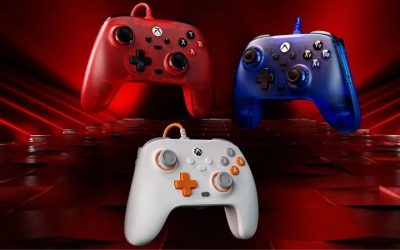
Best overall available choice: Nacon Pro Compact Controller. Its 15%-smaller-than-standard design, conventional asymmetrical layout, Windows support, and explicit US in-stock listing make it the clearest starting point for players whose fingers must stretch on an ordinary Xbox controller. Its compromise is a wired-only connection and a price above basic pads.
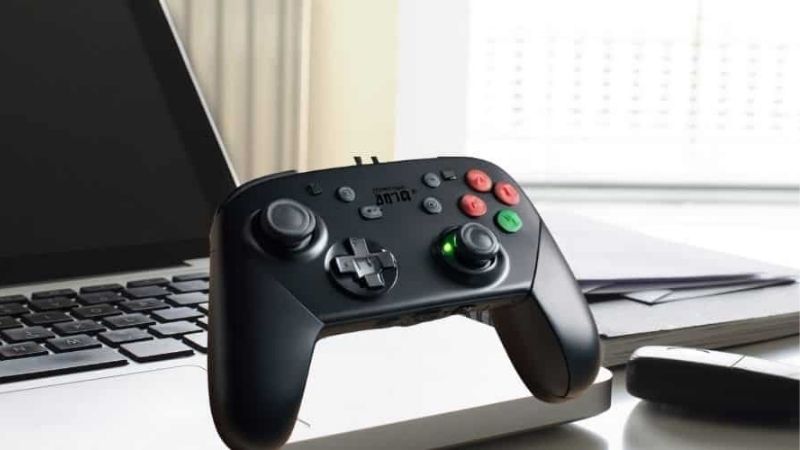
Best compact wireless option: 8BitDo SN30 Pro Bluetooth, Hall Effect edition. The low-profile 144 mm body removes the bulky handles of most controllers, and the manufacturer confirms X-input support for Windows. It is especially attractive for platformers, indie games, and players who prefer symmetrical sticks. The compromise is that its shallow shoulder/trigger geometry may be less comfortable for frequent trigger use.
Best lower-cost wired option: 8BitDo SN30 Pro USB. You get the same broadly flat retro form factor with a direct USB connection, at the expense of wireless freedom, motion controls, and the newest wireless edition’s Hall Effect-stick specification. Check the exact model before ordering.
Best design to watch for restocking: 8BitDo Ultimate Mini Wired Controller for Xbox. It has clearly documented miniature grips, 189.6 g weight, and Hall Effect sticks/triggers, but Walmart showed the white version out of stock and Best Buy showed that listing no longer available in new condition when researched. Do not treat its listed price as a confirmed buy-now offer.
Comparison table: size, PC support, price, and stock
| Controller / best use | Verified dimensions or design | Windows connection | Observed price (seller; Oct. 28, 2026 US ET) | Stock status at checked seller | Main drawback |
|---|---|---|---|---|---|
| Nacon Pro Compact — best overall orderable | 15% smaller than conventional pad (Nacon claim) | Wired USB; Windows/Xbox | $49.90 — Nacon US | In stock — Nacon US | No wireless mode; not as tiny as flat pads |
| 8BitDo SN30 Pro Bluetooth (Hall Effect) — small wireless pad | 144 × 63.5 × 33 mm; 114 g (8BitDo) | Bluetooth or USB-C; Windows X-input | $44.99 — Best Buy, gray model 80DM02 | Add to cart available; final checkout unverified | Very shallow triggers; grip-free shape |
| 8BitDo SN30 Pro USB — wired retro value | 144 × 63.5 × 32.5 mm; 145 g (8BitDo) | Wired USB; Windows X-input | $27.99 — Best Buy, model 82AD | Add to cart available; final checkout unverified | No Bluetooth; cable length 1.8 m |
| GameSir Nova Lite — low-cost wireless alternative | 155 × 104 × 61 mm; 205 g (GameSir) | USB dongle, Bluetooth, or wired; PC support | $24.99 — GameSir US, translucent black | Add to cart available; final checkout unverified | Near-standard width; not ideal for very small hands |
| 8BitDo Lite SE 2.4G for Xbox — low-force tabletop use | 145 × 78 × 30 mm; 160 g (8BitDo) | 2.4 GHz dongle or wired; Windows 10/11 | $59.99 — 8BitDo e-shop | Unclear — e-shop shows mixed cart/stock labels | Flat layout differs from a handheld grip |
| 8BitDo Ultimate Mini for Xbox — small-grip watchlist | 135.2 × 95.4 × 58.6 mm; 189.6 g (8BitDo) | Wired USB; Windows 10/11 | $34.99 — 8BitDo e-shop | Unavailable at Walmart/Best Buy; e-shop unclear | Not a reliable buy-now option in checked listings |
Pricing and availability note: Prices refer to the named exact seller and variant seen during research, not guarantees for every US ZIP code. “Add to cart” means the listing offered an order action; payment completion and location-specific fulfillment were not tested. 8BitDo e-shop product pages displayed both “Sold out” and “Add to cart” elements for some models, so those stock labels are deliberately marked unclear rather than invented.
Best controllers for small hands on PC: detailed picks
Nacon Pro Compact — best conventional controller you can order
Not everyone who struggles with a standard Xbox controller wants a miniature retro pad. Some players still need two comfortably positioned analog sticks, familiar trigger travel, and a handle that can be held during an extended session. Nacon’s Pro Compact fills that middle ground. Nacon describes the body as 15% smaller than a classic game controller and confirms Windows compatibility alongside Xbox Series X|S and Xbox One. The US black version was explicitly labeled in stock at $49.90 during the research check.
The smaller shell should help reduce the distance a thumb travels between the left stick, D-pad, and face buttons. The standard asymmetrical arrangement also avoids a learning curve for Windows games that already show Xbox prompts. Nacon provides a companion application through the Microsoft Store for advanced mode adjustments, including button mapping, stick response, and trigger sensitivity. Those controls are useful if a player finds some reaches difficult but does not want to abandon conventional controls altogether.
The important trade-off is that smaller is not automatically softer or more ergonomic for everyone. Players with extremely short fingers may still prefer the Ultimate Mini’s shallower grip or the SN30 Pro’s flat body. The Pro Compact uses a wired connection, and its more complex software features are not necessary for basic plug-and-play gaming. Independent coverage from PC Gamer also regarded its smaller form as comfortable for smaller hands while criticizing aspects of its stick texture. The judgment here is a synthesis of published sources, not a claimed Geek Gaming Tricks hands-on trial.
Buy it if: an ordinary Xbox-style pad feels just slightly too broad, you want familiar trigger placement, and USB is acceptable. Skip it if: you need Bluetooth, an ultraflat controller, or the smallest possible thumb reach.
8BitDo SN30 Pro Bluetooth (Hall Effect) — best compact wireless option
The SN30 Pro takes a fundamentally different approach: it removes the large sculpted handles. At 144 × 63.5 × 33 mm and a manufacturer-listed 114 g, the current Hall Effect edition is a slim controller that can sit lightly across both palms. The D-pad and two analog sticks occupy a very compact face, so it can feel more approachable for players who can comfortably reach buttons on a handheld console but struggle to wrap around large PC controllers.
8BitDo officially supports Windows 10 version 1903 and later, using X-input, with Bluetooth or a wired USB-C connection. The Hall Effect edition is the correct one to seek if magnetic joystick sensors are part of your buying decision: the similarly named older and USB-only versions do not have identical hardware. The Gray model 80DM02 appeared at Best Buy with an add-to-cart option and a $44.99 observed price on the checked product page.
The main compromise is how the back and shoulder controls feel. The SN30 Pro has short, slim shoulder/trigger areas rather than large curved triggers housed within a thick grip. That can suit platformers, puzzle games, emulated retro titles where legally obtained, and games with modest trigger demands. A driving game or shooter that requires sustained trigger pressure might be less comfortable, especially if you must shift your index fingers repeatedly. Its symmetrical thumb-stick placement also feels different from an Xbox controller.
Buy it if: you want a genuine compact footprint with wireless Windows support and prefer a flat, retro-style pad. Skip it if: you need large ergonomic handgrips, rear paddles, or long trigger sessions.
8BitDo SN30 Pro USB — best inexpensive wired compact pad
If wireless operation is not important, the SN30 Pro USB deserves its own place instead of being treated as a color variation of the Bluetooth controller. 8BitDo publishes dimensions of 144 × 63.5 × 32.5 mm and a weight of 145 g, with Windows 10+ support through wired USB and X-input. Best Buy listed the Gray 82AD wired SKU at $27.99 with an add-to-cart option. That exact seller and SKU matter: a similar-looking SN30 Pro Bluetooth listing may have different internals, features, and pricing.
This makes the USB model attractive for a desktop station, a shared family PC, or a portable laptop setup where charging and wireless pairing are unwanted complications. Its small slab-like construction offers plenty of D-pad access for 2D games. Since it lacks full-size grips, you should first consider whether your fingers naturally rest on the rear shoulder buttons without tensing. For a player who primarily uses face buttons and the D-pad, the compact form can be a better fit than a standard Xbox shell.
There are two practical limitations. The manufacturer lists a 1.8-meter cable, so a couch setup may require a safe longer routing solution instead of pulling the controller toward you. And the USB model has no wireless connection or motion controls. Do not assume it includes the newer Hall Effect hardware just because a retail page for the Bluetooth Hall edition mentions that technology. For players who need continuous analog-trigger use, the molded handles of a different controller may be more comfortable despite the larger footprint.
Buy it if: price, low setup friction, compact dimensions, and 2D or mixed PC gaming are your priorities. Skip it if: you play from across the room or need Bluetooth and more substantial trigger grips.
GameSir Nova Lite — budget wireless option for moderately small hands
GameSir’s Nova Lite is the least explicitly “mini” model in this roundup, and that distinction needs to be clear before buying. Its published measurements are 155 × 104 × 61 mm and 205 g. The wider, deeper shell can offer a more familiar two-hand grip than the SN30 family, but it is not a first choice for very small hands. It earns a conditional recommendation because it provides multiple PC connection options at an observed $24.99 on GameSir’s US storefront, which displayed an add-to-cart option for the selected translucent-black version.
The manufacturer lists Hall Effect analog sticks, analog triggers, rumble, and three connectivity choices: Bluetooth, a supplied USB wireless dongle, and wired use. For a Windows laptop that will move between a desk and a television, the included dongle can be more convenient than repeatedly navigating Bluetooth menus. The standard Xbox-style layout helps with familiar in-game prompts, although mapping details can vary by game and connection mode.
The risk is that a cheap controller with a reasonable weight can still have too much thumb reach. Its 155 mm width is greater than the 8BitDo Ultimate Mini’s 135.2 mm and the SN30 Pro’s 144 mm, though width alone does not settle comfort because their grip shapes differ. If the player already finds ordinary controllers too wide, buying the Nova Lite sight unseen defeats the point of this guide. Consider it for hands that are somewhat smaller than average but still want full grips and wireless flexibility.
Buy it if: you have moderately small hands, want several PC connection options, and prioritize cost. Skip it if: you need the narrowest body or have trouble reaching both sticks and triggers on a typical controller.
8BitDo Lite SE 2.4G for Xbox — best low-force alternative
Grip size is only one reason a conventional controller may be difficult to use. Some players have limited grip strength, hand fatigue, or difficulty holding a pad while reaching the top buttons. The 8BitDo Lite SE 2.4G for Xbox addresses this different problem with a flat 145 × 78 × 30 mm body, low-resistance controls, Hall Effect joysticks, and a nonslip base. All main inputs are available on the upper face, including dedicated stick-click buttons. It is designed to rest on a surface rather than to imitate the feeling of an Xbox controller in the hands.
Windows 10/11 compatibility is explicitly documented by 8BitDo and Xbox; it can connect through the included 2.4 GHz adapter or a USB cable. Two large programmable Super Buttons can move frequently used actions to easier locations. This makes the Lite SE potentially valuable for a user who can operate individual buttons but cannot comfortably squeeze shoulder triggers or hold up a regular pad. Xbox’s accessibility announcement also confirms the underlying design focus.
However, a tabletop controller is not automatically a superior choice for every small-handed PC player. Its small controls and flat layout require a different technique and may be unsuitable for someone who wants traditional handheld control. The official 8BitDo e-shop listed $59.99, but its page displayed conflicting stock/cart signals, so stock is unverified. Treat it as a targeted ergonomic choice to evaluate, not a blanket replacement for the other recommendations.
Buy it if: reduced button force or tabletop stability matters more than standard controller grip. Skip it if: you want conventional handgrips or need confirmed immediate availability.
8BitDo Ultimate Mini Wired for Xbox — the most direct small-hand design, if available
The Ultimate Mini is easy to recommend for fit on paper and harder to recommend as an immediate purchase. Its official specifications state 135.2 × 95.4 × 58.6 mm and 189.6 g, with a body 20% smaller and 10% lighter than the standard 8BitDo Ultimate C. Unlike a retro slab, it still has sculpted handles and a recognizable Xbox-style control layout. The shorter separation between inputs could reduce thumb extension for a smaller player. Hall Effect joysticks and triggers are included, and Windows 10/11 support is official.
That specification profile makes it particularly compelling for games that require both sticks, analog triggers, and face buttons: the shape is small without deleting normal modern-controller controls. It also includes a 3.5 mm audio jack and wired USB operation. But the USB cable is a permanent practical constraint if your PC is across a room, and a smaller grip can feel too cramped to someone whose fingers are long even when their palms are narrow.
Availability prevents it from winning the buy-now recommendation. Walmart’s white-variant listing showed out of stock, while Best Buy’s white listing said it was no longer available new. The 8BitDo store showed a $34.99 listed price alongside ambiguous stock/cart indicators. Therefore, that price is only an observed listing, not a claim that a unit can be ordered right now. If a retailer confirms a new unit is available for your ZIP code, compare this model against the Nacon Pro Compact first.
Buy it if: you find a verified in-stock new unit and want a genuinely smaller Xbox-style shell. Skip or wait if: local stock cannot be confirmed or you need a Bluetooth controller.
How to choose the right controller for smaller hands
Measure reach, not just palm size
A controller can have a low listed weight and still require an uncomfortable thumb stretch. Your most useful test is whether you can keep your palms relaxed while moving the left stick to its edges, pressing the nearest face button, and then reaching the bumper without losing the right-stick position. If you must rotate your wrist, lift your palm, or pinch the grip to complete a normal action, the layout may be too large or poorly matched to your hand. Test this in the games you actually play: a relaxed platformer and a fast shooter demand different control transitions.
Use manufacturer dimensions as a preliminary filter, not a universal size score. The Ultimate Mini’s 135.2 mm quoted width, SN30 Pro’s 144 mm flat body, Lite SE’s 145 mm tabletop body, and Nova Lite’s 155 mm standard-style body cannot be ranked by width alone. Finger reach depends on stick placement, front-to-back depth, trigger angle, and grip thickness. If possible, purchase from a retailer with a reasonable return period and try the controller before modifying it.
Choose grip shape by game genre
A compact Xbox-like shell generally helps if you spend equal time with sticks, face buttons, bumpers, and triggers. That is why the Nacon Pro Compact and Ultimate Mini are the strongest shape matches for modern action games. A flat, symmetrical controller may be easier to hold for retro gaming or 2D titles that emphasize a D-pad, which is where the SN30 Pro variants make sense. For sustained racing acceleration, analog-trigger feel and index-finger support may matter more than the shortest overall width.
For limited grip strength, consider a surface-supported arrangement instead of forcing a two-handed hold. The Lite SE changes the interaction method; that should be treated as an accessibility-oriented feature, not merely as a small controller. Be cautious with aftermarket thick grips. Although these can make a controller easier to stabilize for some players, they can also increase the distance from the edge of the handle to the triggers for someone with short fingers.
Check Windows mode and connection before buying
For most Windows games, X-input reduces the chance of confusing button prompts and missing triggers. Both SN30 Pro models support Windows X-input, but the Bluetooth model can use multiple connection modes and should be set to the one intended for PC gaming. The Nacon Pro Compact and 8BitDo Ultimate Mini are licensed Xbox-style wired pads. The Lite SE 2.4G uses its supplied receiver for wireless Windows connection; do not confuse this with generic Bluetooth pairing. GameSir’s Nova Lite provides a USB dongle, Bluetooth, and wired connectivity, but check the manual for the correct pairing procedure before assuming every mode behaves identically.
For a laptop with limited USB ports, count the free ports before choosing a wired controller plus a wireless headset or mouse. For couch gaming, verify whether a cable reaches safely without crossing a walking path. A rechargeable Bluetooth pad avoids a receiver but may require occasional reconnection or charging. None of these convenience factors compensates for a grip that causes repeated strain.
Prioritize durable controls without confusing specifications
Hall Effect sticks are worth considering when available because they sense movement magnetically rather than relying on the same contact mechanism as conventional potentiometers. That does not guarantee immunity from every type of drift, mechanical fault, or calibration problem. It also does not make a controller automatically more accurate or lower latency in every game. Avoid treating retailer claims about triggers as interchangeable with the manufacturer’s official specification for the exact SKU.
Likewise, lighter weight does not always mean better comfort. A 114 g SN30 Pro and a 189.6 g Ultimate Mini distribute pressure differently because one lacks grips and the other has them. A player who wants support against the palms may find a slightly heavier contoured controller easier to use than a lighter flat pad. If the seller offers multiple editions, confirm whether the listing is the Hall Effect version, the older Bluetooth version, or the USB-only model.
A quick fit test before your return window closes
- Connect the controller using the manufacturer-approved Windows mode and open Windows’ controller test interface or a trusted game that supports gamepads. Verify that both sticks, bumpers, triggers, and face buttons register.
- With shoulders relaxed, hold the pad for five minutes without gripping tightly. Note whether thumbs naturally rest on the sticks and index fingers reach the bumpers.
- Play a familiar title for 15–20 minutes. Alternate a diagonal left-stick movement, a right-stick camera adjustment, an A/B/X/Y press, and a trigger press. Watch for forced palm rotation or accidental button presses rather than focusing only on game performance.
- Repeat the same sequence after a short break. If soreness, numbness, or persistent discomfort appears, stop instead of trying to adapt through pain. Consider a different grip design or a tabletop controller.
- Keep the packaging until you confirm that the fit, Windows connection mode, and your preferred games work as expected. Record what failed so you can compare a different model logically.
Frequently asked questions
What is the best small Xbox-style controller for Windows PC?
For an orderable, conventional layout in the sources checked, the Nacon Pro Compact is the best starting point because its US product page explicitly showed stock and the maker describes a smaller body. The 8BitDo Ultimate Mini may have the shorter reach for many players on paper, but its checked US retailer listings did not confirm a new unit available to purchase.
Are the 8BitDo SN30 Pro and SN30 Pro USB identical?
No. Both use a flat, familiar retro-inspired layout and support Windows, but the Bluetooth model works wirelessly or by USB and current Hall Effect editions use magnetic joysticks. The SN30 Pro USB is wired-only, has its own quoted dimensions and weight, and lacks motion controls. Always match the retailer SKU to the version in the comparison table.
Should I choose a wireless controller if my hands are small?
Wireless operation does not improve hand fit on its own. Choose it after confirming that the grip, thumb reach, and shoulder access suit you. The SN30 Pro Bluetooth is a compact wireless choice; the Nova Lite offers broader wireless connectivity but a noticeably larger published width. A wired pad can be a better purchase if it fits naturally and you play next to the PC.
Can a children’s controller work with Windows PC games?
Some can, but Windows compatibility must be verified for the exact device. Marketing descriptions such as “mini,” “junior,” or “for kids” do not prove X-input compatibility or full analog-trigger support. Check the manufacturer’s Windows platform list and ensure it has the sticks and buttons your games require.
Does a smaller controller prevent hand fatigue?
Not necessarily. Better fit may reduce unnecessary reaching, but long sessions, repetitive inputs, hand posture, and grip pressure all affect comfort. A controller that is too small can cause cramped fingers just as a controller that is too big can require stretching. Take breaks, adjust your setup, and stop if use produces pain or numbness.
What should I do if a controller is sold out?
Do not buy an unrelated larger model based only on a small discount. Compare its width, grip geometry, Windows connection requirements, and return terms first. If you specifically want the Ultimate Mini, check official retailer inventory for your ZIP code before ordering or consider the in-stock Nacon Pro Compact as the closest conventional alternative in this research.
How we selected these controllers
This is a research-based buying guide, not a Geek Gaming Tricks laboratory test. We prioritized explicit Windows compatibility, published size and weight, distinctive small-hand ergonomics, connection type, complete controller inputs, and current US seller listings. Manufacturer specifications were favored for dimensions and platform support; seller listings were used only for prices and orderability at the time of checking. Independent PC Gamer coverage was used as supplemental context for the Nacon’s small-hand feel. We excluded Android-only lookalikes and avoided describing unavailable controllers as ready to buy.
We did not measure button force, input latency, hand span, or comfort in-house. No ranking here should be mistaken for a clinical ergonomic assessment. Prices and stock are particularly changeable: the stated seller information is a time-stamped snapshot, not an inventory guarantee. For the greatest confidence, verify checkout availability and return conditions immediately before purchasing.
Final thoughts
Start with the Nacon Pro Compact if you want a familiar PC controller that is smaller and explicitly listed in stock. Choose the 8BitDo SN30 Pro Bluetooth Hall edition if a lighter, flatter wireless design suits your games, or its USB sibling if you want a lower-cost wired pad. Consider the GameSir Nova Lite only if a near-standard-sized shell still fits; evaluate the Lite SE for low-force, tabletop play. If you specifically want the 8BitDo Ultimate Mini, wait for a confirmed retailer listing rather than treating an unverified cart button as proof of stock. Your final decision should come from the thumb-reach test, not from the word “mini” on the box.