Key takeaways
- Verified published size or fit constraint: 73 × 24.2 × 10.5 mm; single/double-sided 2280
- Best use in an ITX build: Balanced passive cooling when a full sandwich clears
- Observed price (seller; Oct. 28): $14.00 (MemoryC US)
- Stock status (seller; Oct. 28): In stock, listed; ships later
- Main drawback: Body width and underside clearance
Choosing the best SSD heatsinks for ITX builds is mostly a clearance problem, not a contest to find the tallest fins. A compact NVMe cooler must fit beside the graphics card, below a CPU-cooler overhang, or behind a Mini-ITX motherboard without putting pressure on the SSD. For most standard M.2 2280 drives with room for a full enclosure, the ARCTIC M2 Pro is the strongest all-around starting point. For a truly restricted slot, the Akasa A-M2HS01-BK or Micro Connectors NGFFM2-HS804-BK deserves attention. This roundup covers add-on internal M.2 heatsinks, not external SSD enclosures or complete SSDs sold with their own factory coolers.
Quick verdict: which heatsink should you buy?
Best overall for many Mini-ITX systems: ARCTIC M2 Pro (ACOTH00001A). Its 73 × 24.2 × 10.5 mm published envelope, clip-together assembly, and accommodation for single- or double-sided M.2 2280 SSDs make it a sensible first choice where the slot has verified clearance. The catch is its 24.2 mm width and sandwich-style underside; do not assume it will clear a motherboard’s stock M.2 armor or a rear-mounted slot.
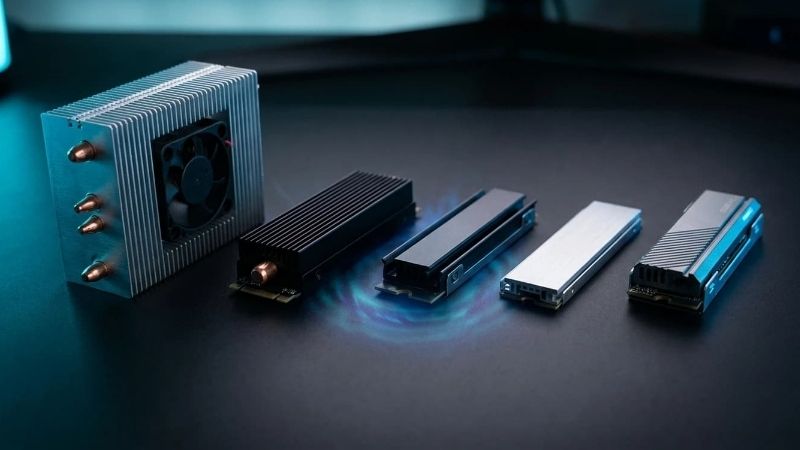
Best adhesive low-profile option: Akasa A-M2HS01-BK. At 71 × 22 × 6.4 mm for the heatsink itself, this simple aluminum piece is less intrusive than a full sandwich. It is expressly intended for single-sided 2280 SSDs. Its pre-applied adhesive thermal tape is convenient but less friendly to frequent removal.
Best heatpipe alternative: be quiet! MC1 Pro (BZ003). Its 74 × 24 × 13 mm design includes a heatpipe and accepts single- and double-sided 2280 drives. Choose it only after checking that those extra millimeters will not touch the GPU, a riser, or the CPU-cooler structure. Heatpipe hardware does not automatically outperform a shorter cooler without good airflow.
Best simple enclosed metal assembly: be quiet! MC1 (BZ002). The 74 × 24 × 10 mm design works with both single- and double-sided 2280 drives and dispenses with the Pro model’s heatpipe. This is a useful alternative if the ARCTIC clip design is not your preference; a US retailer listed it as orderable with a warehouse shipping delay.
Best strict-budget local-store option: Micro Connectors NGFFM2-HS804-BK. Micro Center lists a 5 mm heatsink and an example assembled height of 8.6 mm with an M.2 NVMe installed; the manufacturer instead lists 8.4 mm as its installed-height example. This 0.2 mm source conflict is unresolved and should not be used as a precision clearance guarantee. Silicone rings secure it without a heavy top-and-bottom frame. Local-store stock varies, and that example height is not a universal number for every SSD.
Best for a compatible single-sided SSD with a backplate: Thermal Grizzly TG-M2SSD-ABR. The bundled Minus Pad 8 thermal pads and compact sandwich architecture suit a careful installation. However, Thermal Grizzly explicitly limits compatibility to single-sided 2280 drives and M.2 sockets with a 4.2 mm connector height. That makes it a conditional pick, not a generic universal solution.
Best specialist active cooler: Thermaltake MS-1 (CL-O043-AL02BL-A). The 14 × 22 × 70 mm design combines a heatpipe and a small powered fan. It offers a plausible path for a particularly hot drive when the case permits fan wiring and the needed space. Its tiny fan and extra cable are disadvantages in a quiet, crowded Mini-ITX machine.
Best only when substantial free space remains: Sabrent SB-HTSK. Sabrent’s approximately 0.90-inch-tall copper-and-aluminum assembly is designed for desktop M.2 2280 drives. It can be an option in an open or roomy ITX layout, but it is the wrong default for an SSD hidden immediately beneath a graphics card.
Comparison table: size, fit, price, and stock
Checked October 28, 2026 (US time). Dollar figures below are observed US seller listings, not guaranteed checkout prices or promises of delivery to every ZIP code. A seller’s Add to Cart button is not a verified completed checkout. Manufacturer dimensions may describe the complete cooler or the heatsink component only; they are not directly interchangeable measurements of finished height above the motherboard.
ARCTIC M2 Pro Black — ACOTH00001A
- Verified published size or fit constraint: 73 × 24.2 × 10.5 mm; single/double-sided 2280
- Best use in an ITX build: Balanced passive cooling when a full sandwich clears
- Observed price (seller; Oct. 28): $14.00 (MemoryC US)
- Stock status (seller; Oct. 28): In stock, listed; ships later
- Main drawback: Body width and underside clearance
Akasa M.2 SSD Heatsink — A-M2HS01-BK
- Verified published size or fit constraint: Heatsink 71 × 22 × 6.4 mm; single-sided 2280 only
- Best use in an ITX build: Simple slim top-side cooling
- Observed price (seller; Oct. 28): $12.83 (MemoryC US)
- Stock status (seller; Oct. 28): In stock, listed; ships later
- Main drawback: Adhesive pad; single-sided limitation
be quiet! MC1 Pro — BZ003
- Verified published size or fit constraint: 74 × 24 × 13 mm; single/double-sided 2280
- Best use in an ITX build: Heatpipe cooling with known extra headroom
- Observed price (seller; Oct. 28): $28.67 (MemoryC US direct product page)
- Stock status (seller; Oct. 28): In stock, listed; verify checkout
- Main drawback: Taller than MC1, pricier
be quiet! MC1 — BZ002
- Verified published size or fit constraint: 74 × 24 × 10 mm; single/double-sided 2280
- Best use in an ITX build: Straightforward covered 2280 cooler
- Observed price (seller; Oct. 28): $23.43 (MemoryC US brand listing)
- Stock status (seller; Oct. 28): In stock, listed; verify checkout
- Main drawback: Fit still requires checking 24 mm width
Micro Connectors Low-Profile — NGFFM2-HS804-BK
- Verified published size or fit constraint: 5 mm heatsink; total 8.4 mm per maker / 8.6 mm per retailer example
- Best use in an ITX build: Tight space with store access
- Observed price (seller; Oct. 28): $10.99 (Micro Center)
- Stock status (seller; Oct. 28): In stock at selected Houston store; varies by store
- Main drawback: Bands and drive-dependent total thickness
Thermal Grizzly M.2 SSD Cooler — TG-M2SSD-ABR
- Verified published size or fit constraint: Single-sided 2280; requires 4.2 mm M.2 connector height
- Best use in an ITX build: Compatible bare SSD needing a plated enclosure
- Observed price (seller; Oct. 28): $12.99 (ModMyMods US)
- Stock status (seller; Oct. 28): In stock, listed
- Main drawback: Restrictive connector and drive rules
Thermaltake MS-1 — CL-O043-AL02BL-A
- Verified published size or fit constraint: 14 × 22 × 70 mm; active micro fan
- Best use in an ITX build: Open slot and sustained heavy writes
- Observed price (seller; Oct. 28): $21.99 (Performance-PCs US)
- Stock status (seller; Oct. 28): In stock, one listed; direct brand shop sold out
- Main drawback: Fan cable, sound, serviceability
Sabrent M.2 SSD Heatsink — SB-HTSK
- Verified published size or fit constraint: 3.13 × 0.95 × 0.90 inches; 2280 single/double-sided
- Best use in an ITX build: Roomy ITX with no GPU collision
- Observed price (seller; Oct. 28): $26.99 (Sabrent US direct)
- Stock status (seller; Oct. 28): Add to Cart available; checkout not verified
- Main drawback: Too tall for many concealed M.2 slots
The prices above are observations from specific pages, not normalized market averages. The two be quiet! coolers are distinct products: MC1 is 10 mm tall; MC1 Pro is 13 mm tall and adds a heatpipe. A 10 mm component-style heatsink dimension is not necessarily a 10 mm installed-height promise. None of the products was physically tested by Geek Gaming Tricks for this article.
Eight SSD heatsinks for small-form-factor PCs, reviewed
ARCTIC M2 Pro: best overall when a sandwich-style cooler fits
The ARCTIC M2 Pro earns the top recommendation because its design offers a predictable combination of passive cooling, documented measurements, and compatibility with either single-sided or double-sided M.2 2280 drives. ARCTIC lists an external size of 73 mm long, 24.2 mm wide, and 10.5 mm high, plus two TP-3 pads with 1.0 mm and 1.5 mm thicknesses. Those are concrete planning dimensions rather than the vague promise of an “ultra-thin” heatsink. Its black model code is ACOTH00001A; the silver model uses a different code, so use the exact variant when checking a seller.
Installation uses a click-together structure rather than tiny screws or stretch bands. That can reduce loose-hardware anxiety in a crowded build, but it does not remove the need to follow ARCTIC’s SSD-thickness and orientation instructions. An incorrect pad arrangement can prevent closure, create uneven pressure, or stop effective contact with the drive’s controller. Check whether the motherboard uses its own underside thermal pad or retention mechanism before fitting the ARCTIC bottom plate. Don’t stack multiple coolers together unless the applicable motherboard documentation explicitly allows it.
For an M.2 slot on the front of an ITX board, this is an attractive choice when the graphics card or CPU heatsink is not directly overhead. A 24.2 mm assembly may extend beyond the 22 mm-wide SSD and make contact with adjacent capacitors or motherboard shields. A rear-mounted slot is less straightforward: the underside of the board may face a case tray with little room, and the M2 Pro’s full enclosure may be physically unsuitable. The product’s PlayStation 5 compatibility does not establish compatibility with any specific Mini-ITX board.
Buy it if: you own a bare 2280 drive, have checked space in all directions, and want a passive cooler with pads included. Skip it if: you have a 2230 or 2242 SSD, factory-fitted SSD heatsink, or a rear slot with unmeasured clearance. The observed MemoryC price makes it approachable, but the listing’s shipping lead time should be checked before an urgent build.
Akasa A-M2HS01-BK: best slim adhesive heatsink
The Akasa A-M2HS01-BK targets a different problem: you need some extra metal on the top of an SSD, but there is no room for a bulky body or complicated frame. Akasa specifies 71 × 22 × 6.4 mm for the heatsink and restricts it to standard single-sided M.2 2280 SSDs. The 22 mm width is an advantage when components flank both sides of the connector. Unlike a two-piece product, its pre-applied thermal adhesive tape does not introduce a separate bottom plate beneath the drive.
That simplicity has a consequence. The adhesive is part of the thermal interface, not merely a shipping sticker. Cleaning off an existing pad or peeling an attached cooler away later is more involved than releasing a clip, and trying to force it loose can damage the SSD. Read Akasa’s installation instructions, apply the cooler to the intended component side only, and avoid sticking it across exposed connectors or motherboard retention hardware. Do not assume a self-adhesive top plate solves poor contact if a controller package is much lower than nearby memory components.
This is a sensible candidate for a front-mounted M.2 slot underneath a large air cooler when there is still a measured gap above the SSD. Its narrow body also helps when the M.2 socket is near a riser-cable anchor. For a truly flush rear-side slot, however, even 6.4 mm of heatsink thickness could exceed the available space. No heatsink becomes universally compatible simply because a seller calls it low profile.
Buy it if: your drive is a bare, single-sided 2280 and you want the least elaborate attachment approach. Skip it if: the SSD has chips on both sides or you regularly swap drives; a removable clamp design will be easier to service. Akasa’s product page verifies the dimensions and single-sided condition, while the US retail listing supports an observed price and orderable status, not measured thermal performance.
be quiet! MC1 Pro BZ003: best heatpipe option for extra headroom
The be quiet! MC1 Pro’s distinctive feature is an integrated heatpipe inside a 74 × 24 × 13 mm enclosed cooler. The manufacturer says it supports both single- and double-sided 2280 modules. A heatpipe is useful as a way to distribute heat from concentrated components into a larger surface, but its benefit depends on airflow and contact. A 13 mm assembly that sits under a warm graphics card with almost no air movement may be less effective than a shorter sink beside a case intake.
In a Mini-ITX build, the extra 3 mm over the regular MC1 is a real installation decision. Measure the obstruction from the mounted SSD’s position, not from the bare motherboard PCB. The GPU backplate, card-retention lever, or low-profile CPU cooler can create a local interference point even when the general case specification looks generous. The MC1 Pro also uses an underside part, which could conflict with the motherboard’s thermal pads or limited rear-side standoff room.
This model makes most sense for an accessible front-side M.2 socket and a relatively hot drive that performs sustained writes. If your gaming workload consists mostly of launching games, loading levels, and small patches, avoid assuming the heatpipe gives faster frame rates or noticeably shorter loads. SSD throttling is workload- and controller-dependent, and the headline design alone cannot establish a real-world difference.
Buy it if: you’ve verified a 13 mm envelope and want a documented passive heatpipe design for a 2280 SSD. Skip it if: the GPU sits immediately over the slot, the motherboard supplies a functional shield, or silence and low cost matter more than incremental hardware. MemoryC’s US product page showed an orderable BZ003 listing; reconfirm stock and price directly before placing an order.
be quiet! MC1 BZ002: best straightforward enclosed alternative
The regular MC1 is the more compact sibling: 74 × 24 × 10 mm with support for single- and double-sided 2280 SSDs, but no integrated heatpipe. That may sound like a small difference, yet Mini-ITX component stacking makes three millimeters significant. If the Pro model is near a GPU backplate or a horizontal fan bracket, the standard MC1 is the better fit to investigate first.
Its full cover and backplate offer a contained assembly rather than an adhesive top-only strip. This can make consistent pad placement appealing for users who are assembling the drive on a workbench before installing it on the board. It also means checking clearance beneath the module, not merely above the label. The mounting components must match the SSD’s actual thickness and motherboard retention arrangement. Do not tighten any screw as a method of forcing the cooler to close against chips or the PCB.
The MC1 is appropriate for a front slot that accepts an additional passive enclosure and for builders who want a clean black finish rather than exposed silicone retention bands. It is not automatically the best deal: the manufacturer’s dimensions were verified, and MemoryC listed BZ002 for $23.43 with an in-stock indicator and a delayed shipping estimate. That listing does not verify a completed checkout; compare current delivery dates with the ARCTIC and Akasa alternatives before ordering.
Buy it if: you need a documented 10 mm enclosed 2280 cooler and prefer be quiet!’s screw-assembled approach. Skip it if: the M.2 slot is too close to components for a 24 mm-wide assembly or the seller cannot confirm delivery on your schedule. This is an alternative pick, not the default recommendation for the tightest clearance.
Micro Connectors NGFFM2-HS804-BK: best bargain when your local store has it
The Micro Connectors low-profile kit offers a particularly clear retailer-stated use case: a 5 mm-high heatsink attached with heat-resistant silicone rings. Micro Center lists a total of 8.6 mm with an example M.2 NVMe drive installed. The important distinction is that 8.6 mm describes the seller’s example assembly, while real SSD component height and the motherboard connector’s placement can change the installed profile. Treat it as a planning reference, never as a fit guarantee.
With no clamping backplate surrounding the drive, this can be easier to fit near certain motherboard components than a 24 mm-wide sandwich. Its rings still need clear routes around the SSD without disturbing the retention screw, motherboard clips, or fragile surrounding parts. Avoid stretching a ring over sharp motherboard protrusions. If the retaining bands appear misaligned or press on sensitive parts, choose a different mounting solution rather than improvising.
Micro Center listed the NGFFM2-HS804-BK for $10.99 and showed local stock at a selected Houston store during the research. That is a useful price observation, but it says little about availability in your own ZIP code. Stock on a retail store selector can change independently from a nationwide listing, and the checkout may require pickup. Confirm your location before relying on it for a same-day build.
Buy it if: a Micro Center near you shows stock and you need low cost plus a modest installed profile. Skip it if: you dislike band mounts, need a more certain double-sided SSD solution, or cannot verify clearance. Its budget appeal comes from practical packaging and availability, not a claimed universal temperature reduction.
Thermal Grizzly TG-M2SSD-ABR: best for the exact SSD/socket combination it specifies
Thermal Grizzly’s M.2 SSD Cooler is easy to misunderstand as a standard accessory for every NVMe stick. It is not. The manufacturer explicitly specifies single-sided M.2 2280 NVMe SSDs and an M.2 connector height of 4.2 mm. Its front cover and backplate are supplied with two Minus Pad 8 thermal pads, one 0.5 mm and one 1.0 mm thick. Those conditions are more important than the brand’s cooling reputation when deciding whether the cooler belongs in your ITX setup.
Before purchasing, inspect the exact SSD’s underside, not just its top label. A double-sided drive can place chips where the backplate needs to sit. Likewise, a socket of a different height may prevent correct compression or introduce bending stress. If you cannot establish the connector geometry from motherboard documentation or physical inspection, choose a less restrictive top-side solution rather than forcing a marginal fit.
The product has a practical upside: where all the conditions are met, the kit gives you a complete passive assembly rather than a loose sheet of thermal material. The available US listing from ModMyMods showed $12.99 and an in-stock indicator. That supports recommending it to a narrowly defined buyer, but it does not justify declaring it superior to other heatsinks without independent comparable testing in the same chassis.
Buy it if: your SSD is one-sided, your connector height is confirmed at 4.2 mm, and the slot has room for the assembled cooler. Skip it if: you cannot verify either requirement or have a double-sided SSD. This is an excellent example of why compatibility details should outrank marketing labels in small-form-factor builds.
Thermaltake MS-1 CL-O043-AL02BL-A: best active specialist, with caveats
The Thermaltake MS-1 is unusual in this lineup because it adds an active 20 mm micro fan and a heatpipe to an aluminum heatsink. Thermaltake’s published manual describes an overall 14 × 22 × 70 mm cooler, a 12 V fan using a 3-pin connection, and an 8,000 RPM rated fan speed. These are manufacturer specifications, not measurements taken in an ITX case. They make the unit more complex to integrate than a passive plate: power routing, fan access, and possible acoustic character all become part of the purchase decision.
Why consider it at all? PCIe 5.0 SSDs performing extended sequential writes or other heavy I/O can become thermally constrained, and a directed small fan can improve heat removal where the case’s ambient airflow is weak. Yet an active accessory also occupies a cable path and creates another moving part. The fastest fan on paper is not always the right answer underneath a GPU or next to an intake that is already doing the work. Thermaltake’s high-throughput testing claims are for its own stated conditions and should not be treated as results for your drive.
There was a meaningful availability conflict: the Thermaltake US store showed the MS-1 sold out, while Performance-PCs displayed a separate US in-stock listing at $21.99 with limited quantity. That is not permission to label the product universally available. Use the specific seller and recheck before ordering. Also establish whether your motherboard has an appropriate fan header; do not connect a 12 V fan to a mismatched connector or force a fan lead beneath the graphics card.
Buy it if: the M.2 slot is accessible, the fan and wire have measured space, and you have a real sustained-write thermal problem to solve. Skip it if: you want a quiet, low-maintenance gaming PC or have a concealed rear-mounted slot. For normal game launching, a passive cooler and sensible case airflow may be enough.
Sabrent SB-HTSK: best conditional pick for a roomy ITX chassis
Sabrent’s SB-HTSK is a more substantial desktop-oriented heatsink using copper and aluminum. Its official dimensions are 3.13 inches long, 0.95 inches wide, and 0.90 inches high—approximately 79.5 × 24.1 × 22.9 mm. It supports single- and double-sided M.2 2280 drives and includes mounting material and a screwdriver. Those details make it a legitimate product, but they are also precisely why it should not lead an ITX roundup.
At nearly 23 mm high, it may interfere with the underside of a graphics card, the edge of a large CPU-cooler shroud, or a side-panel assembly. The general claim that it fits desktop computers is not the same as guaranteed compatibility with a sandwich-style Mini-ITX chassis. Use it only when a drawing or actual measurement shows substantial clearance and a favorable airflow path. If you are replacing a motherboard shield, keep the manufacturer-recommended SSD support and attachment hardware; do not stack the Sabrent unit on top of the existing cover.
The Sabrent direct store displayed a $26.99 offer and an Add to Cart control for SB-HTSK. That is a seller-page observation, not confirmation the unit will ship to your address or that the discount will remain. Do not confuse this model with SB-HTSP, a similarly named Sabrent heatsink whose separate product page showed a sold-out status in the research.
Buy it if: you own a relatively spacious ITX layout, use sustained large transfers, and have verified room for its height and mounting structure. Skip it if: the SSD is under a low GPU backplate or on the rear of the motherboard. In the typical densely packed gaming ITX setup, a shorter passive cooler is the safer starting point.
How to choose an M.2 cooler that actually fits Mini-ITX
Measure the right clearance, not just the advertised heatsink height
A cooler’s product dimensions can refer to the heatsink itself, the full top-and-bottom enclosure, or an example assembled height. Read the exact definition before using a number. Start with the bare motherboard and identify the M.2 slot’s orientation. Measure from the uppermost SSD components or the intended top plate to the nearest fixed obstruction. Then account for the pad, fasteners, and any part that protrudes sideways. If you need to remove the GPU to reach the SSD, also check whether the GPU can be reinstalled without touching the new cooler.
Mini-ITX boards often put an M.2 socket near the main PCIe x16 slot, under a stacked chipset/M.2 assembly, or on the rear side of the PCB. Those are three very different cooling conditions. A front-side socket may benefit from airflow across the motherboard; a rear slot may be limited by case-tray spacing and receive little fresh air. The manufacturer-supplied M.2 cover can be a functional heatsink already. When it has a proper thermal pad and hardware, replacing it with a third-party cooler might add complexity without improving temperatures.
Don’t rely on the SSD’s nominal 22 mm width to infer safe cooler width. The ARCTIC and be quiet! assembled products are wider than the underlying module. A 24 mm body can foul a capacitor or a cable guide even when there is sufficient vertical space. Check mounting-hole and screw access as well: the best cooler is useless if it blocks the latch or prevents the case from closing.
Single-sided and double-sided SSDs change the correct pick
The terms describe where memory packages and other components appear on the SSD PCB, not whether the printed label has graphics on both sides. Many compact heatsinks use a bottom plate to spread heat or stabilize the assembly; these are the ones to examine particularly carefully with a double-sided drive. ARCTIC M2 Pro and both MC1 variants explicitly advertise single- and double-sided 2280 support. Akasa’s A-M2HS01-BK and Thermal Grizzly’s TG-M2SSD-ABR specifically target single-sided SSDs. Follow those stated restrictions rather than assuming extra thermal pads can fix every mismatch.
Check length as well as thickness. Every main pick here is intended for 2280-format media; do not present them as guaranteed solutions for 2230 handheld storage or 22110 workstation drives. Some motherboard slots use integrated standoffs or tool-free retention instead of ordinary screws. Confirm that the mounting mechanism remains usable with the heatsink attached and that there is no bending of the drive when the fastener is secured.
Match thermal design to workload instead of chasing benchmark headlines
Gaming load times are not usually the same thermal stress as copying hundreds of gigabytes or repeatedly writing video captures. A drive may already avoid throttling with the board’s stock heatsink, in which case an aftermarket product provides no proven gaming-performance advantage. A cooler cannot fix an SSD limited by capacity, PCIe link configuration, nearly full storage, cache exhaustion, or background software activity. It is a thermal component, not a universal performance upgrade.
If you do move huge game libraries, record long captures, or use a demanding PCIe 5.0 SSD, check actual controller and NAND temperatures using a reputable monitoring utility that reports the drive’s sensors. Compare the same task, drive fill level, ambient conditions, and case airflow before and after the change. Some utilities expose multiple temperature sensors with different labels; don’t compare an arbitrary “temperature 1” with a different sensor and claim a cooling improvement. Look for sustained throughput behavior and repeated thermal-throttle symptoms, not just a lower idle number.
Passive cooling is generally preferable for an ITX gaming PC when clearance and airflow permit. It has no extra cable, no fan noise, and fewer failure points. Active cooling becomes a conditional option when there is sufficient room and a documented reason that passive cooling is inadequate. The Thermaltake MS-1 is an example of that category, not a default recommendation for everyone.
Install safely and verify that the cooler helps
- Record your baseline. Before touching hardware, check your SSD’s health and temperature at idle and during a repeatable transfer using your preferred monitoring tool. Save or write down the results. Back up important files first; hardware work carries risk even when the task is simple.
- Shut down and disconnect power. Turn off the PC, switch off/unplug external power, discharge remaining power according to your system manufacturer’s guidance, and protect components from static electricity. Work on a stable surface. Let a hot drive cool before touching it.
- Review your motherboard’s M.2 instructions. Locate the slot and determine whether the factory cover is required for mounting, what thermal pads are already installed, and whether the CPU cooler or GPU must be removed for access. Photograph the original assembly so you can restore it accurately.
- Check both sides of the SSD and the chosen cooler. Confirm 2280 dimensions, single-/double-sided rules, backplate compatibility, and full installed clearance. Remove only protective film from the surfaces that the manufacturer’s instructions identify. Never peel the SSD label merely because it exists; consult the SSD warranty and installation guidance first.
- Fit the manufacturer’s specified pads and hardware. Keep pads flat over the intended heat-generating components. Do not double-stack pads, tape, or heatsinks without manufacturer guidance, and never force a screw or click latch closed against resistance. For an active cooler, route and connect its fan cable only to the correct rated header.
- Reassemble and check for interference. Verify the GPU or riser fits without pressing on the SSD, no band or cable touches a fan blade, and the side panel closes normally. If it does not, stop and remove the cooler rather than forcing the system together.
- Test and restore if necessary. Boot the system, verify that the SSD is detected, and repeat the original workload while monitoring the same sensor and ambient conditions. If the drive vanishes, new errors appear, or components contact one another, power down and return to the original manufacturer-approved mounting arrangement before further testing.
A no-change result is still useful information. If the drive was already staying within its operating range without throttling, an aftermarket cooler may not be worth the extra mechanical complexity. In a particularly cramped case, improving chassis airflow or keeping the factory M.2 shield can be the better engineering decision.
Common mistakes with ITX SSD heatsinks
Buying a 23 mm-tall heatsink for a slot under the GPU. The Sabrent SB-HTSK is a real product, but its official height alone disqualifies it from many closely stacked layouts. Check the obstruction first, not after you have mounted the cooler.
Using an SSD cooler and the motherboard’s original heatsink simultaneously. Thermal contact is designed around specific surfaces and pad thicknesses. Stacking can create uneven pressure, damage parts, and impair heat transfer. Use one manufacturer-supported configuration at a time.
Assuming every 2280 drive has the same thickness. Controller packages, DRAM, NAND placement, and backside chips can vary. A design that is approved for a single-sided SSD is not necessarily compatible with a double-sided one, even though both share the same 2280 form factor.
Treating a store’s stock label as a national guarantee. Micro Center stock is tied to selected stores; some other retailers list warehouse transfer lead times. Check the actual ZIP code, shipping method, and model suffix before ordering, especially when an ITX build is scheduled for a particular weekend.
Expecting higher FPS from cooler fins. NVMe cooling aims to maintain storage performance under sustained thermal load. It does not directly increase GPU rendering capacity, repair low frame rates, or promise a specific in-game load-time reduction. Match the upgrade to an observed problem.
Frequently asked questions
Do Mini-ITX motherboards need aftermarket M.2 SSD heatsinks?
Not automatically. Many include an M.2 cover and thermal pad, while others expose a bare slot. Start with the board manual and your SSD manufacturer’s thermal guidance. If temperatures remain under control and sustained transfers do not throttle, replacing a functional stock solution may not help. Clearance, airflow, and mounting are often more important than the aftermarket brand name.
What is the best low-profile M.2 heatsink for a GPU-covered slot?
For a bare single-sided 2280 drive, Akasa’s A-M2HS01-BK is a logical candidate because its heatsink is 6.4 mm thick and 22 mm wide. The Micro Connectors NGFFM2-HS804-BK is another low-profile option with a 5 mm heatsink (with a conflicting 8.4–8.6 mm example total installed height). But neither should be described as guaranteed under-GPU compatible. Measure the actual space above the mounted SSD and account for the entire attachment method before purchasing.
Can I put an ARCTIC M2 Pro on a double-sided NVMe SSD?
ARCTIC explicitly lists both single- and double-sided M.2 2280 support and supplies multiple pad thicknesses. Follow the official installation instructions for your SSD’s component layout. Support for a double-sided drive does not mean a motherboard’s underside slot or surrounding hardware has enough room for the complete assembly.
Is the be quiet! MC1 Pro always better than the MC1?
No. MC1 Pro has an integrated heatpipe and a published 13 mm height; standard MC1 is 10 mm and omits the heatpipe. If the taller Pro conflicts with the GPU or offers no meaningful benefit in a well-ventilated gaming workload, the regular MC1 is the more practical option. A valid head-to-head thermal result requires testing the same SSD under comparable conditions.
Should I buy an SSD cooler with a fan for a gaming PC?
Only when it solves a documented heat problem and the layout supports it. A small fan can help with sustained heavy I/O but adds wiring and mechanical noise. Ordinary game loading generally does not justify adding another tiny fan automatically. For a typical ITX gaming machine, try the motherboard’s supplied cover or a compact passive solution before moving to an active unit.
Can I reuse the thermal pads from my motherboard’s M.2 shield?
Do not assume they will fit a new cooler. Pad dimensions and compression thickness are chosen for specific mechanical assemblies, and a used pad may be damaged or contaminated. Follow the instructions of the cooler you actually install and keep the original hardware in case you need to restore the stock configuration. Avoid irreversible changes to a working motherboard shield.
Will an SSD heatsink void my warranty?
Warranty terms vary by SSD and motherboard manufacturer. Using a compatible heatsink is different from damaging a device through an incorrect installation. Read the relevant warranty and installation instructions, avoid removing labels without manufacturer approval, and keep all original mounting hardware. The safe rule is to verify before modifying, not to assume either guaranteed coverage or automatic warranty loss.
Final thoughts
For most people searching for the best SSD heatsinks for ITX builds, start by measuring the M.2 slot, then choose the shortest compatible product that makes proper thermal contact. ARCTIC M2 Pro is the balanced all-around pick when its sandwich body fits; Akasa A-M2HS01-BK is especially practical for an exposed single-sided 2280 SSD in a tighter space. MC1 Pro and the Thermaltake MS-1 serve more specialized layouts, while the tall Sabrent should be reserved for genuinely roomy builds. If the existing motherboard heatsink already prevents throttling, keep it rather than buying an upgrade without a problem to solve.