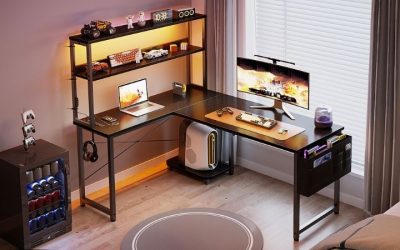
The best gaming monitor arms for corners must solve a geometry problem before they solve a screen-height problem. A desk placed tightly against two walls can prevent an articulated arm from folding backward, while a clamp may not fit past a rear apron or cable tray. For most standard-size screens on a compatible sturdy desk, the Ergotron LX 45-241-224 is the premium all-around choice because its documented weight range, folding design and mounting options are clear. A much less expensive VIVO STAND-V001 can work when you rarely move the display; for a heavy ultrawide, look instead at a properly matched VIVO STAND-V101G1. This guide compares seven actual arms and explains what to measure before buying.
Quick verdict: which arm fits the corner, not just the monitor?
Best premium all-around: Ergotron LX 45-241-224. The black 2-piece-clamp/grommet model supports manufacturer-rated 7–25 pounds and displays up to 34 inches. Its folding construction can reclaim surface space, but folding still needs free room behind or beside the mounting point. The direct maker listing showed $219.00 and In Stock. Do not buy it for a display below its minimum supported weight.
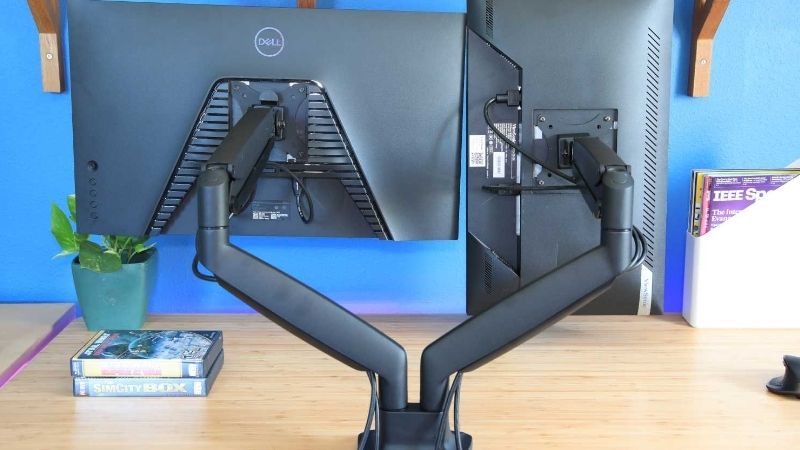
Best affordable static-height choice: VIVO STAND-V001. At a direct-listed $34.99 and up to 22-pound support rating, it offers articulating position changes at a much lower price. Its traditional pole design does not provide the same touch-to-raise gas-spring movement as a premium dynamic arm. This is a sensible budget option when you set a screen once and only occasionally turn it.
Best budget dynamic adjustment: VIVO STAND-V001K. The maker lists 2.2–19.8-pound compatibility, up to 20.5-inch extension and 11.5-inch spring-assisted height travel. The checked black listing displayed $39.99 and In Stock. It has more flexible positioning than the basic pole mount but still needs rear swing clearance and the proper display weight.
Best heavy ultrawide option: VIVO STAND-V101G1. Manufacturer-listed support is 2.2–33 pounds, with curved ultrawides up to 49 inches and a 23-inch arm extension. The manufacturer advertises a flush-wall arrangement, which is relevant to corners, but that does not guarantee clearance against both walls or a tall desk shelf.
Alternatives for different constraints: Mount-It MI-1771 suits a standard screen requiring a long 24-inch reach; Mount-It MI-2751 is a simpler pole-mounted budget solution; HUANUO HNCM9 uses an unusually tall pole for vertical adjustment but is not the best choice when a wall limits lateral movement. All require VESA, weight, clamp and desk-material verification.
Comparison table: seven corner-desk monitor arms
Prices and stock descriptions are seller-page observations from October 29, 2026, not guaranteed checkout totals. Weight ranges are vendor ratings, not measurements made by Geek Gaming Tricks. The screen-size statements do not override weight, VESA, curvature, pivot clearance or desktop construction. A listed corner-desk use case is editorial analysis rather than a manufacturer certification for every room geometry.
| Exact arm / SKU | Verified fit and useful motion | Best corner setup | U.S. price and seller checked | Availability | Main limitation |
|---|---|---|---|---|---|
| Ergotron LX matte black 45-241-224 | Up to 34-in.; 7–25 lb; 13-in. lift; 75×75/100×100 VESA | Premium standard-screen articulating arm | $219.00, Ergotron direct | In Stock and Add to Cart | 7-lb minimum; desk clamp 0.4–2.4 in. |
| VIVO STAND-V001, black | Standard 13–32-in. or eligible ultrawide to 38-in.; up to 22 lb; VESA 75/100 | Low-cost single-display position | $34.99, VIVO direct | In stock, ready to ship | Pole adjustment less fluid than gas spring |
| VIVO STAND-V001K, black | 17–32-in.; 2.2–19.8 lb; 20.5-in. extension; 11.5-in. spring travel | Budget adjustable single gaming monitor | $39.99, VIVO direct | In stock, ready to ship | Rear movement can hit wall |
| VIVO STAND-V101G1, black | Standard to 32-in., ultrawide to 49-in.; 2.2–33 lb; 23-in. reach | Curved ultrawide in wall-adjacent corner | $99.99, VIVO direct | In stock, ready to ship | Large display needs more physical clearance |
| Mount-It MI-1771, silver | 13–32-in.; up to 20 lb; 24-in. reach; 13-in. height adjustment | Screen positioned diagonally across desk corner | $99.99, Mount-It direct | Add to cart; brand category says in stock | Heavy monitors near tilt limit need care |
| Mount-It MI-2751 | 17–32-in.; up to 19.8 lb; VESA 75/100; 16-in. pole | Budget occasional repositioning | $37.99, Mount-It category | Maker category says in stock | Less convenient frequent height changes |
| HUANUO HNCM9 | 13–32-in. or up to 35-in. ultrawide; up to 22 lb; tall pole | Very high display placement when verified needed | $45.99, HUANUO direct | Add to cart on brand collection; checkout unverified | Tall pole may conflict with shelves and wall cabinets |
Detailed reviews of the best gaming monitor arms for corners
Ergotron LX 45-241-224 — premium choice for a standard gaming display
Ergotron’s LX is a particularly well-documented monitor arm, which matters more in a corner than another generic claim of full motion. The black 45-241-224 kit includes a two-piece desk clamp and a grommet mount, with a quoted 7-to-25-pound display range and screen compatibility up to 34 inches. Ergotron lists approximately 13 inches of lift, 360 degrees of pan and rotation, and a tilt range concentrated toward backward motion. The mount accepts the common 75-by-75 and 100-by-100 mm VESA patterns. A 10-year warranty and an official 10,000-cycle test claim are manufacturer statements, not endurance tests we repeated.
Its primary advantage for a corner is that the arm can fold back over the base, allowing the display to move closer to the mounting point rather than consuming a large fixed stand footprint. But fold-back ability is not the same as zero rear clearance. If a corner desk is flush against both walls, the elbow can strike a wall before the display reaches a desirable eye distance. You may need to place the clamp several inches inward from the corner, which changes the available lateral room. Make a cardboard or tape mockup of the display width and anticipated arm path before ordering.
The weight minimum deserves real attention. A lightweight gaming monitor below seven pounds without its stand can be outside the intended counterbalance range, even if the screen fits the size claim. Ergotron also notes reduced movement range for some monitors over twenty pounds or with unusually deep bodies. Its clamp requires a desk edge roughly 0.4 to 2.4 inches thick; that range does not certify composite desktop strength. Buy it if: your exact screen and substantial desk meet the published limits. Skip if: the price outweighs benefits or the rear space is completely blocked.
VIVO STAND-V001 — economical pole-mounted single-monitor arm
VIVO’s STAND-V001 is a more conventional way to clear a display’s factory stand from a compact desk. The direct U.S. product page lists $34.99, in-stock availability and a three-year warranty. It accepts 75-by-75 and 100-by-100 VESA mounts and is advertised for most standard 13-to-32-inch screens and compatible ultrawides up to 38 inches, with a weight rating up to 22 pounds. The key distinction from VIVO’s similarly named mechanical-spring V001K is the adjustment system: the basic model is aimed more at manual positioning along a pole than frequent one-handed height changes.
For a gaming desk tucked into a corner, the simplicity can actually help. A straight support pole behind the monitor often takes less elaborate counterbalance calibration than a spring arm, and the user may not need to change position once the seated eye level is set. You can free room under the display for a keyboard when not playing, although the clamp and pole still require room at the desk edge. The arm sections must not collide with a wall during tilt and swivel. Do not assume it will place a screen fully flush against the corner.
VIVO’s maximum desk-thickness statement is up to 3.25 inches for the product variant examined, but thickness is only one compatibility dimension. A decorative rear apron or blocked underside may prevent the clamp from reaching the tabletop. Buy it if: you want a known low-cost mounting kit and rarely alter screen height. Skip if: you repeatedly switch between sitting and standing or want the display to float up and down without loosening any fasteners.
VIVO STAND-V001K — best budget spring-assisted reach
The STAND-V001K is not just a new color of the STAND-V001. VIVO describes a mechanical spring single arm suitable for 17-to-32-inch displays weighing 2.2 to 19.8 pounds, with a maximum 20.5-inch reach, an 11.5-inch height adjustment range and a maximum screen-center height around 21.5 inches. It supports 75-by-75 or 100-by-100 VESA and a desktop thickness up to three inches. The brand’s black-variant page showed $39.99 and In stock, ready to ship during the research check.
The extra reach matters when the monitor needs to sit diagonally relative to a corner desk instead of straight over the clamp. Mounting behind the left portion of the desk, for example, can allow the screen to move toward the center of the seated position while preserving open space for a keyboard or a microphone base. Yet a longer arm also sweeps a larger path behind the screen. If the wall blocks the elbow, you may achieve less useful reach than the advertised maximum. The upper display weight limit also leaves less room than a premium heavy-display model.
Spring arms require adjustment to the monitor’s installed weight. If the screen rises or sinks on its own, follow VIVO’s official tension instructions with the display secured rather than improvising extra counterweights. The price is attractive, but buyers should not infer a lifetime spring-performance claim from the product description. Buy it if: you want occasional height and distance changes on a moderate-weight gaming monitor. Skip if: your display exceeds the weight range or the desk edge has no clear clamp space.
VIVO STAND-V101G1 — stronger support for a curved ultrawide corner
Large gaming ultrawides are where a cheap arm can turn into a poor investment. The VIVO STAND-V101G1 is published for regular monitors up to 32 inches and eligible ultrawides up to 49 inches, including curved and 1000R screens, within a quoted 2.2-to-33-pound installed-display range. It provides approximately 23 inches of reach, a reported 10.5-to-23.5-inch screen-center height span, and both clamp and grommet installation choices. Its direct U.S. page showed $99.99 and In stock, ready to ship for the black variant.
This model has a useful manufacturer claim for wall-adjacent gaming desks: VIVO describes a flush-wall arrangement that does not require the arm to extend beyond the desktop edge in its intended configuration. That is a promising design attribute, not a universal promise for a particular 49-inch monitor in a cramped two-wall corner. The screen itself may be too wide to rotate, and a curved display protrudes differently from a flat 27-inch panel. Compare full monitor dimensions, back-panel curvature and cable exits, not just the diagonal size printed on the box.
The published clamp range is 0.4–3.3 inches, and the grommet range is 0.4–1.9 inches, depending on mounting method. The wider support rating still does not authorize clamping it to thin honeycomb furniture. A large screen exerts substantial leverage when pulled forward. Buy it if: your actual ultrawide is within the specified weight and VESA range and you have tested the desk geometry. Skip if: an ordinary 24–27-inch monitor needs only a simple budget mount.
Mount-It MI-1771 — longest listed reach for diagonal positioning
Mount-It’s MI-1771 offers an explicitly published 24-inch maximum extension, a 13-inch height adjustment span and support for 13-to-32-inch screens weighing up to 20 pounds. It accepts 75-by-75 and 100-by-100 VESA and can use a C-clamp or grommet arrangement on a compatible desktop up to 3.3 inches thick. The brand’s U.S. listing showed $99.99 with an Add to cart button; its monitor-arm category listed the model as in stock. That is useful retailer evidence, although it is not a completed order.
The 24-inch reach gives flexibility when a deep corner desk forces the clamp off to one side. You may be able to center the gaming display in front of the chair even if the mount is attached to a side segment instead of the rear edge. But extension is not a free benefit: the further the display sits from the base, the more leverage is applied to the desk. A thin top can become the weak point even if the monitor weighs less than the arm’s rated capacity. Check both the mount’s instructions and the desktop’s clamp suitability.
The maker’s own customer review section includes a user comment about difficulty keeping a heavier monitor at a desired tilt angle. That is a single reported experience, not a statistically established defect. It does suggest examining tilt adjustment closely if your panel approaches the twenty-pound limit. Buy it if: a standard-size monitor needs an unusually long diagonal reach. Skip if: the desk edge is weak or the display’s mass places it near the limit with little room to adjust.
Mount-It MI-2751 — budget full-motion arm for occasional repositioning
Mount-It MI-2751 is a simpler metal pole-arm solution, rather than the gas-spring design used by MI-1771. The manufacturer lists support for 17-to-32-inch displays up to approximately 19.8 pounds, common VESA 75-by-75 and 100-by-100 patterns, and a 16-inch mounting pole. It allows tilt, swivel and rotation with height adjustment along the pole. The direct brand category displayed $37.99 and an in-stock status at the time of research, although the precise checkout cost could vary with shipping or promotions.
In a corner where the display will mostly stay fixed, this design is a cost-effective way to clear desk space. A conventional clamp under a rear edge can move the monitor base off the top and permit a keyboard to slide beneath it between sessions. The drawback is that height changes are less fluid than a calibrated gas spring. If a user often alternates between a low seated gaming position and a standing workstation, repeated manual readjustment could become frustrating.
The wide articulation range is useful for rotating a second-screen display toward a seated corner, but neither the listed pole height nor screen-size range means it can clear a wall-mounted cabinet. Measure the complete arm envelope and avoid placing cables where they will snag against the wall. Buy it if: your monitor is comfortably within the 19.8-pound rating and affordability outranks continuous movement. Skip if: a very heavy or tall ultrawide needs an arm designed for that weight and geometry.
HUANUO HNCM9 — height-focused alternative with a long pole
HUANUO’s HNCM9 stands out for its tall central pole. The manufacturer markets it for 13-to-32-inch standard displays and eligible ultrawides up to 35 inches with a 22-pound weight limit, using 75-by-75 and 100-by-100 VESA mounts. The maker describes an approximately 39-inch pole and two attachment methods: C-clamp for compatible desks up to 3.93 inches thick, or grommet mounting up to 2.75 inches thick. The company displayed $45.99 and an Add to cart option in its U.S. collection, but exact checkout delivery was not verified.
A tall pole solves a different problem from an extra-long articulated elbow. It can place a monitor higher to clear an unusually tall laptop below or to align with a raised gaming seat, provided the user still maintains sensible viewing posture. However, extreme height is often wasted in a bedroom corner with a shelf or cabinet directly overhead. A large vertical structure can collide with wall furniture even when the monitor weight is supported safely. It is not automatically the best answer for a low ceiling or small loft bed.
The HNCM9 can be useful if the user specifically needs vertical placement that a standard short pole cannot provide. For a conventional seated 27-inch monitor, a lower profile arm can be simpler and less intrusive. Buy it if: the elevated pole range addresses a measured need and the desk permits the clamp. Skip if: your priority is wall-flush articulation or frequent spring-assisted horizontal movement rather than monitor height.
How we selected these corner-desk monitor arms
We required identifiable model numbers, published VESA and weight support, a usable mounting method, and enough technical detail to discuss real desk-corner geometry. We then compared reach, height movement, rear clearance, clamp thickness, seller availability and price. A corner setup requires at least three independent checks: the monitor must fit the arm, the arm must fit the desk, and the full movement envelope must fit the walls. Passing only one of these is not sufficient.
All performance figures are manufacturer ratings. We did not install, endurance-test, strain-gauge or measure arm wobble on these models. Ergotron and several manufacturers publish their own cycle or warranty claims; those do not constitute independent comparative tests. No affiliate retailer listing is used as proof of universal stability on furniture with hollow-core tops.
Buying guide: measure the entire arm swing in a corner
Measure both wall clearances behind the desk
Draw the desk from above and mark the two walls. If the desk touches both, an arm elbow may not move behind the top even when the manufacturer advertises a wide swivel angle. The important figure is not maximum reach alone but the path between the retracted and extended positions. Imagine the monitor centered in front of the seat, then trace where each arm joint and the screen edges would go. You may need to move the clamp inward, pull the desk slightly away from the wall, or select a design intended to keep movement over the desktop.
Confirm monitor weight without the original stand
Arm ratings normally concern the monitor as installed on the VESA plate, not the combined shipping-box weight or the monitor with its original desk stand. Use the maker’s actual panel weight without the stand if provided. A gas-spring system can have a minimum supported weight as well as a maximum; Ergotron LX begins at seven pounds while VIVO STAND-V001K lists a lower minimum. A very light monitor on a stiff arm may rise unexpectedly, and an overly heavy monitor may sag or fall. Compare actual numbers with the selected SKU, not a related color or series.
Verify VESA and any adapter before ordering
Most of these products support VESA 75-by-75 and 100-by-100 mm mounting-hole patterns. Some gaming displays use recessed mounts, unusual screw lengths or proprietary stand connections. Check the monitor’s manual for the hole pattern, required screw length, optional spacers and whether the manufacturer sells a VESA adapter. Do not jam longer screws into a display or stack improvised hardware because the arm’s plate appears close enough. An incompatible adapter is a stop sign, not an invitation to drill the monitor housing.
Check desk material, clamp opening and under-edge obstructions
A desk that is 1 inch thick may still be unsuitable for a heavy monitor arm if it is made from hollow-core composite with weak local compression resistance. The clamp applies concentrated pressure near an edge and a forward-extended screen adds leverage. Check the desk manufacturer’s mounting guidance and the arm’s exact clamp-thickness range. A rear apron, privacy panel or cable tray can block the clamp even when the thickness seems correct. A reinforcing plate may distribute some pressure but cannot turn an unsupported tabletop into a manufacturer-approved mount.
Distinguish static pole height from spring-assisted movement
Pole-mounted arms are frequently affordable and useful for setting a fixed display position. They are less convenient when changing height repeatedly. Spring-assisted arms can be easier to move but require correct weight balancing and have their own rear movement path. Choose for your behavior: a gaming-only desk where the monitor stays centered may not justify a premium arm, while a sit-stand desk or multi-user station can benefit from frequent adjustment. The ability to rotate a screen in portrait is not automatically useful if a corner wall blocks the rotation.
Protect cables and wall finishes through the full range
A long display cable that works with the monitor fully retracted may become taut when the arm reaches forward. Route power, HDMI or DisplayPort cables with slack at the joints and observe minimum bend radius guidance, especially for thick high-bandwidth cables. Do not pinch a power lead between the wall and arm. Before moving a heavy screen, confirm any cable-management clips are closed without crushing cords. Test the arm’s travel slowly and put soft protection where incidental contact could damage the wall, but never rely on padding to conceal an unsafe mounting geometry.
Match eye position rather than chasing maximum height
OSHA’s workstation guidance recommends positioning a monitor at or slightly below eye level, with a comfortable downward viewing angle. Extremely tall poles are not automatically more ergonomic. Sit in the posture you actually use for gaming, set the chair and foot support, then determine where the screen center should be. Keep the keyboard and mouse close enough to avoid prolonged reaching. A correctly placed arm should support that layout rather than force you to sit sideways because the screen cannot clear the corner.
Order only after checking the exact U.S. seller variant
A monitor arm family can contain materially different products with similar names. Ergotron LX black 45-241-224 is not necessarily identical in included mounting hardware to a white variant; VIVO STAND-V001K is a different mechanism from STAND-V001. Check the full seller SKU, included clamps and grommet hardware, warranty, return costs and ZIP-specific delivery. Our prices are observations from U.S. manufacturer pages, not a promise that a specific offer will still exist when you check out.
Safe installation workflow for a corner gaming station
- Read the exact instructions. Check monitor without-stand weight, VESA standard, desktop material and thickness, and any prohibited mounting surfaces. If the desk’s manufacturer does not approve the clamp, choose a different support.
- Clear the surface and power down the monitor. Remove heavy objects near the mounting edge. Disconnect cables and arrange the screen on a protected soft surface following the monitor’s manual.
- Attach the base securely. Install the clamp or grommet exactly as specified. Do not overtighten into particleboard or attempt to improvise wall anchors for a desk-mount product.
- Fix the VESA plate using correct fasteners. Use the supplied screws or the monitor maker’s specified compatible hardware. Have another person help support a large curved panel.
- Balance the arm with the screen held. Adjust spring tension according to the brand manual. Stop if the monitor rises, drops or drifts beyond safe control.
- Test movement slowly. Check both walls, shelves, desk edges, cables and any PC equipment during retraction, extension, tilt and rotation. Leave slack and keep the display from striking the wall.
- Recheck after use. Inspect clamp seating and fasteners according to manufacturer instructions, especially after repositioning the desk. Stop using the mount if the tabletop deforms or the arm loosens.
Common corner-monitor-arm buying mistakes
Buying for diagonal size alone: weight and VESA often matter more. Ignoring the wall behind an articulating elbow: a 24-inch extension is meaningless if the arm cannot fold. Assuming a monitor arm fixes an undersized desk: the screen needs a safe viewing distance and room for input devices. Using a cheap hollow-core top as a structural mount: a small display can exert concentrated force during movement. Confusing similar SKUs: factory colors and installation kits can change what’s included.
Frequently asked questions
Can any gaming monitor arm be mounted in the corner of a desk?
No. The clamp must reach an approved surface, and the arm needs a movement envelope that clears both walls and nearby shelves. Some desks have no appropriate exposed edge or grommet hole. A product labeled full motion is not automatically compatible with a tight two-wall corner.
Is a longer monitor arm always better for corner gaming?
No. Extra reach helps when the mounting point must be offset from the user, but it increases leverage on the desktop and may require more joint space behind the screen. Measure the intended final screen position and the route of the elbow before choosing reach.
Can an Ergotron LX hold any 34-inch gaming monitor?
No. The exact 45-241-224 has a specified 7–25-pound range, VESA patterns and additional depth considerations. A 34-inch display can fail the weight, mounting or geometry checks even when it meets the diagonal size claim. Confirm the monitor’s without-stand weight.
Do I need a grommet mount for a corner desk?
Not necessarily. A C-clamp may be sufficient when the desk has a suitable edge, adequate structural strength and free underside access. A grommet is useful where a compatible hole and approved tabletop structure exist. Do not drill a composite desk without checking its construction and the manufacturer’s guidance.
What if my desk touches both walls?
Make a top-down mockup of the arm positions. A flush-wall design might help, or you may need to shift the mounting point inward or move the desk slightly forward. If the full range cannot clear the walls safely, use the monitor’s existing stand or change the desk layout rather than forcing joints into contact.
Does a monitor arm improve FPS or refresh rate?
No. An arm is a mechanical positioning device. It does not raise graphics frame rate, reduce network ping, or unlock a higher monitor refresh rate. Its potential gaming benefit is a clearer and more comfortable screen position and reclaimed work surface.
Can I mount a 49-inch ultrawide on a cheap narrow desk?
Only when both the arm and the desk are explicitly compatible with the display’s installed weight, curvature, VESA mount and applied loads. A monitor arm’s 33-pound rating does not automatically certify a lightweight honeycomb desktop. If in doubt, use a suitably rated freestanding desk or obtain the manufacturers’ approval.
Final thoughts
Choose the Ergotron LX 45-241-224 for a compatible standard-size gaming monitor when documented support, folding geometry and warranty justify the premium. The VIVO STAND-V001K is a strong budget comparison for frequent height changes, while the STAND-V001 is enough for a largely fixed setup. For a legitimately heavy curved display, investigate VIVO STAND-V101G1 first and verify both screen and desk limits. Before buying any arm for a corner, measure wall clearance and desk strength as carefully as you measure monitor weight: the most expensive mount is still wrong if its elbow cannot move.