Finding the best anti fatigue mats for standing gamers is about matching foot support to the way you actually play, not simply finding the thickest foam. A standing-desk player who shifts weight during an RPG benefits from a different surface than someone who keeps a precisely planted stance in a competitive shooter. For most adjustable-desk setups, the Ergodriven Topo is the most interesting movement-oriented choice; UPLIFT’s flat mat is a more straightforward option when you want room to reposition without raised terrain. This roundup compares seven real products, flags uncertain U.S. availability, and explains when a mat helps—and when sitting, walking, or changing desk height matters more.
Quick verdict: which mat fits your gaming session?
Best for varied standing positions: Ergodriven Topo Original. Its raised terrain is built for subtle foot changes, stretches, and stance variation. Choose it when you consciously want a more active platform under an adjustable desk; it is a poor match for anyone who wants a completely flat, predictable surface or must roll a chair over the mat.
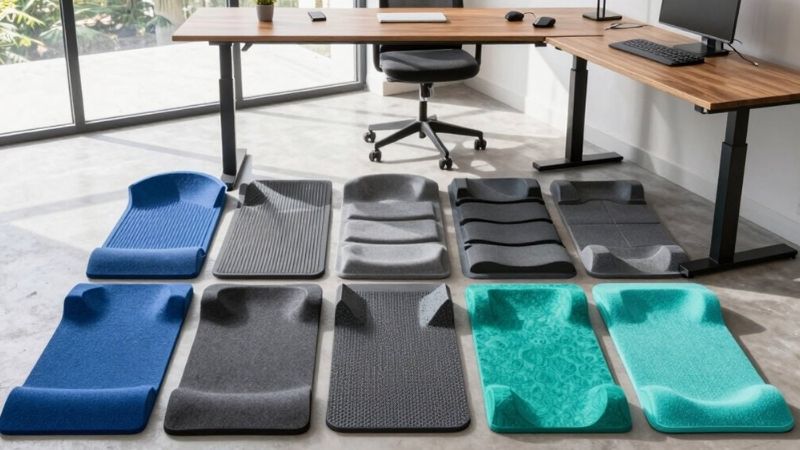
Best conventional flat option: UPLIFT Standing Desk Mat. The 32-by-20-inch, three-quarter-inch polyurethane mat has a simpler footprint and beveled edge. This is the sensible starting point for players who move frequently between chair and standing use and do not want contour features dictating foot position.
Best value among directly listed desk mats: UPLIFT Standing Desk Mat with Heel Grab. Its 30-by-18-inch footprint and built-in heel recess are designed for moving the mat aside with a foot. The currently advertised discount deserves a checkout check; treat it as a sale observation, not a permanent price.
Best broad flat standing surface: WellnessMats Original 3-by-2-foot. A one-piece polyurethane surface and 36-by-24-inch size offer more lateral foot room than narrower models. Its website simultaneously displays a sale price, shipping guidance, and an unavailable state on some page elements, so buy only after confirming your exact color and U.S. address.
Other credible choices: ComfiLife’s three-quarter-inch flat floor mat is versatile for shared kitchen/desk use; GelPro NewLife Professional Grade Black targets durability; Gorilla Grip’s standing comfort mat provides a range of lengths but carries an explicit manufacturer warning that it is not slip-resistant. That warning makes floor conditions especially important.
Side-by-side comparison: size, support, price, and stock
These are manufacturer-reported specifications and U.S. storefront observations checked October 29, 2026. A listed Add to Cart button does not verify delivery to every ZIP code. Exact variant selection can change price and availability, so rows marked unclear are not counted as confirmed in-stock orders.
| Model / intended role | Published specification | Price observed, seller, Oct. 29 | U.S. stock / purchase status | Main limitation |
|---|---|---|---|---|
| Ergodriven Topo Original — varied stance | 29 × 26.25 in; raised terrain; 0.85-in flat zone | $119; Ergodriven direct, Original selection | Add to Cart shown; contradictory page stock text | Bulkier raised terrain; premium price |
| UPLIFT Standing Desk Mat MAT016 — flat daily mat | 32 × 20 × 0.75 in; polyurethane | $69 starting; UPLIFT direct | Orderable listing; delivery not confirmed | No molded foot-position features |
| UPLIFT Mat with Heel Grab MAT145 — quick stowage | 30 × 18 × 0.75 in; rubberized gel foam | $29 starting promotional; UPLIFT direct | Orderable listing; sale/variant verification needed | Smaller standing area |
| WellnessMats Original 3 × 2 ft Black — large surface | 36 × 24 × 0.75 in; one-piece polyurethane | $125.60 sale; WellnessMats direct | Unclear: Add to Cart and Unavailable both visible | Heavy and expensive; stock contradiction |
| ComfiLife Anti-Fatigue Floor Mat — flat multipurpose | 20 × 32, 20 × 39, or 24 × 70 in; 0.75 in | $57.99–$99.95 range; ComfiLife direct | Add to Cart; exact size/color stock not verified | Range is not one selected-SKU price |
| GelPro NewLife Professional Grade Black — durable support | 0.75-in molded Bio-Foam; 20 × 32 in option | From $99.95; GelPro direct | Choose Options; precise 20 × 32 stock unclear | Higher price and production lead time |
| Gorilla Grip Standing Comfort Mat — size flexibility | 20 × 32 × 0.75 in among many sizes | Price not verified | U.S. orderability unclear | Maker warns mat is not slip-resistant |
Seven standing mats explained for gaming use
Ergodriven Topo Original — best for players who constantly shift position
Topo’s terrain is the opposite of a basic rectangular kitchen pad. Its raised front, rear, and side contours offer places to rest or stretch parts of the foot rather than forcing both feet to stay on one horizontal surface. Ergodriven publishes a 29-inch width, 26.25-inch front-to-back depth, 2.7-inch maximum height at the highest contour, and a 0.85-inch-thick neutral zone. Those dimensions matter under a standing gaming desk: the mat takes up more depth than a small flat cushion, and the peaks create a surface that will not accommodate a rolling office chair smoothly.
For slower-paced gaming, streaming control, or working between matches, the different edges may make it easier to vary stance without leaving the desk. That is an intended-use inference, not a claim that Geek Gaming Tricks measured lower fatigue or improved performance. In a tight-footwork activity such as rhythm gaming, a molded ridge can instead be an obstacle. Likewise, the mat cannot correct a desk that leaves your wrists too high or a monitor that makes your neck crane forward. Use it with a properly adjusted work surface and switch posture whenever discomfort builds.
The direct product page displayed $119 for the Original selection, a 90-day satisfaction offer, and a 16-year warranty in its principal feature panel, although a lower site section contained differing warranty wording. Because stock-related text also conflicted within the page, we classify the offer as orderable page, checkout unconfirmed, rather than guaranteed stock. Pros: foot-position variety, disclosed dimensions, simple cleaning. Cons: expensive, bulky, and inappropriate when a perfectly flat stance is essential. Choose Topo if deliberate movement is the point of your standing setup; otherwise buy a simpler mat.
UPLIFT Standing Desk Mat MAT016 — best uncomplicated flat mat
The UPLIFT Standing Desk Mat makes a different promise: a broadly usable, ordinary flat area where you decide how to stand. UPLIFT specifies a 32-by-20-inch footprint and a 0.75-inch high-density polyurethane foam core with beveled sides. At that size, it suits an ordinary sit-stand gaming desk while leaving more floor around the edges than a very large kitchen-runner mat. Its faux-leather-style top is easy to wipe down, a practical detail when shoes, drinks, and desk hardware occupy the same room.
The principal advantage is predictable positioning. A keyboard player can place feet beneath the hips, step laterally a little, or change which leg bears more weight without locating a sculpted ramp. On the other hand, a flat pad does not cue varied ankle angles as the Topo design intends. Neither approach is automatically healthier for every user; your tolerance, shoes, room layout, and session length matter. A desk mat is a comfort accessory, not a substitute for regular breaks or medical treatment.
UPLIFT’s U.S. accessories listing showed the mat starting at $69 with an Add to Cart product page. The finish is less important than correctly sizing the usable floor zone and checking the underside against your floor material. Pros: simple geometry, substantial foot area, easy to pair with many desk designs. Cons: no special stance terrain and a footprint that may need lifting aside when sitting. This is the sensible default if you dislike complex ergonomic gimmicks and want comfort that does not interfere with controller or keyboard movement.
UPLIFT Standing Desk Mat with Heel Grab MAT145 — best for quick sit/stand changes
The distinctive feature of MAT145 is not extra thickness but the recessed heel-grab edge. UPLIFT describes a 30-by-18-inch, three-quarter-inch-thick rubberized gel-foam mat that can be pulled or nudged out of the way with a foot. Anyone gaming at a motorized desk knows the nuisance: the desk moves down, the chair rolls in, and an anti-fatigue mat must be relocated first. A heel recess can make that conversion less of a two-handed interruption, provided the mat can slide safely on your particular flooring.
Its 18-inch depth is relatively compact. That is convenient under a shallow desk or among pedal hardware, but it offers less front-to-back room to vary stance than the Topo or the 36-by-24-inch WellnessMat. The product’s textured finish and beveled perimeter aim to improve grip and reduce edge-catching, yet the user’s floor can overturn the theoretical advantage. Test it dry, without a chair load, and make sure the mat does not unexpectedly travel when you step onto it. Never assume a manufacturer slip-resistance statement guarantees a safe result on every surface.
The UPLIFT product category page advertised the Heel Grab mat from $29, compared with a $69 regular reference, during the current promotional period. That is a seller-listed starting price, not a promise that every option or delivery address receives the same deal. Pros: compact, foot-operated repositioning concept, low promotional entry price. Cons: less stance space, discount can change, and sliding behavior needs checking. Choose it if rapid chair-to-standing transitions are more important than maximum cushioning area.
WellnessMats Original 3-by-2-foot Black — best expansive one-piece surface
WellnessMats’ Original is aimed at the buyer who would rather stand on one wide, conventional cushion than work around raised features. The selected black 3-by-2-foot item is a 36-by-24-by-0.75-inch polyurethane mat, weighing 7.6 pounds according to the manufacturer’s specification. A one-piece body avoids a glued-on second cushioning layer, while its sloped edges are designed to lower the chance of catching a shoe on the perimeter. The larger width can be valuable if you frequently shift side to side at a wide desk or move between keyboard and controller play.
That comfort-oriented design is also the limitation. This is a substantial floor accessory: you need space to store it when a chair rolls in, and the larger rectangle might intersect a wheel base, foot pedals, or a desk leg. A wide mat can solve a narrow stance problem, but it cannot make a desk surface larger, ensure good monitor height, or help if standing itself is uncomfortable. A heavy mat with smooth edges still needs a dry, compatible floor; do not place it across a transition between a rug and hard floor without evaluating edge stability.
The black model’s official listing showed $125.60 as a sale price from $157, plus shipping language and an Add to Cart button. Other page elements called the selection unavailable. Accordingly, stock is unclear, and we do not present it as a ready-to-ship pick. Pros: roomy, documented size, one-piece polyurethane construction. Cons: cost, substantial footprint, ambiguous live stock. Consider it when lateral standing room and simple cushioning justify more floor space, but confirm actual purchase availability before treating it as a finalist.
ComfiLife Anti-Fatigue Floor Mat — best shared office and kitchen option
ComfiLife sells a traditional three-quarter-inch floor mat in 20-by-32-, 20-by-39-, and 24-by-70-inch configurations. The 20-by-32-inch size is the logical starting point beneath a conventional gaming standing desk; longer options make more sense if the same mat also serves a workbench, kitchen counter, or an unusually wide station. The company specifies a stain-resistant surface and an underside designed to resist movement, although actual stability depends on the surface underneath. The rectangular format is easier to understand than complex terrain, especially if you stand in shoes rather than socks.
For gamers, the trade-off is between size and removability. The 20-by-32-inch variant leaves room for a narrow chair path, while the 24-by-70-inch runner could block rolling-chair access across much of a desk. A bigger mat will not improve gameplay by itself, and premium foam does not guarantee that every person will prefer the same firmness. ComfiLife’s strength is straightforward cushioning for users who prefer familiar surfaces. It is also an option when desk use alternates with household chores; the same product should still be kept clean and dry before moving between rooms.
The U.S. direct listing showed a $57.99–$99.95 range across sizes and colors, with a purchase control. No one exact size-and-color combination was fully selected and checked at checkout, so an exact model price and inventory remain unverified. Pros: size choice, flat design, wipe-clean practicality. Cons: variant-dependent pricing and no established superiority over the lower-priced UPLIFT during this check. Match the 20-by-32-inch version to your real floor rectangle rather than paying extra for length you cannot use.
GelPro NewLife Professional Grade Black — best heavy-use candidate
GelPro’s NewLife Professional Grade Black is a more worksite-oriented alternative. Its published construction is molded, three-quarter-inch Bio-Foam, with a 20-by-32-inch size offered alongside larger dimensions. The manufacturer emphasizes resilience, a beveled perimeter, and a surface made for frequent use; these are manufacturer claims, not comparative fatigue measurements made for this article. The material may appeal to a player who also uses the same standing station for long editing, coding, or workshop sessions, where repeated traffic can be more relevant than decorative finish.
The key buying distinction is that NewLife is a traditional flat mat rather than a movement platform. It can provide cushioning under a stable desk, but it does not encourage particular ankle stretches or correct poor posture. Its molded thickness is not evidence that it is softer or more protective than a differently constructed mat; perceived support is personal. If you mostly game seated and stand for only occasional breaks, a less expensive mat or no mat may be the more reasonable spending decision.
GelPro showed a starting price of $99.95 for the black Professional Grade line and a Choose Options path. The product page notes production and packaging time before shipping, but this research pass could not confirm inventory and exact price for the 20-by-32-inch selection through a completed checkout. Pros: durable-use focus, clearly published foam architecture, U.S. manufacturing statement. Cons: higher starting cost and production/stock uncertainty. Buy only when a specific size, lead time, and return policy are confirmed against your schedule.
Gorilla Grip Standing Comfort Mat — best broad size menu with a warning
Gorilla Grip’s Standing Comfort Mat is available in many dimensions, including a 20-by-32-inch, three-quarter-inch-thick option and longer runners. That makes it useful to compare when your room has an odd layout or you want a matching mat for another workstation. The manufacturer’s published care guidance favors indoor use and wiping or vacuuming the surface, and its product specifications identify dimensions and weights for multiple size combinations. Do not confuse a long kitchen runner with a compact standing-desk mat simply because both share the same material category.
There is a particularly important safety issue: Gorilla Grip’s own product page says the mat is not slip-resistant and instructs buyers to clean up water on or beneath it, stop using it if the edges curl, and avoid unsupported floor conditions. That is more important than generic marketing about comfortable standing. We therefore would not select this mat by default for a gaming space with spills, active footwork, smooth flooring, or a narrow traffic aisle. An indoor room is not automatically a dry, hazard-free environment.
No reliable variant-specific U.S. direct price or shipping availability was established in this check, so both remain unverified. Pros: many available footprint choices, straightforward flat geometry, clear care warnings. Cons: explicit slip warning and uncertain purchase details. It belongs in the comparison for dimension planning, but a gamer who prioritizes floor grip should consider models with clearer verified suitability and still test the floor-and-mat combination before use.
How to choose a standing mat for a gaming desk
Decide whether you want flat support or guided movement
The first decision is the surface shape. A flat mat gives your feet an uninterrupted platform, which is helpful when you regularly shuffle between mouse, keyboard, controller, and microphone controls. A contoured mat like Topo provides ramps and ridges that can invite foot movement during slower activities. Neither model is objectively better for every style of play. During fast first-person shooters, repeatable footing may matter more than varied standing positions; during building games or long streams, the opportunity to change foot angle might be welcome. Remember that a textured mat is not a balance trainer and should never be treated as one if your stability is impaired.
Ask yourself whether your feet stay in one place for five minutes at a time or whether you naturally walk away between matches. Someone who already takes frequent breaks may benefit less from a premium sculpted design than someone who tends to stand motionless. Also check whether your shoes have thick cushioning, because a mat’s feel is different in socks, thin indoor shoes, and heavy sneakers. Product ratings based on materials do not settle personal comfort or a medically relevant issue.
Measure the entire floor zone, not just the mat’s width
Measure from the front desk feet to the clear space behind your standing position, and mark where the chair casters roll when seated. A mat that fits between the legs of a desk can still block the chair’s normal path. Include the maximum desk lowering position, the front edge of any footrest or pedal set, and the space needed to slide the mat aside. A 30-by-18-inch mat may suit a shallow station; 32 by 20 inches is a practical general reference; 36 by 24 inches demands a larger storage plan. A 29-by-26.25-inch contoured mat has a different obstacle footprint than a rectangle despite comparable area.
On carpet, look for possible tipping at mat edges and whether a thick pile makes a pad shift. On hardwood or laminate, do not assume that a gripping texture is compatible with the floor finish—manufacturer floor-care instructions take precedence. Never tape a mat down with adhesive that can damage a surface. If you share the room, verify that the mat does not create a trip point when someone walks behind your chair.
Think about fatigue, ergonomics, and realistic session length
Cushioning is only one part of standing comfort. Appropriate desk height keeps shoulders relaxed and elbows comfortably positioned, while a screen at a suitable viewing distance reduces the need to lean forward. A mat cannot compensate for a very high keyboard, a screen that is too low, or staying motionless for hours. Standing continuously is not a goal in itself. Alternate positions, stretch, and walk periodically, especially when a long game tempts you to ignore discomfort.
Do not treat claims that a mat reduces leg, knee, or back symptoms as proof that it will treat a medical condition. Manufacturer tests may show material properties without establishing personal clinical benefit. If you experience significant pain, numbness, balance problems, or circulation issues, consult a qualified professional about appropriate standing time and floor stability rather than trying to solve the problem through a product purchase alone.
Compare real landed price and claims rather than simple foam thickness
Three-quarter-inch thickness appears in several products on this page, but identical height does not mean identical firmness, durability, or support. Some companies offer a molded foam core; others use polyurethane with a different construction or incorporate raised geometry. Consider the permitted return window, expected use with shoes, cleaning requirements, and whether you want easy chair conversion. A mat that is slightly cheaper but takes five minutes to remove every time you sit can be less practical than a smaller one with an easy repositioning feature.
Price labels in this category vary widely by color, length, and promotion. Our table reports storefront observations on the research date, not a shopping cart total with tax, delivery, or coupons applied. A product option showing both an add-to-cart control and an unavailable message must not be promoted as confirmed in stock. Before ordering, select the exact size and color, check the delivery ZIP, and verify that the seller’s return policy covers the assembled or opened item if comfort is not as expected.
Three practical gaming-room setups
A standing keyboard-and-mouse player with a narrow desk
Start by keeping the floor below the keyboard edge clear. A conventional 30-by-18- or 32-by-20-inch mat gives enough room for a normal stance while staying easier to move when the chair returns. Use a mousepad or desk surface appropriate for low-sensitivity aim; the standing mat will not change mouse tracking. If your knees or ankles feel tired, sit or walk rather than adding extra layers of mats, which can create an unstable interface. Prioritize consistent desk height and monitor position before spending on thicker foam.
A controller gamer who stands during slower games
A controller removes some of the need to keep both hands fixed above a desk, but your display still requires a comfortable viewing angle. A contoured mat may be fun for gentle shifts and stretches while exploring, building, or streaming. Keep the controller’s charging lead away from the foot zone and ensure the mat does not hide a power strip on the floor. If you use a racing wheel, pedals, or a dance mat, reposition the anti-fatigue mat; those accessories may require firm ground and should not be installed on unstable cushioning.
A streamer who moves between standing and seated scenes
For a setup that changes position several times a session, moving the mat easily is often more valuable than maximizing its area. A heel-grab design is worth considering, but test the motion without dragging the mat beneath a loaded chair. Place cables in a desk tray, check the standing desk’s travel clearance, and ensure camera framing still works at both heights. Build a brief standing segment into the routine rather than committing to standing for the entire broadcast.
How we selected and what was not tested
We considered genuine manufacturer-listed mats with published dimensions, material information, and relevance to a gaming or adjustable-desk environment. The comparison weights five factors: stable floor fit, practical support area, ease of sit/stand conversion, cleaning and edge safety, and current U.S. purchase information. Manufacturer descriptions are labeled as claims or specifications, while retailer prices are dated observations. We did not conduct hands-on wear tests, pressure mapping, slip tests, pain-reduction trials, or a standardized comparison of long gaming sessions. There is no basis here for claiming one mat makes gamers perform better or prevents injury.
The product shortlist deliberately includes premium and conventional designs so a buyer can compare why they cost different amounts. Limited or contradictory stock does not become confirmed availability merely because a checkout button exists. Where a verified purchase offer could not be tied to a precise size and color, the table says so. Any published performance claims and warranty terms should be reconfirmed from the seller before checkout because a listing can change between research and purchase.
Frequently asked questions
Do anti-fatigue mats actually improve gaming performance?
There is no reliable basis to claim that a standing mat raises FPS, improves input latency, or makes you aim better. The practical value is potentially greater standing comfort and a surface that fits your posture preferences. Game skill and hardware performance do not come from floor cushioning.
Can I leave a chair on an anti-fatigue mat?
Generally, do not roll a heavy office chair over a standing mat unless the manufacturer expressly permits that use. Casters can damage foam, catch beveled edges, or make the chair unstable. Move the mat aside and use a suitable chair surface instead.
Is a thicker mat automatically better?
No. Thickness alone is a poor substitute for firmness, edge design, material recovery, and floor compatibility. Several mats here are three-quarters of an inch thick but behave differently because of their construction and geometry.
Should I stand barefoot while gaming?
That depends on personal comfort, floor conditions, and the manufacturer’s guidance. Try safe, dry footwear or socks as appropriate; avoid testing a new mat in a way that compromises balance. Persistent foot discomfort deserves more than a footwear or mat experiment.
What if I use racing pedals or a foot-controlled device?
Keep pedal sets on the stable surface recommended by their manufacturer. Soft foam can let a pedal base tilt or travel under braking forces. An anti-fatigue mat for standing should not double as a rig-mounted traction pad without explicit compatibility.
Which mat should I buy for a small gaming room?
Begin with your measured usable standing area and chair movement path. A compact UPLIFT Heel Grab or 32-by-20-inch flat mat is often easier to integrate than a 36-by-24-inch option. Confirm the exact floor contact and orderable variant before purchase.
Final thoughts
For the best anti fatigue mats for standing gamers, choose Ergodriven Topo Original if varied stance is your priority and the contoured footprint fits; choose UPLIFT Standing Desk Mat if predictable flat support matters more. The discounted UPLIFT Heel Grab deserves a look when you alternate sitting and standing frequently. Before purchasing, measure the chair path, inspect floor conditions, and verify the selected U.S. SKU and checkout inventory. The best mat is one that complements regular movement—not one that encourages you to stand motionless through every match.