Choosing the best cable trays for sit stand desks is about protecting connections while the work surface moves, not merely hiding a tangle of wires. The strongest everyday options hold the power strip and adapters on the moving desktop, leave a controlled route to the wall outlet, and clear the frame at both height extremes. For most renters and gaming desks, the VIVO DESK-CM6L-B is a practical clamp-on starting point; the Monoprice Workstream #33815 is a more permanent choice made explicitly for adjustable desks. Below are seven specific products, including a manufacturer-specific Vari option, with real mounting restrictions and U.S. seller observations rather than invented movement tests.
Quick verdict: match the tray to your desk
Best reversible steel tray: VIVO DESK-CM6L-B. Its padded clamp works with published desktop thicknesses of 0.2–2 inches; the tradeoff is a rear-edge clamp that may compete with your monitor arm.
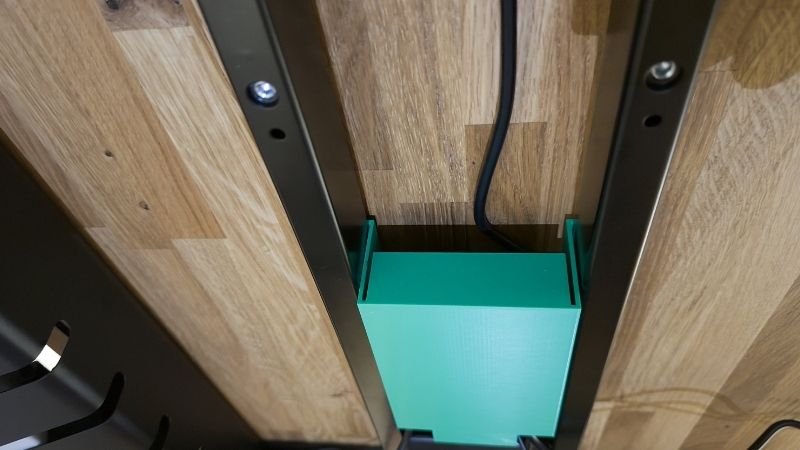
Best value screw-on basket: VIVO DESK-AC06-1C. The 16.5-inch steel basket suits dense wood or MDF where the included screws can be installed safely. Never drill a glass or hollow-core top by assumption.
Best explicitly built for a moving desk: Monoprice Workstream #33815. The maker says this powder-coated steel organizer is designed to travel with height-adjustable desks. Its fixed installation requires a suitable underside and careful positioning relative to crossbars.
Best for concealed bulky adapters: VIVO DESK-ACMB20-S. A flip-open enclosure provides measured internal room for power strips, although its hinged lid requires additional opening clearance.
Best for compatible Vari desks: Vari Cable Management Tray 403087. It attaches using rotating brackets to specified Vari electric desks; it is not a universal accessory for every standing desk.
Other sensible choices: Mount-It! MI-7286BLK provides a particularly wide 23.6-inch clamp-on tray with a documented 11-pound rating and 0.2–1.97-inch desktop thickness fit. The fabric VIVO DESK-AC16F-C may be gentler on awkward adapter shapes but hangs deeper beneath a desk.
Comparison table: real mounting requirements and U.S. availability
Manufacturer capacities and sizes below refer to the exact versions named, not a whole product family. Prices are observed U.S. storefront references on October 29, 2026, subject to change without notice. “In stock, listed” means that the page displayed stock or an order button; no ZIP-code-specific order was placed.
| Product and role | Mount and key published fit | Rated load / useful size | U.S. price observed Oct. 29 | U.S. stock status Oct. 29 | Main limitation |
|---|---|---|---|---|---|
| VIVO DESK-CM6L-B — reversible overall | Clamp; 0.2–2 in tabletop | 11 lb; 17 × 6 × 5.8 in | $39.99 VIVO direct | In stock, listed | Clamp collides with rear hardware |
| VIVO DESK-AC06-1C — budget screw-in | Screws into wood/MDF | 11 lb; 16.5 × 3 × 4.5 in | $19.99 VIVO direct | In stock, listed | Narrow for large adapters |
| Monoprice Workstream #33815 — adjustable-desk pick | Screw-fixed beneath desktop | Steel; load not confirmed | $29.99 Monoprice | In stock, listed | No removable clamp |
| VIVO DESK-AC16F-C 16 in — fabric option | Clamp; 0.4–2 in tabletop | 11 lb; basket 15.7 × 5.5 × 5 in | $29.99 VIVO direct | In stock, listed | Deep hanging clearance |
| Mount-It! MI-7286BLK — extra-wide clamp | Clamp; tabletop thickness 0.2–1.97 in | 11 lb; 23.6 × 3.9 × 7 in | $39.99 Mount-It! direct observed | In stock, listed | Long basket may hit desk frame or arm clamps |
| VIVO DESK-ACMB20-S — hidden power strip | Screws; top at least 0.6 in thick | 11 lb; inside 15.6 × 6.5 × 3.9 in | $39.99 VIVO direct | In stock, listed | Lid needs 7.2 in opening clearance |
| Vari Cable Management Tray 403087 — Vari desks | Rotating proprietary brackets | Around 21.5 in length | $59 Vari direct | In stock, listed | Not for Essential Desk line |
The table is a fit filter, not a promise that an 11-pound-rated tray will safely hold any combination of power strip and power adapters. Account for how the load is distributed and the desk maker’s mounting rules. A seller’s price for one selected variant does not apply to two-packs or different sizes.
The seven best cable trays for sit stand desks reviewed
VIVO DESK-CM6L-B — best clamp-on steel tray for a gaming desk
VIVO’s DESK-CM6L-B makes a strong first recommendation because the published constraints answer the questions a standing-desk owner needs to settle before ordering. The metal tray is 17 inches long, six inches wide, and 5.8 inches high, while its clamping arrangement creates a larger total vertical footprint. VIVO states a weight capacity of 11 pounds and a compatible desktop thickness range from 0.2 to two inches. The clamp tightens by hand and has padding to reduce scuffs. Unlike adhesive organizers, it can be removed when a desk is moved or replaced without leaving a strip of glue behind.
That convenience is not universal fit. On a compact gaming desktop, the same rear edge may already carry the jaws of a monitor arm, a microphone boom, a headset hanger, or the desk’s manufacturer-supplied cable bracket. Measure the clear straight edge, not just overall desk width. Check whether an apron or beveled edge prevents both clamp pads from contacting flat, stable surfaces. The basket must also travel safely past any horizontal frame rail at the highest and lowest desk positions. A steel tray does not solve a pinched cable if placed inside the motor’s travel path.
Pros: reversible installation, published tabletop thickness range, accessible open top, and a credible load rating. Cons: more visible clamps, potential interference with other accessories, and limited suitability for nonstandard edges. Buy this if you have a conventional solid desktop and want the flexibility to rearrange a multi-monitor workstation. Skip it for an edge-to-edge monitor arm arrangement or a desk whose rear surface is inaccessible. Confirm the exact single-pack listing; the manufacturer also markets other tray configurations under similar product names.
VIVO DESK-AC06-1C — best affordable permanent cable basket
The DESK-AC06-1C is an uncomplicated 16.5-inch metal cable basket that mounts with screws into an appropriate wood, particleboard, or MDF desktop. VIVO publishes dimensions of 16.5 by three by 4.5 inches, mounting holes 11 inches apart, and an 11-pound load limit. It is the version to consider when you know your desk permits wood screws and you prefer the rear lip to remain free for other mounts. Its direct U.S. page displayed $19.99 for the selected single black unit, with an in-stock message, on the research date.
Because it is narrow, placement matters more than the raw load rating. A long power strip may fit while a large laptop power brick sits awkwardly or extends outside the walls. Measure the widest adapter and the plug heads while plugged into the actual surge protector. Position the basket so outlets remain accessible and thick cables turn without severe bends. For a desk with a T-frame or central support, two smaller baskets can sometimes be easier to place than one long unit; however, the listed single-unit price should not be presented as the two-pack price.
Pros: low storefront price, simple metal construction, unobstructed desk edge, and clear manufacturer dimensions. Cons: drilling is permanent and may conflict with desk warranties; narrow depth limits bulky devices. Choose it for a solid desktop with verified screw length and no hidden hardware in the drilling zone. Avoid it if the desktop has a hollow honeycomb core, glass, unknown reinforcement, or a thin finish. Prevent accidental motor or tabletop damage by reading the desk manual before drilling rather than assuming every underside is safe.
Monoprice Workstream #33815 — best purpose-designed standing-desk tray
Monoprice specifically describes its Workstream product #33815 as a steel under-desk cable organizer made to travel with a height-adjustable desk. The white version’s U.S. product page displayed a $29.99 listing and an in-stock state during this check. The central advantage is not a proprietary motor interface; it is the intention that the organized power strip, AC adapters, and loose desktop wiring ride with the top instead of dragging independently across the floor. That is the simplest arrangement for a gaming PC setup with a monitor, USB hub, speakers, and a dock.
You still need to choose an installation site. On an adjustable desk, inspect the complete underside at both extremes, including the crossbar, cable guides, control box, and motor wiring. Never place new screws near the actuator or electronics, and never relocate existing bolts without explicit approval. Confirm your chosen cable path by moving the desk with no cables permanently fastened first; an open tray can have sufficient room at sitting height yet strike a frame member as the desk reaches standing height. Monoprice’s public summary does not establish a universally safe screw pattern or a load ceiling, so those details need to be checked in its installation documentation for your tabletop.
Pros: directly targeted at sit-stand use, robust powder-coated steel, and a U.S. storefront with a visible purchase path. Cons: requires permanent fastening; the exact hardware approach depends on your desk material. Buy it when your desk has a dense wooden underside and you want a clean, fixed route for several cables. Skip it for a rented or manufacturer-restricted desktop where new holes are not permitted. After installation, keep the lead to the wall outlet free enough to cover the entire height range without pulling on the plug.
VIVO DESK-AC16F-C — best fabric-style option for flexible access
The 16-inch DESK-AC16F-C uses Oxford fabric held by clamps rather than a conventional exposed wire basket. VIVO lists 15.7 by 5.5 by five inches for the fabric tray itself, an 11-pound carrying limit, and compatibility with desktop edges 0.4 to two inches thick. Its side panels can be released from the brackets for access to gear. This is particularly attractive when a gamer’s desk includes adapters of awkward shapes: softer walls and a wider basket opening make routing easier than a narrow, rigid channel.
There are two catches. First, the tray’s complete assembled shape hangs substantially farther beneath the desk than its bare five-inch basket depth implies; the manufacturer lists different under-desk clearance settings and bracket dimensions. Knee room, seated chair movement, and the lift frame must all clear the installation. Second, fabric does not turn a cable organizer into a heat-safe, sealed enclosure. Keep adapters within their manufacturers’ ventilation requirements, avoid enclosing hot power supplies beneath thick cloth, and do not put beverages or loose metal objects into the pocket.
Pros: no-drill clamping, removable fabric sides, optional longer formats, and published fit limits. Cons: hangs deeper than slim metal baskets and relies on correctly tensioned clamps. Select the 16-inch variant for smaller desks and light-to-moderate power strips; check the 31- and 47-inch versions separately for wider setups because their dimensions and price are not identical. The selected 16-inch direct page showed $29.99 and in-stock status, but a buyer should reconfirm the selected size before paying.
Mount-It! MI-7286BLK — best long clamp tray with verified fit
Mount-It!’s MI-7286BLK deserves a much more confident technical description than a generic ‘alternate clamp.’ The official product specifications identify a steel-and-ABS tray measuring 23.6 inches long, 3.9 inches wide and seven inches high, with an 11-pound rated capacity and supported desktop thicknesses from 0.2 to 1.97 inches. The maker’s U.S. page lists the exact SKU, installation resources and its mounting method. The length makes this a logical choice for a wide power strip with bulky plugs spread across several sockets, rather than forcing everything into a shorter basket. Its published capacity is a hard ceiling, not a suggestion to fill the basket with the maximum possible weight.
Long trays have a different clearance risk from short ones. On a T-frame sit-stand desk, a crossmember can run behind the underside of the desktop, and the tray may collide with it on the way up or down. Its seven-inch exterior height matters when the user sits low or has a keyboard tray. Measure the underside from the intended mounting edge to the nearest brace, then trace the entire lift path. If a monitor arm occupies the same rear edge, compare the clamp jaw positions before buying; overlapping pressure pads can tilt the tray or damage a laminate edge.
The 0.2-to-1.97-inch thickness figure applies to a flat, solid clamping surface. It is not blanket authorization for a heavily beveled edge, thick butcher-block top, glass, or a desk whose rear edge is shielded by a cable grommet or steel apron. The user manual should determine whether pads and clamps contact the surfaces safely. Also distinguish the basket’s stated width from the size of a surge protector with every AC adapter installed. Measure cable bends and plug protrusion, not just the bare power-strip enclosure.
Pros: verified dimensions, capacity and clamp fit; generous length; reversible non-drilled installation; U.S. manufacturer support. Cons: unusually long clearance footprint, possible competition with monitor-arm clamps and limited inner width. Buy if your moving desktop is wide and has a clear rear edge. Skip if the desk’s crossbar, apron or electrical control box obstructs the tray’s full travel. Compared with four VIVO options in this roundup, the Mount-It! is the strongest non-VIVO general-purpose alternative for a documented wide clamp design.
VIVO DESK-ACMB20-S — best concealed box for adapters and a power strip
A flip-open steel box looks tidier from across the room than a mesh basket, and VIVO’s DESK-ACMB20-S provides concrete measurements to evaluate. The selected 19-inch exterior version has 15.6 by 6.5 by 3.9 inches of internal space. VIVO specifies an 11-pound weight limit, a minimum tabletop thickness of 0.6 inches for screw installation, approximately 6.5 inches of under-desk hang, and 7.2 inches of clearance to open the lid. The U.S. direct listing displayed $39.99 and an in-stock message.
That lid clearance is the make-or-break specification. A gaming desk’s crossbar may leave enough space for the closed box but block access when the hinge swings open. Check the full arc before drilling; put the enclosure where you can reach the surge protector without crawling beneath a moving desk. Check the box’s internal dimensions against the power strip with every plug connected, not the strip alone. VIVO advertises ventilation cutouts, but warm charging bricks still need their specified airflow and should not be packed tightly in the housing.
Pros: clean appearance, positive retention compared with loose adhesive strips, measured inner space, and quick access after correctly mounting the hinge. Cons: deeper under-desk intrusion, permanent holes, and a lid that can strike the desk frame. Choose this for an open-sided sit-stand desk with enough hidden clearance. Skip it for a crowded underside or a setup where the power strip must be manipulated frequently during sessions; an open tray can be easier to troubleshoot and safer to inspect for heat.
Vari Cable Management Tray 403087 — best for supported Vari electric desks
The Vari 403087 is a specialist purchase with a meaningful advantage: the maker identifies the desks it fits. Vari’s product page lists it at $59 with an in-stock status, rotating metal mounting brackets, cable openings at both ends, and a length of roughly 21.5 inches according to its product specification. The supported models include several Vari Electric Standing Desk sizes and specified L-shaped configurations. Vari expressly excludes the Essential Electric Standing Desk line. This is a much better match for an approved Vari desktop than trying to retrofit an unrelated product with the wrong frame mounting points.
Compatibility is narrower than the brand name suggests. Before buying, check whether you own a ComfortEdge, a prior-generation electric desk, an L-shaped desktop, or the Essential model; confirm the correct measurement of the working surface as well. Vari’s mounting brackets attach the tray so it moves with the desk, but that does not mean every power strip or adapter is automatically safe to store inside it. Leave service loops for cables reaching the floor, do not obstruct the desk electronics, and keep the tray from being loaded with equipment beyond its documented purpose.
Pros: manufacturer-specific compatibility table, tool-friendly bracket system, and easy two-ended cable routing. Cons: price premium and incompatibility with some Vari products and other desk brands. Buy this if your exact Vari desk appears in the manufacturer’s approved list and you value a factory-matched accessory. Everyone else should compare the universal clamp and screw-on trays instead of assuming a similar tabletop width ensures support.
How to choose a tray that survives full desk travel
Start with the moving surface and available mounting zone
The safest arrangement is usually to attach a basket or tray to the desktop that moves, not to a stationary wall or nearby drawer unit. Start by identifying the desk’s top material, thickness, internal crossbar positions, control box, and existing mounting holes. A clamp needs a straight, unobstructed edge and contact pads that rest fully on the tabletop. A screw-in unit needs substrate capable of securely holding the provided fasteners; dense wood and suitable MDF can work, but glass and unknown hollow-core panels demand a different solution. A manufactured sit-stand desk may also have explicit limits on drilling and aftermarket components. Consult its documentation before creating permanent holes.
Move the desk to both its lowest and highest positions and measure what actually clears. A box that looks comfortably tucked away at 40 inches can run into a horizontal support at 26 inches, while a tray mounted too far forward can hit a knee or chair arm. The hinge of a closed box has a separate clearance requirement beyond the static dimensions. Plan around the total installation envelope, not just the nominal basket length printed on a product page.
Measure the power strip with plugs connected
Take the power strip you intend to use and plug in the actual brick chargers, monitor cords, and USB hub adapters. Measure the longest and widest resulting footprint with strain reliefs included. A basket may be 17 inches long externally while the usable area between brackets is smaller. A narrow open rack can hold a strip but force plugs against its lip. Distribute weight, avoid stacking hot adapters, and leave enough finger access to disconnect equipment when necessary. If a product publishes an 11-pound capacity, that is an upper stated rating, not a reason to pack 11 pounds of loose power electronics into a basket with poor ventilation.
Do not put an uninterruptible power supply into a lightweight cable tray unless the manufacturer expressly approves its weight and heat handling. Many UPS units are too heavy and have required ventilation or battery-service rules. The usual purpose of an under-desk tray is cords, a surge protector, and small adapters—not a mini server rack.
Calculate slack from the highest position, not from the seated position
With everything unplugged, position the desk at its maximum height and run the main power cord and signal cables toward their destinations. Leave enough free length for the full travel without any taut connection; then lower the desk to its minimum height and inspect the spare loop. A hanging loop must not get caught in a moving lift column, casters, drawer slide, or chair. Reusable hook-and-loop straps help keep desktop cables organized, but fasten them only where the bundle needs support, not so tightly that a connector is stretched. A flexible desk-to-floor cable spine can help manage the final vertical run, but a spine is not a substitute for a tray holding the power strip.
The safest method is a slow full-range movement check while another person watches both sides of the desk. Stop immediately if a cable catches or an adapter pulls. Only after confirming the motion should you tighten all ties. Repeat the test whenever adding a console, second monitor, audio amplifier, or new docking station.
Separate cable types and protect heat-sensitive equipment
Route the AC power cord through a path that avoids sharp sheet-metal edges and pinching; keep data and audio cables tidy so they cannot snag. Cable separation is mainly about sensible routing and serviceability here, not a claim that every adjacent cord creates electrical interference. Use manufacturer-rated power strips, do not daisy-chain extension cords or power strips, and never run high-wattage adapters inside a closed enclosure that blocks their ventilation. Follow the desk and power strip safety manuals for load ratings, placement, and cord routing.
For gaming, give special attention to monitor HDMI or DisplayPort cables: a short cable might work at sitting height but tug on a costly monitor port when raised. Controllers that charge by USB, microphones, capture devices, and speakers introduce several additional connection points. One well-organized tray and a single measured service loop can be more reliable than many adhesive clips attached to separate parts of the desk.
How to compare a 17-inch tray against a 23.6-inch tray
For a dual-monitor gaming workstation, put the fully plugged-in power strip, laptop brick and extension leads on a ruler before buying. If the total safe arrangement fits in around 17 inches, the VIVO DESK-CM6L-B saves rear-edge space and usually leaves more room for a monitor arm or microphone clamp. If your strip and separated bulky transformers occupy more of the underside, Mount-It! MI-7286BLK offers another 6.6 inches of nominal exterior length, at the cost of more potential interference with support bars. Neither length figure should be treated as the internal unobstructed capacity.
A permanent screw-on tray such as the Monoprice #33815 can be preferable when the rear edge is already occupied. A proprietary Vari 403087 can be more predictable for a listed compatible desk, but is not universally attachable to the Essential line. Put weight, clearance, reversible mounting and the desk’s actual construction ahead of brand familiarity or the largest number of cable ties included.
Installation workflow for an adjustable gaming desk
- Turn off and unplug devices. Photograph the current cable layout, identify each lead, and make sure the lift controls cannot be pressed accidentally while hands are near moving hardware.
- Choose the exact mounting location. Check the manufacturer-approved screw or clamp zones, desk thickness, frame rails, motor wiring, and the full hinge or basket clearance envelope.
- Test-fit before drilling. Hold the empty tray in its intended position, move the desk slowly through the full range, and verify that your knees, chair, and clamp accessories have space.
- Mount according to the maker’s instructions. Use the supplied clamp pads or specified screws; do not drill into wiring, replace frame bolts, or substitute oversized screws.
- Load the strip and route only the essential leads. Keep connectors accessible, orient hot adapters as required by their own manuals, and secure the cable bundle with removable ties.
- Check desk-to-floor movement. At full height, confirm no plug is pulled; at minimum height, ensure extra cable cannot be crushed. Test several complete cycles before using the setup normally.
- Reinspect after adding devices. The final cable route changes as soon as a capture card, desk lamp, second display, or new console is introduced. Retest before another long gaming session.
How we selected these trays
We prioritized documented products with identifiable model numbers, manufacturer installation information, and live U.S. retail pages where accessible. The selection includes clamp-on and screw-on metal baskets, a fabric tray, a covered enclosure, and a manufacturer-specific Vari system. Published sizes and weight limits are manufacturer claims; none of these products was installed, pulled to failure, measured for temperature, or tested in person by Geek Gaming Tricks. Storefront observations represent one date, not delivery guarantees. We also declined to rank accessories by unverified customer anecdotes or imply that all sit-stand desks support new screw holes.
Frequently asked questions
Is a clamp tray safer than an adhesive cable organizer?
For heavier power strips or a frequently moving desk, a correctly fitted mechanical clamp can be easier to inspect and reposition than adhesive that may weaken on textured finishes or under heat. However, clamps can slip on beveled edges or interfere with monitor mounts. Follow the product’s capacity and edge-geometry rules; neither method is automatically safe for every desk.
Can I attach a tray directly to a standing desk frame?
Only if the desk or tray maker specifies that installation. Some frame members carry motors or structural loads, and a frame-mounted tray can obstruct moving components. A tray attached to the moving tabletop is often simpler; approved proprietary systems such as Vari’s may use dedicated mounting brackets.
Should the surge protector go inside the tray?
It can if the tray is designed for it, the strip fits with plugs inserted, and the strip’s instructions allow that location. Keep heat, overload protection, and access in mind. Never block a UPS vent or treat an ordinary organizer as a rated electrical cabinet.
How much slack should I leave on a sit-stand desk?
There is no safe universal extra-inch value independent of the desk’s travel, wall-outlet position, cable route, and monitor mounting. Measure at full extension, check the loop when lowered, and perform a full slow movement test without tension or pinching.
Will a cable tray increase FPS or reduce input lag?
No. The benefit is cable safety, less clutter, and more reliable physical connections. A routed DisplayPort or USB cable that is no longer pulled by desk movement may prevent accidental disconnects, but a tray does not make hardware run faster.
Does a universal tray fit glass or hollow-core desks?
Not necessarily. A clamp may be acceptable only where the tray and desk manufacturers permit it, and screw mounts generally are not appropriate for glass or unsupported hollow tops. Check the substrate and manufacturer restrictions rather than relying on a generic product photo.
Final thoughts
For a common gaming desk with a usable rear edge, start with VIVO DESK-CM6L-B and measure the clamp space before paying. Choose Monoprice Workstream #33815 or the VIVO DESK-AC06-1C when a permanent mount is approved, VIVO DESK-ACMB20-S when a concealed power strip is important, and Vari 403087 only for its explicitly supported desks. The best cable trays for sit stand desks are the ones that clear the full travel range with no pulled plugs, pinched cords, or inaccessible power equipment—not simply the ones that hide the most cables in a photograph.