Shopping for the best monitor risers with charging starts with an electrical question: are you powering a gaming laptop, a Qi-compatible phone, or small USB accessories? Those devices do not share one charging standard. The Anker 675 remains the best fully documented laptop-docking option, while StarTech MONSTADQI and Bostitch STND-2408WH offer more focused wireless phone charging without a costly USB-C hub. We also compare a wooden j5create dock, a compact JINRAIKO charging riser, Luxor’s foldable USB-charging stand, and a variant-sensitive Vaydeer drawer stand. Each has a different power source, footprint and purchase risk. We separate official specifications from U.S. retailer availability and do not claim hands-on electrical tests.
Quick verdict: match charging power to the device
Best integrated laptop dock: Anker 675 A8377. Verified by Anker: 100W maximum USB-C charging to a compatible host, 45W shared between two downstream USB-C ports, 10W maximum Qi phone pad, and HDMI 2.0 limited to 4K60. It cannot replace every gaming laptop’s original high-watt AC adapter.
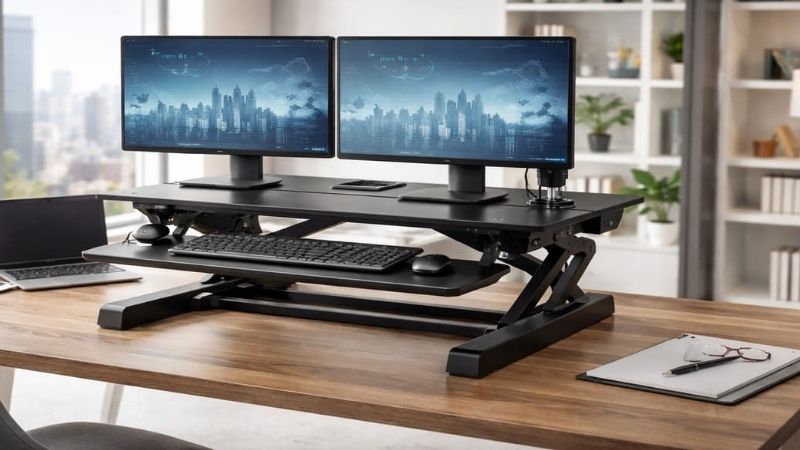
Best specified standalone Qi charger: StarTech MONSTADQI. Its manufacturer documents an integrated Qi-certified 15W maximum wireless charger, a 23.6-by-9.8-inch platform and a 33-pound rated load. StarTech’s own U.S. page did not offer confirmed inventory, but a U.S. NeweggBusiness listing displayed an order button, and a separate reseller advertised in-stock inventory; the older Monoprice product page was later found to redirect to an unavailable-product notice. Verify the chosen seller before ordering.
Best furniture-style Qi riser: Bostitch STND-2408WH. A 24-by-8-inch riser with a built-in Qi pad, drawer, two height settings and a 33-pound published capacity. Unlike a vague USB hub, it explicitly includes wireless charging. The manufacturer storefront listed it as in stock.
Best wood-and-USB dock: j5create JCT425. Its per-port BC1.2 information is stronger than a generic ‘fast USB’ claim. Detailed specs state up to 60W power delivery and HDMI output only up to 4K30; the manufacturer has also shown availability uncertainty.
Other carefully qualified options: JINRAIKO N1PRO combines an aluminum riser, wireless pad and drawer with a U.S.-dollar orderable listing; the official spec panel advertises a 15W maximum wireless pad but disagrees with its FAQ about physical dimensions. Luxor SUD-RISER includes USB-A charging, while wireless charging depends on selecting an optional Qi configuration. The Vaydeer dual-drawer wireless variant advertises up to 15W but needs model/variant confirmation. None should be described as a high-power laptop charger without supporting specifications.
Comparison table: actual charging function and U.S. buying limits
U.S. listing and specification observations were reviewed October 29, 2026. Prices are snapshots, not checkout-confirmed quotes. Qi and USB-C wattage figures are manufacturer maximums under compatible conditions; no Geek Gaming Tricks power or durability testing was performed. An ‘in-stock’ page can change after this research date.
| Exact product / use | Documented charging capability | Stand size or notable limit | U.S. reference price / source | Availability observed | Biggest trade-off |
|---|---|---|---|---|---|
| Anker 675 A8377 — laptop dock | Host PD up to 100W; shared downstream USB-C 45W; Qi up to 10W (iPhone 7.5W) | HDMI 2.0 up to 4K60; USB 10Gbps | $249.99 list, Anker US | In stock, listed | Costly; not a full-watt gaming-laptop adapter |
| StarTech MONSTADQI — dedicated Qi | Qi-certified pad, up to 15W | 23.6 × 9.8 in; 33 lb | $76 NeweggBusiness marketplace listing; price varies | Add to cart via third-party offer; manufacturer direct not confirmed | Conflicting channel availability; not laptop PD |
| Bostitch STND-2408WH — Qi plus drawer | Integrated Qi wireless pad; wattage not published in source checked | 24 × 8 in; 33 lb; adjustable two heights | $78.74 Bostitch US | In stock, listed | Narrow top; no published high-watt PD output |
| j5create JCT425 — USB-C dock | BC1.2 USB-A outputs (5V/1.5A); downstream USB-C 5V/1.5A; PD up to 60W per detailed spec | 21.02 × 9.76 in; HDMI up to 4K30 | Price subject to current store selection | Contact maker for availability | Not 4K high-refresh; external PD source may be needed |
| JINRAIKO N1PRO — wireless riser | Wireless pad up to 15W max per spec panel; Apple 7.5W/5W | Aluminum body; size conflict FAQ vs spec panel | $135 JINRAIKO US page | In stock, listed | Conflicting product dimensions; load rating not verified |
| Luxor SUD-RISER — basic USB power | USB-A charging; Qi pad optional by configuration | Folding riser; up to 22 lb maker-rated | Starting at $24 Luxor US | In stock, listed; variant must be chosen | Qi not standard; USB wattage not verified |
| Vaydeer dual-drawer wireless version — organizer | Wireless version advertises up to 15W Qi; hub ports can be data-only on other variants | Several mixed variant descriptions | Approximately $85.99 direct listing | Selected SKU stock not verified | Ambiguous charging and dimensions by version |
The Target North 94404910 and Razer Monitor Stand Chroma were removed from the recommended seven. Target’s published Q&A identifies only 2.5W per USB-A port on North, and multiple U.S. buyer reports describe malfunctioning ports. Razer’s documented appeal is USB data and RGB rather than a verified high-watt charger. The sold-out Vaydeer 39.3-inch model was likewise excluded from the shortlist. They may suit other needs, but they do not outperform products with identifiable charging functions for this query.
Seven monitor risers with charging features examined
Anker 675 A8377 — best full dock when a laptop needs power and ports
Anker’s A8377 is the most complete electrical specification in this roundup. Its 12-in-1 stand provides up to 100W dynamic charging to a compatible laptop through the USB-C upstream connection, a combined 45W budget across two downstream USB-C outputs, one USB-A BC1.2 port rated at 7.5W, two more USB-A ports at 4.5W each, and a Qi pad rated up to 10W or 7.5W for iPhone. A separate 180W power adapter is part of the system. These are distinct circuits and negotiated maxima: the USB-C pair does not give each device 45W, and Qi does not provide universal 10W charging to every phone.
A gamer who works on a USB-C laptop by day and plays on a separate monitor can benefit from the integrated Ethernet, USB, SD/microSD, and audio functions. The monitor riser itself keeps the keyboard beneath a roughly 21.3-inch-wide platform and provides a designated phone charging spot. Independent evaluations from Macworld and Tom’s Guide describe the combination as convenient but expensive, and neither review should be mistaken for testing by this site.
Gaming compatibility is the catch. Anker’s HDMI 2.0 output tops out at 4K60 and carries no promise of matching a 4K144Hz monitor or the variable-refresh features of a direct GPU output. A gaming laptop that specifies a 180W-plus brick may still drain its battery or reduce performance if powered only by the dock during GPU-heavy play. Keep the OEM gaming adapter where required and use the riser to handle the ordinary peripherals, phone and desk organization.
Pros: precisely identified power budgets, usable Qi pad, high port count, official U.S. product page with purchase option. Cons: expensive, output bandwidth limitations, complex cabling and no blanket promise of full-power gaming. Buy if a laptop’s USB-C PD compatibility is already known. Skip if you only need a modest phone charger under a monitor.
StarTech MONSTADQI — best published Qi specifications without a dock
StarTech identifies MONSTADQI as a height-adjustable monitor stand with a flush-mounted Qi-certified charging area rated up to 15W for compatible wireless-charging devices. The riser measures about 23.6 by 9.8 inches and supports a manufacturer-rated 33 pounds. Those measurements matter when your gaming monitor has a deep V-shaped base; measure the actual stand feet rather than assuming a nominal monitor diagonal guarantees fit. Because this is a charging stand rather than a full USB docking station, the phone pad is the primary electrical feature.
The U.S. purchasing story deserves precision. One StarTech direct storefront view did not confirm stock, while a current NeweggBusiness marketplace listing for MONSTADQI displayed a $76 orderable offer; other U.S. specialty resellers also displayed stock. The older Monoprice listing that once appeared available now redirects to a no-longer-available page. Different sellers can disagree without proving deliverability at a particular ZIP code. Treat the order as conditional on an actual seller and shipping promise, not merely on the maker’s product page. This is a practical replacement for the previously shortlisted sold-out model because it has a real SKU, formal charging specification and identifiable U.S. retailer listing.
Qi’s 15W number is an upper bound rather than an always-on output: phone support, case thickness, alignment, and temperature determine negotiated power. The pad cannot charge a gaming laptop or wirelessly power a controller that does not implement compatible Qi charging. Leave the charging surface accessible when the monitor is placed; a display base resting over the pad defeats the point of integrated charging.
Pros: clear wireless charging standard, substantial top surface, published 33-pound capacity, adjustable stand. Cons: one-phone charging rather than a multifunction dock, possible checkout variability and no laptop power delivery. Buy if wireless phone charging is the central requirement and the product is orderable from an authorized seller. Skip if your devices require USB-C PD.
Bostitch STND-2408WH — best wood-look Qi stand with a drawer
Bostitch’s STND-2408WH is a conventional 24-inch-wide, approximately eight-inch-deep monitor riser that adds a built-in wireless charging pad. Its official U.S. listing specifies two height positions, a storage drawer, nonslip feet, a 33-pound rated load and a three-year limited warranty. That is a useful combination for a gamer who wants to hide spare headset dongles, USB-C controller cables and small accessories without buying a separate charger stand. The manufacturer page displayed an in-stock order option and an observed promotional price of $78.74, while Office Depot Business also identified the same exact model.
Unlike Anker, Bostitch is not advertised as a USB-C laptop charging hub. The public technical summary does not provide a precise watt rating for its Qi pad in the source checked, so it should not be characterized as 15W, Qi2 magnetic, or a fast-charge replacement for a dedicated charger. The correct test before buying is simple: confirm your phone has Qi compatibility, locate the pad relative to the monitor base, and check what adapter or supply arrangement the package requires. A phone that sits at an angle or overhangs the marked charging zone may charge inconsistently.
Its eight-inch depth makes it less forgiving of large gaming-monitor bases than deeper 9- or 10-inch alternatives. Measure the physical feet including rubber contact points and verify the stable base is contained. The drawer is meant for passive accessory storage, not for running hot electronics or charging lithium batteries buried under papers. Raising an already-high display by several inches can also put the screen above the user’s natural gaze.
Pros: identifiable Qi charging model, useful drawer, two height choices and manufacturer-backed U.S. listing. Cons: no verified fast Qi wattage, shallow surface, no laptop PD. Buy if you value a tidy wooden-looking riser and ordinary wireless phone charging. Skip if you need gaming-display connectivity or a documented 15W charging profile.
j5create JCT425 — best wooden riser with USB BC1.2 and laptop PD
The JCT425 uses a pinewood platform with an aluminum support structure and a separate USB-C docking arrangement. Official detailed specifications give a 21.02-by-9.76-inch surface, HDMI up to 4K30 or 1080p60, two USB-A ports supporting BC1.2 charging at 5V/1.5A, and a USB-C downstream charging output at 5V/1.5A. The detailed U.S. page states power delivery up to 60W; another promotional statement has referenced 100W. The lower detailed figure is the conservative number to use until the maker reconciles the discrepancy for the exact production revision.
In a mixed-use gaming setup, its greatest advantage is access to several devices under one riser without stacking a stand on top of another hub. You can leave a keyboard, mouse receiver or capture accessory connected while storing small items under the natural-wood top. But a USB-C port with a power symbol does not guarantee that a USB-C charger is included. j5create explains that a suitable external adapter may be needed when high-power USB devices and a laptop must operate together.
Do not route a premium high-refresh gaming panel through this monitor riser’s HDMI and expect full frame rate: 4K30 is an office display-class limit. Use a direct monitor connection for gameplay, and rely on the dock for work peripherals if the laptop’s USB-C alternate mode and power requirements match. The maker’s international listing said to contact it for availability, so do not translate a visible catalog price into a verified U.S. checkout.
Pros: physically deep platform, specific USB charging-port ratings and authentic wood styling. Cons: PD documentation tension, 4K30 video, uncertain immediate stock. Buy if you need a multipurpose peripheral riser and can confirm the PD setup. Skip if guaranteed 100W charging or 144Hz output is essential.
JINRAIKO N1PRO — best compact aluminum riser with a wireless pad
JINRAIKO sells an aluminum monitor riser with a dedicated wireless charging area and a small drawer, identified on its U.S.-region product page as the N1PRO charging dock and monitor riser stand. The listing presented a $135 promotional selling price and an in-stock/Add to Cart state. Unlike a loose charging puck resting on top of a generic riser, the pad is part of the furniture layout and a drawer can keep controller adapters, cable ends or spare batteries organized without letting them spread around the mousepad.
There is an evidence boundary: the detailed specification section claims a 15W maximum wireless pad (Apple profiles 7.5W/5W, Android 15W/10W), but the maker also publishes two conflicting dimension sets: 500 × 210 × 90 mm in its FAQ and 560 × 253 × 70 mm in the specifications panel. The page does not establish an unambiguous rated monitor load for the chosen version. That means this cannot responsibly outrank the Anker or StarTech selections on electrical performance, and the 15W figure must be called a maker-listed maximum, not a guaranteed phone result, and Qi2 compatibility should not be asserted without proof. Before buying, ask the seller for input adapter requirements, pad standard and supported devices, width and depth of the usable top, and how warranty returns are processed for U.S. customers.
This model is most plausible for players who prefer the look of a compact metal riser and need low-maintenance phone top-ups rather than optimized fast charging. Check that the pad stays reachable with a wide gaming-monitor stand installed; otherwise a separate angled wireless phone stand can be more ergonomic. Wireless charging also generates heat, so follow the maker’s case and metal-object warnings and keep cables clear of the drawer mechanism.
Pros: integrated phone charging, aluminum construction, useful small storage, visible U.S.-dollar orderable offer. Cons: conflicting exterior dimensions and no verified rated monitor load. Buy conditionally for aesthetics and convenience after requesting the technical sheet. Skip when precise electrical power must be known before purchase.
Luxor SUD-RISER — best simple USB-charging foldable riser
Luxor’s SUD-RISER is an unusual folding monitor platform with a USB-A charging port and an optional Qi wireless charging configuration. The manufacturer describes the model as supporting displays up to 22 pounds and lists it through a U.S. product page with an in-stock label and a starting price near $24. The essential caveat is that ‘optional’ is not ‘included’: a base USB-charging version cannot be sold to readers as a wireless Qi charger unless the selected SKU actually contains the wireless pad. Nor does the available summary establish USB-A fast-charge wattage.
A folding structure can make sense for a very small desk or a gaming station that is converted back into a worktable after a session. But moving parts introduce another check: set the riser on a level, stable surface, deploy it fully, and keep the monitor’s feet within the rated support area. Do not assume that closing a stand around connected charging cables is safe. If the selected configuration includes a UV sanitizing feature, treat that as a separate advertised feature; the present article does not evaluate disinfection claims or recommend exposing skin or eyes to UV light.
This is a product where variant discipline matters more than appearance. Ask whether the order includes the Qi charging pad, the appropriate power adapter and cable, and a return option if the USB output cannot charge your intended device. A controller plugged into USB may receive low-power charging, but no evidence here establishes USB-C PD for a laptop or multiple high-watt ports. A separate, certified phone charger could remain the more reliable solution.
Pros: basic USB charging, foldable desk-space flexibility, identifiable manufacturer listing. Cons: optional wireless pad, no verified charge wattage and a more specialized folding mechanism. Buy if you need a portable utility stand for small accessories. Skip if you want guaranteed Qi fast charging from the cheapest variant.
Vaydeer Wireless Monitor Riser with Dual Drawers — conditional Qi organizer
Vaydeer sells several monitor-stand variants with similar images and descriptions. The wireless dual-drawer version advertises a pad up to 15W and uses drawers to hide USB dongles and cables. That is an attractive combination for a gamer whose monitor occupies a compact desk and who wants phone charging at the front edge rather than on a separate puck. Its U.S.-dollar manufacturer page displayed a listing around $85.99, but the accessible materials did not establish the full SKU-to-function mapping or current shipping status for the selected wireless configuration.
A buyer must not assume that the Wireless, Hub, and Type-C/Fast Charging versions are a single product. One part of the manufacturer’s family page explicitly calls out USB hub ports that are for data transfer rather than charging; other panels use charging language without identifying individual outputs. That is a real reason to condition the recommendation. Demand a photo of the package label or a model-specific port diagram showing exactly which pad and sockets are powered. Check the input adapter wattage and which phones negotiate the claimed wireless maximum.
For storage, the drawers can keep light accessories in place, but they are not safe boxes for hot adapters or batteries being charged without supervision. Confirm that a monitor base does not overlap the Qi zone and that the drawers can open without hitting a keyboard or audio interface. The premium is worthwhile only when the exact wireless hardware is confirmed, not because a generic graphic advertises many ports.
Pros: potential 15W phone pad and integrated small-item drawers. Cons: conflicting variant descriptions, uncertain stock for the chosen type, no verified per-port charging map. Buy only after verifying the precise wireless SKU; otherwise choose StarTech or Bostitch for clearer product identity.
Buying guide: which charging function matters on a gaming desk?
Phone charging is not laptop charging
An integrated Qi pad usually targets a phone, not a laptop or game console. Even when a manufacturer advertises up to 15W, the actual phone may charge at a lower rate based on its supported profiles and temperature. USB-C Power Delivery is a separate negotiated protocol that can supply much higher wattages to compatible notebooks. For a gaming laptop, check the machine’s supported USB-C input wattage and whether the battery will discharge under full graphics load. A desk dock limited to 60W or 100W cannot be assumed to replace a proprietary 180W, 230W, or higher AC gaming adapter. Use the supplied notebook charger for sustained gaming when required by its manufacturer.
A few ordinary USB-A ports do not inherently count as “fast charge.” For each port identify its source of power, output voltage and current, and whether the maker lists BC1.2 or a modern dedicated charging protocol. If no wattage is published, treat the output as basic peripheral power until reliable documentation establishes otherwise.
Data ports can look like charging ports
USB-A and USB-C are connector styles. On an ordinary USB hub they may primarily serve as peripheral interfaces. On an Anker docking stand, specific USB-C outputs are explicitly identified as PD charging ports, with shared output limits. On the Vaydeer product family, one part of the listing describes hub ports that do not support charging. The safe buying process is to read the per-port diagram or support manual for the exact version being sold, not infer features from the number of rectangles in a product photograph.
When connecting a gaming mouse receiver, capture card, webcam, external SSD, and phone at the same time, the hub can be constrained by a single upstream USB cable. Speed claims are maxima under specified conditions, not guaranteed per-device rates while every other port is active. For competitive gaming, a direct motherboard or dock connection can be preferable for certain peripherals when reliability matters more than desk aesthetics.
Check what is included in the box and what supplies power
Some monitor stands have an integrated AC adapter; others rely on a USB-C charger, a powered USB hub, or the upstream PC port. A bare USB-C connector on a stand does not mean a suitable 100W power brick is included. Confirm the exact package contents, external adapter rating, cable length, and whether the manufacturer supports simultaneous laptop and accessory charging. Connecting a high-watt charger does not force a low-power hub to output more than its negotiated limit. Do not use unverified charging bricks or overloaded power strips beneath a closed drawer.
For the j5create JCT425 specifically, the detailed PD power specification and the headline marketing do not perfectly match. That is a purchase-risk flag worth resolving with support. If the exact charging wattage is essential to your laptop, choose a product whose documentation agrees throughout rather than betting on the largest quoted number.
Make sure the monitor actually fits the platform
A riser rating describes a support surface and maximum load, but the display’s base may be deeper than the usable shelf. Large gaming monitors, curved ultrawides, and deep V-shaped bases can extend beyond a seven- or eight-inch platform. Compare the complete footprint of the original monitor stand, not the diagonal display measurement. A VESA arm can clear the riser entirely, in which case a charging dock on the desk may be more rational. Likewise, if your monitor is already at eye level, raising it by three or four inches might harm rather than improve comfortable alignment.
Confirm that the phone’s wireless charging area remains accessible with the display positioned in its actual place. A gaming headset stand, microphone boom, or soundbar can obscure the charging pad or obstruct drawer opening. Measure available depth for the keyboard when sliding it underneath the platform; storing one keyboard there is a bonus, not proof that a full-size keyboard, mouse, and charging accessories can all fit at once.
Understand gaming video limitations before paying for a dock
Dock-integrated HDMI should not be assumed equivalent to the output on a graphics card. The Anker 675 lists HDMI 2.0 with up to 4K60, and the j5create JCT425 lists 4K30 through its hub. Those can be serviceable for productivity but may not unlock 120Hz or 240Hz gaming, variable refresh, or the full features of a modern monitor. Check your laptop’s USB-C video mode, the dock’s output, and your display’s input support together. If any link is limited, keep a direct DisplayPort or suitable HDMI connection for gameplay and let the riser handle charging or ordinary USB accessories.
Safe setup workflow for charging accessories
- List the devices that actually need power. Separate laptop charging, phone wireless charging, controller battery charging and low-power USB peripherals.
- Read the product’s exact port specification. Look for watts, volts, shared output limits, USB data-only labels, and included power adapters. Reject assumptions from connector shape alone.
- Measure the display base and desk depth. Set the platform where it will not tip, flex the monitor cable, or lift the screen beyond a comfortable viewing height.
- Connect the intended power source first. Use manufacturer-approved adapters and the correct upstream cable; then add one device at a time and verify the expected charging state.
- Check full system behavior. Run the laptop’s normal work applications and then a demanding game. If battery charge declines while plugged into USB-C, use its specified AC power supply rather than blaming the shelf.
- Keep the wireless zone clear. Align the phone with the pad, remove metal accessories if the charger maker instructs, and avoid burying the device under objects while it charges.
- Recheck after a week of use. Confirm cables remain cool and untangled, connectors are not stressed, the charging pad is accessible, and a low-power hub is not being used beyond its rated capacity.
How these charging risers were evaluated
We compared seven identifiable risers against official charging documentation, manufacturer dimensions and U.S. seller pages. Priority went to products with a genuine charging function, a usable monitor platform and a traceable model or selected configuration. The Anker, StarTech and Bostitch charging functions are more clearly described than the JINRAIKO, Luxor and Vaydeer options. We did not perform hands-on load, electrical, thermal or phone-charging tests. StarTech had differing manufacturer and retailer stock signals, j5create had inconsistent PD messaging, and Vaydeer mixed product configurations; none is presented as checkout-confirmed.
Frequently asked questions
Can a monitor riser charge my gaming laptop while I play?
Only if the riser has a documented USB-C PD output that your laptop supports, and the available wattage covers the system’s demands. Many gaming laptops require a higher-power dedicated charger during GPU-heavy games. An ordinary USB-A hub or Qi pad cannot replace that adapter.
Does every monitor stand with USB-C offer fast charging?
No. USB-C may be used for upstream data, video, power input, or charging output. Confirm the direction and wattage of each port. The North USB riser and many RGB data hubs illustrate why a port alone does not establish high-watt charging; Target identifies just 2.5W per North USB-A port.
What does 15W wireless charging mean in practice?
It is typically a claimed maximum for compatible phones under suitable conditions, not a guaranteed fixed charging speed. Phone model, wireless protocol, case material, alignment, and heat affect actual results. It does not imply laptop charging.
Will a USB dock in the riser support 4K 144Hz gaming?
Not automatically. The j5create JCT425 lists 4K30 through HDMI and the Anker 675 lists HDMI 2.0 up to 4K60. A 4K144Hz setup may need a different port or direct graphics connection. Check the exact monitor, graphics system, and cable capabilities.
Is it worth paying more for a wireless charger built into the shelf?
It is convenient if your phone is charged frequently at the desk and the charging zone stays accessible. If you already use a working certified charger, a passive riser plus that charger may be cheaper and easier to replace independently.
Why does StarTech show different stock status at different U.S. sellers?
A manufacturer and authorized retailer can have separate inventory. NeweggBusiness displayed an orderable marketplace offer and an independent U.S. reseller displayed stock, while the Monoprice product page has since redirected to an unavailable notice and StarTech direct stock was unclear. Verify the seller and destination-specific shipping at checkout; do not treat cached page badges as guaranteed delivery.
Final thoughts
For a laptop-centered gaming setup, the Anker 675 offers the strongest documented combination of PD, Qi and peripheral connectivity. For phone-only charging, check StarTech MONSTADQI from an orderable U.S. retailer or the Bostitch STND-2408WH if you also want a drawer. Choose the j5create JCT425 only after confirming its lower detailed PD rating is sufficient, and treat JINRAIKO, Luxor and Vaydeer as variant-sensitive alternatives. Most importantly, avoid the North riser as a fast-charging recommendation: Target specifies just 2.5W per USB-A port and buyer complaints raise reliability concerns. The best monitor risers with charging earn that description through documented outputs and actual device fit, not through the presence of USB sockets.