Key takeaways
- Genuinely portable: slim low-profile design fits a laptop sleeve without adding bulk.
- Hot-swap sockets: change switch feel without soldering.
- Triple connectivity: Bluetooth, 2.4GHz, and USB-C cover every device.
- Durable keycaps: PBT caps and RGB backlighting look good long-term.
The Air75 has become shorthand for a very specific idea: a mechanical keyboard thin enough to slide into a laptop bag, quiet enough for a shared office, and satisfying enough that you actually look forward to typing on it. NuPhy built its reputation on that low-profile formula, and the current V3 generation refines it with a control knob, hot-swap sockets, and a switch lineup that finally gives typists real choice.
This review looks at the NuPhy Air75 V3 across its Nano switch options, plus how the older V2 with Gateron Browns still fits into the picture. If you want a 75% board that travels well without feeling like a compromise, here is what actually matters before you buy.
Our top picks


 nuphy Air75 V2 Portable 75% Mechanical Keyboard
- Translucent bottom shell design: The overall layout of…
- Supports multi-device connectivity: Air75 V2 wireless mechanical keyboard…
- Cool RGB Backlit Effect: The backlight of Air75…
 nuphy Air75 V2 Portable 75% low profile
- Translucent bottom shell design: The overall layout of…
- Supports multi-device connectivity: Air75 V2 wireless mechanical keyboard…
- Cool RGB Backlit Effect: The backlight of Air75…
As an Amazon Associate we earn from qualifying purchases at no extra cost to you.
🎮 Get More From Your Setup — Free
Prime Gaming gives you free PC games every month, in-game loot, and a free Twitch channel sub — plus fast free shipping on all the gear above. New members get a 30-day free trial.
Watch: air75 Keyboard: Review & Buyer’s Guide — Video Review
Design & Build
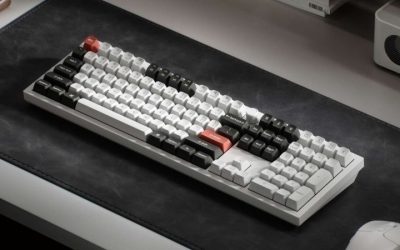
At its core the Air75 V3 is a 75% layout, meaning you keep the function row and arrow keys while dropping the number pad. The chassis is remarkably slim for a mechanical board, and the PBT keycaps on the color variants resist the greasy shine that plagues cheaper ABS caps. The new knob in the top-right corner is a genuinely useful addition for volume and scrolling, and the color schemes, from the understated Black-Red to the softer White-Brown and White-Red, give the board a bit of personality without looking loud. Wireless flexibility is the quiet headline: Bluetooth for tablets and phones, low-latency 2.4GHz for your main machine, and USB-C when you want a wired connection or a top-up.
Performance
NuPhy’s low-profile Nano switches are the real story. The Red variant is a light linear that suits fast typing and gaming, the Brown adds a tactile bump for people who like feedback, and the Blush “silent” option dampens sound for open-plan spaces. Because the sockets are hot-swappable, you are not locked into one feel forever. The 2.4GHz connection is stable enough for everyday gaming, and Mac and Windows compatibility is baked in with dedicated keycaps and toggles. The older V2 with Gateron Brown switches remains a slightly taller, more traditional-feeling alternative if you prefer a longer key travel.
Pros & Cons
- Genuinely portable: slim low-profile design fits a laptop sleeve without adding bulk.
- Hot-swap sockets: change switch feel without soldering.
- Triple connectivity: Bluetooth, 2.4GHz, and USB-C cover every device.
- Durable keycaps: PBT caps and RGB backlighting look good long-term.
- Learning curve: the compact 75% layout takes a few days to adjust to.
- Premium price: you pay more than a basic membrane travel board.
Alternatives to Consider
If low-profile switches feel too shallow for you, the NuPhy Air75 V2 with Gateron Brown switches offers a taller, more conventional keystroke while keeping the same wireless flexibility. Within the V3 family, the choice mostly comes down to switch feel and colorway: the Black-Blush silent build is the pick for quiet offices, while the Black-Red and White-Red linears are better suited to gamers who value speed. Anyone who needs a number pad should look at a full-size board instead, since the 75% layout deliberately trims that section to stay compact.
Frequently Asked Questions
Is the Air75 good for gaming?
Yes. The 2.4GHz wireless mode delivers low latency, and the linear Red switches are responsive enough for most competitive play. Wired USB-C mode removes any lingering concern about input delay.
Does it work with both Mac and Windows?
It does. NuPhy includes both Mac and Windows keycaps and an operating-system toggle, so the layout and shortcuts adapt to whichever machine you are using.
Can I change the switches later?
The V3 uses hot-swap sockets, so you can pull switches out and drop new ones in by hand. This lets you mix linear and tactile switches or swap to the silent option down the road.
How long does the battery last?
Battery life depends heavily on your backlight settings. With RGB dimmed or off you will get many days of use, and USB-C lets you keep typing while charging.
Verdict
The NuPhy Air75 V3 is one of the most convincing low-profile mechanical keyboards you can buy, blending real portability with hot-swap flexibility and a knob that earns its place. Choose a linear Red or White-Red variant for gaming and fast typing, the Black-Blush silent build for quiet offices, and consider the older V2 with Gateron Browns if you prefer a taller, more traditional keystroke.