Our Top Picks
As an Amazon Associate I earn from qualifying purchases.
A 43-inch monitor is a different kind of upgrade. It is not a slightly bigger screen. It is a wall of display that replaces a dual-monitor setup, turns a console session into a living-room event, and gives a spreadsheet room to breathe. Done right, it is the most dramatic change you can make to a gaming or work setup. Done wrong, it is a giant panel that sits too close and leaves you turning your head to read the corners. The best 43 inch monitors have matured into a real category, with true 144Hz gaming panels and IPS workhorses built for four windows side by side. This guide covers five 43-inch monitors, and flags the compromises openly.
The Short Answer
If you want the strongest all-around pick and you mainly play games, start with the Samsung Odyssey Neo G7: a 43-inch 4K panel at 144Hz with a 1ms response time, Mini LED backlighting, DisplayHDR 600, and smart TV apps built in. If you want a dedicated gaming panel with HDMI 2.1 ports for a console, look at the Gigabyte AORUS FV43U, with DisplayHDR 1000 and G-SYNC compatibility. For work first and games second, the LG 43UN700-B is the calm choice, with an IPS panel, USB-C, and four HDMI inputs. The ViewSonic VX4381-4K is the multitasking pick, showing four sources at once. The LG 43SQ700S is the smart-monitor pick, with webOS and wireless screen sharing. Before anything else, measure your desk: if you sit closer than about three feet from a 43-inch screen, you will turn your head to read the corners.
Our Top Picks

- Best Overall: Samsung 43-Inch Odyssey Neo G7 Series 4K UHD Smart Gaming Monitor — 43-inch 4K Mini LED panel, 144Hz, 1ms response, DisplayHDR 600, FreeSync Premium Pro, smart TV apps.
- Best Dedicated Gaming Panel: Gigabyte AORUS FV43U 43-Inch 4K 144Hz Gaming Monitor — 43-inch 4K VA panel, 144Hz, 1ms response, DisplayHDR 1000, G-SYNC Compatible, HDMI 2.1.
- Best for Work and IPS Color: LG 43UN700-B 43-Inch Class UHD IPS Display — 43-inch 4K IPS panel, HDR10, USB-C, four HDMI inputs.
- Best for Multitasking: ViewSonic VX4381-4K 43-Inch Ultra HD MVA 4K Monitor — 43-inch 4K MVA panel, 60Hz, HDR10, MultiPicture with four simultaneous sources, 450-nit brightness.
- Best Smart Monitor: LG Smart Monitor 43SQ700S 43-Inch 4K UHD IPS Display — 43-inch 4K IPS panel, webOS smart monitor, Magic Remote, USB-C, AirPlay 2, built-in speakers.
Quick Comparison
| Monitor | Size | Resolution | Refresh Rate | Panel | Best For |
|---|---|---|---|---|---|
| Samsung Odyssey Neo G7 | 43 inches | 3840 x 2160 (4K) | 144Hz | VA Mini LED | Gaming and streaming |
| Gigabyte AORUS FV43U | 43 inches | 3840 x 2160 (4K) | 144Hz | VA | Dedicated PC and console gaming |
| LG 43UN700-B | 43 inches | 3840 x 2160 (4K) | Confirm on the listing | IPS | Work, color consistency, many inputs |
| ViewSonic VX4381-4K | 43 inches (42.5 viewable) | 3840 x 2160 (4K) | 60Hz | MVA | Four-source multitasking |
| LG 43SQ700S | 43 inches | 3840 x 2160 (4K) | Confirm on the listing | IPS | Smart features without a PC |
How to Choose
Desk depth first
A 43-inch monitor is roughly 38 inches wide. At a typical desk distance of two feet, the edges sit outside your central vision, and you will move your head to read them. That is fine for a movie or a racing game, and tiring for eight hours of spreadsheet work. A desk depth of 30 inches or more, or a monitor arm that pushes the screen back, makes a real difference. If your desk is shallow, a 32-inch or 34-inch ultrawide may suit you better.
Resolution
Every monitor in this guide runs at 3840 x 2160, and that is not a coincidence. At 43 inches, a 1080p panel shows visible pixels at desk distance, and even a 1440p panel looks soft when you sit close. 4K gives you roughly 103 pixels per inch on a 43-inch screen, which is enough for crisp text. If you see a 43-inch screen at a lower resolution, treat it as a television, not a monitor.
Refresh rate
The Samsung Neo G7 and the Gigabyte FV43U both run at 144Hz, which makes fast motion look smooth. The ViewSonic runs at 60Hz, and the two LG models are built for steady work and media rather than fast play. A 60Hz panel is fine for strategy games, single-player adventures, and office work, and a compromise for fast shooters. Driving 4K at 144Hz also takes a strong graphics card, or the extra refresh rate sits unused.
Panel type
IPS panels, found in both LG models, keep colors steady when you view the screen from an angle, which matters on a screen this wide because the corners are always at an angle to your eyes. VA panels, found in the Samsung and Gigabyte models, deliver deeper blacks and stronger contrast for dark games and movies, but can shift slightly at the edges. The ViewSonic uses an MVA panel with a listed 4,000:1 static contrast ratio, the highest contrast figure in this group.
Ports and HDR
A 43-inch monitor often becomes the hub of a setup, with a PC, a console, a laptop, and a streaming stick all attached. The LG 43UN700-B has four HDMI inputs and USB-C, the most flexible port selection here. The Gigabyte FV43U has two HDMI 2.1 ports for consoles at 4K and high refresh rates, plus DisplayPort 1.4 and USB-C. On HDR, DisplayHDR 1000 on the Gigabyte signals much higher peak brightness than DisplayHDR 600 on the Samsung, and both sit above plain HDR10.
Smart features
Two monitors here, the Samsung Neo G7 and the LG 43SQ700S, have smart platforms built in, with streaming apps and a remote. That is useful if the screen will double as a television, or if you want to watch something without turning on the PC. It is clutter if you only ever use the screen with a computer. Decide whether you want a screen or a screen-plus-TV before you pay for the extra features.
The Picks in Detail
Samsung 43-Inch Odyssey Neo G7 Series 4K UHD Smart Gaming Monitor
The Neo G7 is the most complete package in this guide. Its 43-inch 4K panel runs at 144Hz with a 1ms response time, and its Quantum Mini LED backlighting carries a DisplayHDR 600 label. AMD FreeSync Premium Pro keeps frames smooth with compatible graphics cards, and the built-in smart platform adds streaming apps and a Gaming Hub, so the screen stays useful when the PC is off. The trade is its VA panel, which is less even at the far edges than IPS, and its appetite for a strong graphics card to reach high frame rates at 4K.
Pros
- 144Hz refresh rate with a 1ms response time on a 43-inch 4K panel
- Mini LED backlighting with DisplayHDR 600
- FreeSync Premium Pro for smooth variable refresh gaming
- Smart TV apps and Gaming Hub built in
Cons
- VA panel viewing angles are narrower than IPS at the screen edges
- Needs a strong GPU to reach high frame rates at 4K
- Large footprint demands a deep desk or a sturdy arm
View the Samsung Odyssey Neo G7 on Amazon
Gigabyte AORUS FV43U 43-Inch 4K 144Hz Gaming Monitor

The FV43U is the most gamer-focused monitor here. It is a 43-inch 4K VA panel at 144Hz with a 1ms response time, DisplayHDR 1000, and G-SYNC compatibility, plus wide DCI-P3 color coverage. Its ports are built for a gaming setup: DisplayPort 1.4, two HDMI 2.1 ports, two USB 3.0 ports, and USB-C. The compromise is that it is an older design with minimal smart features, so confirm current availability on the listing.
Pros
- 144Hz at 4K with a 1ms response time and G-SYNC compatibility
- DisplayHDR 1000, the brightest HDR label in this group
- Two HDMI 2.1 ports for consoles, plus DisplayPort 1.4 and USB-C
- Wide DCI-P3 color coverage and built-in audio extras
Cons
- No smart TV platform, so it needs a connected device for streaming
- VA panel viewing angles are narrower than IPS at the edges
- Older model, so confirm current availability on the listing
View the Gigabyte AORUS FV43U on Amazon
LG 43UN700-B 43-Inch Class UHD IPS Display

The LG 43UN700-B is the work-first pick. Its 43-inch IPS panel runs at 3840 x 2160 with HDR10 support, and IPS is the right panel for a screen this wide because colors stay consistent from corner to corner. A USB-C port and four HDMI inputs let you attach a laptop, a desktop, a console, and a streaming stick without swapping cables. The compromise is refresh rate: this is a steady 60Hz-class panel, so confirm the refresh rate on the listing if fast play matters to you.
Pros
- IPS panel with consistent color across a very wide screen
- USB-C plus four HDMI inputs for a multi-device setup
- 4K resolution with HDR10 support
- Simple, distraction-free monitor with no smart platform to manage
Cons
- Built for steady work and media rather than fast competitive play
- Confirm the refresh rate on the listing if you play fast-paced games
- No built-in streaming apps
View the LG 43UN700-B on Amazon
ViewSonic VX4381-4K 43-Inch Ultra HD MVA 4K Monitor

The ViewSonic VX4381-4K is the multitasking specialist. Its 43-inch MVA panel runs at 3840 x 2160 with a 60Hz refresh rate, a 3ms response time, HDR10 support, and a listed brightness of 450 nits. Its MultiPicture mode shows up to four video sources at once, each in its own Full HD quadrant. The listed 4,000:1 static contrast ratio is the strongest in this group, and the ports cover two HDMI 2.0 inputs, DisplayPort, mini DisplayPort, and a DisplayPort output. The compromise is clear: 60Hz makes this a work and media screen, not a fast gaming panel.
Pros
- MultiPicture shows four sources at once on one screen
- Listed 4,000:1 static contrast ratio and 450-nit brightness
- Wide port selection including DisplayPort output
- Dual 7W speakers built in
Cons
- 60Hz refresh rate and 3ms response time, not built for fast play
- MVA panel viewing angles sit between IPS and VA
- No smart platform or USB-C video input listed
View the ViewSonic VX4381-4K on Amazon
LG Smart Monitor 43SQ700S 43-Inch 4K UHD IPS Display
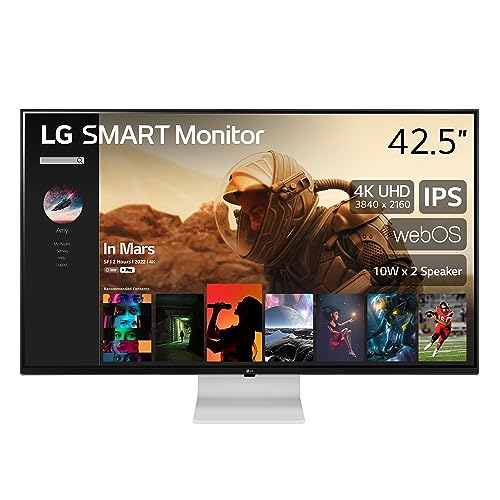
The LG 43SQ700S is the pick for people who want a screen that works on its own. It is a 43-inch 4K IPS display with webOS built in, so it runs streaming apps without a PC attached. It lists a Magic Remote, supports AirPlay 2 and screen sharing, and has USB-C, Bluetooth, and two stereo speakers. That suits a bedroom or small living space where one screen is a monitor, a streaming screen, and a casual gaming display at once. The compromise is gaming speed: its refresh rate is in the standard 60Hz class, so confirm the exact figure on the listing.
Pros
- webOS smart monitor with streaming apps built in
- Magic Remote, AirPlay 2, and screen sharing
- IPS panel with consistent color across the wide screen
- USB-C and Bluetooth for wireless accessories
Cons
- Standard refresh rate, not a high-refresh gaming panel
- Smart interface adds menus and updates to manage
- Confirm the refresh rate on the listing before buying for fast play
View the LG Smart Monitor 43SQ700S on Amazon
Who Should Choose What
Choose the Samsung Odyssey Neo G7 if you want one screen for PC gaming, console gaming, and streaming.
Choose the Gigabyte AORUS FV43U if gaming is the whole point and you need HDMI 2.1 ports for a console. Confirm current availability on the listing first.
Choose the LG 43UN700-B if you work at the screen all day, want IPS color consistency, and need to connect several devices at once.
Choose the ViewSonic VX4381-4K if your day involves watching several sources at once, or you want the strongest contrast figure in this group.
Choose the LG 43SQ700S if you want a screen that streams on its own and your gaming is casual rather than competitive.
Common Mistakes
The most common mistake is buying a 43-inch monitor for a shallow desk. Measure your desk depth and the distance from your eyes to the screen before you order. If the screen will sit closer than three feet from your face, plan on a monitor arm or a deeper desk, or step down a size.
The second mistake is expecting a 60Hz panel to feel like a 144Hz panel. If you play fast shooters and you buy a work-focused screen, the motion will feel slower, and no setting will fix it. Match the refresh rate to the games you actually play.
The third mistake is ignoring the graphics card. A 4K panel at 144Hz asks a lot of a GPU, and a weaker card will leave the extra refresh rate unused. If your card is a few years old, a 60Hz panel may be the better match.
The fourth mistake is treating HDR labels as a ranking. DisplayHDR 1000, DisplayHDR 600, and plain HDR10 describe different brightness levels, and the panel type matters as much as the badge. Judge the screen by its panel, brightness, and contrast.
The fifth mistake is forgetting the ports. A 43-inch monitor tends to collect devices, and a screen with only two HDMI ports fills up fast. Count your devices before you buy, and confirm the port list on the listing.
FAQ
Is a 43-inch monitor too big for a desk?
It depends on desk depth. On a desk 30 inches deep or more, with the screen pushed back or mounted on an arm, a 43-inch monitor works well for gaming and multitasking. On a shallow desk where the screen sits two feet from your face, the corners fall outside comfortable view and you will turn your head constantly. Measure first, and consider a monitor arm if your desk is tight.
Is 4K necessary on a 43-inch monitor?
Yes, for desk use. At 43 inches, 4K resolution gives about 103 pixels per inch, which keeps text crisp at normal viewing distance. Lower resolutions show visible pixels and soft text when you sit close, which is why every monitor in this guide runs at 3840 x 2160.
Can you play competitive games on a 43-inch monitor?
You can, but the refresh rate matters more than the size. The Samsung Neo G7 and the Gigabyte FV43U both run at 144Hz, which suits fast play. The 60Hz models in this guide are better for strategy games, single-player adventures, and work. A strong graphics card also matters, since 4K at 144Hz is demanding.
Is a 43-inch monitor a good replacement for two monitors?
For many people, yes. A single 43-inch 4K screen has the same pixel count as four 1080p screens, so you can place several windows side by side without bezels in the middle. The ViewSonic VX4381-4K goes further with a MultiPicture mode that shows four sources at once. The trade is that a very wide single screen is less flexible than two screens you can angle independently.
Do I need HDMI 2.1 on a 43-inch monitor?
HDMI 2.1 matters if you connect a current console and want 4K at a high refresh rate. The Gigabyte FV43U has two HDMI 2.1 ports, which is the strongest console connectivity in this group. For a PC connected over DisplayPort, HDMI 2.1 is less important.
Are smart monitors worth it at 43 inches?
A smart monitor is worth it if the screen will double as a television or stream without a PC. The Samsung Neo G7 and the LG 43SQ700S both have streaming apps built in, and the LG adds a Magic Remote and wireless sharing. If the screen will only ever connect to a computer, a plain monitor is simpler and avoids menus you will never open.
Conclusion
The best 43 inch monitors are not just bigger screens. They are a choice about how you use your desk: one huge canvas instead of two smaller ones, a gaming display that doubles as a television, or a workhorse that holds four windows at once. The Samsung Odyssey Neo G7 is the strongest all-around pick, with a 144Hz 4K panel, Mini LED backlighting, and smart apps built in. The Gigabyte AORUS FV43U is the dedicated gaming alternative, with DisplayHDR 1000 and HDMI 2.1 ports for consoles. The LG 43UN700-B is the calm work choice, the ViewSonic VX4381-4K is the multitasking specialist, and the LG 43SQ700S is the smart monitor for rooms where the screen does everything.
Before you buy, measure your desk, check your graphics card, and confirm the refresh rate and port list on the listing.
FAQ
Is a 43-inch monitor too big for a desk?
Is 4K necessary on a 43-inch monitor?
Can you play competitive games on a 43-inch monitor?
Is a 43-inch monitor a good replacement for two monitors?
Do I need HDMI 2.1 on a 43-inch monitor?
Are smart monitors worth it at 43 inches?
More from Amazon
Programs that pair well with the guide above. Offers and eligibility are set by Amazon and may change.
Free shipping on eligible items, Prime Video and more. Eligible new members can start with a free trial.
Start a Prime free trialAd-free music streaming. Eligible new subscribers can start with a free trial.
Try Music Unlimited freeA Prime membership for ages 18-24 with a trial period. Eligibility is set by Amazon.
See Prime for Young AdultsAudiobooks and podcasts to listen to on the go. Eligible new members can start with a free trial.
Try Audible freeAs an Amazon Associate we earn from qualifying purchases.