Our Top Picks
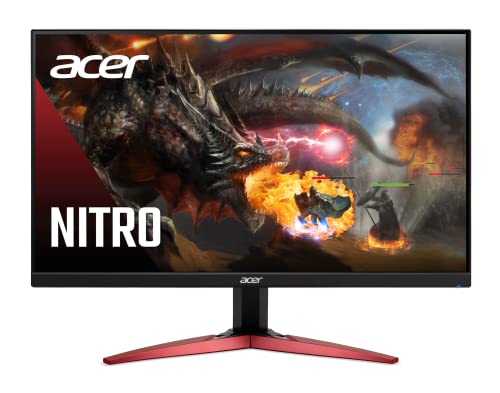 Acer Nitro 23.8in FHD 1920x1080 180Hz Gaming Monitor23.8-inch21.27 x 7.44 x 16.3 inches8.4 poundsCheck on Amazon
Disclosure: As an Amazon Associate, we earn from qualifying purchases made through links on this page, at no extra cost to you.
The 24-inch class remains the home turf of competitive gaming. Nearly every monitor in this roundup pairs a 23.8-inch panel with a 1920 x 1080 resolution, and that combination is deliberate: at this size, Full HD stays sharp enough for fine detail, while the modest pixel count lets graphics hardware push frame rates high enough to feed a 165Hz or 180Hz panel. A smaller screen also keeps the whole playfield inside a single glance, which matters in shooters and arena titles where targets appear at the edges.
This guide gathers five current models from ASUS, MSI, LG, Samsung and Acer. Four of them run at 180Hz and one at 165Hz, and all five support adaptive sync for tear-free play with both AMD and NVIDIA graphics cards. Panel technology splits between Fast IPS and Rapid IPS screens, which favor response speed and viewing angles, and VA screens, which favor contrast. Every pick below is a flat panel in the 23.8 to 24 inch class, so there are no oversized or curved screens mixed in. Read the buying notes first if you are unsure which panel type suits your games, then compare the individual models.
What to Look for in a 24-Inch Gaming Monitor
Panel type. Fast IPS and Rapid IPS panels are the default choice for fast-paced play. They combine quick pixel transitions with wide viewing angles and strong color coverage, so the image holds up when you lean in or shift in your chair. VA panels trade a little of that speed for much deeper contrast, with the Samsung and Acer picks below listing a 3000:1 static contrast figure against the 1000:1 typical of IPS. That contrast helps in dark scenes and evening play. Older TN panels still exist in this size class, but current IPS and VA models have largely closed the response gap.
Refresh rate. The step from 60Hz to 144Hz is the single biggest change most players notice, and the current crop of 24-inch models pushes further to 165Hz and 180Hz. A higher refresh figure shortens the time between frames, which makes tracking moving targets feel steadier. Your graphics card still has to produce those frames, so pair a 180Hz screen with hardware that can hold high frame rates at 1080p in the titles you play.
Response time figures. Makers quote response in different ways. GTG figures describe pixel transitions, while VRB and MPRT figures describe backlight-driven motion clarity modes. A 1ms figure from one brand is not measured the same way as a 1ms figure from another, so treat these numbers as a rough guide rather than a direct comparison. Features such as ELMB on the ASUS pick address motion blur directly and can be switched on when a game demands it.
Adaptive sync. Every monitor here supports variable refresh through FreeSync, and the ASUS and LG models also carry G-SYNC Compatible validation from NVIDIA. Adaptive sync matches the panel refresh to the frame output of the graphics card, removing tearing without the input delay that fixed sync methods add. Whichever graphics card you own, one of these sync paths will cover it.
Stand and connections. Height adjustment is worth having in this class because a small screen sits low on many desks; the ASUS and Samsung stands include it, while the MSI, LG and Acer stands are tilt-only designs that pair well with a separate arm. For connections, DisplayPort is the input that unlocks the full refresh figure on most models, and dual HDMI inputs make it easy to keep a console connected alongside a PC. Current consoles output up to 120Hz at 1080p, and all five panels here can accept that signal.
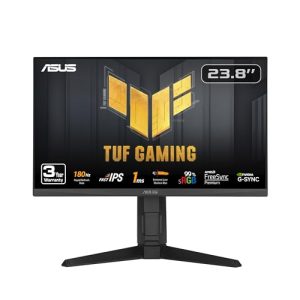
1. ASUS TUF Gaming VG249QL3A

The VG249QL3A sits at the top of this list because it combines the strongest stand in the group with a well-rounded panel. Its 23.8-inch Fast IPS screen runs at 180Hz with a listed 1ms GTG response, and ASUS adds ELMB, its backlight strobing mode for clearer motion, alongside Variable Overdrive for tuning pixel transitions. Color coverage is listed at 99% sRGB, and the panel carries both FreeSync Premium and G-SYNC Compatible support, so it pairs cleanly with either graphics card family.
The stand is the differentiator. Where most rivals in this class offer tilt alone, the VG249QL3A adjusts for height, which makes it easier to set the screen at eye level without stacking it on books or a riser. Built-in speakers are included for call audio and casual video, and the rear panel provides DisplayPort, two HDMI inputs and a headphone jack, so a PC and a console can stay plugged in at the same time. ASUS also lists GamePlus on-screen aids and Shadow Boost, which lifts dark areas of a scene so opponents are easier to pick out of shadow. The listing carries a three-year warranty, the longest coverage mentioned among these five. For players who want one screen that handles competitive play, console sessions and everyday desktop work, this is the most complete package in the roundup.
Specs
- Panel: 23.8-inch (24-inch class) Fast IPS, flat
- Resolution: 1920 x 1080 (Full HD)
- Refresh rate: 180Hz
- Response time: 1ms (GTG), ELMB motion clarity mode
- Adaptive sync: FreeSync Premium, G-SYNC Compatible
- Color: 99% sRGB
- Stand: height adjustable, tilt
- Connections: DisplayPort, 2 x HDMI, headphone jack, built-in speakers
See the ASUS TUF Gaming VG249QL3A on Amazon
2. MSI G244F E2

MSI builds the G244F E2 around its Rapid IPS panel, a variant tuned for fast transitions. The listed figures are a 180Hz refresh rate and a 1ms GTG response, with Adaptive-Sync covering a 48Hz to 180Hz range so the panel stays smooth when frame rates dip in demanding scenes. Brightness is listed at 300 nits with a 1000:1 contrast figure, and MSI quotes a wide color gamut for this model, which gives games a more saturated look than older panels in this class.
The design follows the frameless style MSI uses across its gaming line, with slim bezels that suit a two-screen desk. The stand adjusts for tilt only, so plan on a VESA arm if you need height control. MSI includes its Night Vision tuning, which brightens dark regions of the image, plus anti-flicker and reduced blue light modes for longer sessions. Connectivity covers DisplayPort and HDMI, and both inputs accept the full 180Hz at 1080p according to the maker, which is convenient if your graphics card has limited DisplayPort outputs. Console players are covered as well, since the panel accepts a 120Hz signal at Full HD. If your priority is a fast IPS screen with strong color for mixed gaming and media use, the G244F E2 is a direct rival to the ASUS above, separated mainly by the stand.
Specs
- Panel: 23.8-inch Rapid IPS, flat
- Resolution: 1920 x 1080 (Full HD)
- Refresh rate: 180Hz
- Response time: 1ms (GTG)
- Adaptive sync: Adaptive-Sync (48Hz to 180Hz range)
- Brightness and contrast: 300 nits, 1000:1
- Stand: tilt adjustable, VESA mount support
- Connections: DisplayPort, HDMI
See the MSI G244F E2 on Amazon
3. LG UltraGear 24GS60F-B
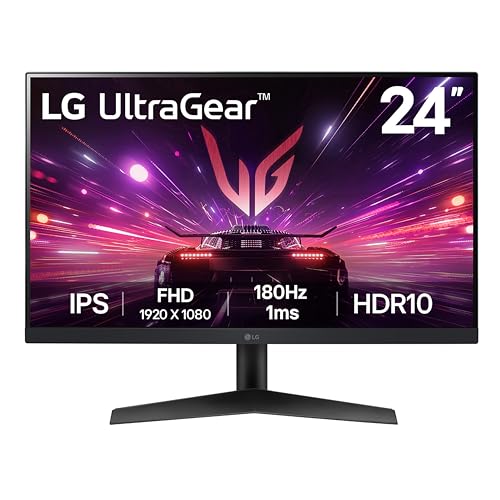
LG’s UltraGear line is a fixture of this size class, and the 24GS60F-B is its current 180Hz entry. The 24-inch IPS panel runs at 1920 x 1080 with a listed 1ms GtG response, HDR10 support and 99% sRGB coverage. Both sync camps are covered: the monitor is NVIDIA G-SYNC Compatible and supports AMD FreeSync, so tearing stays away regardless of your graphics card. LG rates the panel for a borderless design on three sides, which keeps the focus on the game and makes multi-screen setups look tidy.
LG loads this model with its usual gaming aids. Dynamic Action Sync reduces input lag, Black Stabilizer lifts detail out of dark scenes, and a crosshair overlay plus an FPS counter are available from the on-screen menu. The stand is a tilt-only design, and the rear offers HDMI, DisplayPort and a headphone output. One point to note for desk planning: this is a fixed-height screen, so a monitor arm or a riser helps if you like your display raised. Taken as a whole, the 24GS60F-B is the pick for players who value LG’s color handling and menu features and who already have their screen height sorted through their desk setup.
Specs
- Panel: 24-inch IPS, flat, borderless design
- Resolution: 1920 x 1080 (Full HD)
- Refresh rate: 180Hz
- Response time: 1ms (GtG)
- Adaptive sync: G-SYNC Compatible, AMD FreeSync
- Color and HDR: 99% sRGB, HDR10
- Stand: tilt adjustable
- Connections: HDMI, DisplayPort, headphone output
See the LG UltraGear 24GS60F-B on Amazon
4. Samsung Odyssey G3 (G30D) LS24DG302ENXZA

The Odyssey G3 in its G30D form is the contrast pick of this group. Samsung fits a 24-inch VA panel with a listed 3000:1 static contrast figure, triple the number quoted for the IPS models here, and that shows in darker games where shadow detail matters. The panel runs at 180Hz with a 1ms MPRT response figure, supports HDR10 and covers 95% of the sRGB gamut according to the maker spec sheet. AMD FreeSync handles tear prevention.
Samsung adds its gaming extras: Black Equalizer for lifting dark areas, a Virtual Aim Point crosshair and a refresh rate optimizer, along with Eye Saver Mode and flicker-free operation for long sessions. The ergonomic stand is a strong point, with height adjustment included, which puts it level with the ASUS for desk comfort and ahead of the tilt-only designs. Inputs are a DisplayPort 1.4 and an HDMI 2.0, enough for a PC and one console. The trade-off for the VA panel is viewing angles that shift color more than IPS when seen from the side, which matters for shared viewing but rarely for a solo desk setup. For players whose games lean dark and atmospheric, or who play in a dim room, this is the natural choice of the five.
Specs
- Panel: 24-inch VA, flat
- Resolution: 1920 x 1080 (Full HD)
- Refresh rate: 180Hz
- Response time: 1ms (MPRT)
- Adaptive sync: AMD FreeSync
- Contrast and HDR: 3000:1 static contrast, HDR10, 95% sRGB
- Stand: ergonomic, height adjustable
- Connections: DisplayPort 1.4, HDMI 2.0, headphone output
See the Samsung Odyssey G3 (G30D) on Amazon
5. Acer Nitro KG241Y Sbiip
The Acer Nitro KG241Y Sbiip is the second VA option in this roundup and the only 165Hz model, a figure that still sits far beyond what a 60Hz screen can show. Its 23.8-inch VA panel delivers the deeper blacks this panel family is known for, and Acer quotes a 1ms VRB response figure, with VRB being its backlight-driven motion clarity mode. FreeSync Premium support keeps frame delivery smooth with AMD cards and with compatible NVIDIA setups.
Acer wraps the panel in its ZeroFrame design, so the visible border is minimal on three sides. The port selection is generous for the class: one DisplayPort 1.2 and two HDMI 2.0 inputs, which makes this a good fit for a desk that hosts a PC plus two consoles or a streaming box. The stand tilts, and the cabinet accepts a VESA mount for arm users. Acer’s VisionCare features, including flicker-free backlighting, aim to keep longer sessions comfortable. Color saturation is listed at 72% NTSC, narrower than the IPS picks above, so this screen suits players who put contrast and input count ahead of wide-gamut color. As a second monitor or a console-focused screen, it covers a lot of ground.
Specs
- Panel: 23.8-inch VA, flat, ZeroFrame design
- Resolution: 1920 x 1080 (Full HD)
- Refresh rate: 165Hz
- Response time: 1ms (VRB)
- Adaptive sync: FreeSync Premium
- Color: 72% NTSC
- Stand: tilt adjustable, VESA mount support
- Connections: DisplayPort 1.2, 2 x HDMI 2.0
See the Acer Nitro KG241Y Sbiip on Amazon
How the Five Picks Compare
Speed is close across the group. The ASUS, MSI, LG and Samsung panels all run at 180Hz, while the Acer follows at 165Hz, and in practice the gap between those two figures is hard to spot outside of frame counters. Panel choice is the bigger divide. The three IPS models, from ASUS, MSI and LG, hold color better at an angle and post GTG response figures, which suits bright rooms and shared desks. The Samsung and Acer VA panels triple the contrast figure, which suits dark rooms and story-driven games.
Ergonomics split the field as well. The ASUS VG249QL3A and Samsung Odyssey G3 include height adjustment on the stand, while the MSI, LG and Acer rely on tilt, so arm users will level that difference with a VESA mount. For connections, the ASUS and Acer offer two HDMI inputs for multi-device desks, while the MSI and LG keep things simpler. Any of the five will serve competitive play well; the decision comes down to panel preference, stand needs and how many devices you keep connected.
Frequently Asked Questions
Is a 24-inch monitor big enough for gaming?
For desk play at a typical viewing distance of two to three feet, yes. A 24-inch screen keeps the full image in view without head movement, which is why this size dominates tournament setups. It suits competitive titles and single-screen desks best; players who want a more cinematic view for open-world games often step up to a larger size, but they give up some of the compactness and frame rate headroom that 1080p at this size provides.
Why do these monitors use 1080p instead of 1440p?
At 23.8 inches, 1920 x 1080 gives a pixel density that still looks clean at desk distance, and the lower pixel count lets mid-range graphics cards sustain the high frame rates these panels are built for. A 1440p screen at this size would demand far more graphics power to hold 180 frames per second, which defeats the purpose of a high-refresh esports display. Resolution jumps make more sense at 27 inches and above.
Can these monitors run at 120Hz with a PlayStation 5 or Xbox Series X?
Yes. Current consoles output up to 120Hz at 1080p, and all five monitors here accept high-refresh input over HDMI as listed by their makers. The panel will simply run at the rate the console sends, and adaptive sync still applies where the console and game support it. Check the maker listing for your chosen model to confirm the exact HDMI refresh support before ordering.
Do I need DisplayPort to reach 180Hz?
On most of these models, DisplayPort is the connection the maker lists for the full 180Hz at 1080p, and it is the safest choice for PC use. MSI lists both HDMI and DisplayPort at up to 180Hz for the G244F E2, while other models may cap HDMI lower. When you set up your screen, open the display settings on your PC and confirm the refresh rate is set to the maximum the panel offers, since systems often default to 60Hz on a new connection.
Final Word
The best 24 gaming monitors share a simple formula: a 23.8-inch 1080p panel, a refresh rate of 165Hz or more and adaptive sync. The ASUS TUF Gaming VG249QL3A leads this group on the strength of its height-adjustable stand and complete feature set. The MSI G244F E2 and LG UltraGear 24GS60F-B answer with fast IPS panels and strong color, while the Samsung Odyssey G3 (G30D) and Acer Nitro KG241Y Sbiip bring VA contrast for darker rooms and games. Match the panel type to your lighting and your games, confirm your desk setup against the stand on offer, and any of these five will deliver smooth, responsive play.
FAQ
Is a 24-inch monitor big enough for gaming?
Why do these monitors use 1080p instead of 1440p?
Can these monitors run at 120Hz with a PlayStation 5 or Xbox Series X?
Do I need DisplayPort to reach 180Hz?
More from Amazon
Programs that pair well with the guide above. Offers and eligibility are set by Amazon and may change.
Free shipping on eligible items, Prime Video and more. Eligible new members can start with a free trial.
Start a Prime free trialAd-free music streaming. Eligible new subscribers can start with a free trial.
Try Music Unlimited freeA Prime membership for ages 18-24 with a trial period. Eligibility is set by Amazon.
See Prime for Young AdultsAudiobooks and podcasts to listen to on the go. Eligible new members can start with a free trial.
Try Audible freeAs an Amazon Associate we earn from qualifying purchases.