The best joystick mounts for desk setups put a flight stick or HOTAS at a comfortable height without turning your work desk into a permanent cockpit. Our overall choice is the MONSTERTECH Joystick / HOTAS Desk Mount for its controller-specific plate choices, adjustable vertical position, and quick-release clamp. For Thrustmaster Airbus and T.16000M equipment, the TM Flying Clamp offers simpler manufacturer-defined compatibility. The right purchase depends less on the word “universal” than on your exact controller base, desk edge, leg clearance, and whether you need one mount or a matched pair.
Quick verdict: the mount to buy for your setup
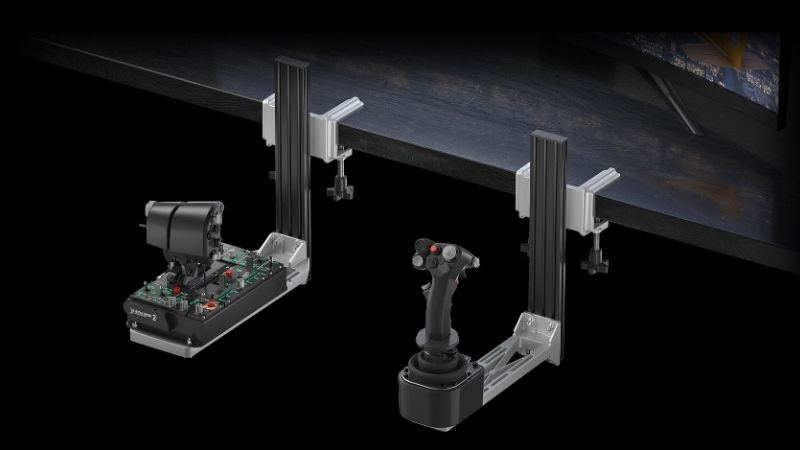
Best overall modular option — MONSTERTECH Joystick / HOTAS Desk Mount. It uses an aluminum-profile construction and a selectable device-specific plate; one unit holds one stick or throttle, so a conventional two-piece HOTAS requires two units. Its BESSEY quick-release system is useful if the same desk becomes a workspace after flying. Check the current US landed cost rather than treating the euro list price as a domestic quote.
Best official Thrustmaster fit — TM Flying Clamp. A good match for the TCA Airbus range, T.16000M FCS and TWCS, with a stated 15–45 mm desktop thickness range. It is not a universal plate for every stick or a recommended shortcut for a heavy extension base.
Best compact VKB match — UCM-S for Gladiator (US). The US-specific UCM-S package includes the Gladiator adapter and universal plate. The US listing observed was marked sold out; treat it as a compatibility reference and recheck inventory before purchase.
Best two-station value to investigate — 2-Pack J-PEIN HOTAS Mount. A manufacturer-listed pair removes the common mistake of ordering one clamp for a stick-and-throttle system. Check its plate-hole alignment and desk-edge space against your particular hardware.
Joystick desk mount comparison
| Product | Verified construction or fit | Most useful for | US price / listing observed October 29, 2026 | Availability note | Main limitation |
|---|---|---|---|---|---|
| MONSTERTECH Joystick / HOTAS Desk Mount | Aluminum profile, selected controller plate; 0.5–10 cm tabletop range | Premium stick or throttle on a removable clamp | US delivered price not verified; maker lists euro pricing | Seller configuration page available; US stock unverified | One unit per controller; plate selection matters |
| Thrustmaster TM Flying Clamp | Metal dual-screw clamp; 15–45 mm desk thickness | TCA Airbus, T.16000M FCS, TWCS | $89.99 at Thrustmaster US eShop | US eShop showed in stock | Not intended for unrelated bases |
| VKB UCM-S for Gladiator (US) | Short VKB bracket with Gladiator adapter and universal plate | Gladiator/NXT/EVO ergonomics | $109 at VKBSIM US | US listing showed sold out | Ecosystem-specific adapter; check restock |
| 2-Pack J-PEIN HOTAS Mount | Pair of multipurpose desk-mount brackets | Sim pilots needing both stick and throttle | $105 at PEIN Gear shop | Add-to-cart listing observed; fulfillment not independently verified | Confirm exact bolt patterns and hardware |
| Hikig 2-Set HOTAS Desk Mount | Two adjustable desk-mounted brackets; multi-device compatibility list | Lower-cost two-controller setup | $96.49 at RetailMarket US listing | Listing showed in stock | Seller specifications and after-sales support vary |
| MONSTERTECH Desk Mount Long Version | Extended profile for joystick extensions; up to 38 cm vertical adjustment | Center-stick extensions | US delivered price not verified; maker lists euro pricing | Configurable maker page; US stock unverified | More lever load and knee-space demand |
Prices are page observations, not tax-inclusive checkout quotes; international shipping, tariffs, and third-party stock can change. A manufacturer model name and a retailer’s similarly named bundle do not guarantee identical contents.
How we selected these mounts
We prioritized documented physical mounts rather than controller bundles or generic “flight sim accessories.” Manufacturer fit lists, included hardware, desk clamping ranges, the number of mounts supplied, and the available positioning adjustments matter more than marketing claims about how realistic flying feels. MONSTERTECH, VKBSIM, Thrustmaster, and PEIN describe their own hardware. For Hikig, availability and dimensions are retailer-supplied rather than independently measured. Published specs help screen options but do not constitute our own rigidity, desk-damage, or vibration tests.
A useful review also distinguishes the controller’s platform compatibility from its mount’s physical compatibility. A stand that fits a stick base does not make that USB controller work on PlayStation or Xbox. Conversely, nearly any supported PC flight simulator can benefit from more ergonomic hardware placement once the game already recognizes the stick. If your desk has a rear apron, drawer, cable tray, curved edge, or glass top, fit requires more scrutiny than a simple thickness figure.
Product reviews: the six mounts worth comparing
MONSTERTECH Joystick / HOTAS Desk Mount — best overall modular pick
MONSTERTECH’s standard desk mount is the safest recommendation when the controller may change over time. Its aluminum extrusion supports adjustable mounting height, while the buyer selects a compatible plate for a particular stick or throttle. Officially listed supported families include VKB Gladiator and Gunfighter, multiple Thrustmaster controllers, Logitech/Saitek, VIRPIL, and WINCTRL/Winwing devices. That breadth is a menu of specific configurations, not a promise that any one included plate fits them all. Ordering a new plate can be more economical than replacing the full mount when the controller changes.
The maker specifies a BESSEY quick-release clamp with a 0.5–10 cm tabletop thickness range and a grippy protective contact surface. The quick-release approach matters for a dual-purpose office desk: detaching a stick between sessions is faster than removing conventional through-bolts. It also lets you place two separate modules nearer the elbows instead of leaving a full HOTAS above the keyboard. However, neither a clamp nor its high advertised force rating can compensate for a weak particleboard edge, a hollow desktop, or a wobbly height-adjustable desk at full extension.
Advantages: documented, device-specific plates; fine vertical positioning; fast removal; accessory ecosystem. Trade-offs: normally priced per single controller, extra plate choices can complicate the order, and delivered US price requires checkout verification. Buy for: a serious mixed-brand PC setup on a sturdy desk. Skip for: a light temporary HOTAS where two premium clamps would cost more than the stick system. Measure knee space with the controller moved down before ordering.
Thrustmaster TM Flying Clamp — best for supported TCA and T.16000M hardware
Thrustmaster’s TM Flying Clamp narrows the fit question in a helpful way. Its official support includes the TCA Sidestick Airbus Edition, Airbus quadrant and add-on, T.16000M FCS and TWCS throttle. The manufacturer specifies a metal structure, dual clamping screws, desk thickness of 15–45 mm, and adjustable height and depth. The listed unit is about 220 mm wide, 390 mm deep, and 233 mm high. For pilots who already own one of those compatible products, official bolt placement reduces the guesswork of a multipurpose plate.
This mount is appealing in a small office because the two clamp wheels and non-slip contact points make removal relatively straightforward. You still have to confirm that the front of the desk has a clear overhang and that the lower mounting assembly will not strike a drawer or your knees. The rather substantial bracket also occupies more front-to-back space than its photographs may suggest. If you fly with a centered stick and keyboard directly behind it, place the mount in a cardboard mockup before committing.
Advantages: clearly defined accessory fit, published desk-thickness range, maker-backed instructions, US eShop listing. Trade-offs: a focused Thrustmaster compatibility list rather than true cross-brand support, and only one device can occupy a given configured mount at a time. Buy for: TCA Airbus or T.16000M pilots who want low-risk fit selection. Skip for: Logitech X56, VKB Gunfighter or other bases not on the approved list. The similarly named TM Flying Desk Mount is a different accessory primarily for the TCA Boeing throttle quadrant; do not substitute it.
VKB UCM-S for Gladiator (US) — best matching VKB Gladiator bracket
The VKBSIM US product labeled UCM-S for Gladiator includes a short UCM assembly with a Gladiator adapter plate and a universal mounting plate. VKB’s UCM design separates the controller support from the desk surface, which can give the Gladiator an ergonomic position alongside the keyboard. It is especially relevant for a VKB-only cockpit where the user values matching fit over third-party interchangeability. The US listing distinguishes domestic-shipped goods from products that may be subject to import fees, so the selected store variant matters.
The Gladiator adapter is the decisive detail, not the letters UCM-S alone. VKB also sells versions aimed at Gunfighter and STECS units; buying the wrong one can result in awkward fit or require an accessory plate. The short format is a logical starting point for an unextended Gladiator. If you plan a long center-stick extension later, determine whether a long mount and different support geometry are more appropriate. Check controls at maximum deflection to ensure they do not hit the desk edge.
Advantages: named manufacturer match, modular UCM accessories, dedicated short-format geometry. Trade-offs: not a universal stick plate, accessories are not all included, and the particular US listing viewed showed sold out at $109. Buy for: a Gladiator owner once the correct US SKU is actually purchasable. Skip for: a mixed-brand HOTAS without a verified corresponding plate. Never confuse the Australian store’s dollar prices with a US quote; currency and regional inventory differ.
2-Pack J-PEIN HOTAS Mount — best packaged pair for a complete HOTAS
PEIN Gear lists a 2-Pack J-PEIN HOTAS Mount, with a manufacturer’s US-dollar price and an included multipurpose-bracket concept. The two-pack positioning solves a surprisingly common shopping error: pilots see a desk-mount photograph showing a joystick and throttle but discover that the advertised price covers a single unit. A pair lets the stick and throttle sit independently on the desk edge; moving one does not automatically change the other. This can suit an entry-to-midrange desktop setup where both components need to be removed each evening.
PEIN’s product descriptions name several controller families, including Thrustmaster T.16000M/TWCS, Warthog and Logitech X55/X56 examples. Treat broad compatibility claims as a screening list, not a hole-pattern drawing. Ask whether the kit supplies the necessary bolts, nuts, and alternative brackets for your precise revision. If your desk has a very thick beveled edge or an apron, measure the clamp’s open throat rather than assuming that the mount’s overall vertical adjustability guarantees fit. Check that both mounts leave hand clearance from the keyboard and chair armrests.
Advantages: a clearly identified two-mount purchase, adjustable positioning, one-order convenience. Trade-offs: less extensive published dimensional documentation than specialist premium mounts, and US delivered costs and support turnaround need checkout verification. Buy for: a pilot buying mounts for both controls at once. Skip for: a heavy force-feedback flight base or long center-stick extension without a load-appropriate approved configuration. The maker’s online listing was an orderable product page, not evidence of a delivered US order or performance test.
Hikig 2-Set HOTAS Desk Mount — best alternative two-piece value
The Hikig two-set kit appears in US retail listings with compatibility examples such as Logitech X52/X56, Thrustmaster T-Flight, T.16000M and TCA, and other flight devices. A US retail page advertises adjustable positions and lists the two-mount product, while another Newegg marketplace page charges materially more for a similar title. This difference is precisely why a roundup should identify the seller and date rather than announce one permanent “street price.” A lower price is valuable only if the shipped plates and hardware match your controllers.
A two-piece kit can make a conventional stick-left-throttle or right-stick-left-throttle layout less intimidating than building from individual brackets. The downside is documentation quality: marketplace specifications can be reused across revisions or populated from broad listing text. Unverified torque or “universal” claims should not be treated as engineering load ratings. The safest path is to match hole spacing from the actual base, inspect retailer return terms, and confirm edge clearance using photos showing the complete clamp, not just the vertical post.
Advantages: two supports in one listing, multiple named consumer HOTAS families, budget-oriented retail options. Trade-offs: mixed seller prices, variable fulfillment, and fewer authoritative installation details than Thrustmaster or MONSTERTECH. Buy for: a budget setup where easy returns and physical fit are verified. Skip for: expensive extended sticks or desks you cannot risk damaging. If the seller cannot confirm the needed mounting plate, paying a little more for explicit model support is often the economical decision.
MONSTERTECH Desk Mount Long Version — best for extended center sticks
The Long Version is a separate SKU family intended for joysticks with an extension, not simply a cosmetic alternative to the standard clamp. Its maker describes a longer profile with maximum vertical adjustment around 38 cm. That extra reach can put an extended center stick between the knees while the desk edge remains above the grip. For helicopter simulation or center-stick aircraft ergonomics, the geometry may matter more than a slightly cheaper standard mount.
A longer lever also magnifies imperfect mounting. The desk must resist the pull of an off-center grip, and the operator needs a comfortable exit path from the chair. A low stick can conflict with chair upholstery, a center pedestal, the underside of the desktop, or a cable tray. Measure the extended base and grip at full pitch travel, not just the at-rest position. Check the variant’s mounting plate and whether a support for a throttle needs a separate, shorter unit.
Advantages: purpose-built extension geometry and MONSTERTECH plate ecosystem. Trade-offs: occupies more below-desk space, does not automatically make a desk stronger, and costs more once the correct plate and US shipping are included. Buy for: a real extended center-stick configuration on a structurally sound desk. Skip for: basic desktop sidesticks where the longer drop adds complexity without ergonomic benefit.
Buying guide: six checks that prevent a bad mount purchase
Match the exact stick base before looking at price
Write down the controller’s full name and hardware revision, not only its brand. A VKB Gladiator NXT EVO, Gunfighter, TCA Airbus sidestick, Warthog grip/base, and Logitech X56 each create different mounting constraints. The grip may share a connector across several bases while the base footprint is completely different. Look for a manufacturer plate chart, template, or support confirmation. A mount that supports one Thrustmaster stick does not support every Thrustmaster device. If you swap between two bases, price the extra plate and bolts before comparing total cost.
Measure the desktop and obstruction below it
Record thickness at the actual front or side clamping location, including any structural lip, not in an unobstructed center region. Then measure depth before encountering a desk apron, leg frame, cable tray, drawers, or sit-stand crossbar. Most clamps require space both above and beneath the surface. A published 15–45 mm range addresses thickness but not the throat’s ability to get around a lip. Avoid loading unsupported glass, fragile hollow-core furniture, or damaged laminate edges. Protective pads help limit marks but are not proof against crushing or delamination.
Choose one mount or two deliberately
A HOTAS consists of at least two separate devices in the classic arrangement. Listings frequently price an individual clamp; product photos can show a complete cockpit that is not included. Compare a two-pack against the price of two premium single units. If you need rudder pedals, a keyboard bridge, mouse platform, center extension, or quick-disconnect cables, include those accessories in a realistic total. A beautiful joystick mount has little value if the throttle remains uncomfortable on the desktop.
Set stick position around the elbow and chair
The ideal position is not the lowest possible mounting point. Sit in your normal chair and let your shoulders relax. Elbows should remain near the torso without the wrist being bent upward at the stick’s neutral position. An elevated desktop base often forces the arm to reach; a mount too low can make the grip hit the chair and knees. Test lateral clearance, full pitch-and-roll throw, and any planned trim or desk-mode button use with a temporary mockup. Adjust the chair first, then fine-tune mount drop rather than compensating with awkward posture.
Think about removal, desk vibration, and cables
A quick-release clamp is valuable for a work-and-play desk, but a quick release is not automatically vibration-free. Avoid pinching USB cables in the clamp and leave service loops for full axis travel. During a sit-stand height change, verify that the cable can move without pulling the controller. If the table sways at standing height, a premium mount may still transmit that motion. Two large clamps can also compete with keyboard trays and monitor arms along the same edge.
Compare US checkout total, not mixed currencies
Thrustmaster and VKBSIM publish US-dollar product pages; other specialist mounts may display euros, Australian dollars, or global shipping conditions. An online euro amount without US tax, shipping and duty is not a comparable domestic price. Even a US marketplace listing can change seller or bundled hardware. Prioritize correct plate, returns, warranty handling and replacement parts. Where a selected variant showed sold out, set a restock reminder rather than paying a high third-party markup on an unverified listing.
Installing and checking a desk-mounted joystick
- Disconnect the controller and clear the desk edge. Inspect the surface for looseness, splits and any protected-glass restrictions.
- Assemble the correct model plate using the maker’s supplied fastener lengths. Do not substitute long bolts that could contact a controller PCB.
- Attach the empty mount to the desk and tighten per the maker’s instructions; do not overtighten soft desktop surfaces.
- Fit the controller, then sweep the entire pitch, roll, twist and throttle range while seated. Confirm that grip, knees and chair arms never collide.
- Route USB and power cables with slack, reconnect the controller, and use the Windows game-controller tester or the maker’s configuration utility to confirm all axes move correctly.
- After an initial session, inspect fasteners and clamp contact points. If movement or desk damage appears, stop using the mount until the underlying cause is corrected.
The physical bracket has no firmware of its own. If the game cannot see the joystick after installation, troubleshoot the USB connection and in-game bindings separately instead of blaming the mechanical clamp.
FAQ
Do joystick desk mounts improve accuracy?
They can improve repeatability and comfort by preventing the base from sliding and lowering an overly high grip. That is an ergonomic inference, not evidence of a measured improvement in aim or landing scores. Pilot technique, controller calibration, springs and simulation settings remain important.
Can one mount hold both joystick and throttle?
Most of these individual clamps support one device at a time. A two-pack contains two supports, while some manufacturers offer special multi-device plates. Read the actual in-box list before ordering; a marketing photo with two controllers is not a promise of two mounts.
Do I need to drill holes in the desk?
The products compared here are clamp-style solutions and ordinarily do not require desktop drilling. You may still need to bolt the controller to its mounting plate. Screws must match the device manufacturer’s mounting specification and should not penetrate the desktop.
Are these mounts compatible with Xbox or PlayStation?
A passive metal mount does not determine console compatibility. It may physically hold the controller, but the controller still needs appropriate native console support. Do not infer console functionality from a listing that says “PC flight simulator compatible.”
Will a mount damage a wooden or standing desk?
Pads reduce cosmetic abrasion but cannot eliminate concentrated compression or flex. Solid structural edges are preferable; weak particleboard, hollow-core boards, thick chamfers and glass require particular caution. Lower the desk to a stable height before deciding a mount is rigid enough.
What is the best choice for a long joystick extension?
Start with the MONSTERTECH Long Version or another mount specifically rated for the complete extended base and lever arrangement. The standard mounting plate alone does not establish suitable leverage or clearance. Confirm dimensions with the maker before applying high forces.
Final thoughts
For a mixed-brand flight setup on a sturdy shared desk, the MONSTERTECH standard desk mount offers the strongest verified plate-selection and quick-removal story. A Thrustmaster TCA Airbus or T.16000M owner has a more straightforward manufacturer-approved option in the TM Flying Clamp. Two-device pilots should compare the complete J-PEIN and Hikig kits, while Gladiator owners can monitor the VKB UCM-S listing for a legitimate restock. Buy around the exact base, desktop and intended joystick height—not around a generic claim of universal compatibility.