The best triple monitor mounts for racing hold three screens in a repeatable wraparound position without making each adjustment a balancing act. Our overall recommendation is the Next Level Racing Elite Freestanding Triple Monitor Stand for a permanent cockpit using three 21- to 43-inch displays. The Trak Racer 22- to 32-inch freestanding stand better targets common triple-27 or triple-32 builds, while Sim-Lab’s Freestanding Vario design emphasizes fine alignment. Before ordering, verify actual screen weight, VESA holes, the total room footprint, and whether a product is a complete three-screen stand rather than an add-on kit.
Quick verdict: three screens require more than three VESA plates
Best overall complete rig stand — Next Level Racing Elite Freestanding Triple Monitor Stand. The manufacturer specifies support for three 21–43-inch screens and adjustable aluminum-profile arms. A full freestanding frame keeps monitors mechanically separate from force-feedback and motion transmitted through the cockpit.
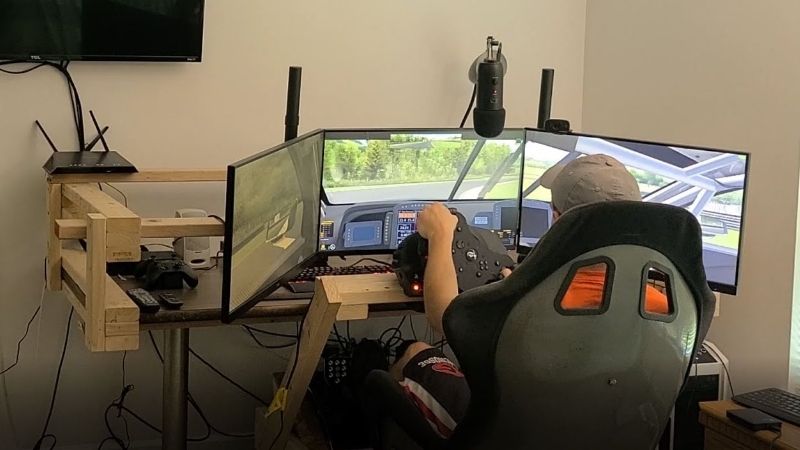
Best for typical 27- or 32-inch triples — Trak Racer Freestanding Triple Monitor Stand, 22–32-inch version. Its advertised display range matches common sim-racing monitors, and a US storefront provides a recognizable purchase path. It is not the same SKU as Trak Racer’s 32–45-inch variant.
Best for fine alignment — Sim-Lab Freestanding Vario Monitor Mount. The VARIO/VESA fine-adjustment concept and anti-sag pivot design address the persistent problem of uneven bezel joins. Verify the chosen Type/configuration and US shipping rather than equating a base euro price with a delivered US kit.
Best for larger or multifunction screens — Next Level Racing Round Tube Freestanding Triple Monitor Stand. It supports three displays up to 43 inches and uses broad VESA support with fine adjusters, but its steel tube geometry and deep footprint may be less convenient in a cramped room.
Triple monitor stand comparison for sim racing
| Product | Manufacturer-supported display scope | Mounting design / VESA | Observed price or US context, October 29, 2026 | Availability note | Key limitation |
|---|---|---|---|---|---|
| Next Level Racing Elite Freestanding Triple Stand (NLR-E036) | Three 21–43-inch or one 65-inch screen | Extruded aluminum; VESA 75×75 to 200×200 mm family | $499 at Next Level Racing; $499.99 B&H special order | US manufacturer product; B&H special order | Wide footprint and meaningful assembly time |
| Trak Racer Freestanding Triple Stand 22–32-inch | Three 22–32-inch displays | Freestanding aluminum frame; confirm selected VESA kit | $359 on Trak Racer US collection | Product listed for purchase; final stock unverified | Not the larger 32–45-inch model |
| Trak Racer Freestanding Triple Stand 32–45-inch | Three 32–45-inch displays | Wider freestanding triple configuration | $359 on Trak Racer US collection | Product listed for purchase; final stock unverified | Too large to assume small-room suitability |
| Sim-Lab Freestanding Vario Monitor Mount | Up to three monitors; confirm selected Type and display limits | VARIO-VESA fine alignment and sag-resistant pivot | €269.78 shown on regional site; US delivered cost unverified | Regional listing showed in stock | Configuration and import/shipping complexity |
| Next Level Racing Round Tube Freestanding Stand (NLR-R011) | Three displays up to 43 inches | 50 mm steel tubes; wide 75×75 to 800×400 mm VESA range | US manufacturer store; current USD total unverified | Manufacturer US product page available | Larger front-to-back depth; verify room dimensions |
| Advanced SimRacing Freestanding Triple Stand Up to 32-inch | Three displays up to 32 inches | Aluminum profile; standard 75×75/100×100 mm VESA plates | $469.99 CAD on maker site, not USD | Maker lists production lead time | Specific monitor screws not included |
| Advanced SimRacing Freestanding Triple Stand Up to 43-inch | Three displays up to 43 inches | Larger aluminum frame; standard 75×75/100×100 mm plates | $649.99 CAD on maker site, not USD | Maker lists production lead time | Oversized floor footprint; optional adjusters cost extra |
A “triple add-on” is not a complete stand. In particular, Next Level Racing’s Elite Triple Monitor Add-on requires its corresponding Elite Freestanding Single Monitor Stand, and Trak Racer sells add-on arms separately from complete freestanding frames. Confirm the manufacturer’s exact SKU and in-box parts list.
How we selected these seven monitor stands
The shortlist favors dedicated, named sim-racing stands from manufacturers publishing meaningful dimensions, screen-size guidance, VESA coverage, or installation information. We treat manufacturer-supported maximum screen sizes as product-family guidance, not as substitutes for individual screen weight and mounting-hole compatibility. Display size is measured diagonally; a curved or ultrawide monitor can occupy a different physical width than a conventional 16:9 display at the same diagonal. Without a verified monitor-specific fit calculation, maximum diagonal alone cannot settle the question.
We also weighed stand architecture. A freestanding frame is easier to isolate from steering-wheel and pedal vibrations than a cockpit-mounted frame. Adjustable aluminum-profile systems allow broad lateral repositioning, while fine VESA adjusters help reduce stepped bezels or a drooping side screen. A steel-tube system can be attractive for larger VESA patterns. None of these design differences proves measured vibration damping, sag-free operation under every load, or improved lap times. We have not physically tested these seven SKUs or measured monitor movement. Check seller inventory and delivered prices again at checkout.
In-depth reviews of the best triple-monitor mounts
Next Level Racing Elite Freestanding Triple Monitor Stand — best overall
The Elite Freestanding Triple Monitor Stand, commonly identified by the black NLR-E036 variant, is the most complete all-around recommendation for a serious three-screen cockpit. Next Level Racing describes 6063 aluminum extrusions, three 21–43-inch display support, height/width/angle adjustment and VESA plates covering common 75×75 through 200×200 mm patterns. A spirit level, hardware and cable-management components are included. The meaningful advantage is not merely strength: the frame can be positioned independently of a steering seat, allowing the center screen to move toward the wheel without transferring as much cockpit vibration through a direct structural connection.
For a typical three-32-inch monitor build, independent placement gives room to set the desired screen distance, side-screen angle and center height before the cockpit is finalized. However, the manufacturer’s assembled dimensions and independent retailer data indicate a substantial wide stand. A shopper should measure the room with the monitors rotated into their intended wraparound angle, including room for feet, cable bends and standing access. Do not use the maximum assembled width alone as the predicted final footprint: arm angle changes it considerably. Heavy curved monitors also warrant separate load and clearance checks.
Advantages: known complete three-screen package, maker documentation, common VESA sizes, adjustability and replacement-part ecosystem. Trade-offs: $499-class premium price, assembly complexity, and US retailers may show special-order status. Best for: a dedicated aluminum-profile sim rig with three mainstream monitors. Not for: a narrow desk corner where the arms cannot spread or a monitor with a mounting pattern outside the included range. Do not confuse NLR-E036 with the much cheaper NLR-E039 upgrade kit.
Trak Racer Freestanding Triple Stand 22–32-inch — best for conventional triples
Trak Racer lists a specifically named 22–32-inch freestanding triple monitor stand on its US shop. That screen-size range is practically useful: many sim racers settle on three similar 27-inch or 32-inch panels, and a frame sized for that class avoids paying for extraordinary wide-display hardware. The retailer listing is a better starting point than a generic marketplace title promising to fit everything from a 22-inch monitor to a television. Trak Racer also offers larger freestanding and cockpit-mounted configurations, so the distinction must be preserved at purchase.
This is particularly attractive if your goal is to sit close to the center panel and angle the side screens without attaching weight to the wheel deck. A freestanding assembly still needs room for its feet, and its arms must clear each monitor’s rear case and connector orientation. Curved screens deserve an extra measurement: the bezel-to-bezel join and rear housing can collide before the advertised arm angle reaches the position suggested in photographs. Expect to spend time aligning three different VESA centers if your monitors are not identical models.
Advantages: size-specific product range, direct US storefront, sensible target for three 27/32-inch panels. Trade-offs: specific VESA kit contents and maximum load need confirming for the exact configuration, and a freestanding frame consumes permanent floor space. Best for: matched triple monitors in the common desktop-gaming size band. Not for: a triple-43-inch or unusually heavy television setup. Check whether your selected listing is the 22–32-inch rather than the 32–45-inch kit before payment.
Trak Racer Freestanding Triple Stand 32–45-inch — best for larger monitors
The 32–45-inch Trak Racer variant is a different proposition from its smaller sibling even though both appear at similar promotional prices on the US collection page. Larger side panels create longer lever arms and demand a wider layout; the associated support structure should be selected intentionally rather than assuming the 22–32-inch model will work because the VESA holes happen to line up. The manufacturer markets this as a three-display freestanding stand for racing, flight simulation and trucking, so it fits more than one simulator use case.
A three-40-inch arrangement can feel immersive but may also make the outer screens too close to walls, shelves or doorways. The stand needs enough adjustment to bring the displays into a continuous field of view at the intended eye point. Do a paper or cardboard layout using the actual panel widths and side angle before ordering. A few inches of omitted rear connector clearance can force the stand away from the cockpit, reducing the benefit of buying the larger arrangement in the first place.
Advantages: separately identified large-display configuration and US sales channel, room for more ambitious triples than the smaller kit. Trade-offs: a significant footprint, monitor weight and VESA pattern must be checked individually, and the model should not be treated as interchangeable with the small version. Best for: three 32–45-inch screens with a permanent dedicated space. Not for: compact apartments or light 27-inch setups where the bigger frame delivers little benefit. Compare the optional leg-support accessories if your chosen heavy screens require them.
Sim-Lab Freestanding Vario Monitor Mount — best fine-alignment system
Sim-Lab’s Freestanding Vario Monitor Mount stands out for alignment hardware rather than a claim that bigger is automatically better. Its manufacturer highlights VARIO-VESA adjustments, sag-resistant pivot geometry, and a free-standing platform with arms that can be positioned to bring the monitors into line. Anyone who has tried to align three different mounting-point heights knows why this matters: a side screen that droops even slightly breaks the perceived continuity of the road ahead. Fine adjustments can minimize the constant loosen-tighten-recheck cycle often required with basic plates.
The manufacturer offers selectable “Type” configurations on the product page, making configuration verification essential. Do not infer that a euro price for the default selector equals a fully equipped triple kit with all VESA accessories for your exact monitor arrangement. If the center screen is a different model from the sides, measure the location of each VESA center relative to the visible screen edges. Fine aligners cannot fix a gross width mismatch or a panel that is physically too heavy for its support geometry.
Advantages: purposeful fine VESA adjustment and anti-sag concept, established aluminum-rig ecosystem, published manual availability. Trade-offs: configuration details and European-store pricing can complicate US shopping; a dedicated alignment system still takes careful first installation. Best for: perfectionists who notice stepped bezels or frequently adjust monitor angle. Not for: someone expecting a no-assembly desk clamp or universal fit without measuring. Request a US landed quote and confirm each optional adapter before choosing this over a domestic stand.
Next Level Racing Round Tube Freestanding Stand — best broad VESA support
The NLR-R011 Round Tube Freestanding Triple Monitor Stand uses 50 mm carbon-steel round tubing and a dual-crossbar layout instead of the Elite stand’s extruded-aluminum architecture. The manufacturer’s technical support page states three screens up to 43 inches, a wide VESA matrix from 75×75 through 800×400 mm, a center-display rated maximum of 50 kg and outer-display maximum of 30 kg each. Those figures make it worth investigating when the monitors have unusually large mounting patterns. Do not transfer the Round Tube stand’s ratings to the Elite model; they are distinct assemblies.
The manufacturer’s listed min/max assembled dimensions also communicate a real space penalty: the frame is approximately 95.6 cm deep in its published configuration, with adjustable width and height ranges. This could be awkward behind a wheel in a shallow room. It has locking casters and adjustable feet according to the product documentation, giving a possible repositioning advantage, but casters should be locked and stability checked before racing. Rollable does not mean effortless relocation with three fragile monitors attached.
Advantages: broad manufacturer-listed VESA compatibility, stated load limits, rigid tube structure and height/angle adjustments. Trade-offs: substantial depth, complex handling during relocation and a style that will not disappear into a minimal office desk. Best for: large-display rigs with nonstandard mounting holes, provided the full footprint fits. Not for: a small apartment corner or buyers who need frequent teardown. Confirm the exact NLR-R011 package in the US store; do not accidentally buy the older NLR-E036 by name alone.
Advanced SimRacing Freestanding Triple Stand Up to 32-inch — best North American support option
Advanced SimRacing’s smaller freestanding triple stand explicitly targets monitors up to 32 inches, using its generation-two “Flat Face” aluminum profiles and steel brackets. It ships with three standard 75×75/100×100 VESA plates and lists adjustable height and angle. The maker describes a 40-inch central beam and 24-inch outside beams, useful geometry to check against your planned screen positions. Its product page also notes that monitor-specific mounting screws are not included, a detail that can interrupt installation for buyers who discard the screws from their original screen stands.
This is a strong option for US buyers who value North American customer service and shipping logistics. Advanced SimRacing states free shipping in the continental US and Canada, with a listed production lead time. Its storefront prices, however, are displayed in CAD in the page we reviewed. Treat $469.99 CAD as a Canadian-dollar observation, not a US-dollar quote. The maker offers optional advanced VESA hardware; if you frequently chase millimeter-perfect bezel alignment, include that option in the total before comparing with Sim-Lab.
Advantages: manufacturer-defined triple-32-inch scope, clear standard VESA specification, North American shipping context and known in-box parts. Trade-offs: CAD storefront amount, unbundled monitor screws, potentially additional alignment-kit cost. Best for: three matched 27- or 32-inch monitors and a buyer prioritizing clear assembly documentation. Not for: monitors with 200×200 VESA without a verified compatible adapter or displays exceeding the supported size. Ask the maker about unusually heavy panels before buying.
Advanced SimRacing Freestanding Triple Stand Up to 43-inch — best ASR expansion step
ASR’s larger version supports displays up to 43 inches and uses a broader support structure than the 32-inch product. The maker lists a maximum width of approximately 80 inches and a depth of 36 inches, and provides an example width near 65 inches with a three-32-inch setup. These measurements are a valuable planning starting point even if the final footprint changes with arm angle and monitor shape. As with the smaller model, the supplied VESA plates default to 75×75/100×100 mm and optional microadjustment hardware is available.
The product should appeal to a buyer moving from smaller triples to large displays while keeping a freestanding architecture. But the extra width is not free: side screens can block a doorway, crowd speakers, or create a narrow walkway. Weight and pattern checks become more critical as panel size increases. A large 43-inch TV may have mounting holes outside the included standard pattern, so “supports up to 43 inches” should never be read as “includes a plate for all 43-inch TVs.” The manufacturer also notes that screws specific to your monitors are not included.
Advantages: clearly published 43-inch range, dimensions useful for floor planning, North American after-sales contact. Trade-offs: substantial footprint, CAD price of $649.99 rather than USD, monitor fasteners and some aligners sold separately. Best for: a planned large-screen racing room with measured clearance. Not for: a tight bedroom where triple-27-inch screens would already fill the space. Choose based on the monitors’ full rear measurements, not only the screen diagonal.
Buying guide: plan the whole triple-screen geometry
Use screen width and eye distance, not diagonal size alone
Screen diagonal is a convenient retail label but a poor stand-layout measurement. Measure the full exterior width and height of each display including the bezel. Then estimate the required side angle from your normal seated eye point; closer screens generally need more angle to wrap around your field of view. Different panel curves and bezel thicknesses affect where the actual picture planes meet. A stand may support a 32-inch diagonal but still struggle with three unusually wide curved 32-inch units arranged sharply. A cardboard footprint mockup is more useful than an advertising render for a small room.
Check VESA dimensions, screw depth, and total weight
Locate the four mounting holes on the back of each screen. Common 75×75 and 100×100 patterns appear on many gaming monitors, while heavier or television-sized displays may need 200×200 or larger. Confirm the stand’s specific plate supports that hole pattern. Check whether the screen’s recess needs spacers and which screw length the monitor manual permits. Bolts that are too long can damage internal components. Include each monitor’s weight without its factory stand and compare with the mount’s specified limit for center and side positions. When the stand publishes only a recommended diagonal, ask the manufacturer to confirm heavy-model compatibility.
Decide between freestanding and cockpit-mounted systems
Freestanding stands sit on their own feet or casters, mechanically separated from the wheel deck. That usually makes them easier to position independent of cockpit adjustments and reduces direct structural vibration transfer. Cockpit-mounted brackets can conserve floor space but may vibrate with a strong wheel base or motion platform. Neither is universally superior: the right choice depends on room geometry and how much the rig moves. This roundup centers on freestanding products because they offer flexible placement across many racing-cockpit brands, but the desktop or cockpit decision should precede the SKU comparison.
Make microalignment part of the budget
The visual join between screens is determined by bezel spacing, vertical offsets, tilt and side angle. When multiple adjusters share a bolt, fixing one problem can create another. Dedicated VESA microadjusters simplify this process, especially if your monitors have slightly different mounting locations or if the stands settle after initial assembly. Compare whether adjusters are included or sold as an accessory. A lower base stand price can turn into a higher total once you add three fine-adjustment plates, side-arm stiffeners and shipping. Budget time for a second alignment pass after the first few sessions.
Compare the complete stand with “triple add-on” listings
This is the highest-risk shopping mistake. The NLR Elite triple add-on attaches to an existing Elite freestanding single-monitor stand; it is not a three-screen floor stand by itself. Likewise, Trak Racer markets both complete stands and separate triple-monitor arms for an existing support. Check the package contents for two uprights, a center crossbar, two side arms, three VESA plates, feet and all necessary brackets. If any fundamental structural pieces are missing, the checkout total is incomplete even if the product photograph depicts a full cockpit.
Plan cables, power, and accessibility around the frame
Three monitors require three appropriate video outputs or an explicitly supported alternative, plus sufficient GPU display bandwidth for the chosen resolution and refresh rates. A stand cannot guarantee the PC can drive three high-refresh displays simultaneously. Ensure cable lengths account for arm travel and leave a service loop near each VESA mount. Route power away from pinch points and keep wall outlets, ventilation and emergency access unobstructed. For homes with children or pets, secure cables and assess tip risk before installing heavy screens. Never drag a fully loaded frame over an uneven surface to adjust positioning.
Compare US delivered cost and real inventory status
Manufacturer catalogs contain USD, CAD and EUR prices in different markets. Trak Racer’s US collection and Next Level Racing US store are useful domestic starting points; the Advanced SimRacing pages reviewed displayed Canadian dollars despite listing US shipping. Sim-Lab showed regional euro pricing. Seller availability can vary independently of the manufacturer’s continued catalog listing. If a US retailer shows special order or no stock, treat lead time as unresolved rather than assuming the stand can ship immediately. The warranty contact location and cost of returning a heavy boxed frame can matter more than a temporary discount.
Setup checklist: get three monitors level and safe
- Verify the stand’s SKU, include list and each screen’s VESA pattern and weight before unpacking. Keep the monitors off the frame until its base is stable.
- Build on a level floor, following the supplied instructions and torque guidance. Leave alignment joints adjustable until all three mounts are positioned.
- Install the center monitor first and set its height and distance relative to the seated eye point. Use a second person for large or heavy screens.
- Mount the side displays, match their visible top edges and adjust angle for a continuous view. Check clearance between housings and rear connectors at the desired angle.
- Tighten fasteners in the maker’s recommended order, recheck alignment and verify no screen can rotate or drop unexpectedly. Do not exceed VESA load ratings.
- Connect cables with enough slack for adjustment, then use the graphics-driver display arrangement and each game’s triple-monitor options to set resolution, orientation and field of view. Hardware alignment cannot solve a wrong in-game FOV.
- After several sessions, inspect bolts, feet, caster locks and screen positions. Stop and correct any looseness rather than compensating by pushing on an installed panel.
FAQ
Is a freestanding triple monitor stand better than three desk arms?
It usually makes alignment easier for a permanent cockpit and keeps screens together as one racing-focused geometry. Three desk arms may be practical for a shared office but can introduce separate sag, desk-edge loads and limited side-panel reach. Choose for your available space and required stability, not only price.
Will a stand for three 32-inch displays fit three curved 32-inch monitors?
Not necessarily. Match each screen’s VESA pattern and weight, then check back-case depth, curvature and total width at your desired side angle. The advertised diagonal is only one compatibility condition.
Do I need special VESA screws?
Many stands provide a selection, but some explicitly omit monitor-specific bolts, including the ASR products reviewed. Use the screw diameter and allowable insertion depth stated in each screen’s manual; never force an oversized or overlong screw into the display.
Can I use monitors from different brands?
Yes if all three mechanically fit, but different panel dimensions, bezel widths and VESA center locations complicate alignment. Color, refresh, resolution and display-scaling differences also affect the final experience; those are monitor/graphics settings rather than stand features.
Does an independent stand reduce racing-wheel vibration?
It removes the direct structural path from cockpit to monitor frame, which can help, but floor vibration, an unstable stand or a motion platform can still transmit movement. No numerical damping performance has been verified for this roundup.
How many GPU outputs do I need for triple-screen racing?
Normally three simultaneously supported display connections for three independent monitors, with the correct cables and GPU capabilities. Confirm the graphics card’s maximum active displays, refresh/bandwidth support and game rendering configuration. Three VESA mounts do not supply video outputs.
Are the inexpensive NLR triple arms a complete mount?
No. The Elite Freestanding Triple Monitor Add-on is specifically designed for the compatible Elite Freestanding Single Monitor Stand. Treat it as an upgrade to an existing base rather than a cheap substitute for the complete NLR-E036 three-screen stand.
Final thoughts
For a permanent cockpit with three mainstream monitors, the Next Level Racing Elite Freestanding Triple Monitor Stand is the strongest overall balance of complete-package clarity, adjustable geometry and manufacturer documentation. Trak Racer’s 22–32-inch variant is a focused choice for common triple-27 or triple-32 builds; Sim-Lab’s Freestanding Vario system rewards drivers who demand fine bezel alignment. The Round Tube NLR and larger ASR/Trak Racer models suit big-display projects only after careful room and load measurements. Before paying, check that you are buying a full stand, that your screens fit its real VESA and weight limits, and that the delivered US total is the one you intended.