Key takeaways
- The best professional gaming laptops balance office-ready design with gaming power. Learn what to check in the screen, GPU, cooling and battery before buying.
As an Amazon Associate we earn from qualifying purchases.
A professional gaming laptop has to pass two very different tests. In the morning it sits on a conference table next to colleagues and clients, where a loud fan, a flashing keyboard or a chassis covered in angles can feel out of place. In the evening the same machine is expected to run demanding games smoothly, drive a high-refresh display and stay cool under sustained load. The real decision is not how much graphics power you can afford, but how much of it you can carry into a workplace without compromise, and which trade-offs you are willing to accept on each side.
This guide is written for consultants, analysts, engineers, designers and anyone else who needs one laptop for both a working day and a gaming session. It explains the design, display, graphics, cooling and battery details that separate a machine that genuinely works in both roles from one that only pretends to, so you can judge any listing on its own merits before choosing the wrong machine.
How to Choose
Four details decide whether a dual-purpose laptop succeeds. Get these right and the machine will feel at home in a meeting and in a game; get them wrong and one of the two roles will always feel like a compromise. The sections below walk through each detail in turn, with examples of what good looks like on a real listing.
Design That Fits the Meeting Room
Start with the lid. A plain metal lid in a dark neutral colour draws no attention on a conference table, while aggressive angles, oversized logos and glowing strips announce a machine built for a bedroom desk. Check whether the keyboard lighting can be turned fully off or set to a single quiet white, and whether the machine keeps a sober look on waking. Weight matters just as much: a 14-inch machine close to one and a half kilos slips into a bag beside documents, whereas a larger chassis with a heavy power brick turns a short walk between offices into a chore. Look for hinges that hold the screen steady and a palm rest that stays cool during video calls.
Screen Quality for Work and Play
The display is where work and gaming either meet or collide. For daytime work you want a bright panel with accurate colours, because spreadsheets, slide decks and photo edits all suffer on a dim, washed-out screen. For gaming you want a fast refresh rate, so motion stays smooth and aiming feels responsive. A sharp 1440p-class panel with a 120Hz or higher refresh rate covers both needs well, and an OLED option adds deep contrast that flatters films and creative work alike. Check the brightness rating if you often sit near windows, and confirm the colour coverage is described for creative use rather than gaming alone, since the two are not the same promise.
Graphics Power and Cooling Without the Noise
A discrete graphics chip is what separates a professional gaming laptop from an ordinary office machine, but the badge on the lid tells only half the story. Two laptops can carry the same graphics chip and perform very differently, because the power limit set by the manufacturer and the cooling system decide how fast that chip can run. What the fans sound like matters just as much: a machine that roars on a video call is a poor colleague, however fast it plays. Look for a quiet or silent mode for office work, a cooling design that keeps hot air away from your hands, and vents that stay clear when the laptop sits flat on a desk.
Battery, Ports and Everyday Practicalities
Battery life decides whether the laptop is portable or merely movable. The headline figure usually assumes light work on integrated graphics with the screen dimmed, so a machine quoted at a full day may still need its charger by mid-afternoon. A laptop that charges over USB-C can top up from a compact travel charger or a monitor, which matters more than the headline number. Check the ports as well: a fast USB-C port, an HDMI output for meeting-room screens, a webcam with a privacy shutter, and a keyboard you can type on for hours all shape the working day. Finally, confirm whether memory and storage can be upgraded later, since a machine that cannot grow with your workload ages fast.
Which One Fits Your Situation
The right configuration depends on how you split your time between work and play. Match the machine to the heavier half of your day first, then make sure the other half is covered.
The Frequent Traveller Who Games in Hotels
Pick a slim 14-inch machine with a mid-range discrete graphics chip and 16GB or more of memory. This size fits a tray table, keeps the bag light, and plays games well at its display’s native resolution. A compact USB-C charger is an advantage, replacing a heavy power brick in the bag. The ASUS Zephyrus G14 shows what this category looks like: a restrained lid, an OLED display option, and enough power for evening sessions without turning the laptop into luggage.
The Designer or Video Editor Who Games After Hours
Choose a machine whose screen serves creative work first and gaming second. A colour-accurate panel with wide gamut coverage makes photo edits and video timelines trustworthy, while a graphics chip and 32GB of memory keep renders and exports moving. A 14-inch or 16-inch machine with an OLED or IPS display suits this buyer, and a larger SSD matters because project files and game libraries share the same space. The Razer Blade 14 and the ASUS ProArt Studiobook family are examples.
The Analyst or Engineer Running Heavy Workloads
Prioritise the processor, memory and keyboard over the graphics badge. Data sets, virtual machines and compiled code all reward a fast multi-core chip and 32GB of memory more than a flagship card, while a comfortable keyboard decides how the machine feels after a long day. A 16-inch machine with a mid-range graphics chip, a bright display and room for a second SSD strikes the best balance. Lenovo’s slim Legion machines and the HP Omen Transcend line show this middle ground.
The Desk-Based Professional Who Wants One Machine
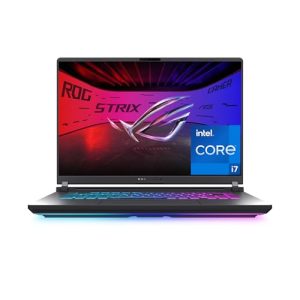
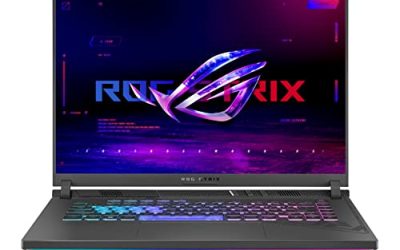
If the laptop rarely leaves your desk, size and weight stop mattering. A 16-inch machine with a sharp high-refresh display, a strong graphics chip and a full-size keyboard can replace a desktop for most working days. Accept a heavier chassis and a larger power brick, since both stay at home, and spend the difference on memory, storage and a pleasant display. A 16-inch Legion Pro or an ASUS ROG Strix G16 set to quiet office use fits this brief well.
Common Mistakes
- Judging a laptop by the graphics badge alone. Two machines can carry the same graphics chip yet perform very differently, because the manufacturer sets the power limit and the cooling capacity. Always check the power limit and the cooling design before assuming a familiar chip will deliver familiar frame rates. A cheaper machine with a generous power limit can beat a pricier one with the same chip that is held back by heat, so the number on the box is never the whole story.
- Ignoring fan noise until the first meeting. A laptop that sounds fine in a shop can dominate a quiet video call once its fans spin up under load. Look for a silent or office mode and check how the machine behaves during light work, since a laptop with no fan control will embarrass you at the worst moment. A short test in a quiet room tells you more about daily life with the machine than any specification sheet.
- Choosing a loud design for client-facing work. Bright lighting, aggressive angles and oversized logos are a statement, and in a client meeting that statement is about you rather than the machine. If you meet clients, present, or teach, a restrained lid and lighting you can switch off are worth more than a few extra frames. A plain lid costs nothing in performance and keeps the focus on your work rather than your hardware.
- Skimping on memory and storage to afford a faster graphics chip. Games and work tools both consume memory, and a machine with too little will stutter long before its graphics chip is tested. Aim for 32GB of memory if your work involves large files or virtual machines, and a 1TB SSD as the starting point. Memory and storage are the parts you will feel every day, long after the novelty of a faster graphics chip has worn off.
- Trusting the headline battery figure. The quoted battery life almost always assumes light browsing on integrated graphics with the screen dimmed, not video calls, spreadsheets and a dozen browser tabs. If a full day away from the charger matters to you, favour machines with a large battery and USB-C charging, and carry a compact charger as a backup. A short test on your own workload tells you far more than any quoted figure ever will.
Frequently Asked Questions
Can a gaming laptop look professional enough for the office?
Yes, provided you choose a restrained model. Look for a plain metal lid in a dark neutral colour, lighting you can turn off entirely, and a chassis without oversized logos or aggressive angles. Several slim gaming lines are designed to blend into a workplace, and once the lighting is off and the lid is closed, most colleagues will never know what graphics chip is inside.
How much memory and storage do I need for work and gaming?
For most buyers, 16GB of memory and a 1TB SSD are the sensible starting point, covering office tools, browsers and a modest game library at the same time. If your work involves virtual machines, large data sets, video editing or heavy multitasking, step up to 32GB of memory and a larger SSD, since both are cheaper to buy now than to add later.
Do I need the most powerful graphics chip for a dual-purpose laptop?
No, and chasing the flagship tier often works against the professional half of the brief. A mid-range discrete graphics chip handles modern games well at the native resolution of a 14-inch or 16-inch display, and it usually runs cooler and quieter than the top tier. Spend the difference on a better screen, more memory or a larger battery instead.
Will a gaming laptop last a full workday on battery?
It depends on how you use it. Light office work on integrated graphics with the screen dimmed can stretch a large battery through most of a working day, but video calls, bright screens and background tools drain it far faster. Treat the headline figure as a best case, favour machines that charge over USB-C, and keep a compact charger in your bag for long days.
FAQ
Can a gaming laptop look professional enough for the office?
How much memory and storage do I need for work and gaming?
Do I need the most powerful graphics chip for a dual-purpose laptop?
Will a gaming laptop last a full workday on battery?
More from Amazon
Programs that pair well with the guide above. Offers and eligibility are set by Amazon and may change.
Free shipping on eligible items, Prime Video and more. Eligible new members can start with a free trial.
Start a Prime free trialAd-free music streaming. Eligible new subscribers can start with a free trial.
Try Music Unlimited freeA Prime membership for ages 18-24 with a trial period. Eligibility is set by Amazon.
See Prime for Young AdultsAudiobooks and podcasts to listen to on the go. Eligible new members can start with a free trial.
Try Audible freeAs an Amazon Associate we earn from qualifying purchases.