
Key takeaways
- Compressed air: Canned air or an electric air duster blows dust out of fins and tight spots without touching components.
- Microfiber cloths: For wiping fan blades and surfaces without leaving lint or scratches.
- Soft brush: An anti-static brush loosens stubborn dust from filters and grilles.
- Avoid a household vacuum: It can generate static that damages components; use it only near the PC to catch airborne dust, never directly on the board.
Dust is the silent killer of gaming PC performance. Over months, a fine layer builds up on your fan blades, heatsink fins, and dust filters, choking airflow and forcing your components to run hotter. The result is higher temperatures, louder fans working overtime, thermal throttling that drops your frame rate, and shortened component life. The fix is simple, cheap, and something every PC owner should do a few times a year.
This guide shows you how to clean your PC fans and filters safely and thoroughly, without damaging anything. You will learn the right tools to use, the ones to avoid, and how proper dust filters can keep your case cleaner in the first place so you spend less time on maintenance and more time gaming.
Our top picks
 ThreeBulls 12 Pcs 120mm PVC Black PC
- 100% brand new and high quality Suitable for.
- For the home computer chassis fan dust, speaker…
- Help to keep your PC and PC components…
 IMSurQltyPrise 120mm Computer Fan Filter Grills
- Brand New PC Case Fan Vent Filter Finger…
- Black Color
- Compatible with: Most of Standard 120mm Fan /…
 MoKo 400x300mm DIY PC Case Dust Mesh
- 400 x 300mm DIY Filter: This DIY PC…
- 8 x 400mm Magnetic Strips: Come with 8…
- Dustproof and Ventilation: 1mm hole not only prevent…
| Product | Key specs | |
|---|---|---|
| ThreeBulls 12 Pcs 120mm PVC Black PC | 100% brand new and high quality Suitable for. For the home computer chassis fan dust, speaker… Help to keep your PC and PC components… | Check price |
| IMSurQltyPrise 120mm Computer Fan Filter Grills | Brand New PC Case Fan Vent Filter Finger… Black Color Compatible with: Most of Standard 120mm Fan /… | Check price |
| MoKo 400x300mm DIY PC Case Dust Mesh | 400 x 300mm DIY Filter: This DIY PC… 8 x 400mm Magnetic Strips: Come with 8… Dustproof and Ventilation: 1mm hole not only prevent… | Check price |
 Dust Filter PC 120mm for Computer Cooler/PSU/Routers Dust Filter PC 120mm for Computer Cooler/PSU/Routers | 【DELIVERY LIS】YIMATEECO Provides: 2 x 120*120mm PC Dust… 【PRODUCT DESIGN】Weak magnetic design, Easy to install and… 【CHOICE OF PETS FAMILIES】The ultra-small aperture as low… | Check price |
 MoKo 400x300mm DIY PC Case Dust Mesh MoKo 400x300mm DIY PC Case Dust Mesh | 400x300mm DIY Filter: This DIY PC case dust… 16 x 400mm Magnetic Strips: Come with 16… Dustproof and Ventilation: 1mm hole not only prevent… | Check price |
| ThreeBulls 12 Pcs 140mm PVC Black PC | 100% brand new and high quality Suitable for. For the home computer chassis fan dust, speaker… Help to keep your PC and PC components… | Check price |
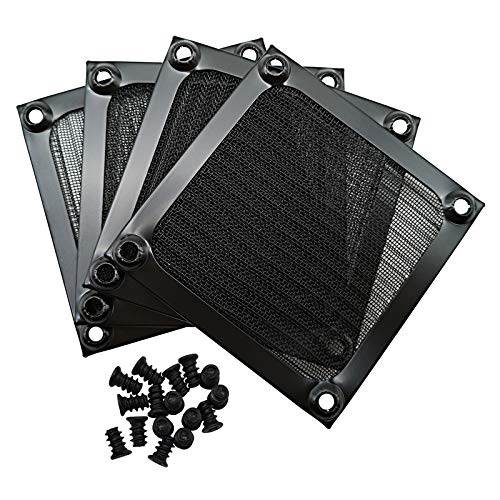 IMSurQltyPrise 80mm Computer Fan Filter Grills IMSurQltyPrise 80mm Computer Fan Filter Grills | Brand New PC Case Fan Vent Filter Finger… Black Color Compatible with: Most of Standard 80mm Fan /… | Check price |
 Adyoney 4 Pcs 120mm Black Square Plastic Adyoney 4 Pcs 120mm Black Square Plastic | 【Packaging & Size】: Our 4 Pcs Black Cooling… 【Unique Design】: These fan filters feature a unique… 【High-Quality Materials】: Made from durable plastic materials, these… | Check price |
As an Amazon Associate we earn from qualifying purchases at no extra cost to you.
⚡ Save on Your Next PC — Amazon Prime
Prime members get fast free shipping on the systems above, plus early access to Prime Day & Black Friday PC deals. New members get a 30-day free trial.
Watch: How to Clean Your PC Fans and Filters — Video Review
Why Dust Hurts Performance
Dust acts like an insulating blanket. When it coats a CPU cooler’s fins, heat can no longer transfer efficiently to the air, so temperatures climb. When it clogs a case fan or intake filter, less fresh air enters, and the whole system runs hotter. A neglected PC can easily run 10 to 20 degrees hotter than a clean one, which is often the difference between holding full boost clocks and throttling mid-game. Clean airflow is free performance you already paid for.
Gather the Right Tools
- Compressed air: Canned air or an electric air duster blows dust out of fins and tight spots without touching components.
- Microfiber cloths: For wiping fan blades and surfaces without leaving lint or scratches.
- Soft brush: An anti-static brush loosens stubborn dust from filters and grilles.
- Avoid a household vacuum: It can generate static that damages components; use it only near the PC to catch airborne dust, never directly on the board.
Step-by-Step Fan and Filter Cleaning
Power down the PC, unplug it, and move it to a well-ventilated area or outdoors so you are not just relocating dust around your room. Remove the side panels. Take out the magnetic or clip-in dust filters from the front, top, and bottom, and clean them separately. Hold each fan blade still with a finger while you blow it with compressed air, because letting fans spin freely from the air stream can generate a small voltage that stresses the fan or motherboard header. Work through every fan, the CPU cooler, and the GPU shroud.
Clean the Dust Filters Properly
Filters take the brunt of the dust, which is exactly their job. For most mesh and PVC filters, tap out loose debris, then rinse washable ones under lukewarm water, and let them dry completely before reinstalling; never put a damp filter back into a running system. Magnetic frame filters like fine nylon mesh panels are easy to pop off and rinse. Products such as ThreeBulls 120mm PVC fan filters or MoKo DIY magnetic dust mesh make this a two-minute job because you clean the filter instead of digging dust out of the case interior.
Prevent Dust With Good Filtration and Placement
The best cleaning strategy is stopping dust before it enters. Cover every intake with a filter, keep your case off carpeted floors where possible, and run slightly positive air pressure by having a bit more intake than exhaust so air pushes out through unfiltered gaps rather than pulling dust in. Adding filters like magnetic 120mm or 140mm covers to intakes that lack them dramatically cuts how often you need a deep clean.
Tips for Easy Ongoing Maintenance
- Do a quick filter tap-out or rinse monthly and a full interior blowout every three to four months.
- Keep the PC elevated off the floor to reduce the dust and hair it pulls in.
- Use magnetic snap-on filters so cleaning intakes takes seconds, not a full teardown.
- Check fan bearings while cleaning; a fan that rattles or wobbles after cleaning may be wearing out.
Frequently Asked Questions
How often should I clean my PC fans?
Give filters a quick clean monthly and do a thorough interior cleaning every three to four months. Homes with pets, carpet, or smokers need more frequent attention because they generate far more airborne debris.
Can I use a vacuum cleaner on my PC?
Avoid using a vacuum directly on internal components because it can build up static electricity that damages sensitive parts. Compressed air is the safe choice. You can hold a vacuum nearby to catch the dust you blow out, just not touching the board.
Should I hold the fans still while cleaning?
Yes. Blowing compressed air can spin fans faster than they are designed to go, and a spinning fan motor can generate a small reverse voltage. Hold each blade with a finger while you clean it to be safe.
Do dust filters reduce airflow?
A clean filter costs a tiny amount of airflow, far less than the airflow a dusty, unfiltered case loses over time. Keeping filters clean gives you the best of both: protection from dust and near-full airflow.
Conclusion
Cleaning your PC fans and filters is the cheapest performance upgrade there is. A short session with compressed air, a microfiber cloth, and a rinse of your dust filters can drop temperatures by double digits and quiet a noisy machine. Fit filters to every intake, run slightly positive pressure, and stick to a simple monthly and quarterly routine, and your gaming rig will stay cool, quiet, and fast for years.









