Our Top Picks
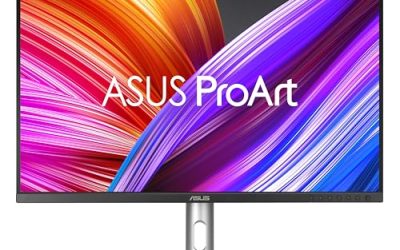
 ASUS ProArt PA279CRV 27 Inch 4K UHD USB-C27 Inch24.1 x 8.46 x 16.07 inches18.25 poundsCheck on Amazon
A 27-inch 4K monitor is the sweet spot for desk work. The panel is big enough to hold two documents side by side, and the 3840 by 2160 resolution keeps small text sharp instead of fuzzy at normal viewing distance. The real decision is not whether to buy 4K, but which kind of 4K panel fits the work: a color-accurate screen for design, a hub monitor that docks a laptop with one cable, or a simple screen that brings 4K to a tight budget.
Office workers who live in documents and spreadsheets need crisp text and a stand that adjusts to eye level. Designers and photo editors need wide color coverage and factory calibration they can trust without extra hardware. Laptop owners who hot-desk need a USB-C port that carries video and charging over one cable. The five monitors below were chosen from the names and specifications shown on their Amazon product pages, with everyday work in mind.
Quick Picks
As an Amazon Associate we earn from qualifying purchases
| Product | Best for | Key spec from title |
|---|---|---|
| ASUS ProArt PA279CRV | Color-accurate design and photo editing | 27-inch 4K IPS, 99 percent DCI-P3 |
| Dell UltraSharp U2723QE | A hub monitor for a two-computer desk | 27-inch 4K IPS Black, USB-C hub |
| LG 27UP850-W | One-cable laptop docking with strong color | 27-inch 4K IPS, USB-C 96W |
| Dell S2721QS | Everyday 4K on a smaller spend | 27-inch 4K IPS, FreeSync |
| ASUS ProArt PA279CV | Calibrated color at the lowest cost here | 27-inch 4K IPS, Delta E under 2 |
How to Choose
Resolution and Text Sharpness
At 27 inches, 4K means about 163 pixels per inch, which is the main reason text looks so much sharper than on a 27-inch 1440p screen. Small spreadsheet cells, code lines and document text stay readable without zooming in, and two windows can sit side by side at a useful size. Check the scaling setting on the computer before judging a panel: 4K at 27 inches usually needs scaling raised so menus and icons are comfortable, and some older software still handles scaling poorly. A matte finish helps in bright rooms by cutting reflections, and a flicker-free backlight matters for anyone staring at text all day.
Color Accuracy for Design Work
Color accuracy decides whether a photo edit or a design file looks the same on screen as it does in print or on a client display. Panels that cover nearly all of DCI-P3 or Adobe RGB show richer reds and greens than a standard sRGB screen, while a factory calibration report means the colors are verified before the monitor ships. A Delta E figure under 2 means color errors are too small for most eyes to notice. For office documents and spreadsheets, standard sRGB coverage is enough, and paying for a wide gamut adds little. Match the panel to the work, not to the specification sheet.
USB-C Docking and Ports
A USB-C port that carries video, data and laptop charging over one cable turns the monitor into a docking station. The charging wattage decides which laptops it can keep powered: 65 watts covers most ultrabooks, while 96 watts handles larger machines that draw more under load. Check how many downstream USB ports the monitor offers, because a keyboard, mouse and external drive all need somewhere to plug in. DisplayPort and HDMI cover desktops and consoles, and an Ethernet port keeps a wired connection steady. If two computers share the desk, a built-in KVM switch lets one keyboard and mouse control both.
Ergonomics and Desk Fit
A 27-inch screen fits a normal desk, but the stand decides whether it fits comfortably. Height adjustment matters most, because the top of the screen should sit near eye level to keep the neck straight through a long day. Tilt, swivel and pivot into portrait help when the monitor is shared, when documents run long, or when a second screen sits beside it. A VESA mount lets an arm lift the screen off the desk and free the space below. Measure the desk depth first: a deep stand base can push the screen too close on a shallow desk.
The 5 Best Options
ASUS ProArt PA279CRV 27-Inch 4K Monitor
The PA279CRV is the color pick of this group, built for photo and video work where the screen has to be trusted. Its 27-inch 4K IPS panel covers 99 percent of DCI-P3 and 99 percent of Adobe RGB, and every unit leaves the factory Calman Verified and pre-calibrated to a Delta E under 2. The USB-C port carries video, data and 96 watts of charging, so a laptop docks with one cable, and DisplayPort daisy-chaining links a second screen behind it. The ergonomic stand adjusts height, tilt, swivel and pivot, which suits long editing sessions.
Specs
- 27-inch 4K (3840 x 2160) LED backlight HDR display, 178-degree wide-view IPS panel
- 99 percent DCI-P3 and 99 percent Adobe RGB coverage, 100 percent sRGB
- Calman Verified, factory pre-calibrated to Delta E under 2
- 10-bit color depth, more than 1.07 billion onscreen colors
- DisplayPort over USB-C with 96-watt Power Delivery, DisplayPort, HDMI, USB 3.2 hub
- Ergonomic stand with tilt, swivel, pivot and height adjustment
- 3-year warranty
Best for: Photo and video editors who need factory-calibrated color and a one-cable laptop dock.
Watch out for: The 60Hz refresh rate suits work, not fast gaming; confirm the panel size on the listing, since ASUS sells similar ProArt models at other sizes.
Dell UltraSharp U2723QE 27-Inch 4K Monitor

The U2723QE is the hub monitor of the group, made for a desk where a laptop and a desktop share one screen. Its 27-inch 4K panel uses IPS Black technology for a 2000 to 1 contrast ratio, so dark documents and photos show more depth than on a standard IPS screen. The built-in hub adds USB-C, DisplayPort, HDMI, Ethernet and a row of USB ports, which keeps chargers and docks off the desk. The fully adjustable stand moves height, pivot, swivel and tilt, and the blue light filter helps on long days. The 3-year warranty covers the monitor for the long term.
Specs
- 27-inch 4K UHD (3840 x 2160) WLED LCD monitor, 16:9 aspect ratio
- IPS Black panel, 2000 to 1 contrast ratio, 400 nits brightness
- 60Hz refresh rate, 5 millisecond response time, VESA DisplayHDR 400
- DisplayPort, HDMI, USB-C, Ethernet and USB hub connectivity
- Matte screen finish, 178-degree viewing angle
- Height, pivot, swivel and tilt adjustment, blue light filter
- 3-year manufacturer warranty
Best for: A two-computer desk that needs a built-in hub, Ethernet and strong contrast.
Watch out for: No clean new-condition buy box was reported in an October 2026 check, so confirm the seller and stock on the live listing before ordering.
LG 27UP850-W 27-Inch 4K Monitor

The 27UP850-W is the value way to get a 27-inch 4K panel with a strong USB-C dock. Its IPS screen covers 95 percent of DCI-P3 and carries VESA DisplayHDR 400, which gives photos and video more life than a basic office panel. The USB-C port delivers 96 watts of charging, enough for large laptops, and two HDMI ports plus DisplayPort cover a desktop and a console beside it. The stand adjusts height, pivot and tilt, and the three-sided borderless design looks clean on a shared desk.
Specs
- 27-inch UHD (3840 x 2160) IPS display, 16:9 aspect ratio
- 95 percent DCI-P3 color gamut, VESA DisplayHDR 400, 400 nits brightness
- 60Hz refresh rate, 5 millisecond response time, AMD FreeSync
- USB-C with 96W Power Delivery, 2 HDMI, DisplayPort, 2 USB-A ports
- Matte screen finish, 178-degree viewing angle
- Height, pivot and tilt adjustable stand
- Limited 1-year parts and labor warranty
Best for: Laptop owners who want strong color and 96W charging without paying for a flagship.
Watch out for: A successor model exists, so confirm the W model on the live listing; the 60Hz refresh rate suits work, not fast gaming.
Dell S2721QS 27-Inch 4K Monitor

The S2721QS is the simplest route to 27-inch 4K in this group, and the one to pick when the budget is the deciding factor. Its IPS panel shows 99 percent of sRGB, which covers office documents, web work and casual photo viewing well, and HDR content playback adds depth to movies after hours. Two HDMI 2.0 ports and a DisplayPort keep a computer and a console connected at once, and built-in dual 3W speakers cover video calls without extra hardware. The stand adjusts height, tilt, swivel and pivot.
Specs
- 27-inch 4K UHD (3840 x 2160) IPS display, ultra-thin bezel
- 99 percent sRGB color coverage, HDR content playback
- AMD FreeSync, Picture by Picture and Picture in Picture modes
- 2 HDMI 2.0 ports, DisplayPort 1.2, USB 3.0 upstream and downstream ports
- Built-in dual 3W speakers, audio line out
- Height, tilt, swivel and pivot adjustment, ComfortView blue light reduction
- 10.36 pounds, silver finish
Best for: Everyday office work and streaming when the lowest spend on real 4K matters most.
Watch out for: No USB-C port, so laptop owners need a separate dock or adapter; check that the listing is the QS model, not the similar QHD version.
ASUS ProArt PA279CV 27-Inch 4K Monitor
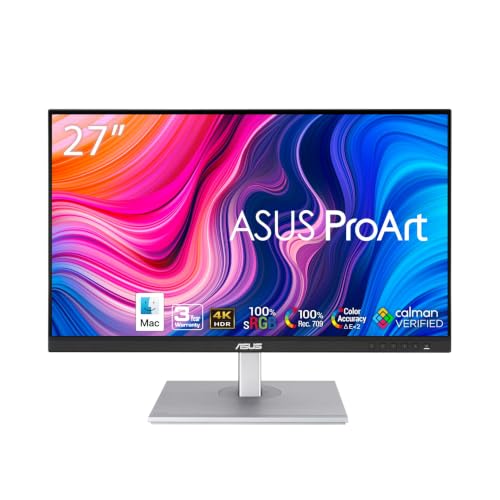
The PA279CV is the budget color pick, giving factory-calibrated accuracy at a lower spend than its newer sibling. Its 27-inch 4K IPS panel covers 100 percent of sRGB and 100 percent of Rec. 709, and the Calman Verified calibration holds color errors to a Delta E under 2. The USB-C port carries video and 65 watts of charging, which covers most ultrabooks, while DisplayPort, HDMI and a USB hub handle the rest of the desk. The ergonomic stand tilts, swivels, pivots and rises 150 millimeters for long sessions.
Specs
- 27-inch 4K HDR UHD (3840 x 2160) LED backlight display, IPS 178-degree wide viewing angle
- 100 percent sRGB and 100 percent Rec. 709 wide color gamut
- Calman Verified, factory calibrated to Delta E under 2
- 350 nits brightness, Adaptive-Sync 40 to 60Hz
- DisplayPort over USB-C with 65W Power Delivery, DisplayPort, HDMI, USB 3.1 hub
- Ergonomic stand: tilt, swivel, pivot and 150mm height adjustment
- 3-month Adobe Creative Cloud included
Best for: Designers and photo editors who want calibrated color at the lowest cost in this group.
Watch out for: The US product page was not opened during checks, so confirm the listing and seller on the live page; 65W charging suits ultrabooks, not larger laptops.
Which One Fits Your Situation
For Photo and Video Editing
Pick the ASUS ProArt PA279CRV first, with the PA279CV as the lower-cost second choice. Both are factory calibrated to a Delta E under 2, and the CRV adds wider DCI-P3 and Adobe RGB coverage plus a 96W USB-C port. The Dell U2723QE is the third option when the editing desk also needs a hub and Ethernet.
For a One-Cable Laptop Desk
Pick the LG 27UP850-W when the laptop needs 96 watts of charging, or the PA279CRV when color work shares the desk. Both carry video, data and charging over one USB-C cable. The PA279CV works for lighter ultrabooks at 65 watts, while the Dell S2721QS has no USB-C port and needs a separate dock.
For Spreadsheets and Office Work
Pick the Dell S2721QS for crisp 4K text at the lowest spend, with built-in speakers for calls. The Dell U2723QE is the step up when the desk needs a hub, Ethernet and a fully adjustable stand. Any of the five works for documents, since all share the same 27-inch 4K panel size.
For the Lowest Spend on Real 4K
Pick the Dell S2721QS first and the ASUS ProArt PA279CV second. The S2721QS is the plain 4K screen of the group, while the PA279CV adds factory-calibrated color for only a modest step up. Skip the U2723QE and PA279CRV here, since their hubs and wide gamuts cost more.
Common Mistakes
- Buying a 32-inch screen or a 1440p panel when the goal is 27-inch 4K text sharpness: check the size and resolution fields on the listing, not the headline.
- Assuming every 4K monitor has USB-C: the Dell S2721QS has none, so laptop owners need a separate dock.
- Ignoring charging wattage: a 65W USB-C port may not keep a large laptop charged under load.
- Picking a wide-gamut panel for plain office work: standard sRGB coverage is enough for documents and spreadsheets.
- Skipping the stand check: a fixed or tilt-only stand cannot set the screen at eye level for a full workday.
Frequently Asked Questions
Is 27 inches the right size for 4K?
Yes for most desks. At 27 inches, 4K gives about 163 pixels per inch, so text stays sharp at normal viewing distance and two documents fit side by side. A 32-inch 4K screen shows the same resolution larger, which suits a deeper desk, while a 24-inch 4K screen makes text very small. For a standard desk, 27 inches is the balanced choice.
Do I need USB-C on a 4K monitor?
It depends on the computer. A laptop owner gains the most, since one USB-C cable can carry video, data and charging, and the monitor becomes a docking station. Desktop owners can use DisplayPort or HDMI instead and lose nothing. Check the charging wattage: 65 watts suits ultrabooks, while larger laptops need 96 watts or a separate charger.
Is 60Hz enough for office work?
Yes. All five monitors in this guide run at 60Hz, which is smooth for documents, spreadsheets, video calls and photo editing. A higher refresh rate helps fast gaming and smooth scrolling, but it adds little to reading and typing. Spend the money on panel quality, color accuracy and ports instead of chasing a faster refresh rate for a work desk.
What is Delta E, and why does it matter?
Delta E measures how far a displayed color sits from the true color, and a figure under 2 means the error is too small for most eyes to notice. Factory-calibrated monitors ship with a measured Delta E, so designers and photo editors can trust the screen without buying extra hardware. For office documents, Delta E matters far less than brightness and text sharpness.
FAQ
Is 27 inches the right size for 4K?
Do I need USB-C on a 4K monitor?
Is 60Hz enough for office work?
What is Delta E, and why does it matter?
More from Amazon
Programs that pair well with the guide above. Offers and eligibility are set by Amazon and may change.
Free shipping on eligible items, Prime Video and more. Eligible new members can start with a free trial.
Start a Prime free trialAd-free music streaming. Eligible new subscribers can start with a free trial.
Try Music Unlimited freeA Prime membership for ages 18-24 with a trial period. Eligibility is set by Amazon.
See Prime for Young AdultsAudiobooks and podcasts to listen to on the go. Eligible new members can start with a free trial.
Try Audible freeAs an Amazon Associate we earn from qualifying purchases.