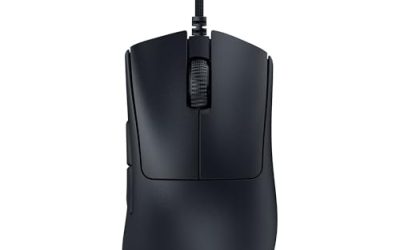
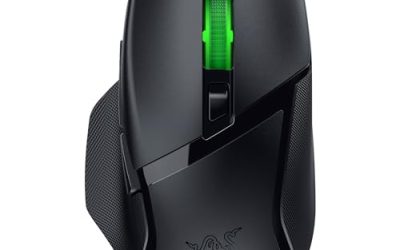
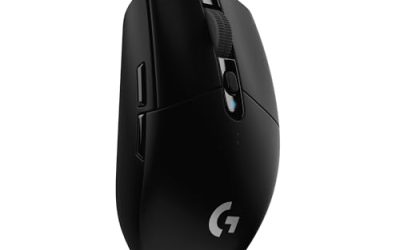
Our Top Picks
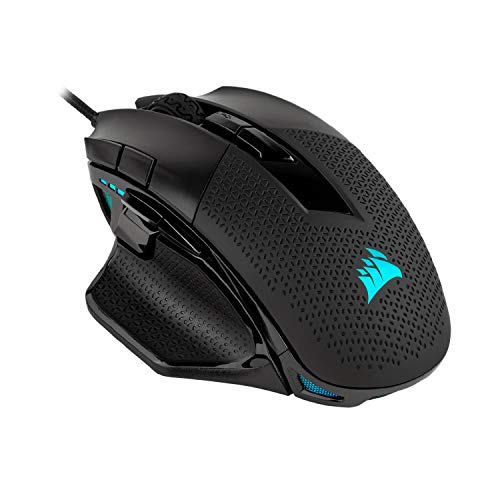 CORSAIR NIGHTSWORD RGB Adjustable Weight FPS MOBA PC5.08 x 3.38 x 1.71 inches0.3 poundsCheck on Amazon
 Logitech G502 LIGHTSPEED Wireless Gaming MouseWireless5.19 x 2.95 x 1.57 inches0.81 poundsCheck on Amazon
 Razer Naga V2 Pro Wireless MMO Gaming MouseNaga V2 Pro (Mouse)4.68 x 2.94 x 1.7 inches0.48 poundsCheck on Amazon
 Razer Basilisk V3 Customizable RGB Wired Ergonomic GamingMouse2.96 x 5.12 x 1.67 inches0.2 poundsCheck on Amazon

Disclosure: As an Amazon Associate, we earn from qualifying purchases made through links on this page, at no extra cost to you.
Most gaming mice ask you to adapt to a fixed shape, a fixed weight and a fixed button layout. An adjustable gaming mouse flips that idea around: the hardware changes to suit your hand, your grip and the games you play. That adjustment can be physical, such as removable weights that shift the balance point, swappable side plates that change the button count, or a palm rest that slides to lengthen the shell. It can also be functional, such as a scroll wheel that switches between a free-spinning mode and a notched tactile mode, or sensitivity stages you can change mid-match with a dedicated button.
This roundup gathers five gaming mice where adjustability is a headline feature rather than a software footnote. Every pick below is a complete gaming mouse in its own right, with a high-end optical sensor and programmable buttons, and every one of them lets you change something meaningful about how it feels or behaves without buying a different mouse. The five models cover wired and wireless designs, weight tuning systems from two major makers, the most modular button layout in the category, and a dual-mode tilt wheel. Read the buying notes first if you want help deciding which kind of adjustment matters most, then compare the individual picks and their published specs.
What Adjustable Can Mean on a Gaming Mouse
Weight tuning is the most common form of adjustment. The mouse ships with small metal weights that slot into compartments in the base. Adding or removing them changes the total mass, and moving them between positions shifts the balance toward the front or the rear of the shell. Players who make wide, sweeping arm movements often prefer a lighter setup, while players who make short, precise flicks sometimes like extra mass for a steadier stop.
Shell and grip adjustment goes further. A small number of mice let you change the shape itself, through interchangeable side panels, alternative palm rests or a length that slides in and out. Button layout adjustment is closely related: swappable side plates can turn the same mouse from a two-button shooter layout into a twelve-button grid for massively multiplayer games.
Wheel and sensitivity adjustment is the third family. Dual-mode scroll wheels switch between free-spin and tactile behaviour, some wheels tilt for extra inputs, and adjustable scroll tension changes how much resistance each notch gives. Hardware sensitivity controls, such as a dedicated DPI button or a temporary sensitivity clutch, let you drop or raise tracking speed on demand without opening software.
How to Choose the Right Adjustable Mouse
Start with the kind of adjustment you will actually use. If you play several genres, a swappable button layout solves a real problem, because one mouse can cover a shooter one evening and an MMO the next. If you mostly play one genre, weight and balance tuning is usually the more valuable feature, since it fine-tunes the exact movement you repeat thousands of times.
Next, match the shell to your hand and grip. Adjustable weight cannot fix a mouse that is the wrong size, so check the published dimensions and weight range against your current mouse. Palm grip players generally suit larger, contoured shells, while fingertip and claw players often prefer shorter bodies. Wireless models add freedom of movement but carry battery weight inside the shell, which is why the lightest wireless picks still weigh more than the lightest wired ones.
Finally, look at how the adjustment is controlled. Physical systems, such as weights and side plates, work instantly and need no software. Software-linked systems, such as scroll tension profiles or stored sensitivity stages, offer deeper control but depend on the maker’s app. On-board memory is worth having if you move between computers, because your settings travel with the mouse.
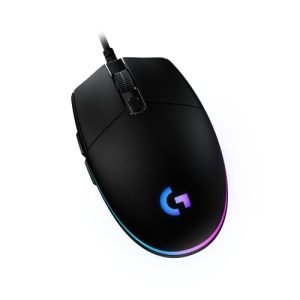
1. Logitech G502 HERO

The G502 HERO is the wired benchmark for weight tuning. Logitech includes five removable weights of 3.6 g each, and they can be arranged inside the mouse in different positions, so you can change both the total mass and where that mass sits. With none fitted, the mouse weighs 121 g; with all five in place, it rises to roughly 139 g. That spread covers players who want a planted, deliberate feel as well as those who prefer something closer to a midweight all-rounder.
Tracking comes from the HERO 25K optical sensor, with sensitivity adjustable from 200 to 25,600 DPI. Eleven programmable buttons include the familiar dual-mode scroll wheel, which switches between free-spin and notched scrolling, plus a sensitivity shift button near the thumb. The primary buttons use a mechanical tensioning system with metal springs and pivots, which Logitech lists as a way to keep left and right clicks crisp and consistent. On-board memory stores your profiles on the mouse itself, and LIGHTSYNC RGB lighting can be configured through Logitech G HUB. For players who want proven weight adjustment in a wired design with a long feature list, this remains the reference point in the category.
Specs
- Sensor: Logitech HERO 25K optical
- Sensitivity: 200 to 25,600 DPI
- Adjustability: Five removable 3.6 g weights for weight and balance tuning
- Weight: 121 g base, up to roughly 139 g with all weights fitted
- Buttons: 11 programmable
- Connection: Wired USB
- Extras: Dual-mode scroll wheel, on-board memory, LIGHTSYNC RGB
See the Logitech G502 HERO on Amazon
2. Corsair Nightsword RGB
Corsair takes weight tuning further than anyone else in this roundup. The Nightsword RGB uses two sets of weights and six mounting locations, which Corsair says produces 120 different weight and balance configurations. The adjustable range runs from 119 g to 141 g, and Corsair’s iCUE software includes a smart tuning system that detects the mouse’s centre of gravity in real time, showing you how each weight placement changes the balance before you settle on a setup.
The sensor is a custom PixArt PMW3391 optical unit with a native range up to 18,000 DPI, adjustable in single DPI steps, which gives unusually fine control over sensitivity stages. Ten programmable buttons sit in a contoured, right-handed shell with a pronounced thumb rest, and the primary switches are Omron units with a listed lifespan of 50 million clicks. Four-zone RGB lighting, macro recording and surface calibration all run through iCUE. The Nightsword is a large, wired mouse, so it suits palm and claw players with medium to large hands who want the deepest weight and balance adjustment available in a mainstream gaming mouse, together with detailed software feedback on every change they make.
Specs
- Sensor: PixArt PMW3391 optical (custom)
- Sensitivity: Up to 18,000 DPI, adjustable in 1 DPI steps
- Adjustability: Two weight sets, six mounting locations, 120 weight and balance configurations, real-time centre of gravity detection in iCUE
- Weight: Adjustable from 119 g to 141 g
- Buttons: 10 programmable
- Switches: Omron, listed lifespan of 50 million clicks
- Connection: Wired, 1.8 m cable
See the Corsair Nightsword RGB on Amazon
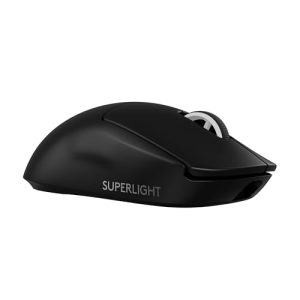
3. Logitech G502 Lightspeed
The G502 Lightspeed takes the G502 formula wireless. It uses Logitech’s LIGHTSPEED connection with a 1 ms report rate, and the HERO 25K sensor delivers the same 200 to 25,600 DPI range as the wired model. Weight tuning here uses six weights, two of 4 g and four of 2 g, for up to 16 g of added mass over the 114 g base weight. Because the weights can be distributed between the front and rear compartments, you can bias the balance as well as the total.
Battery life is listed at up to 60 hours with lighting off and up to 48 hours with default lighting, and the mouse is compatible with Logitech’s PowerPlay wireless charging system, which charges through a compatible mouse pad while you play. Eleven programmable buttons, the dual-mode scroll wheel and on-board memory all carry over from the wired design. If you like the G502 shape and its tuning system but want to drop the cable, this is the natural pick, and it is also a sensible choice for a desk where the mouse moves between a gaming PC and a work machine, since profiles are stored on the mouse itself.
Specs
- Sensor: Logitech HERO 25K optical
- Sensitivity: 200 to 25,600 DPI
- Adjustability: Six removable weights (two 4 g, four 2 g) for up to 16 g of added mass and balance tuning
- Weight: 114 g base, up to roughly 130 g with all weights fitted
- Buttons: 11 programmable
- Connection: LIGHTSPEED wireless, wired USB mode
- Battery: Up to 60 hours with lighting off, as listed by Logitech
- Extras: PowerPlay wireless charging compatible, dual-mode scroll wheel, on-board memory
See the Logitech G502 Lightspeed on Amazon
4. Razer Naga V2 Pro
The Naga V2 Pro adjusts something the other picks cannot: the entire side button layout. Three magnetic side plates are included in the box. The two-button plate suits shooters, the six-button plate suits battle royale and MOBA play, and the twelve-button plate turns the mouse into an MMO control surface. With the twelve-button plate fitted, the mouse offers 19 plus 1 programmable buttons. Swapping plates takes seconds and needs no tools, so one mouse genuinely covers several genres.
Its second adjustable feature is the HyperScroll Pro wheel. Through Razer’s software you can adjust the scroll tension, and the wheel switches between a tactile mode and a free-spin mode, with an automatic behaviour that spins freely on fast flicks and returns to tactile steps at lower speeds. The Focus Pro 30K optical sensor tracks at up to 30,000 DPI, and the optical switches are Razer’s third-generation units. Connectivity covers HyperSpeed Wireless, Bluetooth and wired USB-C, with battery life listed at up to 150 hours on HyperSpeed and up to 300 hours on Bluetooth. At roughly 134 g it is a substantial mouse, aimed at players who value layout flexibility above low weight.
Specs
- Sensor: Razer Focus Pro 30K optical
- Sensitivity: Up to 30,000 DPI
- Adjustability: Three swappable side plates (2, 6 and 12-button layouts); HyperScroll Pro wheel with adjustable scroll tension and tactile or free-spin modes
- Weight: Approx. 134 g
- Buttons: 19 + 1 programmable with the 12-button plate fitted
- Switches: Razer Optical Mouse Switches Gen-3
- Connection: HyperSpeed Wireless, Bluetooth, wired USB-C
- Battery: Up to 150 hours on HyperSpeed, up to 300 hours on Bluetooth, as listed by Razer
See the Razer Naga V2 Pro on Amazon
5. Razer Basilisk V3
The Basilisk V3 builds its adjustability around the scroll wheel and sensitivity controls. Its HyperScroll Tilt Wheel has two modes: a tactile mode with distinct notches for cycling through weapons or skills, and a free-spin mode for moving through long menus and maps quickly. The wheel also tilts left and right for two extra inputs, and Razer’s Smart-Reel Shift behaviour can move the wheel into free-spin automatically when you scroll fast, then return it to tactile mode. Sensitivity stages are adjustable, with an on-the-fly shift control for temporary changes while aiming.
Underneath those controls sits the Focus+ 26K optical sensor, tracking at up to 26,000 DPI, and Razer’s second-generation optical switches, which actuate with light rather than physical contact and carry a listed lifespan of 70 million clicks. Eleven programmable buttons, a thumb rest on the contoured right-handed shell and Chroma RGB lighting with an underglow strip complete the package. At roughly 101 g excluding the cable, it is the lightest mouse in this roundup, and its wired Speedflex cable is designed to minimise drag. Choose it if wheel behaviour and quick sensitivity changes matter more to you than weight tuning or swappable panels.
Specs
- Sensor: Razer Focus+ 26K optical
- Sensitivity: Up to 26,000 DPI
- Adjustability: HyperScroll Tilt Wheel with switchable tactile and free-spin modes, four-way tilt inputs, adjustable sensitivity stages with on-the-fly shift
- Weight: Approx. 101 g, excluding cable
- Buttons: 11 programmable
- Switches: Razer Optical Mouse Switches Gen-2, listed lifespan of 70 million clicks
- Connection: Wired, Razer Speedflex cable
- Extras: Chroma RGB lighting
See the Razer Basilisk V3 on Amazon
Which Adjustment Style Suits Which Player
If your main aim is to dial in how the mouse moves, pick a weight system: the G502 HERO for a wired all-rounder, the G502 Lightspeed for the same tuning without a cable, or the Nightsword RGB for the widest weight range and software-guided balance detection. If you switch genres often, the Naga V2 Pro’s swappable side plates solve a problem that weight tuning cannot, and its adjustable wheel tension adds a second layer of customisation. If your frustrations centre on scrolling and quick sensitivity changes, the Basilisk V3’s dual-mode tilt wheel is the most focused tool here. None of these adjustments is inherently better than the others; the right one is the one aimed at the thing you notice most during play.
Frequently Asked Questions
What makes a gaming mouse adjustable?
An adjustable gaming mouse lets you change part of its physical behaviour or layout. Common examples include removable weights that alter mass and balance, swappable side plates that change the button layout, adjustable palm rests that change the shell length, dual-mode scroll wheels and hardware sensitivity controls. The five mice above each offer at least one of these systems as a headline feature, rather than relying on software settings alone.
Do extra weights change how a mouse tracks?
Weights do not change the sensor or its tracking accuracy. They change how the mouse feels in motion: added mass can make movements feel steadier and stops feel more controlled, while a lighter setup can feel quicker to start and stop. Placement matters as well as total mass, which is why systems such as the Nightsword RGB’s six mounting locations and the G502 models’ split compartments let you shift the balance point toward the front or rear of the mouse.
Can I swap the Naga V2 Pro side plates during a session?
The side plates attach magnetically and can be swapped in seconds without tools, so changing layouts between matches or between games is straightforward. Swapping mid-match is possible in principle, but the practical moment to change is between rounds, since the button layout your thumb expects changes completely between the two-button, six-button and twelve-button plates.
Is a wired or wireless adjustable mouse better for fast-paced games?
Both connection types appear in this roundup because modern gaming wireless, such as Logitech LIGHTSPEED and Razer HyperSpeed, is built for low-latency play. Wired models avoid battery weight and never need charging, which is why the wired picks here include the deepest weight tuning systems. Wireless models remove cable drag and, in the G502 Lightspeed’s case, keep the same weight system as the wired version, so the choice comes down to whether you value a lower starting weight or freedom from the cable more.
FAQ
What makes a gaming mouse adjustable?
Do extra weights change how a mouse tracks?
Can I swap the Naga V2 Pro side plates during a session?
Is a wired or wireless adjustable mouse better for fast-paced games?
More from Amazon
Programs that pair well with the guide above. Offers and eligibility are set by Amazon and may change.
Free shipping on eligible items, Prime Video and more. Eligible new members can start with a free trial.
Start a Prime free trialAd-free music streaming. Eligible new subscribers can start with a free trial.
Try Music Unlimited freeA Prime membership for ages 18-24 with a trial period. Eligibility is set by Amazon.
See Prime for Young AdultsAudiobooks and podcasts to listen to on the go. Eligible new members can start with a free trial.
Try Audible freeAs an Amazon Associate we earn from qualifying purchases.