Our Top Picks
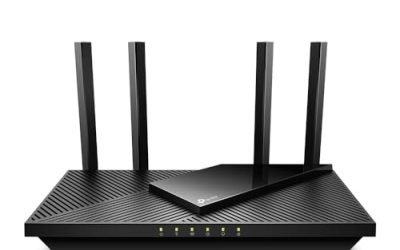
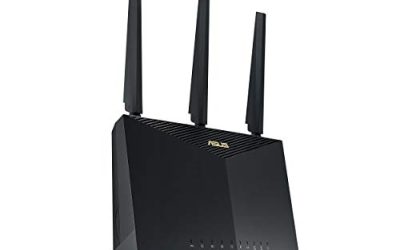
 TP-Link AC1200 WiFi Router Dual Band Wireless Internet5.7 x 9.1 x 1.5 inches5.7 x 9.1 x 1.5 inches1.45 poundsCheck on Amazon
As an Amazon Associate we earn from qualifying purchases.
A budget router does not need to run a large house or support dozens of devices at once to be useful. For a small apartment, a bedroom gaming setup, a dorm room, or a first home network, an entry-level dual-band router can handle the basics well: a stable connection for a console or PC, decent WiFi for phones and streaming sticks, and a few wired ports for the devices that benefit most from a cable. The key is choosing the right trade-offs, because at this level every model gives something up.
Some budget routers keep wired ports at Fast Ethernet speed, which is fine for internet plans below that ceiling but limits local transfers. Others offer Gigabit wired ports in the same compact class, which is better for a gaming PC or console that you plan to wire in. Some focus on travel and VPN features in a tiny case, while others are full-size home routers with external antennas and mesh compatibility. None of these models replaces a high-end gaming router, and none should be expected to cover a large multi-storey home on its own. Used in the right space, though, each one in this guide solves a real problem without moving into a higher tier.
This guide compares four budget and entry-level WiFi routers sold on Amazon US: the TP-Link Archer A54, the Tenda AC6, the GL.iNet Opal GL-SFT1200, and the TP-Link Archer C50. All four are dual-band AC1200 class routers, so the differences come down to wired port speed, antenna design, extra modes, and software features rather than headline wireless speed. Read the port details carefully before choosing, because that single specification decides whether a wired gaming connection gets full speed or hits a lower ceiling.
Disclosure: This article contains affiliate links. If you buy through a link on this page, the site may earn a commission at no extra cost to you.
Quick Picks
- Best all-round budget pick: TP-Link Archer A54 — AC1200 dual-band WiFi, four external antennas, EasyMesh compatibility, guest WiFi, access point mode, and parental controls in a simple home router format.
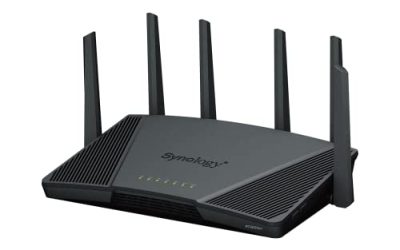
- Best for app-based setup: Tenda AC6 — AC1200 dual-band WiFi with a smart app, four antennas, guest WiFi, access point mode, and parental controls for a small home.
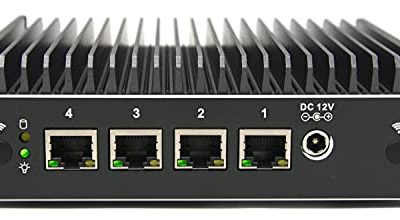
- Best for travel and VPN: GL.iNet Opal GL-SFT1200 — a pocket-size AC1200 router with Gigabit ports, OpenWrt-based software, and pre-installed OpenVPN and WireGuard support.
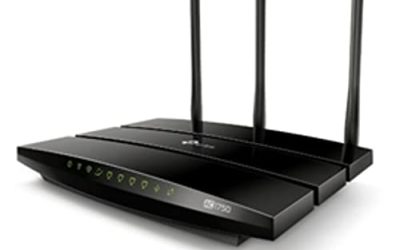
- Best simple home option: TP-Link Archer C50 — AC1200 dual-band WiFi with parental controls, guest WiFi, and VPN support in a familiar full-size design.
1. TP-Link Archer A54 — Best All-Round Budget Pick
The TP-Link Archer A54 is the most balanced home router in this group. It is a dual-band AC1200 model, splitting its wireless speed between the 2.4 GHz band for range and basic tasks and the 5 GHz band for gaming, streaming, and video calls closer to the router. Four external antennas with beamforming help focus the signal toward connected devices, and MU-MIMO support on the listing helps the router talk to more than one device at a time instead of serving them strictly in turn.
For gaming, the sensible setup is to wire the console or PC when possible and leave WiFi for everything else. The A54 includes four LAN ports plus a WAN port, but note the important detail in its listing title: those Ethernet ports are rated at 10/100 Mbps Fast Ethernet speed. That is enough for many entry-level internet plans and for a single wired gaming device on a modest connection, since online gaming itself uses far less bandwidth than a game download. It does mean large local file transfers and very fast internet plans will be capped by the wired ports, so buyers with a faster plan should look at the Gigabit models in this guide instead.
Extra modes add flexibility. EasyMesh compatibility means the A54 can work with compatible mesh extenders to widen coverage later. Access point mode lets it extend an existing wired network, and range extender style use is also listed for this three-in-one design. Guest WiFi keeps visitors on a separate network, IPv6 support is included, and parental controls are available for managing access times on a family network. WPA3 security is listed for this model, which is a welcome inclusion at the entry level.
Key specs:
- WiFi class: AC1200 dual-band, 2.4 GHz and 5 GHz
- Antennas: 4 external antennas
- Ethernet: 4 LAN ports and 1 WAN port, 10/100 Mbps Fast Ethernet
- Features: MU-MIMO, beamforming, EasyMesh compatible, guest WiFi, access point mode, IPv6, parental controls
- Security: WPA3 listed
Pros:
- Balanced feature set for a small home or apartment
- EasyMesh compatibility gives a path to wider coverage later
- Guest network, IPv6, and parental controls included
- Four antennas and beamforming for everyday coverage
Cons:
- Fast Ethernet ports cap wired speed below Gigabit
- WiFi 5 rather than WiFi 6, so no OFDMA efficiency gains
- Best suited to smaller spaces, not large homes
View the TP-Link Archer A54 on Amazon
2. Tenda AC6 — Best for App-Based Setup

The Tenda AC6 takes a similar AC1200 dual-band approach with an emphasis on simple management through its smart app. For buyers who do not want to dig through an advanced web interface, app-based setup and day-to-day control is the main appeal here. The router provides dual-band WiFi with the slower, longer-range 2.4 GHz band for smart home devices and browsing, and the faster 5 GHz band for gaming and streaming near the router.
Like the Archer A54, the AC6 uses Fast Ethernet wired ports. Its listing specifies four 100 Mbps ports, so the same advice applies: it suits entry-level internet plans well, and a wired console or PC will get a stable connection, but the wired ceiling is lower than Gigabit models. If your internet plan is modest and your priority is an easy setup for a small flat or a single gaming corner, that trade-off can be acceptable. If you regularly move large files between wired devices, choose a Gigabit model instead.
The AC6 lists four high-gain antennas and beamforming-style signal focusing in its product family materials, along with MU-MIMO for handling multiple devices. Guest WiFi separates visitor traffic, access point mode lets the router reuse an existing wired connection, IPv6 is supported, and parental controls are included. The Tenda app handles setup and basic management, which keeps firmware and network settings in one place for less technical users.
Key specs:
- WiFi class: AC1200 dual-band, 2.4 GHz and 5 GHz
- Antennas: 4 external antennas
- Ethernet: 4 Fast Ethernet ports at 100 Mbps, plus WAN
- Features: Smart app management, guest WiFi, access point mode, IPv6, parental controls, MU-MIMO
- Use case: Small homes, apartments, and simple gaming setups
Pros:
- App-based setup suits less technical buyers
- Dual-band AC1200 WiFi covers everyday gaming and streaming needs
- Guest network and parental controls included
- Access point mode adds reuse value if you upgrade later
Cons:
- Fast Ethernet ports limit wired throughput
- WiFi 5 platform with no WiFi 6 features
- Fewer advanced controls than OpenWrt-based models
3. GL.iNet Opal GL-SFT1200 — Best for Travel and VPN

The GL.iNet Opal, model GL-SFT1200, is the different one in this guide. Instead of a full-size home router, it is a pocket travel router that weighs very little, folds its antennas away, and is designed to create a private network from a hotel, shared, or home connection. Despite the small case, it still offers AC1200 dual-band WiFi, with the 2.4 GHz band rated up to 300 Mbps and the 5 GHz band rated up to 867 Mbps in the manufacturer description.
Where the Opal pulls ahead of the other budget picks is wired speed and software. It has three Gigabit Ethernet ports in total, covering WAN and LAN connections, so a wired laptop or console is not held back by Fast Ethernet. It runs OpenWrt-based firmware and comes with OpenVPN and WireGuard pre-installed, with compatibility with many VPN service providers listed by the maker. That makes it useful well beyond travel: as a small home router for a single room, as a dedicated VPN router for a console, or as a repeater, access point, or tethering router when you are away from home.
The limits are about scale, not features. A travel router is built for a room or a small flat, not for blanketing a large house. It has fewer LAN ports than the full-size models, so a desk with several wired devices may need a small switch. VPN speed is also capped by its compact processor, so it suits privacy and convenience rather than full-speed encrypted throughput on a fast plan. For gamers who travel, attend events, or want a separate VPN network for one device, those limits are a fair exchange for the size and flexibility.
Key specs:
- WiFi class: AC1200 dual-band, up to 300 Mbps on 2.4 GHz and up to 867 Mbps on 5 GHz
- Ethernet: 3 Gigabit ports in total, WAN and LAN
- Software: OpenWrt-based, OpenVPN and WireGuard pre-installed
- Memory: 128 MB RAM and 128 MB flash as listed
- Modes: Router, repeater, access point, and tethering
- Power: USB-C powered as listed
Pros:
- Gigabit wired ports, unlike the Fast Ethernet home models here
- VPN support built in, with OpenWrt-based flexibility
- Tiny, light design for travel, dorms, and small rooms
- Multiple modes including repeater and tethering
Cons:
- Coverage is aimed at a room or small flat, not a whole house
- Fewer wired ports than full-size routers
- VPN throughput is limited by the compact hardware
View the GL.iNet Opal GL-SFT1200 on Amazon
4. TP-Link Archer C50 — Best Simple Home Option

The TP-Link Archer C50 is a long-running entry-level home router in the AC1200 class. It provides dual-band WiFi with four external antennas in newer versions of the design, simultaneous 2.4 GHz and 5 GHz networks, and the standard set of home features: parental controls, guest WiFi, and VPN support as listed for the model. It is the straightforward choice for a small household that wants a familiar router layout and does not need mesh or travel features.
The C50 uses Fast Ethernet ports rather than Gigabit, with four LAN ports and one WAN port at 10/100 Mbps speed in its listing specifications. As with the A54 and the AC6, that fits internet plans below that wired ceiling and keeps a wired gaming connection stable, but it is not the right pick for a fast plan or heavy local transfers. Its wireless side carries everyday gaming, streaming, and browsing in a small home, especially when the gaming device is on the 5 GHz band near the router or plugged in by cable.
Setup is handled through TP-Link tools and a web interface, with support for router, access point, and range extender modes in current versions, plus IPv6 and EasyMesh compatibility listed for recent revisions. Because this model name has been sold across several hardware revisions, check the exact listing details for antenna count and mode support before ordering, and match the firmware and support pages to the revision you receive.
Key specs:
- WiFi class: AC1200 dual-band, 2.4 GHz and 5 GHz
- Antennas: 4 external antennas on current versions
- Ethernet: 4 LAN ports and 1 WAN port, 10/100 Mbps Fast Ethernet
- Features: Parental controls, guest WiFi, VPN support, IPv6, multiple operating modes as listed
- Use case: Small homes needing a simple, familiar router
Pros:
- Simple, familiar full-size router design
- Dual-band WiFi for gaming, streaming, and browsing in small homes
- Parental controls and guest WiFi included
- Multiple modes add flexibility for later reuse
Cons:
- Fast Ethernet ports cap wired connections
- Hardware revisions vary, so listing details need checking
- WiFi 5 platform without WiFi 6 efficiency features
View the TP-Link Archer C50 on Amazon
How to Choose a Budget Router for Gaming
Start with your internet plan and your wired needs. If your plan is faster than the Fast Ethernet ceiling, or you copy large files between wired devices, pick a model with Gigabit ports such as the Opal in this guide, or step up to a higher tier. If your plan is modest, a Fast Ethernet router can still give a gaming PC or console a stable wired link, which often matters more for online play than raw download speed.
Next, match coverage to your space. All four routers here are AC1200 dual-band models aimed at apartments, small homes, and single rooms. Thick walls, multiple floors, and long distances will stretch any of them. If coverage is the problem, a mesh-compatible model or a later extender is a better answer than expecting one entry-level router to cover everything.
Then decide which extras matter. Gamers who travel or want a private network on shared WiFi should look closely at the Opal and its VPN and repeater modes. Families may value parental controls and guest networks more. Buyers who dislike network settings should favour app-based setup. Finally, place the router centrally and elevated, keep the 5 GHz band for gaming devices near the router, and wire the main gaming machine whenever a cable run is practical. Good placement improves any budget router more than any single feature on a spec sheet.
FAQs
Can a budget router handle online gaming?
Yes, for a small home and a modest internet plan. Online gaming needs a stable, low-interference connection more than very high bandwidth. Wiring the console or PC, or using the 5 GHz band nearby, gives the best results from an entry-level router.
Does Fast Ethernet limit gaming?
For playing online, usually not much, because gameplay traffic is small. It does limit game downloads, updates, and local transfers, and it caps any internet plan that is faster than the port speed. If downloads matter to you, choose a Gigabit model.
Is AC1200 fast enough for streaming and gaming at the same time?
In a small home, generally yes. Put streaming devices and gaming devices on the 5 GHz band when they are close to the router, and keep distant or smart home devices on 2.4 GHz. Heavy use by many people at once will still stretch an entry-level router.
Should I choose a travel router as my main home router?
Only for a very small space. The Opal works well in a dorm, studio, or single room and adds VPN features the others lack, but a full-size home router is the better main router for a family home with many wired and wireless devices.
When should I step up to WiFi 6 instead?
If you have many WiFi 6 devices, a fast internet plan, or a busy household with several people gaming and streaming at once, a WiFi 6 router in a higher tier will handle the load better. For a single gaming setup in a small space, the AC1200 models here remain a sensible budget choice.
Conclusion
For most buyers, the TP-Link Archer A54 is the safest budget starting point, with EasyMesh compatibility and a complete set of home features. The Tenda AC6 suits anyone who wants app-led setup, the GL.iNet Opal is the clear pick for travel, VPN use, and Gigabit wired ports in a tiny case, and the TP-Link Archer C50 covers the simple home brief. Check your internet plan speed against the wired port rating before you order, place the router well, and wire your main gaming device. Those three steps matter more at this level than any other detail.
FAQ
Can a budget router handle online gaming?
Does Fast Ethernet limit gaming?
Is AC1200 fast enough for streaming and gaming at the same time?
Should I choose a travel router as my main home router?
When should I step up to WiFi 6 instead?
More from Amazon
Programs that pair well with the guide above. Offers and eligibility are set by Amazon and may change.
Free shipping on eligible items, Prime Video and more. Eligible new members can start with a free trial.
Start a Prime free trialAd-free music streaming. Eligible new subscribers can start with a free trial.
Try Music Unlimited freeA Prime membership for ages 18-24 with a trial period. Eligibility is set by Amazon.
See Prime for Young AdultsAudiobooks and podcasts to listen to on the go. Eligible new members can start with a free trial.
Try Audible freeAs an Amazon Associate we earn from qualifying purchases.