Our Top Picks
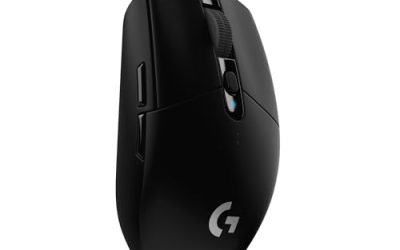
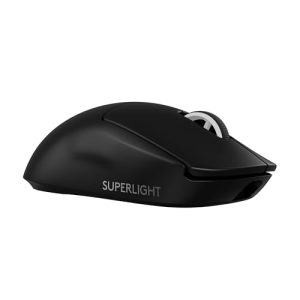
 Logitech G Pro X Superlight 2 Lightspeed WirelessClassic1.57 x 2.5 x 4.92 inches0.1 poundsCheck on Amazon
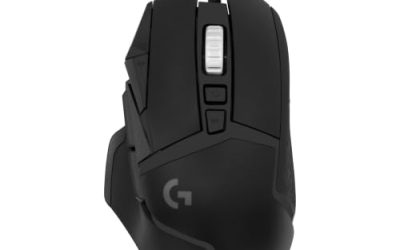
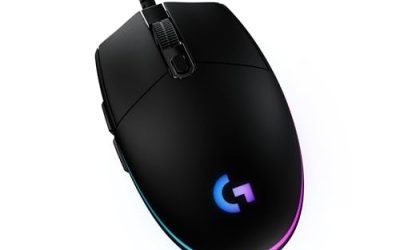
 Razer Basilisk V3 Customizable RGB Wired Ergonomic GamingMouse2.96 x 5.12 x 1.67 inches0.2 poundsCheck on Amazon
The best layout for professional gaming mouse setups is the one that matches your hand, your grip, and the game you play most. Two players with the same aim can need completely different mice: a palm-grip player with large hands wants a tall, right-handed ergonomic shell, while a fingertip player who plays fast shooters wants a short, low, symmetrical shell with nothing in the way. There is no single layout that wins for everyone, and that is exactly why professionals test shapes before they commit to one.
This guide explains the main mouse layouts used in professional gaming, how each grip style maps to a shape, and how to choose button placement for your genre. It is a layout guide, not a product roundup, because the right layout is a property of the shape, not of any one brand or model.
How We Chose the Layouts to Cover
We focused on the layout families that actually appear in professional play, across shooters, MOBAs, battle royales, and MMOs. A layout earned a place here if it is used by a meaningful group of professional players, if its shape solves a real ergonomic problem, and if it can be described clearly enough that you can recognize it in a store listing without holding the mouse first.
We also weighed versatility against specialization. A symmetrical shell with two side buttons works for almost any game, while a twelve-button side grid is superb for MMOs and nearly useless for a tactical shooter. Both deserve coverage, but they deserve different recommendations, because the best layout for professional gaming mouse use depends on what the mouse has to do all day.
Quick Comparison
| Layout | Shape | Best Grip | Button Count | Best For |
|---|---|---|---|---|
| Right-handed ergonomic | Tall hump, thumb rest, flared right side | Palm, relaxed claw | 5–8 | Long sessions, tactical shooters, large hands |
| Symmetrical ambidextrous | Mirror image, low hump, narrow waist | Fingertip, claw | 5–7 | Fast flicks, small to medium hands, FPS |
| Low-profile symmetrical | Short, flat, narrow, light | Fingertip | 5–6 | High-sensitivity play, quick micro-adjustments |
| Button-grid MMO | Wide body, 12-button thumb grid | Palm, claw | 12–20 | MMOs, MOBAs, ability-heavy games |
| Vertical / upright | Tall, handshake angle | Palm | 5–6 | Wrist comfort, non-competitive practice |
The Main Layouts Explained
Right-Handed Ergonomic: Best for Long Sessions and Large Hands
The right-handed ergonomic layout is the classic professional shape. It has a tall hump that sits toward the back of the shell, a sculpted thumb rest on the left side, and a flared right edge that supports the ring finger and pinky. Your hand drapes over it instead of gripping it, which keeps the wrist in a neutral position and spreads pressure across the whole palm.
This layout suits palm-grip players best, especially those with hands longer than about 18 centimeters from wrist to middle fingertip. The tall hump fills the palm, so the hand does not have to curl to maintain contact. That reduces fatigue in long practice blocks and long tournament days, which is why this shape is common among players who scrim for six or more hours a day.
The trade-offs are real. A right-handed ergonomic mouse cannot be used left-handed, and its tall hump makes it slower to lift and reposition than a low symmetrical shell. The thumb rest is a fixed feature: if your thumb naturally sits a few millimeters higher or lower than the rest, you will feel it every time you click. Before buying, check the hump height and the overall length against your hand.
Symmetrical Ambidextrous: Best for Fast Flicks and Small to Medium Hands
The symmetrical layout is a mirror image: the left and right sides match, the hump sits in the middle, and the shell narrows slightly at the waist. It is the shape most associated with professional FPS play, because it gets out of the way. There is no thumb rest to fight, no flare to catch the ring finger, and the low hump lets the hand stay light on the shell.
This layout suits claw and fingertip grips best. In a claw grip, the palm rests lightly on the back of the hump while the fingers arch down onto the buttons. In a fingertip grip, only the fingertips touch the mouse, and the palm floats. Both grips depend on quick, small movements, and a symmetrical shell supports them because there is less plastic in contact with the hand to create drag.
The main weakness is comfort over very long sessions. Without a thumb rest or a tall hump, the hand does more of the work of holding the mouse up, and the pinky and ring finger can drag on the pad. If you play long sessions with a symmetrical mouse, pay attention to the side grip texture and the weight: a textured side and a lighter shell reduce the effort of lifting and repositioning.
Low-Profile Symmetrical: Best for High-Sensitivity Play
The low-profile layout is a symmetrical shell taken to its extreme: short, flat, narrow, and light, with a hump so low it almost disappears. It is built for players who run high sensitivity and aim with the wrist and fingers rather than the arm. The hand stays close to the pad, the fingers stay close to the buttons, and the mouse moves with very little effort.
Fingertip players benefit most. With a low-profile shell, the fingertips control the mouse directly, and the small contact area means the mouse responds to tiny adjustments. That is useful in games where the crosshair is always moving and targets appear for a fraction of a second.
The cost is stability. A low, narrow mouse offers little to hold onto, and it can feel twitchy to a player who is used to a full-size shell. It is also the least forgiving layout for large hands: if your fingers overhang the front of the shell, your clicks will feel cramped and your ring finger will drag.
Button-Grid MMO Layout: Best for Ability-Heavy Games
The button-grid layout is built around one idea: the thumb should be able to reach twelve or more abilities without moving the hand. The shell is wide, the left side carries a grid of numbered buttons, and the hump is tall enough to support a palm grip for hours. It is the standard layout for MMOs and for MOBA players who bind items and abilities to the mouse.
For its intended games, this layout is hard to beat. Twelve thumb buttons plus the usual left, right, wheel, and DPI controls give a player more inputs on one hand than any other layout. The wide body also gives the thumb a stable platform, so accidental presses are less common than the button count suggests.
Outside ability-heavy games, the grid is a liability. The wide body is slow to flick, the extra buttons are easy to hit by accident in a tense shooter round, and the shell is too wide for most fingertip players. If you play one MMO seriously and one shooter casually, a button-grid mouse will serve the MMO well and frustrate you in the shooter.
Vertical and Upright Layouts: Best for Wrist Comfort
Vertical layouts hold the hand in a handshake position, with the shell standing tall and the buttons on the side rather than on top. They are not common in professional competition, because the upright angle changes the mechanics of aiming and makes fast flicks harder. They appear here because they matter for practice: players with wrist pain sometimes use a vertical mouse for aim training and desk work, then switch to a conventional layout for matches.
Matching Layout to Grip Style
Grip style is the fastest way to narrow the field. There are three main grips, and each one points to a different layout family.
Palm grip means the whole hand rests on the mouse: palm on the hump, fingers extended to the buttons, thumb on the side. Palm players need a shell long and tall enough to fill the hand. Right-handed ergonomic layouts and button-grid layouts fit best. A palm player on a low-profile shell will feel like the mouse is too small, because it is.
Claw grip means the palm touches the back of the hump while the fingers arch down like a claw. Claw players need a hump high enough to support the palm but a shell short enough that the arched fingers still reach the buttons comfortably. Symmetrical layouts with a medium hump are the usual fit, and many ergonomic shells work too if the hump is not too far back.
Fingertip grip means only the fingertips touch the mouse, and the palm floats above it. Fingertip players need a short, light, low shell with nothing in the way. Low-profile symmetrical layouts are the natural match. An ergonomic shell with a thumb rest will fight a fingertip grip, because the rest pushes the hand into a position it does not want.
Hand size matters as much as grip. Measure from the base of the wrist to the tip of the middle finger. Under about 17 centimeters is a small hand; 17 to 19 centimeters is medium; over 19 centimeters is large. Then check the mouse dimensions in the listing: length, width, and height. A good rule is that the mouse should be roughly two-thirds the length of your hand. A shell much longer than that will feel bulky; a shell much shorter will leave your fingers overhanging the front.
Button Placement and Count
Button placement matters more than button count. Five well-placed buttons beat twelve poorly placed ones in every game except MMOs.
For shooters, the standard layout is five to seven buttons: left and right click, scroll wheel click, two thumb buttons, and optionally a DPI switch or a sniper button. The two thumb buttons should sit in the natural arc of the thumb, reachable without shifting the grip. A DPI switch belongs behind the wheel or under the thumb, never where the ring finger rests, because an accidental DPI change in the middle of a round is worse than no DPI switch at all.
For MOBAs, six to eight buttons is the sweet spot. Two thumb buttons handle items, a third thumb button or a wheel tilt handles wards or pings, and the rest stay out of the way. Extra buttons on the top of the shell are risky, because the index finger can hit them while clicking.
For MMOs, the twelve-button grid is the standard, and the placement rule is different: the grid should be curved to match the thumb’s sweep, with the front buttons slightly larger or more textured so you can find them without looking. A flat grid of identical buttons is hard to use blind, which defeats the purpose.
One more detail deserves attention: side button stiffness. Soft, shallow side buttons are easy to press but easy to press by accident. Firm, slightly recessed side buttons take a deliberate push. Competitive players usually prefer the firm end of that range, because an accidental ability or melee attack at the wrong moment costs more than the fraction of a second a firmer press takes.
Sensor Position and Weight Balance
Layout is not only the outside of the mouse. Where the sensor sits inside the shell changes how the mouse feels when it moves. Most professional layouts place the sensor near the center of the shell, slightly forward of the middle. A centered sensor makes the mouse rotate predictably around your hand, so a flick feels the same whether it starts from the left or the right. A sensor placed far forward or far back makes the mouse feel different depending on the direction of the flick, which is distracting at speed.
Weight balance works the same way. A mouse that is heavy at the back feels sluggish when you lift it and reposition it, because the back drags. A mouse that is heavy at the front feels nose-heavy and hard to stop precisely. The best layout for professional gaming mouse use keeps the weight centered and low, so the shell feels the same in every direction.
Buying Guide
Start with your grip and your hand size, not with a brand. Hold your hand in your normal gaming position and notice where your palm, thumb, and fingers naturally sit. That picture tells you the shape family before you read a single listing.
Next, match the layout to your main game. Shooter players should prioritize a symmetrical or ergonomic shell with five to seven buttons and a centered sensor. MOBA players should look for six to eight buttons with a curved thumb cluster. MMO players should look for a button grid. If you play several genres, a symmetrical shell with two thumb buttons is the safest compromise, because it does nothing badly even if it does nothing perfectly.
Then check the practical details. Look at the shell length, width, and height against your hand measurement. Check the cable or wireless connection: a stiff cable drags and changes the feel of a light mouse. Check the side grip material, because smooth plastic gets slippery with sweat during long sessions, while a rubberized or textured side holds up better.
Finally, give a new layout time. The first day with a new shape always feels wrong, because your hand is used to the old one. Play your normal routine for a week before judging. If the layout still feels wrong after a week of regular play, it is the wrong layout, and no amount of adjustment will fix it. If it feels natural by day three or four, you have found a shape worth keeping.
Top Picks for Professional-Style Gaming Mice
Layout means button count and shape, so pick what matches your grip. This set spans esports mice, ergonomic shapes and a button-heavy model.
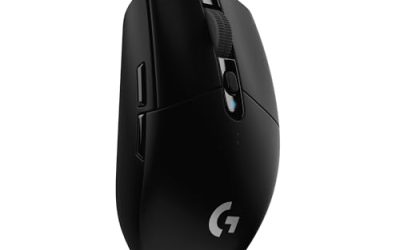
Logitech G Pro X Superlight 2 Wireless Gaming Mouse
A lightweight wireless mouse with a simple five-button layout favored in esports. It is built for fast, precise aim.
Logitech G Pro X Superlight 2 Lightspeed Wireless Gaming Mouse, Black | Lightweight, LIGHTFORCE hybrid switches, HERO 2 sensor, 32,000 DPI, 5 programmable buttons, USB-C charging, Mac & PC gaming
Chosen because it is a hybrid/pocket-spring build.
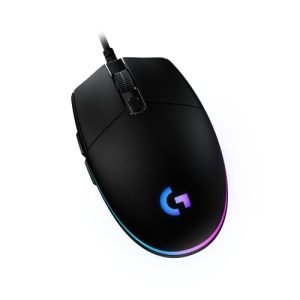
View on AmazonLogitech G PRO 2 LIGHTSPEED Ambidextrous Wireless Mouse
A symmetrical wireless mouse that suits left or right-handed players. The shape fits claw and fingertip grips.

Logitech G PRO 2 LIGHTSPEED Ambidextrous Wireless Gaming Mouse - Black | Symmetrical design, <4 customizable magnetic side buttons, USB-C charging, PowerPlay Wireless Charging Supported, For PC/Mac
One of the home product options compared in this guide.
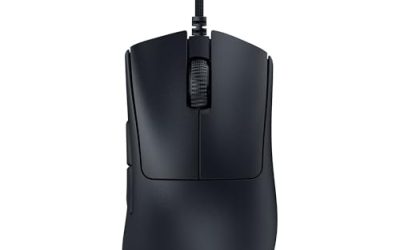
View on AmazonRazer DeathAdder V3 Wired Gaming Mouse, 59g
An ergonomic right-handed mouse that is light and wired. It keeps a familiar curve many players trust for long sessions.

Razer DeathAdder V3 Wired Gaming Mouse, 8Khz, 59g, Black | Focus Pro 30K Optical Sensor, Fast Optical Switches Gen-3, 6 Programmable Buttons, Ergonomic, Speedflex Cable
One of the home product options compared in this guide.
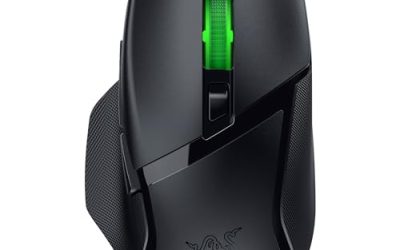
View on AmazonRazer Basilisk V3 Customizable Ergonomic Gaming Mouse
An ergonomic mouse with extra programmable buttons and a flexible scroll wheel. It suits players who like macros.
Razer Basilisk V3 Customizable RGB Wired Ergonomic Gaming Mouse, Black | Fastest Gaming Mouse Switch, Chroma RGB Lighting, 26K DPI Optical Sensor, 11 Programmable Buttons, HyperScroll Tilt Wheel
One of the home product options compared in this guide.
View on AmazonRedragon M908 Wired MMO RGB Gaming Mouse
A 12-button wired mouse with a thumb-side grid. It is meant for MMO and strategy games with many commands.

Redragon M908 Wired MMO RGB Gaming Mouse 12400 DPI Remapping Keys | Stable Lag-Free Connection, Redefine Keybinding Macro, Vibing Backlight, Ergonomic Grip Body Comfort
One of the home product options compared in this guide.
View on AmazonHold a mouse in your usual grip before judging layout: palm, claw and fingertip styles favor different lengths and widths. Weight, side buttons and wireless latency matter, so decide which of those you really use before paying extra for features you will not touch. If a mouse feels slightly off, grip tape or fresh skates can adjust the feel without changing models.
FAQs
What is the best mouse layout for FPS games?
For most FPS players, a symmetrical ambidextrous layout with a low to medium hump is the best starting point. It supports claw and fingertip grips, it flicks quickly, and it stays out of the way during fast aim adjustments. Palm-grip players with large hands often prefer a right-handed ergonomic layout instead, because the taller hump supports the whole hand during long sessions.
Does an ergonomic mouse layout help with wrist pain?
A right-handed ergonomic layout can help, because the tall hump and thumb rest keep the wrist in a more neutral position than a flat shell. It is not a cure, though. Wrist pain also comes from sensitivity settings, desk height, and how long you play without breaks. If pain persists, take regular breaks and consider talking to a clinician rather than relying on a mouse shape alone.
How many buttons should a professional gaming mouse have?
Five to seven buttons cover almost every shooter and MOBA: left and right click, wheel click, two thumb buttons, and optionally a DPI switch. MMO players are the exception, and they usually want a twelve-button thumb grid. More buttons than your game needs only add accidental presses, so match the count to the game, not to the specification sheet.
Can left-handed players use a symmetrical mouse layout?
Yes. A symmetrical layout is the same shape on both sides, so it works for either hand. Check the side buttons, though: many symmetrical mice only include thumb buttons on the left side, which favors right-handed players. A truly ambidextrous mouse has side buttons on both sides or lets you disable the ones you do not use.
Should I copy a professional player’s exact mouse layout?
Use it as a starting point, not as a final answer. A professional player’s mouse fits their hand size, grip, and game, and those three things may differ from yours. The useful part of copying a pro is learning which layout family they chose and why. The mistake is assuming their exact shell will fit your hand the same way it fits theirs.
Final Verdict
The best layout for professional gaming mouse setups is the one that fits your hand and your game, and that usually means starting from your grip. Palm players with medium to large hands should start with a right-handed ergonomic layout. Claw and fingertip players should start with a symmetrical layout, going low-profile if they play at high sensitivity. MMO players should start with a button-grid layout, and everyone else should keep the button count close to what their game actually uses.
Do not chase a layout because a professional player uses it. Chase the layout that disappears under your hand: the shell that lets you forget the mouse exists and think only about the game. When you find that shape, your aim stops being a fight with the hardware and starts being a skill you can practice.
Disclosure: As an Amazon Associate, we earn from qualifying purchases made through links in this article, at no extra cost to you.
FAQ
What is the best mouse layout for FPS games?
Does an ergonomic mouse layout help with wrist pain?
How many buttons should a professional gaming mouse have?
Can left-handed players use a symmetrical mouse layout?
Should I copy a professional player’s exact mouse layout?
More from Amazon
Programs that pair well with the guide above. Offers and eligibility are set by Amazon and may change.
Free shipping on eligible items, Prime Video and more. Eligible new members can start with a free trial.
Start a Prime free trialAd-free music streaming. Eligible new subscribers can start with a free trial.
Try Music Unlimited freeA Prime membership for ages 18-24 with a trial period. Eligibility is set by Amazon.
See Prime for Young AdultsAudiobooks and podcasts to listen to on the go. Eligible new members can start with a free trial.
Try Audible freeAs an Amazon Associate we earn from qualifying purchases.