Key takeaways
- Find the best place for routers in your home. Learn where to put your router for the strongest Wi-Fi signal, fewer dead zones, and faster gaming speeds.
As an Amazon Associate we earn from qualifying purchases.
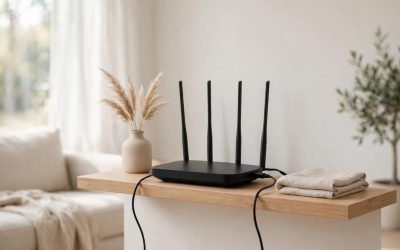
The best place for routers is high up, out in the open, and as close to the center of your home as possible. That single decision matters more than most router upgrades, because Wi-Fi signals weaken every time they pass through a wall, a floor, or a piece of furniture. A well-placed router can turn a connection that drops in the bedroom into one that streams, games, and video calls smoothly in every room. Before you spend money on a new router, a mesh system, or a signal booster, spend twenty minutes finding the right spot for the one you already own.
The Short Answer
Put your router in a central room of your home, on a shelf or table about waist to shoulder height, out in the open with nothing blocking it on any side. Keep it away from thick walls, metal objects, mirrors, fish tanks, and large appliances. Keep it away from other electronics that can interfere with its signal. Then run a speed test in the rooms you use most, and adjust from there.
Rule 1: Go Central
The center of your home is the best place for routers because it shortens the distance to every device. Think of your router as a light bulb in the middle of a room. Put it in the middle and every corner gets some light. Push it into one corner and the far side sits in shadow. A router in a far corner forces the signal to cross the entire building to reach the opposite end, while the same router placed in the middle gives every room a shorter, cleaner path.
For a single-story home, the ideal spot is a room near the geometric center of the floor plan, often a living room or a hallway nook. For a two-story home, the best compromise is a central spot on the main floor, or a spot on the upper floor near the stairs, so the signal can travel both down and across. If your internet connection enters the house at one end, a longer Ethernet cable can move the router toward the center. A ten or fifteen foot cable costs little and is often the cheapest Wi-Fi upgrade you will ever buy.
If your home is long and narrow, place the router about one third of the way from the end where you use Wi-Fi most, and consider a mesh system or a wired access point for the far end.
Rule 2: Go High, But Not Too High
Wi-Fi signals spread outward and slightly downward from a router, so height helps. A router sitting on the floor sends much of its signal into the floor and the furniture around it. Raising it to waist height, chest height, or the top of a bookshelf gives the signal a clearer path over sofas, tables, and other low obstacles.
A shelf mounted on the wall, the top of a tall bookcase, or a small table near the center of the room all work well. Avoid putting the router on the very top of a tall cabinet pressed against the ceiling, because the ceiling itself can block signal to the floor above, and you still need to reach the router to restart it or plug in a cable. Waist to shoulder height is the sweet spot for most homes.
In a two-story home, placing the router on the upper floor often gives better coverage to both levels than placing it on the ground floor, because signals travel downward through a floor more easily than upward. If your bedrooms are upstairs and your living room is downstairs, try the router on the upper floor near the stairwell and test both levels.
Rule 3: Keep It Out in the Open
A router needs open air around it. Do not put it inside a closed cabinet, a media console with doors, a drawer, or behind a stack of books. Enclosed spaces trap heat, and heat makes routers throttle performance and restart unexpectedly. They also block the signal on every side, which defeats the purpose of the antennas entirely.
Give the router at least a few inches of clear space on all sides, and keep its vents uncovered. If the router must sit on a shelf inside a TV stand, leave the doors open or remove the back panel so air and signal can move freely. The same applies to hiding a router behind a television, a large monitor, or a gaming console: those big metal and glass objects absorb and reflect Wi-Fi, and placing a router directly behind one is one of the most common placement mistakes.
Rule 4: Avoid the Biggest Signal Killers
Some materials and objects are far worse for Wi-Fi than others. Knowing them helps you pick a spot and diagnose dead zones.
- Brick, concrete, and stone walls. These absorb a large share of the signal. A router on one side of a brick fireplace wall will struggle to reach the room on the other side.
- Metal. Metal filing cabinets, metal shelving, radiators, and large appliances reflect Wi-Fi. Never place a router inside or directly behind a metal cabinet.
- Mirrors. The metallic coating on the back of a mirror reflects radio waves, so a large mirror between the router and your desk can create a surprising dead zone.
- Water. Water absorbs Wi-Fi signals effectively. Fish tanks and water heaters all block signal, so keep the router away from them.
- Thick plaster walls. Older homes with plaster walls often have metal mesh inside them, which blocks Wi-Fi far more than modern drywall.
- Floors. Each floor between the router and your device weakens the signal. One floor is usually manageable, but two floors of concrete are a serious obstacle.
You cannot remove walls, but you can choose a spot where the signal crosses as few of these obstacles as possible on its way to the rooms you use most.
Rule 5: Keep Away from Interference
Other electronics can interfere with Wi-Fi, especially on the 2.4 GHz band. Microwave ovens are the classic example: a running microwave can briefly disrupt a 2.4 GHz connection in the same room. Baby monitors, cordless phones, and some wireless security cameras can also crowd the same frequencies.
Keep the router at least a few feet away from microwaves, cordless phone bases, baby monitors, and Bluetooth speakers, and away from large motors such as washing machines and refrigerators, which generate electrical noise. Remember that the 5 GHz band is faster but shorter range and more easily blocked by walls, while 2.4 GHz reaches farther but is more crowded. A central, elevated placement helps both bands.
Best Place for Routers in Different Home Layouts
Small Apartments
In a studio or one-bedroom apartment, almost any central, elevated, open spot will cover the whole space. The most common mistake is hiding the router behind the television or inside the media console. Move it to the top of the console or a nearby shelf, and the whole apartment should get a strong signal.
Two-Story Homes
Place the router centrally on the upper floor if the bedrooms are upstairs, or centrally on the main floor near the stairwell if the main living space is downstairs. A spot near the stairs lets the signal travel down the open stairwell, which acts like a channel for Wi-Fi. Avoid placing the router directly above or below a thick load-bearing wall or a chimney, because those block signal between floors.
Long or L-Shaped Homes
A single router cannot cover a long home evenly from one end. Place the router about one third of the way in from the end where your most important devices live, usually the living room or the home office. If the far end still has a weak signal, the honest fix is a mesh system with a satellite node at the far end, or a wired access point connected by Ethernet. Moving a single router back and forth will only trade one dead zone for another.
Homes with Thick Walls
Older homes with brick, stone, or plaster walls need a different strategy. The router should sit in the room where you use Wi-Fi most, with as few thick walls between it and your devices as possible. Hallways help, because an open hallway gives the signal a clear path down its length.
Best Place for a Gaming Setup
Gamers care about latency and stability more than raw download speed, and placement affects both. The best place for routers in a gaming household is as close as practical to the gaming setup while still serving the rest of the home. If the router and the gaming PC or console are in the same room, use an Ethernet cable between them. A wired connection removes Wi-Fi variability entirely, and it is the single most reliable way to keep ping low and stable during online play.
If a cable is not possible, put the router in the same room as the gaming setup, or in the room directly next door with the door open. Keep the path between the router and the console as clear as possible, with no metal furniture or mirrors in between, and never place the router behind the television or the gaming monitor. If the router must stay in another room, the 5 GHz band usually gives lower latency at short range, while 2.4 GHz is the fallback when the signal has to cross walls.
Where Not to Put Your Router
Avoid all of these spots:
- Inside a closed cabinet, drawer, or media console
- On the floor, especially in a corner or behind furniture
- In the basement, unless that is where everyone uses Wi-Fi
- Behind or directly beside a television, large monitor, or gaming console
- Next to a microwave, baby monitor, or cordless phone base
- Inside a metal cabinet or on top of a metal filing cabinet
- Behind a large mirror or a fish tank
- In a far corner of the house, such as a spare bedroom at the end of a hallway
- On top of a refrigerator, washing machine, or other large appliance
If your router is in any of these spots right now, moving it is the fastest free improvement you can make to your home network.
How to Test Whether a New Spot Is Better
Do not judge a new placement by feel. Test it with numbers so you can compare spots fairly.
- Run a speed test at the old spot. Stand in the rooms you use most, run a speed test on your phone or laptop, and write down the download speed, upload speed, and ping for each room.
- Move the router. Pick a new spot based on the rules above, let the router fully restart, and wait a minute for the connection to settle.
- Run the same tests again. Use the same device, the same test, and the same spots in each room. Compare the numbers, not your impression.
- Check the signal strength. On a laptop, look at the Wi-Fi signal indicator or use your operating system’s network details to see the signal strength. A reading around minus 50 is excellent, minus 60 is good, minus 70 is fair, and minus 80 or worse is weak.
- Try two or three spots, and test in the evening too. Small moves can make a surprising difference, and evening congestion can change results, so repeat your best test when you actually use Wi-Fi most.
Keep notes on each test. It takes ten minutes and it stops you from chasing a spot that only felt better.
What to Do When Placement Alone Is Not Enough
Sometimes the right spot does not exist. The internet connection may enter the house at one end, the only available outlet may be in a bad corner, or the walls may simply be too thick. When placement alone cannot fix your coverage, here are the options in order of reliability.
A longer Ethernet cable from the modem to the router is the cheapest fix and often the only one needed. It lets you move the router to the center of the home even when the internet line enters at the edge.
A mesh Wi-Fi system is the best fix for large or thick-walled homes. Place the main unit centrally and add satellite nodes in the rooms that need coverage, each within good range of the main unit. A node placed too far from the main unit just repeats a weak signal, so keep nodes closer than you think you need.
A wired access point is the most reliable fix for a far room or a home office. Run an Ethernet cable to that room and connect an access point there. It gives that room a full-strength signal without depending on Wi-Fi to cross the house.
A Wi-Fi extender is the weakest option. It can help in a small dead zone, but it halves the available bandwidth on the band it repeats, and it only works when placed where the original signal is still strong. Place it halfway between the router and the dead zone, not inside the dead zone itself.
Comparison: Good Spots vs Bad Spots
| Placement | Signal Quality | Best For |
|---|---|---|
| Central room, waist height, open shelf | Excellent | Most homes, general use |
| Upper floor near stairs | Very good | Two-story homes |
| Top of a bookcase in the living room | Very good | Apartments, open plans |
| Same room as gaming setup, wired | Excellent | Gaming, low latency |
| Inside a closed media cabinet | Poor | Nothing, avoid this |
| On the floor in a far corner | Poor | Nothing, avoid this |
| Behind the television | Poor | Nothing, avoid this |
| In the basement | Fair to poor | Only if Wi-Fi is used there |
| Next to a microwave or baby monitor | Fair | Nothing, move it away |
Frequently Asked Questions
What is the best place for routers in a two-story house?
The best place for routers in a two-story house is a central spot on the floor where Wi-Fi is used most, often the upper floor near the stairwell, since the open stairwell lets the signal travel between floors. Test both levels after placing the router, and use a mesh node or a wired access point if one floor stays weak.
Should a router be high or low?
High is better, within reason. Waist to shoulder height on an open shelf is ideal. A router on the floor loses signal to the floor and nearby furniture, while a router pressed against the ceiling can be hard to reach and may have trouble covering the floor below it.
Can I put my router inside a cabinet?
You can, but you should not. A closed cabinet blocks the signal on every side and traps heat, which can make the router slow down or restart. If the router must sit inside furniture, leave the doors open or remove the back panel so air and signal can move freely.
How far should a router be from other electronics?
Keep the router at least a few feet away from microwaves, baby monitors, cordless phone bases, and large appliances. These devices can interfere with Wi-Fi, especially on the 2.4 GHz band. Also keep the router away from large metal objects and mirrors, which reflect the signal.
Does router placement affect gaming ping?
Yes. A weak or obstructed Wi-Fi signal causes higher and less stable ping, which shows up as lag and rubber-banding in online games. Placing the router in the same room as your gaming setup, or better yet connecting with an Ethernet cable, gives the lowest and most stable ping.
Why is my Wi-Fi strong in one room and weak in the next?
The wall between the rooms is usually the cause. Brick, concrete, plaster with metal mesh, and walls containing mirrors, pipes, or large appliances block far more signal than plain drywall. Moving the router so the signal reaches the weak room through a hallway or an open doorway, rather than straight through the worst wall, often fixes the problem.
Conclusion
The best place for routers is central, elevated, and out in the open. Put your router on a shelf near the middle of your home, away from metal, mirrors, water, and interfering electronics, and test the result in the rooms you actually use. For gaming, get the router into the same room as your setup and use a wired connection whenever you can.
FAQ
What is the best place for routers in a two-story house?
Should a router be high or low?
Can I put my router inside a cabinet?
How far should a router be from other electronics?
Does router placement affect gaming ping?
Why is my Wi-Fi strong in one room and weak in the next?
More from Amazon
Programs that pair well with the guide above. Offers and eligibility are set by Amazon and may change.
Free shipping on eligible items, Prime Video and more. Eligible new members can start with a free trial.
Start a Prime free trialAd-free music streaming. Eligible new subscribers can start with a free trial.
Try Music Unlimited freeA Prime membership for ages 18-24 with a trial period. Eligibility is set by Amazon.
See Prime for Young AdultsAudiobooks and podcasts to listen to on the go. Eligible new members can start with a free trial.
Try Audible freeAs an Amazon Associate we earn from qualifying purchases.