Key takeaways
- Full 2.5G Ethernet on every port, a rarity at this price
- Genuine Wi-Fi 7 tri-band performance with low-latency MLO
- Strong single-unit coverage for homes up to roughly 2,000 sq ft
- EasyMesh and USB 3.0 add real expandability
The TP-Link Archer BE550 is a tri-band BE9300 Wi-Fi 7 router built to bring the newest wireless standard to mainstream homes without a mainstream-breaking price. Its headline features are full 2.5G Ethernet ports across the board and six internal antennas, a combination that has made it one of 2026’s most recommended first-time Wi-Fi 7 routers.
It is aimed at households that want faster, lower-latency wireless and multi-gig wired networking for a moderately sized home, typically up to around 2,000 square feet. If you are upgrading from an older Wi-Fi 6 router and have a multi-gig internet plan, this is exactly the kind of upgrade it targets.
Our top picks
 TP-Link Tri-Band BE9300 WiFi 7 Router
- BE9300 Tri-Band Wi-Fi 7 Speeds: Archer BE550 features…
- Unmatched Performance for Streaming and Gaming: Ensures seamless…
- Extend Your Coverage with EasyMesh: Add EasyMesh-compatible routers,…
 TP-Link Tri-Band BE9700 WiFi 7 Router Archer
- 𝐁𝐄𝟗𝟕𝟎𝟎 𝐓𝐫𝐢-𝐁𝐚𝐧𝐝 𝐖𝐢-𝐅𝐢 𝟕 𝐒𝐩𝐞𝐞𝐝𝐬: Features up to…
- 𝟏𝟎 𝐆𝐛𝐩𝐬 𝐏𝐨𝐫𝐭 𝐟𝐨𝐫 𝐌𝐮𝐥𝐭𝐢-𝐆𝐢𝐠𝐚𝐛𝐢𝐭 𝐂𝐨𝐧𝐧𝐞𝐜𝐭𝐢𝐯𝐢𝐭𝐲 : Features…
- 𝐄𝐱𝐩𝐚𝐧𝐝 𝐖𝐢𝐅𝐢 𝐂𝐨𝐯𝐞𝐫𝐚𝐠𝐞 𝐰𝐢𝐭𝐡 𝐄𝐚𝐬𝐲𝐌𝐞𝐬𝐡: Extend network range…
| Product | Key specs | |
|---|---|---|
| TP-Link Tri-Band BE9300 WiFi 7 Router | BE9300 Tri-Band Wi-Fi 7 Speeds: Archer BE550 features… Unmatched Performance for Streaming and Gaming: Ensures seamless… Extend Your Coverage with EasyMesh: Add EasyMesh-compatible routers,… | Check price |
| TP-Link Tri-Band BE9700 WiFi 7 Router Archer | 𝐁𝐄𝟗𝟕𝟎𝟎 𝐓𝐫𝐢-𝐁𝐚𝐧𝐝 𝐖𝐢-𝐅𝐢 𝟕 𝐒𝐩𝐞𝐞𝐝𝐬: Features up to… 𝟏𝟎 𝐆𝐛𝐩𝐬 𝐏𝐨𝐫𝐭 𝐟𝐨𝐫 𝐌𝐮𝐥𝐭𝐢-𝐆𝐢𝐠𝐚𝐛𝐢𝐭 𝐂𝐨𝐧𝐧𝐞𝐜𝐭𝐢𝐯𝐢𝐭𝐲 : Features… 𝐄𝐱𝐩𝐚𝐧𝐝 𝐖𝐢𝐅𝐢 𝐂𝐨𝐯𝐞𝐫𝐚𝐠𝐞 𝐰𝐢𝐭𝐡 𝐄𝐚𝐬𝐲𝐌𝐞𝐬𝐡: Extend network range… | Check price |
| TP-Link Tri-Band BE9300 WiFi 7 Router | Check price | |
 TP-Link BE6500 Dual-Band WiFi 7 Router TP-Link BE6500 Dual-Band WiFi 7 Router | 𝐅𝐮𝐭𝐮𝐫𝐞-𝐑𝐞𝐚𝐝𝐲 𝐖𝐢-𝐅𝐢 𝟕 - Designed with the latest… 𝟔-𝐒𝐭𝐫𝐞𝐚𝐦, 𝐃𝐮𝐚𝐥-𝐁𝐚𝐧𝐝 𝐖𝐢-𝐅𝐢 𝐰𝐢𝐭𝐡 𝟔.𝟓 𝐆𝐛𝐩𝐬 𝐓𝐨𝐭𝐚𝐥 𝐁𝐚𝐧𝐝𝐰𝐢𝐝𝐭𝐡… 𝐖𝐢𝐝𝐞 𝐂𝐨𝐯𝐞𝐫𝐚𝐠𝐞 𝐰𝐢𝐭𝐡 𝐒𝐭𝐫𝐨𝐧𝐠 𝐂𝐨𝐧𝐧𝐞𝐜𝐭𝐢𝐨𝐧 - Get up… | Check price |
 TP-Link Dual-Band AX3000 Wi-Fi 6 Router Archer TP-Link Dual-Band AX3000 Wi-Fi 6 Router Archer | Next-Gen Gigabit Wi-Fi 6 Speeds: 2402 Mbps on… A More Responsive Experience: Enjoy smooth gaming, video… Expanded Wi-Fi Coverage: 4 high-gain external antennas and… | Check price |
 TP-Link Tri-Band BE9700 WiFi 7 Router TP-Link Tri-Band BE9700 WiFi 7 Router | 𝐍𝐞𝐱𝐭-𝐆𝐞𝐧 𝐖𝐢-𝐅𝐢 𝟕 - Optimize performance on latest… 𝟕-𝐒𝐭𝐫𝐞𝐚𝐦, 𝐁𝐄𝟗𝟕𝟎𝟎 𝐓𝐫𝐢-𝐁𝐚𝐧𝐝 𝐖𝐢-𝐅𝐢 𝟕 𝐒𝐩𝐞𝐞𝐝𝐬 - Delivers… 𝐌𝐚𝐱𝐢𝐦𝐢𝐳𝐞𝐝 𝐂𝐨𝐯𝐞𝐫𝐚𝐠𝐞 - Up to 2,600 sq | Check price |
 TP-Link Dual-Band BE3600 Wi-Fi 7 Router Archer TP-Link Dual-Band BE3600 Wi-Fi 7 Router Archer | 𝐅𝐮𝐭𝐮𝐫𝐞-𝐏𝐫𝐨𝐨𝐟 𝐘𝐨𝐮𝐫 𝐇𝐨𝐦𝐞 𝐖𝐢𝐭𝐡 𝐖𝐢-𝐅𝐢 𝟕: Powered by… 𝐁𝐄𝟑𝟔𝟎𝟎 𝐃𝐮𝐚𝐥-𝐁𝐚𝐧𝐝 𝐖𝐢-𝐅𝐢 𝟕 𝐑𝐨𝐮𝐭𝐞𝐫: Delivers up to… 𝐔𝐧𝐥𝐞𝐚𝐬𝐡 𝐌𝐮𝐥𝐭𝐢-𝐆𝐢𝐠 𝐒𝐩𝐞𝐞𝐝𝐬 𝐰𝐢𝐭𝐡 𝐃𝐮𝐚𝐥 𝟐.𝟓 𝐆𝐛𝐩𝐬 𝐏𝐨𝐫𝐭𝐬… | Check price |
 TP-Link Smart WiFi 6 Router TP-Link Smart WiFi 6 Router | OneMesh Compatible Router - Form a seamless WiFi… Next-Gen Wi-Fi 6 Technology Next-gen Dual Band router - 300 Mbps on… | Check price |
As an Amazon Associate we earn from qualifying purchases at no extra cost to you.
⚡ Save on Your Next PC — Amazon Prime
Prime members get fast free shipping on the systems above, plus early access to Prime Day & Black Friday PC deals. New members get a 30-day free trial.
Watch: TP-Link Archer BE550 Review — Video Review
Design & Build
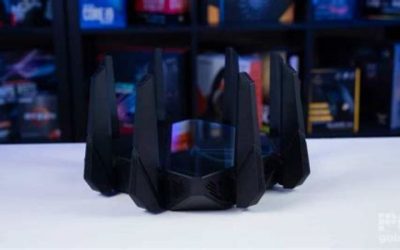
The BE550 keeps its antennas internal, so it looks like a tidy matte-black tower rather than a spider of external aerials. It is a sensible desk or shelf presence rather than a statement piece. The standout on the back panel is that every LAN port is 2.5G, not just the WAN, which is genuinely rare at this price and future-proofs your wired devices. A USB 3.0 port and EasyMesh support round out a well-considered feature set.
Performance
In use, the BE550 delivers the two things that matter most from a Wi-Fi 7 upgrade: higher sustained throughput to modern client devices and noticeably lower latency thanks to features like MLO on the 6GHz band. Coverage across a typical two-story home is strong for a single unit, and the full 2.5G port layout means a NAS, a gaming PC, and a wired backhaul can all run multi-gig without a separate switch.
The realistic caveats are about expectations. To actually see Wi-Fi 7 speeds you need Wi-Fi 7 client devices and, ideally, a multi-gig internet plan; on older laptops and phones the BE550 behaves like a very good Wi-Fi 6/6E router. Its coverage, while good, is single-unit coverage, so larger or awkwardly shaped homes will still want an EasyMesh node. TP-Link’s HomeShield security suite also gates some advanced features behind a paid tier.
Pros & Cons
- Full 2.5G Ethernet on every port, a rarity at this price
- Genuine Wi-Fi 7 tri-band performance with low-latency MLO
- Strong single-unit coverage for homes up to roughly 2,000 sq ft
- EasyMesh and USB 3.0 add real expandability
- Full benefit requires Wi-Fi 7 clients and a multi-gig plan
- Some HomeShield security features need a paid subscription
- No 10G port; heavy multi-gig users may want a higher tier
Alternatives to Consider
If you have or expect a 10-gigabit connection, the TP-Link Archer BE550 Pro (BE9700) adds a 10G port and USB 3.0 for a higher ceiling. Want more raw coverage and device capacity? The Archer BE600 covers up to around 2,600 square feet with a 10G port. Not ready for Wi-Fi 7 at all? The proven Wi-Fi 6 Archer AX55 remains a strong budget option for smaller homes.
Frequently Asked Questions
Do I need Wi-Fi 7 devices to benefit?
To reach true Wi-Fi 7 speeds, yes. Without Wi-Fi 7 clients you still get an excellent router with full 2.5G wired ports, but wireless throughput will match Wi-Fi 6/6E levels.
Will it cover my whole house?
A single BE550 covers up to roughly 2,000 square feet well. Larger or multi-level homes with thick walls should plan to add an EasyMesh node for even coverage.
What does having all 2.5G ports actually get me?
It lets every wired device, such as a NAS, desktop, or mesh backhaul, run at multi-gig speeds without adding a separate 2.5G switch, which many competing routers force you to buy.
Is the HomeShield security free?
Basic protection is included, but some advanced parental controls and security analytics require a paid HomeShield Pro subscription.
Verdict
The TP-Link Archer BE550 is one of the smartest ways to step into Wi-Fi 7 in 2026, largely because of its all-2.5G port layout and solid coverage. Just match it to Wi-Fi 7 clients and a fast plan to see its full value; if you need 10G or a bigger footprint, look to the Pro or BE600.