The best flight yokes for small desks are not necessarily the smallest-looking units in a product photo. A useful yoke must fit the front edge of your work surface, leave room for the push-pull motion of the shaft, clear drawers and knees, and still provide the flight controls you actually use. The Honeycomb Alpha Flight Controls Lite is our overall recommendation for a Windows PC desk with room for a conventional yoke: it offers full 180-degree rotation and a focused set of controls without an integrated switch-panel premium. The Turtle Beach VelocityOne Flight is the better one-box solution when the desk must also accommodate a throttle and trim control. This guide compares six identified yokes and separates readily purchasable options from a newer pre-order model.
Quick verdict: which yoke makes sense on a small desk?
Best overall conventional yoke: Honeycomb Alpha Flight Controls Lite. The 10.75-inch-wide maker-listed housing is comparatively easy to place alongside a normal keyboard, although its roughly 16.14-inch body depth still matters. Buy it for PC general-aviation flying when you do not need an airplane-style switch console on the front of the unit. Best with integrated aircraft switches: standard Honeycomb Alpha, which shares the general footprint but provides master, ignition and light controls.
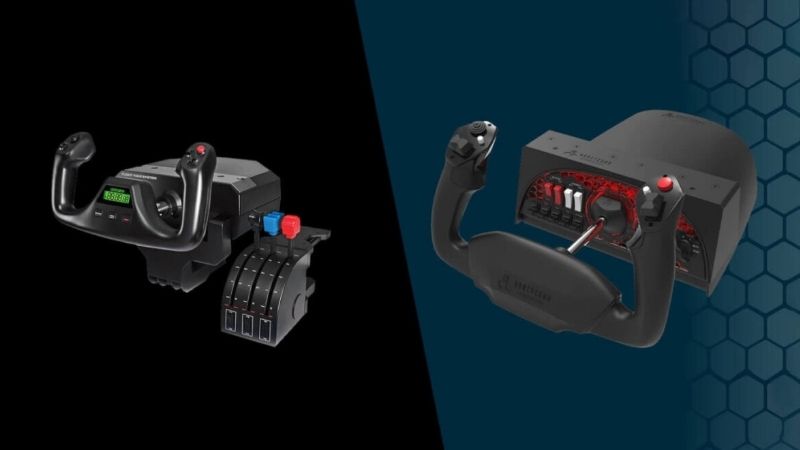
Best all-in-one system: Turtle Beach VelocityOne Flight. It combines yoke, throttle quadrant, trim wheel and several auxiliary controls; that reduces the number of separate boxes but creates a wider assembled device. Best entry price with a throttle: Logitech G Flight Yoke System. The US maker’s page currently says temporarily sold out, while a US retailer displays an add-to-cart option for the precise 945-000023 system. That difference matters more than a low advertised price that cannot be purchased.
Best Boeing-style motion: Thrustmaster TCA Yoke Boeing Edition. Its pendular mechanism is desirable for airliner specialists, not for every shallow desk. Most interesting upcoming compact all-in-one: Thrustmaster TCA Sky Yoke (Xbox/PC), with built-in throttle, trim and rudder controls; the viewed regional launch pages show pre-order rather than confirmed US ready-to-ship stock, so it is a comparison/watchlist item, not our immediate top pick.
Flight yoke comparison: desk needs and US buying status
| Model | Verified space or control characteristic | Best fit and missing extras | Observed seller price, Oct. 29, 2026 | Availability checked | Main limitation |
|---|---|---|---|---|---|
| Honeycomb Alpha Flight Controls Lite | Housing 10.75 W × 16.14 D × 8.19 H in, excludes clamps | PC GA; throttle and pedals separately | Honeycomb official $199.99 | Add to cart | Depth and clamp clearance still substantial |
| Honeycomb Alpha Flight Controls | Same listed 10.75 W × 16.14 D × 8.19 H in; integrated aircraft switch panel | PC GA switch practice | Honeycomb official $299.99 | Add to cart; Best Buy US also lists | Extra switches do not shrink the setup |
| Turtle Beach VelocityOne Flight | Integrated yoke, modular throttle quadrant, trim wheel | PC/Xbox; convenient one-box arrangement | Turtle Beach US $399.99 regular; US collection displayed $329.99 promotion | Add to cart | Wide assembled layout; assess pitch feel |
| Logitech G Flight Yoke System 945-000023 | Separate three-lever quadrant and yoke, dual desk clamps | Entry-level PC with throttle included | Dell US $179.99; Logitech displayed $149.99 sale | Dell add to cart; Logitech temporarily sold out | Older mechanism and two clamp positions |
| Thrustmaster TCA Yoke Boeing Edition | Pendular pitch travel 8.3 in; yoke alone has two added axes | PC/Xbox heavy airliner; separate quadrant optional | Thrustmaster US eShop $399.99 | In stock | Forward pitch arc and weight require clearance |
| Thrustmaster TCA Sky Yoke (Xbox/PC) | Approx. 13.5 W × 17.3 D × 7.09 H in; built-in throttle, trim, rudder | Future all-in-one light-aircraft option | US launch information $199.99 in related regional listing; US price/checkout not fully confirmed | Regional pages show pre-order | Do not treat launch availability as live US stock |
Dimensions describe maker-published device measurements, not the entire operating envelope. Mounted depth changes as the yoke shaft moves; clamp jaws, cabling, throttle placement and your chair also consume space. Displayed prices exclude changing tax, shipping and promotions. Do not place an order based on the pre-order entry without checking current US release and fulfillment information.
Honeycomb Alpha Flight Controls Lite — best overall PC desk yoke
What you get without the larger cockpit controls
The Alpha Lite retains the conventional yoke shape, a full 180 degrees of rotation and a steel shaft while focusing its handle controls on a POV hat, rocker switches and programmable buttons. Its maker-published enclosure is approximately 273 mm wide, 410 mm deep and 208 mm tall, excluding the mounting hardware, at roughly 9.65 pounds. These numbers make its width easier to visualize than its depth: a monitor mounted directly above the desk’s front edge may sit comfortably behind the yoke, but a keyboard tray or deep cable shelf below the top can prevent a secure clamp installation.
Honeycomb’s $199.99 maker listing showed an add-to-cart option during research, and the product page states PC/Mac compatibility plus support for Microsoft Flight Simulator and X-Plane. A buyer can begin with the yoke and map keyboard shortcuts for engine or avionics controls, then add a dedicated throttle quadrant later. That staged approach keeps the initial desk layout simple. The Lite is not a complete flying cockpit, and users should not confuse its leaner front panel with an included throttle.
Why the mechanism and mounting matter more than the name
A long, straight pitch travel can make fine climb and descent adjustments more natural than tapping a keyboard, but a yoke’s feel is a combination of spring/damping design, mounting stiffness and flight-simulator sensitivity. Honeycomb describes a self-centering mechanism with minimal dead zone, but we have not measured control smoothness or axis resolution in a hands-on test. The simplest useful evaluation is whether you can move the full shaft length without touching your monitor stand, desk shelf or chest while seated normally.
Pros: Focused PC flight controls, relatively narrow housing, established 180-degree rotation, attractive maker-direct price versus the standard Alpha. Cons: Still a deep object, does not supply a throttle or pedals, and the supplied mounting solution must fit your particular desk underside. Choose it if cockpit realism matters but the front-facing switch panel would mostly duplicate controls you already use in the simulator.
Honeycomb Alpha Flight Controls — best integrated GA switch panel
How the standard Alpha changes workflow
The standard Alpha adds an ignition key and controls for master, alternator, avionics and lighting functions to the basic yoke concept. Its maker-listed dimensions are the same 10.75-inch width, 16.14-inch depth and 8.19-inch height as the Lite, not a dramatically larger desk footprint. The manufacturer gives 180 degrees of roll, a solid steel shaft on dual linear ball bearings, a damped self-centering system and a USB PC/Mac connection. Its official price was $299.99 when reviewed, with US availability also signaled by a Best Buy listing for the SB003011 model.
That panel can be more valuable than its dimensions suggest for Cessna-style flying. Instead of hunting for ignition or light controls with a mouse, a pilot can follow a consistent preflight sequence with physical switches. In a small space, however, the yoke’s width is not the whole story: the separate Bravo throttle quadrant, rudder pedals or stream deck that you add later can occupy far more horizontal surface than the Alpha itself. Measure your envisioned complete setup rather than the initial purchase.
When to pay the extra $100
Buy the standard Alpha when general-aviation cockpit procedure is part of your hobby and you will repeatedly use the panel. If you typically load into an airliner, fly with an autopilot, and leave most switches untouched, the Lite may be a smarter use of desk real estate and budget. The switch panel itself does not give you an included engine-throttle lever, propeller control or toe brakes; those remain separate controls or game bindings.
Pros: Hardware controls for common GA procedures, stable conventional mechanism, clear manufacturer dimensions, direct US retail listings. Cons: Higher purchase price than the Lite and the same important front-to-back space requirement. The standard Alpha suits a dedicated but compact PC flight station better than a work desk that must be emptied between meetings.
Turtle Beach VelocityOne Flight — best one-box desk cockpit
Consolidating controls without confusing that with being small
VelocityOne Flight builds the yoke, a modular throttle quadrant, trim wheel and an integrated control display into a coordinated system. Turtle Beach specifies a 180-degree yoke rotation with a Hall-effect main sensor and includes fingertip rudder/brake control routes for pilots who have not yet purchased floor pedals. The device supports Windows PC and Xbox, but that does not mean every PC simulator will ship a perfect default profile. Throttle assignments, trim behavior and display support should still be validated in your game and on the latest official firmware.
The convenience is genuine: one purchase supplies more of the essentials for a flight than a conventional yoke alone. The assembled system is wide, though, and the modular quadrant consumes side space that a narrow desk may not have. A desk with a central monitor arm and little room to the right can actually accommodate a Honeycomb Lite plus keyboard bindings more easily. Turtle Beach includes options such as integrated clamping and alternative mounting, but the setup still needs a flat, structurally sound front edge.
Is the all-in-one design worth the price?
The direct US page showed $399.99, while Turtle Beach’s US flight-controls collection displayed a promotional $329.99. We would not guarantee the lower figure until it survives the current checkout. The value depends on avoided future purchases: the built-in quadrant and trim wheel can replace separate hardware for many beginners, but someone who already owns high-quality throttle controls may be paying for duplication. The product also requires storage planning if you remove it after each session; the integrated components make it awkward to pack away quickly.
Independent owner and reviewer discussions have reported variation in perceived pitch-axis friction or smoothness, particularly during tiny corrections. That is a factor to investigate through a seller with a clear return policy, not proof of a universal defect. Pros: Many essential controls in one purchase, Windows/Xbox compatibility, configurable interface and integrated trim. Cons: Wide footprint, higher spend, and potential sensitivity to individual preference in pitch response. It suits a small room with a dedicated desk section better than a physically tiny tabletop.
Logitech G Flight Yoke System — best entry bundle with throttle
Why this older option remains relevant
Logitech’s Flight Yoke System 945-000023 bundles a yoke with a three-lever throttle quadrant, two mounting clamps and a USB-focused Windows PC connection. It also offers a set of programmable controls and a stainless-steel yoke shaft. It can therefore be a cost-controlled way to try general-aviation flying before investing in separate premium throttle hardware. A Dell US listing displayed $179.99 with an add-to-cart action, while Logitech’s own store page displayed a $149.99 promotion but clearly marked the product temporarily sold out.
The split arrangement can actually help some desks. You may position the throttle quadrant immediately beside the yoke, lower down on another supported mount or where the reach suits you. Yet each mount consumes underside clearance, and the second clamp complicates a desk with drawers or a thick front apron. Before placing an order, inspect the exact retailer model number and the included throttle connection cable: it is not the same as purchasing a standalone USB quadrant separately.
What a beginner should realistically expect
This design predates several modern premium control mechanisms and should not be purchased on the assumption that it feels identical to a Honeycomb Alpha. Independent flight-sim coverage frequently describes it as a budget-friendly starter kit but notes that its axis feel and resistance are less refined than more expensive alternatives. That is a qualitative comparison, not an axis-precision benchmark gathered here. It still teaches the basics of coordinating pitch, roll, throttle and trim very effectively when the game controls are mapped correctly.
Pros: Throttle included, accessible US retailer listing, ample buttons, two clamps for an adjustable desk layout. Cons: Brand-direct stock unavailable at research time, older control feel, separate clamp placement and no toe-brake pedals included. It is the sensible starter bundle if you can accept compromises and confirm the retailer has current stock; it is not the best long-term purchase for someone demanding very smooth center response.
Thrustmaster TCA Yoke Boeing Edition — best pendular airliner control
The pitch arc that makes it different
The TCA Yoke Boeing Edition is licensed to evoke the Boeing 787 yoke and uses Thrustmaster’s PENDUL_R mechanism rather than a simple straight push-pull shaft. The manufacturer specifies about 21 cm (8.3 inches) of pitch travel, adjustable springs, a metal internal frame, 18 action buttons and two additional axes on the unit. The US eShop showed $399.99, in stock, for the yoke-only product. This is distinct from the more expensive TCA Yoke Pack Boeing Edition that also bundles the matching throttle quadrant.
This mechanism appeals to airliner fans because the yoke follows a suspended motion pattern unlike conventional GA yokes. But the movement also creates a more complicated space requirement in front of and below the desk. A yoke might fit the tabletop in its neutral position and still sweep too close to a chair arm, knee or under-desk drawer during pitch corrections. The device’s maker-listed weight of about 14.8 pounds calls for a properly secured mount rather than a wobbly lightweight table.
Who should spend this much on a small desk?
A dedicated Boeing or commercial-airliner enthusiast who has measured sufficient forward space can enjoy its specialized action. A pilot mostly flying light aircraft should not pay a premium solely because the hardware has a recognizable aircraft license. The two built-in axes can handle basic functions without an additional quadrant, but many simmers will still want matching throttle hardware to reproduce airline procedures. For a work desk you must clear every evening, the handling and storage weight are serious disadvantages.
Pros: Distinctive pendular feel, airliner-oriented ergonomics, two built-in axes, confirmed US yoke-only stock. Cons: Large pitch envelope, heavy body, costly once extra controls are included. Prioritize the moving clearance diagram over the dimensions on the product listing; this is a specialist pick, not the universal ‘small desk’ winner.
Thrustmaster TCA Sky Yoke (Xbox/PC) — upcoming all-in-one to watch
A design aimed at fewer separate peripherals
The TCA Sky Yoke is an actual, separately named Thrustmaster product rather than an accessory to the Boeing yoke. The Xbox/PC version combines 180-degree rotation, about 9 cm (3.5 inches) of pitch travel, integrated throttle, trim and rudder controls, and 24 buttons. Thrustmaster publishes approximate dimensions of 344 mm wide, 440 mm deep and 180 mm tall, with two mounting brackets supplied. Those measurements describe a potentially convenient all-in-one layout for a small flight station, but the 17.3-inch depth requires a serious front-to-back clearance check.
Its 16-bit magnetic sensing and dual-control feature are interesting for users who want a beginner-friendly device without a separate quadrant. The product family also includes a PlayStation/PC variant; do not assume those console licenses are interchangeable. For a PC-only purchase, either may appear interesting in a listing, but the exact SKU, mapping and current fulfillment region are what matter. The manufacturer presents MSFS 2024 compatibility and preconfigured controls for supported software, which still warrants checking the current official game-support list before purchasing.
Why it is not a buy-now top pick
Regional Thrustmaster pages reviewed in this research displayed pre-order or out-of-stock signals for Sky Yoke variants, and a live US dispatch confirmation for the exact Xbox/PC model was not established. Some other pages list a $199.99 North American figure, but that is not the same as a verified available US checkout offer. We therefore include it for near-term comparison without claiming a ready-to-ship best-buy status. A confirmed US listing and fulfillment date should be checked again before money changes hands.
Pros: Integrated throttle/trim/rudder, included mounts, a potentially convenient middle footprint, modern input specification. Cons: Pre-order/availability uncertainty, not as shallow as it looks, and new-model performance not independently researched here. If you need a yoke now, choose among available units; if waiting is acceptable, it is worth monitoring rather than prepaying based on assumed release timing.
How we chose yokes for work desks and apartment setups
We filtered for real PC-capable yokes and inspected manufacturer dimensions, mounting methods, required extra controls and US purchase evidence. We did not treat a joystick, HOTAS grip or a yoke handle sold without a base as a complete yoke. Price references reflect distinct SKUs and retailers: Logitech’s manufacturer out-of-stock sale is not represented as a product ready to ship, and Thrustmaster’s Sky Yoke launch information is not represented as fulfilled US inventory. Independent flight-control reviews and owner reports informed the trade-off discussion, but this article does not claim our team physically flew each unit or measured axis latency.
A small desk is a geometry problem before it is a product-ranking problem. The best candidate is not necessarily the one with the narrowest case; a yoke can have a small width and a long moving shaft, or a wide body that replaces two separate devices. We favor devices that let the buyer predict where everything will sit and what additional spending will be required.
Buying guide: measure these four clearances before purchase
Check the tabletop edge and underside first
Measure desktop thickness and look for an apron, metal crossbar, front drawer, keyboard tray or cable-management rail that might block clamp jaws. A device can be rated for an ordinary desk thickness but still fail to grip because its clamp needs a flat contact zone several inches behind the front edge. Avoid relying on adhesive mounting for repeated heavy push-pull movements unless the manufacturer approves your surface material and installation method. Do not clamp onto glass or fragile finishes without explicit support.
Measure the whole motion envelope, not the neutral housing
Sit in your normal chair at the height you use for work. Hold your forearms comfortably forward, then estimate where the yoke handle will be at maximum pitch-in and pitch-out positions. Check the monitor stand at full forward travel, your chest at full rear travel and your knees underneath. A Boeing-style pendular mechanism has a different sweep from a straight-shaft Alpha or Logitech. No published case depth can replace checking how the actual pitch travel fits your posture.
Plan space for throttle and pedals
The Honeycomb options need a separate throttle control if you want physical power levers. Logitech includes a small three-lever quadrant, while Turtle Beach integrates a modular quadrant and Thrustmaster Sky Yoke advertises a built-in throttle. The Boeing Edition’s two additional axes can serve basic control functions but may not satisfy airliner enthusiasts who want distinct levers. Rudder pedals normally sit on the floor, and their movement can collide with a rolling desk chair or an under-desk PC tower. Include these objects in the fit plan before deciding that the yoke ‘fits.’
Match the aircraft you fly most often
For Cessna and similar light-aircraft flying, a conventional 180-degree yoke with intuitive pitch travel is a good starting point. For Boeing-heavy airline simulation, the TCA Boeing mechanism has a more specialized appeal. For mixed aircraft and quick sessions, an all-in-one control set may reduce the constant remounting and cable swapping that makes desk-based simming inconvenient. Do not let a specialized license outweigh your actual flight time by aircraft type.
Evaluate comfort and maintenance, not just features
A compact seat position can cause bent wrists if the yoke is mounted too high or too close. Adjust chair height, elbow angle and monitor position before judging the input device. A little center resistance is not automatically a defect, and a beautifully smooth mechanism does not compensate for a wobbly desk. Follow the maker’s instructions for mounting and firmware. Read the actual seller’s return rules if the deciding factor is subjective control feel; a few minutes in a store cannot substitute for hours of flying.
Price the complete flight station
The correct comparison is the yoke plus required throttle control, mounting accessories, cables and optional rudder pedals. A $199.99 yoke-only product can end up costing more to complete than a $329.99–$399.99 all-in-one system. Conversely, buying a costly all-in-one when you already have a premium throttle quadrant creates redundant controls and wasted desk width. Published stock and sales are per seller and date; verify the exact US checkout before committing.
Practical desktop setup sequence
- Remove the keyboard temporarily and measure the front edge, underside clamp zone and chair clearance. Keep a sketch of how far the yoke shaft or pendular assembly moves.
- Mount the yoke firmly according to its actual manual; never improvise a thin glass or unstable tabletop connection. Place the throttle within comfortable reach before tightening side mounts.
- Connect USB directly to a supported port and install or update only official configuration software as needed. Keep enough slack for all yoke travel, without allowing cables to catch the moving shaft.
- In the PC simulator, confirm that pitch and roll axes move correctly in opposite directions; calibrate or adjust dead zones conservatively and remove conflicting controller mappings.
- Test taxiing, takeoff, trim, straight-and-level flight, and landing with an appropriate aircraft. If the desk shifts or the clamp loosens, stop and address mounting rather than increasing input sensitivity.
- To use the same desk for work, disconnect and store the device using the manufacturer’s recommendations, protecting the shaft from accidental bending and keeping the clamp hardware together.
FAQ
Can a flight yoke fit on a 40-inch-wide desk?
Possibly, but width alone does not establish fit. You need a compatible clamp zone, pitch-axis clearance, space for the throttle or keyboard, and legroom. A 10.75-inch-wide Honeycomb Alpha Lite still requires more than 16 inches of device depth before considering movement and mounting hardware.
Is the Honeycomb Alpha Lite smaller than the regular Alpha?
The manufacturer lists the same width, depth and height for their primary housings. The Lite mainly removes the large integrated switch-panel feature set and costs less; it is not a substantially shallower model. Choose based on required controls rather than imagined footprint savings.
Does the Logitech G Flight Yoke come with a throttle quadrant?
Yes, the Flight Yoke System 945-000023 includes a three-lever throttle quadrant and mounting clamps. Make sure the seller is offering the complete system instead of a replacement yoke or standalone quadrant. Logitech’s own page showed temporarily sold out at the research time, so inspect other US retailers’ current stock.
Can I use these yokes with Microsoft Flight Simulator 2024?
Several makers advertise MSFS compatibility, and Honeycomb publishes MSFS 2024 device profiles. Exact mapping quality depends on game updates, firmware and the selected aircraft. Install official device profiles when available, then verify pitch, roll, trim and throttle assignments before takeoff.
Does a yoke include rudder pedals?
These highlighted yoke listings do not bundle a full mechanical rudder-pedal set. Some integrated products provide fingertip or secondary-axis rudder controls, which can let beginners fly without foot pedals, but that is not the same as a three-axis rudder-and-toe-brake pedal assembly.
Should I preorder the TCA Sky Yoke?
Only if you have confirmed the exact platform variant, the retailer’s US fulfillment estimate and cancellation terms. The research did not establish an immediately shipping US listing, so it should not displace a known available product for someone who wants to fly this week.
Final thoughts
For a conventional Windows PC setup with limited desk width, the Honeycomb Alpha Lite is the balanced recommendation, provided you can accommodate its depth and use a proper clamp. Upgrade to the standard Alpha if GA procedures and physical switches are important. The Turtle Beach VelocityOne Flight is better when a single wide unit replaces several smaller peripherals, and Logitech’s Flight Yoke System remains a reasonable entry bundle through an available US seller. The Thrustmaster Boeing Edition serves committed airliner enthusiasts with generous clearance; the TCA Sky Yoke belongs on a monitored launch shortlist until live US stock is verified. Measure the moving yoke, not just the box.