The best rudder pedals for flight sims should make coordinated turns, crosswind landings, ground steering and helicopter control easier to manage, not simply add another controller under your desk. Our overall choice for most Windows PC pilots is the Logitech G Flight Rudder Pedals: the maker lists adjustable resistance and independent toe brakes, and US sellers display stock. The Turtle Beach VelocityOne Rudder is the stronger adjustable mainstream option if you have the budget and floor space. Helicopter specialists should examine the compact VKB T-Rudders Mk.V, but that model has no physical toe brakes and its US-stock listing was sold out when checked. This roundup evaluates seven real pedal systems, with manufacturer specs, exact platform restrictions, pricing evidence and stock caveats.
Quick verdict: choose by aircraft and floor space
Best overall for a typical PC beginner or intermediate: Logitech G Flight Rudder Pedals. They provide three functions—rudder yaw plus left and right toe brakes—and a conveniently adjustable tension dial. They are a safer universal purchase than a one-axis-only set for users who expect to taxi light aircraft. Logitech displayed a US price of $149.99 on promotion, with in-stock status; retailer prices differ.
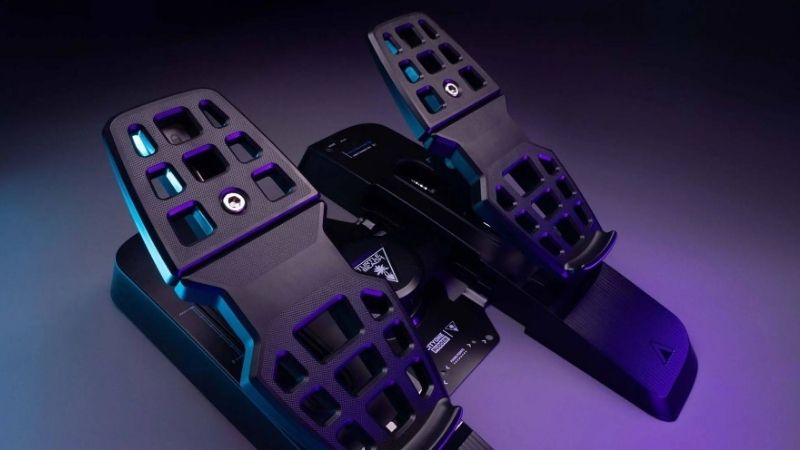
Best adaptable mainstream model: Turtle Beach VelocityOne Rudder. Its Hall-effect sensors, spring choices, adjustable pedal width and interchangeable footplates support multiple aircraft styles. It connects directly by USB on Windows, but Xbox support requires an approved VelocityOne pass-through path—not a direct cable plugged into a console. Best high-end conventional adjustment: MFG Crosswind V3, particularly for pilots prepared to select the correct footplate variant and pay cross-border shipping. Best premium pendular design: Thrustmaster TPR, a much larger and costlier piece of equipment.
Best compact helicopter-style motion: VKB T-Rudders Mk.V, with one analog yaw axis and no individual toe-brake mechanisms. Best configurable combat-sim pedals to consider on backorder: VIRPIL R1-FALCON, which offers three axes, cam adjustments and aluminum half-foot footplates. Best low-cost Thrustmaster ecosystem entry: T.Flight Rudder Pedals (TFRP), although the US category listing indicated out of stock at research time. These status caveats prevent a waiting-list item from being mistaken for an immediate purchase recommendation.
Rudder pedal comparison for US buyers
| Product | Verified rudder / brake setup | Best aircraft and platform | Displayed price, Oct. 29, 2026 | Seller availability | Biggest compromise |
|---|---|---|---|---|---|
| Logitech G Flight Rudder Pedals (945-000024) | Self-centering rudder, individual toe brakes, tension dial | Windows PC GA and mixed flying | Logitech US $149.99 promotion; standard $179.99 | Logitech in stock; B&H US listed stock | Large sliding footprint and fairly basic construction |
| Turtle Beach VelocityOne Rudder | Hall sensors across axes, differential brakes, adjustable width/springs | Windows PC; Xbox through compatible VelocityOne gear | Turtle Beach US $319.99 | Add to cart | Expensive for a new pilot; substantial floor area |
| MFG Crosswind V3 Bf109 | Crosswind V3 adjustable base with aircraft-specific footrests, toe brakes | PC GA/combat; Windows/Mac/Linux | MFG $335.49, tax excluded | Manufacturer displayed available; configuration dependent | Shipping/tax and footplate choices add complexity |
| Thrustmaster TPR Pendular Rudder | Pendular movement, differential brakes, adjustable spring positions | Dedicated PC cockpit | Thrustmaster US $599.99 | US eShop add to cart | Tall 41.5 cm unit and high cost |
| VKB T-Rudders Mk.V (US) | Compact single yaw axis, no physical toe brakes | Windows PC helicopter/space setups | VKBSIM US $199.00 | Exact US product marked sold out | No toe brakes; not presently a buy-now pick |
| VIRPIL R1-FALCON | Three axes, contactless sensors, swappable cams | PC combat/GA, rigid floor setup | VIRPIL US $349.95 | Backorder on exact SKU | Delayed fulfillment and premium cost |
| Thrustmaster T.Flight Rudder Pedals (TFRP) | Sliding rail rudder and individual toe brakes | Windows PC; supported Thrustmaster console setups | Thrustmaster US $129.99 | Individual listing and category conflicted; category marked out of stock | Narrow spacing and US stock uncertainty |
Prices are page observations, not fixed future prices or US landed totals. The Crosswind price is quoted in USD by the international manufacturer but excludes applicable tax and shipment. A vendor’s add-to-cart button is not proof of a finalized order. Manufacturer and retailer availability sometimes disagree, and backorders should be treated separately from in-stock inventory.
Logitech G Flight Rudder Pedals — best practical starting point
A proper three-axis upgrade at a manageable price
Logitech’s Flight Rudder Pedals, manufacturer number 945-000024, use a self-centering sliding mechanism with separate left and right toe brakes and an adjustable tension dial. In a civil aviation simulator, yaw pedals help hold the airplane straight during the takeoff roll, counteract crosswind, and coordinate turns; the toe brakes give independent differential braking for tighter taxi turns. Those are functions that cannot be replicated with equal ergonomics by assigning everything to the same twisting joystick axis. A US Logitech page showed $149.99 on promotion, marked in stock, while B&H US also listed the model with a current purchase option.
The tension dial is especially useful when several people share the setup or when you switch between relaxed sightseeing and more deliberate formation or approach work. Turning it changes how hard you must push, not the number of sensor axes or the physical layout. Independent reviews and community discussion often position Logitech pedals as a reliable way to start learning foot control, though some pilots eventually want a more rigid or configurable mechanism. We did not run our own axis-response or longevity tests.
A realistic assessment of desk use
Before ordering, check the floor width between the desk legs and where your chair rolls. Sliding pedals work best when your body stays centered; a chair that moves backward while you press the right foot can make rudder input inconsistent. A non-slip mat or suitably mounted floorboard may help if it follows the manufacturer’s instructions and does not block pedal travel. Avoid resting storage boxes under the desk where they can interfere with either brake pedal.
Pros: Individual toe brakes, adjustable spring resistance, Windows-oriented USB operation, available US sales channels, approachable price. Cons: Less hardware tuning than premium cam systems, relatively conventional sliding feel, and the need to anchor or stabilize the unit during energetic inputs. For a first serious PC setup with a yoke, the ability to taxi and brake without keyboard work is a meaningful upgrade.
Turtle Beach VelocityOne Rudder — best adjustable mainstream set
Why the feature list translates into practical flying
The VelocityOne Rudder employs non-contact Hall-effect sensors for its axes, two interchangeable pedal styles, adjustable pedal spacing and springs, differential toe brakes and several ways to stabilize the base. Turtle Beach lists $319.99 on its US product page with an add-to-cart option and says it supports Windows 10/11 directly via USB. Its interchangeable footplates distinguish a GA-oriented feel from a more airliner-like foot position. A broader or narrower pedal spacing can also help improve knee alignment for users with different seating positions.
The manufacturer also includes rubber feet, carpet spikes and mounting holes. These options matter because flight pedals have to stay in place while your legs move: a smooth sensor does not solve a base that creeps forward. The spring choices may make the rudder feel more appropriate for a heavier aircraft or for longer sessions, but they do not recreate every aerodynamic force in a real cockpit. Consider them ergonomic settings, not a promise of physical aircraft fidelity.
Platform compatibility has a critical condition
On PC, connect the included USB-A to USB-C cable to the computer and bind the three axes. For Xbox, Turtle Beach documents a pass-through connection through its compatible VelocityOne Flight system or supported Flightstick path, along with the correct mode and firmware. A direct USB connection to an Xbox is not a universal alternative. Users mixing a third-party PC yoke with VelocityOne Rudder generally benefit from the separate-controller model of Windows simulation; console buyers should not infer the same freedom.
Pros: Extensive physical adjustment, independent toe brakes, PC/Xbox route when correctly integrated, solid manufacturer mounting options. Cons: Cost, large foot-area demands and console accessory dependence. It is a compelling midrange-to-premium purchase when the extra adjustments will actually be used, not merely because it has the newest-looking sensor description.
MFG Crosswind V3 Bf109 — best configurable enthusiast pedal base
What makes Crosswind different from basic sliding pedals
MFG’s Crosswind V3 line uses a shared enthusiast mechanism with selectable aircraft-specific footrest shapes and an optional hydraulic damper. The manufacturer publishes USB plug-and-play support on Windows, macOS and Linux and compatibility with mainstream PC sims including Microsoft Flight Simulator, X-Plane, DCS and IL-2. Among its listed variants, the Bf109 model was shown at $335.49 before tax, with an available signal. The maker’s pricing is presented in US dollars on the global storefront, but final US delivery charges and any applicable duty remain separate.
The footrest choice is meaningful rather than cosmetic. Different aircraft types encourage different heel placement and toe-brake technique. An MFG buyer can choose the style that best matches typical footwear and the airplanes they fly instead of treating one footplate design as universal. That also adds an ordering step: the exact variant and selected options must be in stock. A different Bf109, Airbus or Cessna bundle may use the same base but should not be substituted without checking what is included.
When to buy it over VelocityOne
The Crosswind makes more sense for an enthusiast who enjoys adjusting center response and experimenting with pedal geometry, especially on a sturdy mount in a dedicated flight area. The optional hydraulic damper is separate, so do not price the pedal set as if the feature were included. A buyer focused on immediate US delivery and minimal setup may find Turtle Beach or Logitech less complicated; the Crosswind’s international shop and accessory matrix ask for more homework.
Pros: Flexible footrest variants, respected enthusiast-oriented mechanism, broad PC operating-system compatibility, expandability. Cons: Cross-border shipping, variant-level stock complexity, accessory decisions and a higher total than budget USB pedals. Choose it when customization is a long-term goal, not simply because the cheapest listed configuration appears near another product’s price.
Thrustmaster TPR Pendular Rudder — best premium fixed-cockpit option
How the pendular geometry changes the experience
Thrustmaster’s TPR is a different physical class from small under-desk sliding pedal units. It uses a suspended pendular mechanism, differential toe brakes and magnetic sensing. The maker lists dimensions of approximately 45.6 × 33.6 × 41.5 cm and a weight around 7 kg (15.4 pounds), with adjustable spring positions and five pedal-angle settings spanning roughly 35 to 75 degrees. The US eShop displayed $599.99 and an add-to-cart option when checked, placing it well above mainstream pedals in upfront cost.
For an enthusiast flying heavy airplanes or demanding precise small yaw corrections, the pendular geometry may feel closer to the intended real-aircraft movement. However, a smooth premium mechanism cannot improve your flying if it rubs the underside of the desk, moves your chair or causes your knees to strike a support bar. Its tall mechanism makes vertical clearance unusually important. Thrustmaster presents it as a PC product; it should not be purchased based on generic claims that all Thrustmaster flight accessories work with Xbox or PlayStation.
Real advantages and expensive compromises
A fixed cockpit offers the strongest case for the TPR. You can position the seat and pedals as one stable assembly, keep cables away from motion and tune spring resistance around your normal leg position. On a small apartment desk, the assembly may be too tall or too heavy to keep out of the way. Its price can also exceed that of a complete entry-level yoke-and-pedal bundle. Prioritize a stable seating geometry and proper clearance before chasing the advertised sensor resolution.
Pros: Pendular action, adjustable spring and pedal geometry, toe brakes, established manufacturer support. Cons: $599.99 US list, tall body, weight and limited suitability for temporary desktop rigs. It earns a place in the roundup as a premium reference point, not as the normal recommendation for a beginner’s office desk.
VKB T-Rudders Mk.V — best compact yaw control for helicopters
Excellent niche fit with an important missing feature
VKB’s T-Rudders Mk.V (US) product page explicitly calls the pedals a small-footprint device modeled on helicopter torque rudders. It has a single analog yaw axis, steel construction, aluminum heel pads, a reversible hard/soft center cam, a contactless MaRS sensor and an included BlackBox 3 controller. The vendor explicitly states that the unit has no physical toe brakes. Its US-shipping SKU displayed $199 but was marked sold out when the page was opened; therefore it is a strong specialty option to monitor, not a currently available top recommendation.
For helicopter flying, one smooth, coordinated yaw axis with heels close to the floor can be a comfortable fit under a desk. The pedal movement is different from reaching up to depress separate automotive-style brake surfaces, and the compact construction may clear chair legs that interfere with full-size rudder sets. Some users map software-based or virtual braking controls, but those mappings do not create independent physical toe-brake axes and can demand game-specific configuration.
Know exactly what you give up
If your main activity is taxiing taildraggers, airline ground handling or differential-brake procedures in MSFS, the lack of toe brakes is a genuine limitation. You may use a button or separate controller for braking, but that is not equivalent to independent left/right foot pressure. The product is also associated with its supplied BlackBox 3; VKB says this revision is not compatible with older BlackBox Mk.1 or Mk.2 units. Check the complete package if shopping secondhand.
Pros: Compact footprint, single-axis helicopter-style action, metal construction, meaningful cam adjustment. Cons: No physical toe brakes, current US stock marked sold out, different technique from conventional civil pedals. It is best for a specialist willing to wait for confirmed replenishment, not the default pick for a first all-purpose set.
VIRPIL R1-FALCON — best configurable combat set when available
Strong mechanics and broad ergonomic adjustment
The VIRPIL R1-FALCON is a premium three-axis set with separate yaw and toe-brake inputs, a metal frame, contactless digital sensors and multiple centering-cam options. The US manufacturer listing identifies the precise SKU VPC-305-001 and $349.95. It also provides a pedal-angle adjustment range and configurable spacing, which may be useful for a center-stick DCS setup or a pilot who wants to change seating posture. The firm describes an optional damper upgrade, not a standard included part.
Unlike a simple tension wheel, cam selection changes how strongly the pedal mechanism signals its center position. A prominent detent can make straight-ahead orientation obvious; a softer or no-center response can help pilots who constantly make tiny corrections. There is no universally correct configuration: helicopter pilots, combat-jet pilots and civilian pilots may value very different responses. Adjustment should be followed by recalibration in the official VIRPIL configuration software and the actual simulator.
The purchase limitation is fulfillment, not technical interest
The individual US product page showed BACKORDER even though the wider category page presented an add-to-cart control. The SKU-specific stock status wins: do not promise immediate shipping or recommend it as an in-stock buy-now option. In addition, one description section on the product page references older ACE Interceptor details alongside the new R1 model. Specifications should be tied to the R1-FALCON heading rather than copied indiscriminately from mixed legacy copy.
Pros: Three axes, adjustable cams and spacing, solid metal design, US product SKU and support. Cons: Backorder, premium price, optional damper cost and additional setup complexity. Consider it if you have time to wait and expect to invest in a fixed flight cockpit; choose an available Logitech or Turtle Beach set if immediate delivery matters.
Thrustmaster T.Flight Rudder Pedals — best budget ecosystem option with a stock caveat
Familiar sliding pedals with proper brakes
The T.Flight Rudder Pedals, usually abbreviated TFRP, use the brand’s S.M.A.R.T. sliding-rail design and provide a separate differential toe-brake control on each side. Thrustmaster’s official US product page states PC compatibility through USB and/or its relevant Thrustmaster ecosystem connection, including use with supported flight sticks and appropriate console hardware. The manufacturer published a $129.99 US price during research. This is not a single-axis pedal set or a generic USB toe switch; it supplies the core rudder and left/right braking functions needed for aircraft on the ground.
The advantage is budget and breadth of entry-level flight use. It can pair with an existing PC HOTAS or yoke without requiring an expensive premium rig, provided the correct cable/adapter path is present and the game sees the pedal axes. That last qualification matters: some used or bundle-separated units may be missing connection accessories. Always check included cabling and the exact SKU, especially for a listing that says only ‘Thrustmaster flight pedals.’
Why it is not our immediate value winner
The manufacturer’s individual US product page showed an in-stock signal, but the more recently crawled US rudder category page marked TFRP out of stock. Without a completed checkout we cannot resolve that contradiction, so we do not rank it as the straightforward buy-now value choice. The physical pedal spacing may also feel cramped to larger users, and the lightweight base can move on a smooth floor unless stabilized. These issues may be acceptable in a first rig but are reasons to compare Logitech before ordering.
Pros: Affordably priced three-axis design, differential brakes, wide PC flight-control compatibility, manufacturer support. Cons: Conflicting US inventory status, compact pedal spacing and a lighter platform. Buy only when your chosen US seller confirms the exact kit and shipping terms, and when the floor geometry works for you.
How we selected these rudder pedals
We checked exact manufacturer models and connection paths rather than relying on marketplace titles that confuse rudder pedals with racing pedals. Relevant distinctions include three axes versus one, physical toe brakes, centering mechanism, surface stability, replaceable pedal geometry, compatible operating systems and verified seller availability. The research incorporated manufacturer support documentation and independent flight-sim hardware discussions, while avoiding first-person claims about pedal feel, flight test hours or durability metrics we did not measure.
Price and inventory evidence is especially important in this category. VKB’s precise US-shipping product page was sold out, VIRPIL’s R1-FALCON product page marked backorder, and Thrustmaster’s TFRP pages showed inconsistent stock labels. We have made those limitations explicit rather than pretending every attractive model is currently in stock. A buyer who needs hardware this weekend should select an available seller with a clear return policy and confirm fulfillment at checkout.
Buying guide: choose the right axes and pedal movement
Decide if toe brakes are mandatory for your flying
A traditional three-axis flight pedal set normally uses one linked rudder axis and two independent toe-brake axes. This is especially useful when taxiing light airplanes, turning sharply on the ground and managing differential braking. A compact helicopter-style rudder set such as VKB’s can work very well for yaw control while omitting toe brakes entirely. Virtual brake mappings or external brake levers may work in some games, but they should be a conscious workaround rather than a surprise after delivery.
Distinguish sliding, pendular and floor-press mechanisms
Sliding pedals move fore and aft along a linkage or rail and can be comfortable for long general-aviation sessions. Pendular mechanisms place the resistance and travel in a more suspended arrangement; they can feel different and demand more vertical clearance. Compact helicopter pedals often use downward pressure around a low pivot. There is no universally superior design. The correct motion is the one that fits your aircraft interests, chair position and available floor area.
Match the device to PC or console honestly
Windows PC generally allows separate USB game controllers, so rudder pedals, yoke and throttle can come from different brands if the simulator supports them. Console rules are more restrictive. Turtle Beach VelocityOne Rudder requires approved VelocityOne hardware and connection steps on Xbox. Thrustmaster’s console support depends on the specific compatible flight-stick or yoke combination, not merely on the pedals having a USB connector. The VIRPIL, VKB, MFG and TPR models should not be treated as generic console accessories based on PC compatibility statements.
Stabilize the pedals before changing sensitivity
On smooth floors, the base can slide away while your chair rolls backward. Carpet spikes, rubber feet, mounting holes and heavy floor plates address different surfaces. Use only appropriate mounting methods; do not drill into a rental floor. A fixed seat, non-slip mat and solid pedal stop often improve repeatability more than aggressive software sensitivity changes. Make sure there is enough room to apply full left/right yaw and both toe brakes without the unit striking a desk support.
Consider center feel and spring effort for the aircraft
A hard center detent makes straight-ahead obvious but can hinder extremely delicate corrections near neutral for some pilots. Softer cams or adjustable springs may be preferable in helicopter hovering or formation work. The correct tension is one that provides controllable inputs without forcing you to brace against the chair. Apply only adjustment procedures described by the maker, recalibrate after changes, and do not interpret sensor resolution alone as a reliable comfort or realism ranking.
Compare the total delivered price and service path
Domestic US product pages simplify price comparisons, but a retailer sale can end and a backordered unit may have an indeterminate arrival. Crosswind prices shown in USD on a non-US maker’s store exclude delivery-related charges. Premium choices may require optional dampers, mounting hardware or a cockpit frame; check those before deciding that the base product costs only a little more. Manufacturer replacement parts and return logistics matter because flight pedals are mechanical objects subject to repeated loads.
How to set up rudder and brake axes safely
- Seat yourself at a comfortable distance so both feet can move through the pedal travel without straightening your knees or lifting your hips off the chair.
- Stabilize the base on a suitable surface. If using a fixed mount, follow the vendor’s hardware instructions and ensure the screws do not protrude into moving linkages.
- Connect the correct cable to Windows or the explicitly compatible wheel/flight hardware. Use official firmware and configuration tools only when needed; don’t assume console accessories act as direct USB devices.
- Open the Windows controller view or manufacturer’s calibration utility and confirm yaw moves smoothly left/right. For three-axis units, press each toe brake separately and check it is independent.
- In the simulator, remove duplicate twist-axis rudder assignments from a joystick if they cause conflicts, then map yaw, left brake and right brake to the correct pedal axes.
- Test taxi turns, a straight takeoff roll and crosswind correction at modest speeds before making large curve changes. Increase sensitivity only if you can describe the control problem you are solving.
FAQ
Do flight rudder pedals work with any PC yoke?
Many USB rudder pedals operate separately from the yoke in Windows flight simulators, including devices from other brands. That does not guarantee support in every game or on consoles. Verify that the simulator accepts multiple input controllers and that the pedal’s actual USB/interface hardware is included in the purchase.
Are toe brakes really necessary?
Not for yaw control in flight. They become valuable for realistic ground handling, especially in aircraft using differential braking. A helicopter specialist might prefer a compact one-axis rudder set, whereas a general-aviation beginner is usually better served by a set with both toe brakes.
Can I use the VKB T-Rudders Mk.V for Microsoft Flight Simulator?
Its yaw axis can be mapped in compatible PC simulation software, and VKB provides a BlackBox 3 interface. It does not provide physical left and right toe brakes. The specific US-shipping SKU was marked sold out during this research, so check restock rather than assuming it is ready to buy.
Do Turtle Beach VelocityOne Rudder pedals plug straight into Xbox?
No. Turtle Beach documents Xbox operation through a supported VelocityOne Flight or compatible Flightstick pass-through configuration, with the correct cables and mode selection. On a Windows PC the pedals can connect directly by USB. Those paths should not be conflated.
Which is better for helicopters: sliding pedals or pendular pedals?
Neither is automatically best. Helicopter-style low-footprint pedals can provide comfortable, precise yaw without demanding the wider motions of full-size GA pedals. A sliding or pendular set may be more attractive when the same PC is also used for airliners or light aircraft and independent toe brakes are important.
Will expensive pedals improve landing performance immediately?
Better ergonomics and stable, predictable input may make practice easier, but there is no guaranteed performance improvement. Landing quality also depends on aircraft, weather, sight picture, trim and learned technique. Correct installation and repeatable calibration are more useful than assuming a higher price produces better pilot skill.
Final thoughts
Logitech G Flight Rudder Pedals remain the most accessible buy-now choice for a Windows PC pilot who needs all three axes and a realistic budget. Turtle Beach VelocityOne Rudder is the more adjustable mainstream alternative, while MFG Crosswind V3 and Thrustmaster TPR suit serious pilots building a lasting cockpit. VKB T-Rudders Mk.V has a strong specialist case for helicopters but lacks toe brakes and had no verified US stock; VIRPIL R1-FALCON was on backorder, and Thrustmaster TFRP had conflicting stock indicators. Start with your aircraft type, floor geometry and connection requirements, then verify the exact seller’s current checkout before purchasing.