
Key takeaways
- Frequency (MHz): Higher bandwidth; on Ryzen, aim for the sweet spot where memory clock stays synced with the fabric (often DDR5-6000).
- Primary timings (CL): Lower is tighter and faster, but harder to stabilize; CL30 at DDR5-6000 is a strong target.
- Voltage (VDIMM): Small increases can stabilize higher speeds; stay within safe limits (around 1.4-1.45V for DDR5) and watch temperatures.
Overclocking your RAM is one of the cheapest ways to squeeze free performance from an existing PC, especially on Ryzen systems where memory speed directly feeds the Infinity Fabric. Done right, it can lift your 1% lows and average frame rates by a noticeable margin. Done carelessly, it just causes crashes, so this guide walks through doing it safely and methodically.
Before you touch a single timing, understand that stability testing is the real work. A kit that boots at a higher speed but corrupts data hours later is worse than useless. We will cover the safe path, from enabling your rated profile to manual tuning and validation, using popular kits as reference points.
Our top picks
 CORSAIR Vengeance LPX DDR4 RAM 32GB
- Disclaimer: Maximum Speed requires overclocking/PC BIOS adjustments
- Hand-sorted memory chips ensure high performance with generous…
- VENGEANCE LPX is optimized for wide compatibility with…
 JEYI RAM Heatsink Cooler with Thermal Pads
- ram heatsink
- 【Efficient Heat Dissipation】: Equipped with a thermal conductive…
- 【High-quality Materials】: The product utilizes an anodized aluminum…
 Desktop Memory RAM Cooler Heat Sink Pure
- 【Upgraded Model】, we have upgraded the product and…
- And retains the thermal double-sided adhesive on the…
- Product material: pure copper
| Product | Key specs | |
|---|---|---|
| CORSAIR Vengeance LPX DDR4 RAM 32GB | Disclaimer: Maximum Speed requires overclocking/PC BIOS adjustments Hand-sorted memory chips ensure high performance with generous… VENGEANCE LPX is optimized for wide compatibility with… | Check price |
| JEYI RAM Heatsink Cooler with Thermal Pads | ram heatsink 【Efficient Heat Dissipation】: Equipped with a thermal conductive… 【High-quality Materials】: The product utilizes an anodized aluminum… | Check price |
| Desktop Memory RAM Cooler Heat Sink Pure | 【Upgraded Model】, we have upgraded the product and… And retains the thermal double-sided adhesive on the… Product material: pure copper | Check price |
 Thermals DDR4 RAMs Coolers PWMs Fan Control Thermals DDR4 RAMs Coolers PWMs Fan Control | Upgrades your gaming with ARGB DDR4 rams Heatsink… installs this cooling on DDR4 / DDR5 rams… Engineered with temperature sensings pwms fan (0-2500RPM) and… | Check price |
 Acclamator DDR4 RAM 32GB Acclamator DDR4 RAM 32GB | Specifications: Suitable for desktops, dual-channel combination can maximize… Overview: Each module of Acclamator OUNCE is designed… The white aluminum heatsink provides maximum heat dissipation… | Check price |
 CORSAIR Vengeance DDR5 32GB CORSAIR Vengeance DDR5 32GB | Disclaimer: Maximum Speed requires overclocking/PC BIOS adjustments AMD EXPO & Intel XMP 3.0 Compatible Only:… Onboard Voltage Regulation: Enables easier, more finely-tuned, and… | Check price |
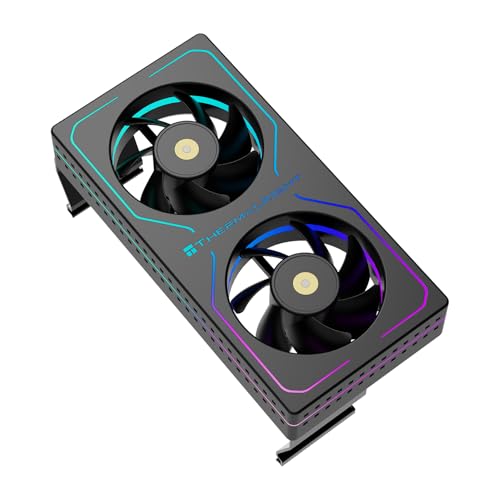 Thermalright MC-2 ARGB Black RAM Cooler Thermalright MC-2 ARGB Black RAM Cooler | [Efficient Heat Dissipation] Equipped with a high-performance dual-fan… [Low-Noise Operation] Despite a speed of up to… [Vibrant ARGB Lighting Effects] The front and sides… | Check price |
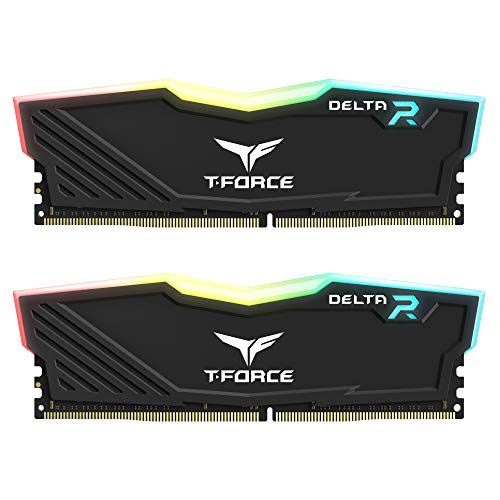 TEAMGROUP T-Force Delta RGB DDR4 16GB TEAMGROUP T-Force Delta RGB DDR4 16GB | TeamGroup Delta RGB 16GB (2 x 8GB) 3200… Full-frame 120 ultra wide-angle illumination with built-in force… Aluminum alloy heat sink with asymmetrical minimalist design. | Check price |
As an Amazon Associate we earn from qualifying purchases at no extra cost to you.
⚡ Save on Your Next PC — Amazon Prime
Prime members get fast free shipping on the systems above, plus early access to Prime Day & Black Friday PC deals. New members get a 30-day free trial.
Watch: How to Overclock Your RAM Safely — Video Review
Start With XMP or EXPO, Not Manual Tuning
Your memory’s advertised speed, like the 3200MHz on a Corsair Vengeance LPX DDR4 kit or 6000MHz on a Vengeance DDR5 kit, is itself an overclock stored as a profile. Enter your BIOS, enable XMP (Intel) or EXPO (AMD), and you instantly get the rated speed and timings. For most people this is 90% of the gains with none of the risk. Only go further once this baseline is rock-solid.
Understand the Key Variables
- Frequency (MHz): Higher bandwidth; on Ryzen, aim for the sweet spot where memory clock stays synced with the fabric (often DDR5-6000).
- Primary timings (CL): Lower is tighter and faster, but harder to stabilize; CL30 at DDR5-6000 is a strong target.
- Voltage (VDIMM): Small increases can stabilize higher speeds; stay within safe limits (around 1.4-1.45V for DDR5) and watch temperatures.
The Safe Overclocking Steps
- Enable the profile first: Boot and confirm XMP/EXPO is stable before anything manual.
- Change one thing at a time: Raise frequency or tighten one timing, then test, so you know what caused any instability.
- Test thoroughly: Run TestMem5 or Karhu for at least an hour, plus real gaming, before calling it stable.
- Manage heat: High-speed kits get warm; a RAM heatsink or fan like a JEYI or Thermalright cooler helps during long stress tests.
Tips
- Keep notes: Record every setting so you can roll back a failed change instantly.
- Watch the fabric on Ryzen: Pushing memory past the fabric’s sync point can lose performance despite higher numbers.
- Cool your sticks: Add airflow or a RAM cooler if you see errors only after the kit warms up.
- Save a BIOS profile: Store your stable settings so a CMOS reset does not erase your work.
Frequently Asked Questions
Is overclocking RAM safe?
Yes, within reason. Enabling XMP/EXPO is designed by the manufacturer and very safe. Manual overclocking is safe if you keep voltage within recommended limits and test for stability rather than pushing blindly.
Will overclocking RAM void my warranty?
Enabling the rated XMP/EXPO profile is expected and does not void memory warranties. Extreme manual overvolting is a gray area, but staying within safe voltages keeps you protected in practice.
How much performance will I actually gain?
It varies by workload. Gaming 1% lows and averages can improve several percent on Ryzen from faster, tighter memory, while some productivity tasks see smaller gains. The free XMP/EXPO step alone is often the biggest jump.
How do I know my overclock is stable?
Run a dedicated memory test like TestMem5 or Karhu for at least an hour with zero errors, then play games for a few sessions. Any error means you back off the last change.
Conclusion
The safest, smartest RAM overclock for most people is simply enabling XMP or EXPO and confirming stability. If you want more, tighten one variable at a time, keep voltage sensible, add cooling for hot kits, and test rigorously. Patience and validation, not extreme numbers, are what make an overclock worth keeping.









