Our Top Picks
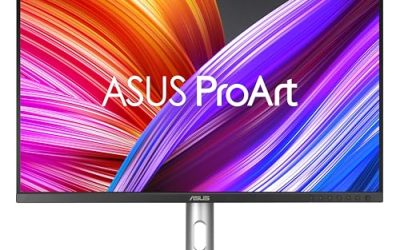
 ASUS ProArt PA279CRV 27 Inch 4K UHD USB-C27 Inch24.1 x 8.46 x 16.07 inches18.25 poundsCheck on Amazon
 ViewSonic VP2756-4K 27 Inch 4K UHD ColorPro Monitor27 Inches24.1 x 8.5 x 21.27 inches15.1 poundsCheck on Amazon
 BenQ SW270C Photo Video Editing Monitor 27" QHD27 Inch26.9 x 23.5 x 13.2 inches40 poundsCheck on Amazon
The ASUS ProArt PA279CRV is the best all-round pick: 99 percent DCI-P3 and 99 percent Adobe RGB, factory calibrated to Delta E under 2, Calman Verified, with 96W USB-C. Print photographers should buy the BenQ SW270C instead for its 99 percent Adobe RGB and hardware calibration, accepting its lower 1440p resolution and shakier availability. If your work only ever appears on the web, the ViewSonic VP2756-4K covers 100 percent sRGB with Pantone validation at the lowest tier of this group.
Choosing a photo editing monitor is a decision about colour accuracy, not screen size or refresh rate. The right monitor shows the colours your camera actually captured, so edits made on screen match prints and published images. This guide is for photographers who print their work, web publishers who only need accurate sRGB, and designers who want a single-cable USB-C setup. Each monitor below was chosen from its Amazon listing and manufacturer specifications, with gamut figures stated separately per product.
Quick Picks
As an Amazon Associate we earn from qualifying purchases
| Product | Best for | Key spec from title |
|---|---|---|
| ASUS ProArt PA279CRV | Best all-round photo editing | 27-inch 4K IPS, 99 percent DCI-P3 and 99 percent Adobe RGB, Delta E under 2, USB-C 96W |
| BenQ PD2705U | Designers and MacBook workflows | 27-inch 4K IPS, 99 percent sRGB and Rec.709, Delta E 3 or under, USB-C 65W, KVM |
| ViewSonic VP2756-4K | Web-only photo work on a budget | 27-inch 4K IPS, 100 percent sRGB, Pantone Validated, Delta E under 2, USB-C 60W |
| Dell UltraSharp U2723QE | USB-C docking hub and deepest blacks | 27-inch 4K IPS Black, 100 percent sRGB and 98 percent DCI-P3, Delta E under 2, USB-C 90W |
| BenQ SW270C | Print photographers | 27-inch QHD IPS, 99 percent Adobe RGB, hardware calibration, Delta E 2 or under, USB-C 60W |
How to Choose
Match the gamut to where your photos end up
Gamut is the first filter because it decides which colours a monitor can show at all. Adobe RGB matters for print, since printers reproduce greens and cyans that fall outside sRGB, and a monitor that cannot show those colours cannot help you edit them. sRGB is enough for web and social media, where wider gamuts are clipped anyway, and paying for Adobe RGB brings nothing if photos never leave a browser. DCI-P3 matters for video work and for delivery inside the Apple ecosystem. Read each figure separately: a monitor can cover 99 percent of sRGB while covering far less of Adobe RGB, and no single number describes the whole panel.
Decide between 4K detail and QHD value
Resolution changes sharpness, not colour accuracy, and that distinction keeps many buyers from overspending. At 27 inches, 4K works out to 163 pixels per inch, which gives fine text and detail at normal scaling and makes retouching at full zoom feel precise. QHD at the same size is about 109 pixels per inch, so text and interface elements look softer, though the colours themselves are just as accurate when the panel is well calibrated. The print pick in this guide is QHD, which proves the point: its gamut and hardware calibration matter more for print than its pixel count. Choose 4K when you stare at fine detail all day, and accept QHD when gamut and calibration are the priority.
Read the calibration claim, not just the badge
Factory calibration is only meaningful when a measurement backs it up, so look for what the claim actually includes. A calibration report proves the unit was measured before shipping, and Calman Verified or Pantone Validated labels attach a named verification process to that claim rather than leaving it as marketing language. Hardware calibration, offered by the BenQ SW270C, stores corrections inside the monitor through a 16-bit 3D LUT, so they survive when the monitor moves between computers; software calibration only corrects the graphics card output on one machine. Remember that backlight drift changes colour over months, so even a factory-calibrated monitor needs recalibration every few months for critical work.
Count the USB-C watts before you buy
A single USB-C cable can carry video, data and charging, but only if the wattage matches the laptop attached to it. The ASUS at 96W and the Dell at 90W deliver enough power to charge a 16-inch laptop under load, which makes them genuine one-cable docking stations. The BenQ PD2705U at 65W and the ViewSonic and SW270C at 60W are fine for 13-inch and 14-inch laptops, yet a large laptop running heavy software may slowly lose charge even while plugged in. Check the hub too: the Dell adds Ethernet and a full set of USB ports, the BenQ adds a KVM switch for two computers, and a monitor with a weak hub still forces a separate dock onto the desk.
The 5 Best Options
ASUS ProArt PA279CRV
The ProArt PA279CRV earns the top spot because it covers every gamut a stills photographer needs without forcing a compromise elsewhere. Its 99 percent DCI-P3 and 99 percent Adobe RGB sit alongside 100 percent sRGB, so the same panel serves print work, video, and web delivery, and the factory calibration to Delta E under 2 is backed by Calman Verified status with a calibration report. The 96W USB-C port charges even a large laptop, DisplayPort daisy-chaining extends to a second screen, and the ergonomic stand adjusts in every direction for long editing sessions.
- Specs:
- 27-inch 4K UHD 3840 x 2160 IPS, 10-bit colour, 60 Hz, 5 ms
- 99 percent DCI-P3, 99 percent Adobe RGB, 100 percent sRGB
- Factory pre-calibrated to Delta E under 2, Calman Verified
- VESA DisplayHDR 400, 350 nits typical, 400 nits peak
- USB-C with 96W Power Delivery, DisplayPort daisy-chain, HDMI, USB 3.2 hub
- Ergonomic stand with tilt, swivel, pivot and height adjustment, 3-year warranty
- Best for: Photographers who print and publish online and want one monitor that covers both jobs.
- Watch out for: DisplayHDR 400 is an entry-level HDR tier, so buy this monitor for colour accuracy, not HDR performance.
BenQ PD2705U

The BenQ PD2705U is built for designers who split their day between stills, video and a MacBook, and its feature set reflects that mixed workload. Its 99 percent sRGB and 99 percent Rec.709 coverage suits design and video delivery, while the factory calibration to Delta E 3 or under arrives with a calibration report, Calman Verified status and Pantone validation. The 65W USB-C connection handles most 13-inch and 14-inch laptops in one cable, the KVM switch shares the screen between two computers, and the included Hotkey Puck G2 puts colour modes within reach without digging through menus.
- Specs:
- 27-inch 4K UHD 3840 x 2160 IPS, 10-bit colour, 60 Hz, 5 ms GTG
- 99 percent sRGB, 99 percent Rec.709
- Factory calibrated to Delta E 3 or under, with calibration report, Calman Verified, Pantone Validated
- HDR10, 250 nits typical, 350 nits peak, 1,200:1 contrast
- USB-C with 65W Power Delivery, DisplayPort 1.4, HDMI 2.0, USB hub, KVM switch, Hotkey Puck G2
- Colour modes include CAD/CAM, Animation, Darkroom, sRGB and Rec.709; 2 x 2.5W speakers
- Best for: Designers and video editors who need accurate Rec.709 and sRGB with a MacBook workflow.
- Watch out for: BenQ publishes no DCI-P3 figure for this model, so do not expect wide-gamut video coverage beyond Rec.709.
ViewSonic VP2756-4K
The ViewSonic VP2756-4K is the honest budget pick for photographers whose work only ever appears on screens. Its 100 percent sRGB and 100 percent Rec.709 coverage, factory calibration to Delta E under 2 and Pantone validation give web publishers exactly the accuracy they need, and nothing in the price goes toward gamut they will never use. The 60W USB-C port connects a smaller laptop with a single cable, the ergonomic stand covers height, tilt, swivel and pivot, and the three-year warranty matches the longer coverage of the more expensive monitors here.
- Specs:
- 27-inch 4K UHD 3840 x 2160 IPS, 60 Hz, ultra-thin bezels
- 100 percent sRGB, 100 percent Rec.709
- Factory calibrated to Delta E under 2, Pantone Validated, ColorPro Verified
- USB-C with 60W Power Delivery, HDMI, DisplayPort, USB hub
- Ergonomic stand with height, tilt, swivel and pivot adjustment, 3-year warranty
- Best for: Photographers who publish only on the web and want calibrated sRGB accuracy without paying for print gamut.
- Watch out for: No Adobe RGB, DCI-P3 or HDR figure is published for this model, so it is the wrong choice for print or video work.
Dell UltraSharp U2723QE

The Dell UltraSharp U2723QE stands out through its IPS Black panel and its docking hub rather than through raw gamut, and that combination suits a laptop-first desk. The IPS Black panel reaches 2,000:1 static contrast, roughly double a standard IPS panel, so shadows hold detail instead of washing out to grey, while 100 percent sRGB and 98 percent DCI-P3 cover web and video delivery. The 90W USB-C port carries video, charging, Ethernet and a full USB hub through one cable, which can replace a separate dock entirely. Check availability before ordering, since an October 2026 check found no clean new-condition buy box for this listing on Amazon.
- Specs:
- 27-inch 4K UHD 3840 x 2160 IPS Black, 60 Hz, 5 ms GTG, 163 PPI, 10-bit colour
- 100 percent sRGB, 100 percent Rec.709, 98 percent DCI-P3
- Factory calibrated to Delta E under 2
- VESA DisplayHDR 400, 400 nits peak, 4 dimming zones
- USB-C with 90W Power Delivery, DisplayPort 1.4 daisy-chain, RJ45 Gigabit Ethernet, USB-A ports, KVM
- IPS Black contrast 2,000:1 static
- Best for: Laptop users who want the deepest blacks in this group plus a full docking hub in one monitor.
- Watch out for: Dell publishes no Adobe RGB figure for this model, and its DisplayHDR 400 tier has only 4 dimming zones, so it is not a print or HDR monitor.
BenQ SW270C
The BenQ SW270C is the only QHD monitor in this group, and it earns its place through print credentials none of the 4K panels match. Its 99 percent Adobe RGB coverage reaches the greens and cyans printers reproduce, and hardware calibration writes corrections into the monitor’s 16-bit 3D LUT, so the calibration survives across computers once a colorimeter has done the measurement. The included shading hood blocks ambient light, the SD card slot speeds up ingest, and colour modes cover Adobe RGB, DCI-P3, sRGB, Rec.709, DICOM, black-and-white and Darkroom. Availability is uncertain, with November 2026 signals split between in-stock and used-only listings, so confirm a new-condition listing first.
- Specs:
- 27-inch QHD 2560 x 1440 IPS, 10-bit colour, 60 Hz, 5 ms GTG
- 99 percent Adobe RGB, 100 percent sRGB, 100 percent Rec.709, 97 percent DCI-P3
- Factory calibrated to Delta E 2 or under, with printed calibration report, Calman Verified, Pantone Validated
- Hardware calibration support with 16-bit 3D LUT (colorimeter sold separately)
- HDR10, 300 nits brightness, 1,000:1 contrast
- USB-C with 60W Power Delivery, DisplayPort 1.4, HDMI 2.0, USB hub, SD card slot, Hotkey Puck, shading hood included
- Best for: Print photographers who need Adobe RGB and hardware calibration above resolution.
- Watch out for: This is a 2019 model with conflicting availability signals, and hardware calibration needs a colorimeter bought separately.
Which One Fits Your Situation
You print your photos and sell the prints
Buy the BenQ SW270C, because 99 percent Adobe RGB and hardware calibration matter more for print than the extra pixels of a 4K panel. Its 16-bit 3D LUT stores the correction inside the monitor, the shading hood keeps ambient light off the screen, and the printed calibration report proves the unit was measured. Accept the QHD resolution and confirm a new-condition listing first, since availability signals conflict.
Your photos only ever go to the web or social media
Buy the ViewSonic VP2756-4K, because 100 percent sRGB with Pantone validation and a Delta E under 2 factory calibration covers everything a browser can show. Wider gamuts would be clipped on delivery anyway, so the money saved buys nothing you can see. Its 60W USB-C port suits a smaller laptop, and the three-year warranty matches the pricier monitors.
You design, edit video and work from a MacBook
Buy the BenQ PD2705U, because its 99 percent sRGB and Rec.709 coverage fits design and video delivery, and the KVM switch shares one screen between two computers. The 65W USB-C connection carries video and charging for most 13-inch and 14-inch laptops in a single cable, and the Hotkey Puck G2 switches colour modes without menu diving.
You want one monitor to replace your dock
Buy the Dell UltraSharp U2723QE, because its 90W USB-C port plus Ethernet, USB-A ports and KVM turn one cable into a full workstation connection. The IPS Black panel adds the deepest contrast in this group, which helps shadow detail in stills. Check the listing first, since an October 2026 check found no clean new-condition buy box.
Common Mistakes
- Treating a 99 percent sRGB figure as print readiness, when Adobe RGB coverage is a separate number that decides whether greens and cyans survive to print.
- Buying for the HDR badge, when DisplayHDR 400 and HDR10 in this group are entry-level tiers and photo editing is an SDR workflow.
- Expecting a 60W USB-C port to charge a 16-inch laptop under heavy load, when only the 90W and 96W ports in this group reliably do that.
- Assuming hardware calibration works out of the box, when the SW270C needs a colorimeter bought separately to write corrections into the monitor.
- Choosing a high refresh rate for stills work, when all five monitors here run at 60 Hz and that is fine for photo editing.
Frequently Asked Questions
Do I need Adobe RGB, or is sRGB enough?
sRGB is enough if photos only ever go to the web or social media, where wider gamuts are clipped on delivery. Adobe RGB matters for print, because printers reproduce greens and cyans that fall outside sRGB. Only the ASUS PA279CRV and the BenQ SW270C in this group cover 99 percent Adobe RGB.
Is 4K necessary for photo editing, or is QHD fine?
4K gives sharper text and finer detail at 27 inches, but resolution does not change colour accuracy. The QHD SW270C is the print pick here despite its lower resolution, because its gamut and hardware calibration matter more than pixel count for print work. Choose 4K for detail and QHD when calibration is the priority.
Does factory calibration mean I never need a colorimeter?
No. Factory calibration proves the monitor was accurate when it left the factory, but backlight drift changes colour over months. Recalibrate every few months for critical work. The SW270C stores hardware calibration in the monitor itself, while the other monitors here rely on software profiles.
Is HDR important on a photo monitor?
Not for stills. The DisplayHDR 400 and HDR10 labels in this group are entry-level tiers, and the Dell has only 4 dimming zones, while photo editing is an SDR workflow. Buy for gamut and calibration, not for the HDR badge, since the HDR tier tells you almost nothing about colour accuracy.
FAQ
Do I need Adobe RGB, or is sRGB enough?
Is 4K necessary for photo editing, or is QHD fine?
Does factory calibration mean I never need a colorimeter?
Is HDR important on a photo monitor?
More from Amazon
Programs that pair well with the guide above. Offers and eligibility are set by Amazon and may change.
Free shipping on eligible items, Prime Video and more. Eligible new members can start with a free trial.
Start a Prime free trialAd-free music streaming. Eligible new subscribers can start with a free trial.
Try Music Unlimited freeA Prime membership for ages 18-24 with a trial period. Eligibility is set by Amazon.
See Prime for Young AdultsAudiobooks and podcasts to listen to on the go. Eligible new members can start with a free trial.
Try Audible freeAs an Amazon Associate we earn from qualifying purchases.