Key takeaways
- NVIDIA (GeForce RTX): leads in ray tracing and has the more mature DLSS upscaling, plus strong support for creative and AI workloads.
- AMD (Radeon RX): frequently offers more VRAM and raw rasterization performance per dollar, making it a strong value choice for pure gaming.
- How to decide: compare cards at your budget and resolution on the games you actually play, and weigh ray tracing and DLSS if those features matter to you.
The graphics card is the single most important component in a gaming PC, the part that most directly determines what resolution you can play at, how high you can push the settings, and what frame rates you will actually see. It is also usually the most expensive piece, which makes choosing well genuinely important: overspend and you waste money on power your monitor can’t use, underspend and you’re stuck lowering settings from day one. Understanding how to read a GPU’s capabilities is the key to spending smart.
This guide covers how to choose a graphics card in 2026: matching the GPU to your resolution and refresh rate, understanding VRAM and modern upscaling, weighing NVIDIA against AMD, and making sure the card physically fits and powers correctly in your system. By the end you will know how to buy the right amount of GPU for your monitor and games rather than chasing benchmarks in a vacuum.
Our top picks
 ASUS Dual NVIDIA GeForce RTX 5060 8GB
Compact SFF-ready size fits small-form-factor builds
0dB technology keeps fans silent at low loads
Backed by a 3-year warranty
8GB of VRAM may limit the highest-resolution textures
Smaller dual-fan cooler runs warmer than larger triple-fan cards
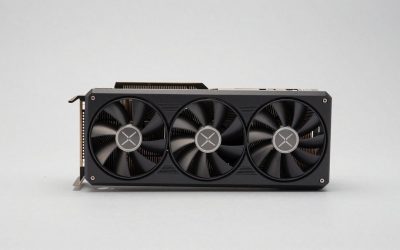
 XFX Swift AMD Radeon RX 9060 XT
- Chipset: AMD RX 9060 XT
- Memory: 16 GB GDDR6
- XFX SWFT Triple Fan Cooling Solution
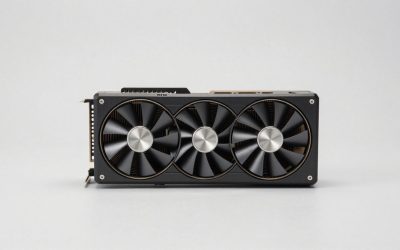
 ASUS TUF Gaming GeForce RTX™ 5080 16GB
16GB GDDR7 memory supports demanding modern titles
Phase-change thermal pad aids sustained heavy workloads
Protective PCB coating guards against moisture and dust
Requires an 850W power supply with a 12VHPWR connector
3.6-slot, 13.7-inch card needs generous case clearance
| Product | Key specs | |
|---|---|---|
| ASUS Dual NVIDIA GeForce RTX 5060 8GB | Check price | |
| XFX Swift AMD Radeon RX 9060 XT | Chipset: AMD RX 9060 XT Memory: 16 GB GDDR6 XFX SWFT Triple Fan Cooling Solution | Check price |
| ASUS TUF Gaming GeForce RTX™ 5080 16GB | Check price | |
 GIGABYTE Radeon™ RX 9060 XT Gaming OC GIGABYTE Radeon™ RX 9060 XT Gaming OC | Powered by Radeon RX 9060 XT - Built… WINDFORCE Cooling System - The WINDFORCE cooling system… RGB Lighting - With 16.7M customizable color options… | Check price |
 ASUS SFF-Ready Prime NVIDIA GeForce RTX 5070 ASUS SFF-Ready Prime NVIDIA GeForce RTX 5070 | AI Performance: 1005 AI TOPS OC mode boosts… Powered by the NVIDIA Blackwell architecture and DLSS… SFF-Ready enthusiast GeForce card compatible with small-form-factor builds | Check price |
 GIGABYTE Radeon RX 9070 XT Gaming OC GIGABYTE Radeon RX 9070 XT Gaming OC | Check price | |
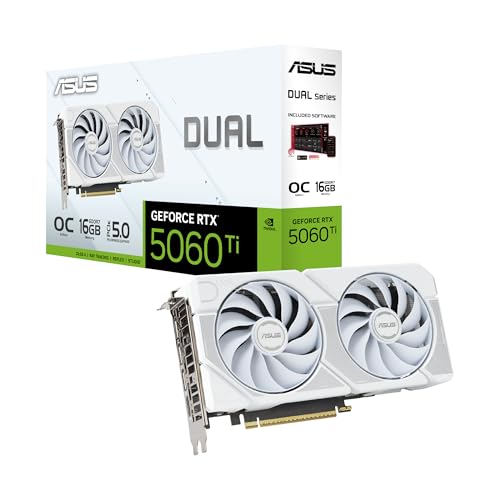 ASUS Dual NVIDIA GeForce RTX™ 5060 Ti ASUS Dual NVIDIA GeForce RTX™ 5060 Ti | OC mode: 2632 MHz (OC mode)/ 2602 MHz… Powered by the NVIDIA Blackwell architecture and DLSS… Axial-tech fan design features a smaller fan hub… | Check price |
 GIGABYTE GeForce RTX 5070 Ti Gaming OC GIGABYTE GeForce RTX 5070 Ti Gaming OC | Powered by the NVIDIA Blackwell architecture and DLSS… Powered by GeForce RTX 5070 Ti Integrated with 16GB GDDR7 256bit memory interface | Check price |
As an Amazon Associate we earn from qualifying purchases at no extra cost to you.
Our recommended gear covers the meaningful tiers of the current generation, from the value-focused ASUS RTX 5060 and AMD RX 9060 XT for 1080p, through the RTX 5070 and RX 9070 XT for high-refresh 1440p, up to the RTX 5080 and RTX 5070 Ti for demanding 1440p and 4K play. Picking from the right tier for your monitor is far more important than buying the most powerful card you can afford.
⚡ Save on Your Next PC — Amazon Prime
Prime members get fast free shipping on the systems above, plus early access to Prime Day & Black Friday PC deals. New members get a 30-day free trial.
Watch: How to Choose a Graphics Card (2026 Guide) — Video Review
Start With Your Resolution and Refresh Rate
The right GPU is defined by the monitor it feeds. A card that’s overkill at 1080p can be exactly right at 4K, so start there. For 1080p high-refresh gaming, a card like the RTX 5060 or RX 9060 XT is well matched. For 1440p at high frame rates, step up to something like the RTX 5070 or RX 9070 XT. For 4K, you want the upper tier such as the RTX 5080 or 5070 Ti. Buying beyond what your display can show simply wastes money.
Understanding VRAM
Video memory (VRAM) holds textures, frame buffers, and assets the GPU is actively using. Run short on it and you get stutters, texture pop-in, and hard frame drops, especially at high resolutions and with detailed texture packs. In 2026, 8GB is the minimum for 1080p, 12GB is comfortable for 1440p, and 16GB is the target for 4K or heavily modded games. Cards like the RX 9060 XT and RTX 5060 Ti in their 16GB versions offer welcome headroom for future titles that keep demanding more memory.
Upscaling and Frame Generation
Modern GPUs lean heavily on AI upscaling to boost performance. NVIDIA’s DLSS and AMD’s FSR render the game at a lower resolution and intelligently reconstruct it to look near-native, often delivering large frame-rate gains with minimal quality loss. Frame generation goes further by inserting AI-generated frames for even higher smoothness. These technologies genuinely change the value equation: a mid-range card with strong upscaling can hit frame targets that once required a tier above, so factor upscaling support into your comparison, not just raw rasterization.
NVIDIA vs AMD
- NVIDIA (GeForce RTX): leads in ray tracing and has the more mature DLSS upscaling, plus strong support for creative and AI workloads.
- AMD (Radeon RX): frequently offers more VRAM and raw rasterization performance per dollar, making it a strong value choice for pure gaming.
- How to decide: compare cards at your budget and resolution on the games you actually play, and weigh ray tracing and DLSS if those features matter to you.
Fit, Power, and Practical Concerns
A powerful card is useless if it doesn’t fit or can’t be powered. Check the card’s length against your case clearance, since high-end models are long and thick (often 2.5 slots or more). Confirm your power supply has enough wattage and the correct connectors; current-gen cards may need modern PCIe power cables. Ensure your case has adequate airflow, and if you have a small-form-factor build, look specifically for compact or SFF-ready models like the ASUS Prime RTX 5070 white edition designed for tight spaces.
Tips
- Buy the GPU tier that matches your monitor’s resolution and refresh rate, not the most expensive card you can stretch to.
- Favor 16GB of VRAM if you game at 1440p or 4K, or plan to keep the card for several years.
- Factor in DLSS or FSR support; strong upscaling can let a cheaper card hit your frame targets.
- Verify physical length, PSU wattage, and power connectors before buying to avoid an expensive card that won’t fit or power on.
Frequently Asked Questions
How much VRAM do I need in 2026?
For 1080p, 8GB is the minimum; for 1440p aim for 12GB; and for 4K or modded games target 16GB. More VRAM protects you against future titles that keep raising texture and memory demands, so err on the higher side if you plan to keep the card a while.
Is ray tracing worth turning on?
It delivers noticeably better lighting and reflections but costs significant performance. Higher-end NVIDIA cards handle it best, and pairing it with DLSS helps recover frame rate. On mid-range hardware many players leave it off in fast competitive games and enable it in single-player titles.
Should I choose NVIDIA or AMD?
NVIDIA generally wins on ray tracing and DLSS maturity, while AMD often provides more VRAM and rasterization performance per dollar. Compare specific cards in your budget at your resolution, and let the features you care about break the tie.
Will a top graphics card fix a slow PC?
Only if the GPU is the bottleneck. If your CPU, RAM, or storage is holding the system back, or you play CPU-bound games at low resolution, a powerful GPU won’t reach its potential. Aim for a balanced build matched to your resolution.
Conclusion
Choosing a graphics card is really about matching it to your monitor and the way you play: pick the tier that suits your resolution and refresh rate, make sure it has enough VRAM for the years ahead, and weigh upscaling support alongside raw power. Confirm it physically fits and that your power supply can feed it, and you’ll avoid the two most common and costly mistakes. Buy the right card for your display rather than the biggest number on the shelf, and every dollar of your GPU budget turns into frames you can actually see.