
The best load cell pedals for beginners are not necessarily the stiffest or the most expensive. A load cell measures pressure applied to the brake, helping a driver repeat a braking point, but it cannot compensate for a sliding pedal tray, a rolling office chair, or an incompatible console connection. For a first PC upgrade, the MOZA SRP2 two-pedal set is our value pick; Logitech’s RS Pedals are especially approachable for desk setups, while Fanatec and Thrustmaster offer clearer routes for some existing console wheel owners. We compared six real, separately sold load-cell sets, not ordinary spring-only pedals masquerading as upgrades.
Quick verdict: choose the right pedal for your setup
Best value for a new PC rig: MOZA SRP2. It includes a 100 kg-rated load-cell brake with adjustable force feel and a separate throttle in the $149 US two-pedal configuration. Best for a desk or rolling-chair setup: Logitech G RS Pedals, whose manufacturer highlights floor-friendly support and a less extreme 75 kg brake sensor; make sure the pedals and chair are braced before relying on them. Best for an existing Fanatec setup: CSL Pedals LC, a three-pedal kit that connects through a compatible Fanatec base for consoles. Best for a Thrustmaster wheel owner: T-LCM, with three pedals and a known RJ12 route through compatible Thrustmaster console bases. A PC racer can mix brands over USB when the game supports separate devices, but that flexibility usually does not apply directly to a console.
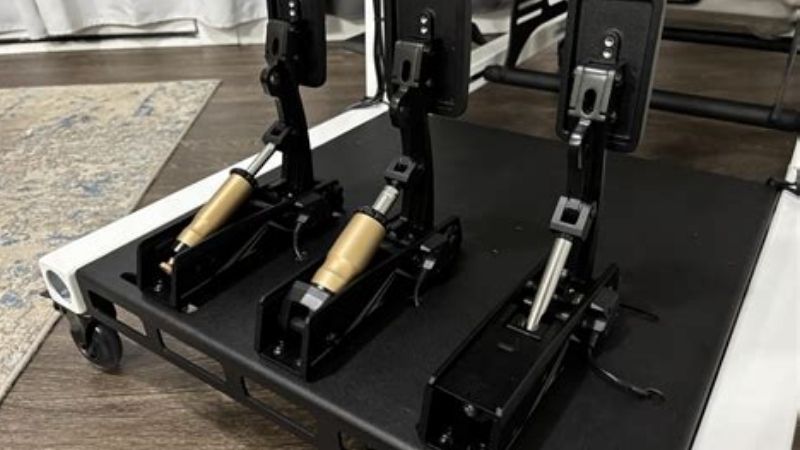
Comparison table: six beginner load-cell pedal sets
| Pedal set | Brake and package | PC / console connection | US price checked Oct. 29, 2026 | Seller inventory status | Main limitation |
|---|---|---|---|---|---|
| MOZA SRP2 two-pedal set | 100 kg load cell plus 15-bit angle sensor; throttle and brake | USB direct to Windows PC; console route needs exact compatible hardware confirmation | $149.00, MOZA Racing US | In stock; manufacturer lists dispatch within three business days | No clutch; needs bracing for repeatable force |
| Logitech G RS Pedals | 75 kg load cell and Hall-effect throttle; two pedals | USB to PC; consoles through supported Logitech wheel or Racing Adapter pathway | $149.99 special / $159.99 regular, Logitech G US | In stock; ready to ship on maker listing | Clutch costs extra; console adapters depend on wheel generation |
| SIMAGIC P500 | 100 kg load cell with angle sensing; two-pedal modular setup | Direct USB to PC or supported SIMAGIC ecosystem; not a native USB console solution | $149, SIMAGIC official advertised price | Cart availability to verify | Software and accessory ecosystem may be new to beginners |
| SIMAGIC P700 two-pedal set | 150 kg-rated dual-sensor brake; optional clutch | PC USB/SIMAGIC ecosystem; confirm exact console setup separately | $189 launch MSRP, SIMAGIC; verify current checkout | Not confirmed from US checkout | Overkill force range for an unbraced desk; setup options add complexity |
| Fanatec CSL Pedals LC | Three pedals with load-cell brake kit | USB on PC; compatible Fanatec wheel base pathway for Xbox/PlayStation | $239.98, Fanatec US | Available on maker’s US store | Very firm brake rewards bolted mounting |
| Thrustmaster T-LCM | Three pedals; load-cell brake and six supplied springs | USB direct on Windows PC; RJ12 through supported Thrustmaster console bases | $249.99, Thrustmaster US listing | Product listed; retailer ZIP availability not verified | Large footprint and spring setup demand stable positioning |
Prices refer to the package named in each row and were observed from the listed US-facing source, except the P700 figure, which is an official launch MSRP rather than verified live checkout pricing. A seller showing “Add to cart” is not the same as a confirmed inventory count. Prices, sale promotions and shipping can change, and the P700 stock state should be rechecked immediately before publication. The quoted kilograms are manufacturers’ sensor/load-cell ratings; they are not an instruction to push that many kilograms with your leg.
Best overall budget upgrade: MOZA SRP2 two-pedal set
MOZA’s SRP2 is attractive because the brake does not force a newcomer to choose between a dead-feeling pressure pedal and a travel-based pedal immediately. The company specifies a hybrid 100 kg load cell and 15-bit angle sensor, allowing the initial motion and later pressure to be blended or adjusted. That gives a learner room to start with a moderate, readable brake curve and then transition toward more pressure-based braking as muscle memory develops. MOZA includes a throttle and brake; the optional clutch is a separate purchase, not a hidden part of the $149 set.
The model name matters. SRP2 is not the older MOZA SR-P and is not the SR-P Lite shipped in certain budget wheel bundles. A photo of two metal pedals on a marketplace page is not sufficient identification. Verify “SRP2” on the manufacturer’s exact SKU listing and look for the specified 100 kg hybrid sensor, included components, and accessory compatibility before you compare offers. The manufacturer lists an optional clutch, support bracket, and brake Performance Kit, but none should be added to the base price without declaring the extra cost.
Installation is relatively friendly on a proper rig: set a comfortable heel position, secure the plate, adjust the brake feel using the provided components, and calibrate in MOZA Pit House before launching your simulator. If you drive from a regular desk, the manufacturer’s anti-slip feet can help, but the floor and seat still need to resist the force you apply. Avoid assuming a USB pedal set labeled “Xbox” by a retailer will pair directly with every console or wheel. MOZA’s support documentation specifically confirms direct USB connection to PC and cross-brand use in that context; an Xbox configuration must be verified against the particular compatible console wheel and approved connection route.
Pros: Competitive two-pedal price; hybrid force/angle sensing can smooth the learning curve; published adjustment ranges; optional clutch later. Cons: No clutch in the entry package; brand/model-name confusion is easy; console use is not a generic plug-and-play promise. Best for: New PC racers who want meaningful brake-pressure practice without buying a complete high-end pedal system.
Best for desk setups: Logitech G RS Pedals
Logitech G’s RS Pedals are a strong beginner alternative because their 75 kg-rated load-cell brake and Hall-effect accelerator come in a modular package that can be adapted to a less permanent station. The official US store displayed the set at $149.99 special pricing against $159.99 regular, with an in-stock notice on the checked listing. A 75 kg sensor rating does not automatically make a brake soft; the springs, elastomers, calibration curve and physical mounting determine what your foot feels. But there is less reason to chase a larger maximum rating when you still use a rolling desk chair.
Connection planning is the biggest advantage and the biggest trap. On PC, Logitech documents direct USB connection and the ability to function as a separate device in most compatible games. On console, the pedals do not simply connect to a console USB socket. They must pass through a supported Logitech racing wheel, such as the compatible RS50 or PRO system, while certain older G-series wheel paths require Logitech’s separately sold Racing Adapter. The adapter is not a universal way to mix arbitrary aftermarket pedals with a game console, and precise compatibility depends on the console-version wheel hardware.
The RS pedal layout is also designed to grow. The two-pedal set covers paddle-shifted GT, prototype, and formula racing; an optional RS Clutch Module can be added if you later focus on H-pattern cars. For a temporary rig, mark the pedal location on your mat, keep chair casters from rolling, and choose a calibration maximum you can reach without moving your hips or lifting your heels. This is more useful than setting a high brake threshold only because an online forum recommends it.
Pros: Explicit in-stock US manufacturer listing; useful two-pedal starting configuration; direct PC USB; upgradeable clutch; console route clearly documented. Cons: Not direct-to-console USB; some legacy wheels need a paid adapter; floor stability remains important. Best for: PC users at a desk and Logitech wheel owners who intend to follow the documented console connection path.
Best SIMAGIC entry point: P500
The SIMAGIC P500 offers another entry into true load-cell braking at a published $149 official price. SIMAGIC describes a 100 kg load cell on the brake with Hall-angle sensing, a Hall-sensor throttle, 12-bit stated resolution, a control box, and support for USB connection to PC or compatible SIMAGIC hardware. The manufacturer’s technical page also lists an included wall support bracket, which is a practical detail for someone who has no welded cockpit. As with every floor-mounted pedal, use the bracket only as designed and verify the wall or stop is structurally suitable; do not improvise an anchor to delicate trim or drywall.
Its chief selling point is choice rather than a large spec-sheet number. A beginner can run throttle and brake now, adjust spring resistance and pedal position, then decide whether a separate C-P500 clutch or haptic accessory is worthwhile. SIMAGIC’s SimPro Manager provides calibration and pedal curves, but a detailed settings menu should not become a reason to endlessly tweak. Choose a reproducible baseline, record it, run several identical braking drills, and only then change one parameter at a time.
The ecosystem deserves scrutiny if your steering hardware comes from another brand. On Windows PC, game-level support for multiple USB controllers generally makes mixing components feasible, and the P500’s direct USB path is the relevant feature. On PlayStation or Xbox, however, USB support does not imply console authorization. A console owner who cannot verify a supported proprietary connection should select a pedal set recognized by the existing wheelbase instead. The US $149 represents an official displayed/advertised price at research time; recheck regional seller and stock when deciding where to order.
Pros: True load-cell brake with included basic pedal system; PC USB compatibility; adjustable positioning; optional clutch and haptics. Cons: Console use is not natively guaranteed; support and availability depend on the selected distributor; accessories can turn a budget purchase into a larger project. Best for: PC beginners who expect to stay with, or enter, the SIMAGIC ecosystem.
Best adjustable step-up: SIMAGIC P700 two-pedal set
The P700 is the natural step-up when the P500’s basic range feels limiting but a premium hydraulic pedal rig makes little sense. The official P700 page specifies a 150 kg-rated load cell paired with an angle sensor, adjustable spring resistance, pedal-face height and angle, modular spacing, and PC compatibility. SIMAGIC announced a $189 US MSRP for the dual-pedal version, a separate $59 clutch module, and a $209 three-pedal launch package. Those numbers are manufacturer launch figures, not an assertion that the complete configurations are currently in stock or still at those amounts.
More sensor capacity is not automatically better for beginners. If the brake is configured so stiffly that your chair slides backward, the signal becomes less repeatable and your lap times may become worse. The value here is the ability to choose your preferred response profile after the hardware is anchored. SIMAGIC says the system supports floor use and offers a compatible wall mount, but a fixed frame still gives more reliable pedal alignment under hard braking. Compare the cost of a stand or heel stop alongside the P700 rather than judging the $189 figure in isolation.
Drivers who frequently switch between formula and rally cars may appreciate saving different pedal curves in compatible SIMAGIC software. Yet the largest early gains usually come from learning the same trail-braking shape repeatedly, not changing hardware profiles each race. This pedal is therefore a sensible intermediate investment for a PC user with stable mounting and the patience to tune it; it is not a recommended first purchase solely because the number 150 is larger than 100.
Pros: Higher rated sensor range; extensive mechanical adjustment; modular two- or three-pedal options; manufacturer-documented PC compatibility. Cons: Official price is launch MSRP, not verified current checkout; availability is unconfirmed; unnecessary complexity for a loosely mounted desk setup. Best for: PC racers building a fixed rig who want growth beyond an entry load-cell set while staying below premium-pedal pricing.
Best existing Fanatec ecosystem: CSL Pedals LC
Fanatec’s CSL Pedals LC package combines the standard CSL pedal set with the manufacturer’s Load Cell Kit, creating a three-pedal arrangement rather than a separate two-pedal entry kit. That distinction matters to shoppers who want a manual transmission: the package retains a clutch-capable three-pedal layout because the original brake position is repurposed during the load-cell upgrade. Fanatec lists the bundle at $239.98 on its US store and marked it available during the research check.
A firm load-cell brake is rewarding when secured to a rigid pedal tray, but it can be frustrating on carpet if you cannot push consistently without displacing the unit. Fanatec’s steel construction is solid, yet weight alone cannot counter strong braking forces and chair motion. Install and calibrate the load-cell assembly according to Fanatec’s instructions, especially its cable routing; do not connect pedals through an arbitrary adapter simply because an RJ-style plug appears to fit. For direct PC use, the appropriate supplied connection and Fanatec software are the reliable starting point.
On consoles, the pedals generally rely on a supported Fanatec wheelbase rather than independent console USB. The wheelbase and rim must separately satisfy the PlayStation or Xbox platform requirements. Owning Fanatec pedals does not make a PC-only wheelbase PlayStation-compatible, and using an Xbox-compatible rim cannot make a PlayStation-only host work without the correct base. Check the exact console, base model, current firmware, and pedal connection before ordering.
Pros: Three pedals from the start; broad Fanatec wheel-system context; US store lists availability; upgrade-friendly mechanical layout. Cons: More expensive than two-pedal alternatives; firm resistance calls for bolting down; console compatibility is conditional on the full wheel system. Best for: Someone already running a supported Fanatec wheel who wants pressure-based braking and a clutch without replacing the entire setup.
Best for a Thrustmaster console wheel: T-LCM Pedals
Thrustmaster’s T-LCM remains a straightforward option when a driver owns a compatible Thrustmaster wheel and wants to retain a fully supported console connection. The set includes throttle, load-cell brake, and clutch, plus six springs for tuning the brake feel. The official US product listing showed $249.99. Thrustmaster specifies substantial metal pedal arms and faces, an adjustable three-pedal layout, and a broad footrest; those features help with day-to-day use, but the unit still needs a stable floor stop or cockpit mount to fully exploit a pressure-based brake.
Connection details are unusually well documented. Thrustmaster’s official support guidance says the T-LCM should connect by RJ12 to a supported Thrustmaster wheelbase when used on PlayStation or Xbox. On Windows PC, it may connect directly over USB or through the compatible base. The support team warns not to attach both cable types simultaneously, and recommends direct USB to a PC port rather than an uncertain hub or extension. Make sure firmware and pedal-mode detection on older compatible bases are current. A T-LCM cannot turn a non-Thrustmaster base into a console-compatible wheel merely because it includes an RJ12 cable.
The adjustable spring stack is useful but can lead to premature over-tuning. Start with the maker’s baseline force setting, increase pressure gradually over several sessions, and calibrate brake dead zones so a light resting foot does not activate braking. If you practice heel-and-toe shifts, the three-pedal kit is more immediately complete than two-pedal entry options. For a user who only drives modern GT cars with paddle shifters, however, paying more for a third pedal may offer little value compared with a less expensive two-pedal load-cell set and a better mounting solution.
Pros: Genuine three-pedal load-cell package; multiple included springs; supported console route through compatible Thrustmaster wheelbases; independent USB PC operation. Cons: Larger package and higher price; exact console-base compatibility must be checked; retailer stock by US ZIP was not independently confirmed. Best for: Owners of suitable Thrustmaster wheels on PlayStation or Xbox and PC drivers who specifically want a clutch included.
How to buy your first load-cell pedal set
Understand force sensing before comparing ratings
A potentiometer or Hall position sensor primarily tells the game how far a pedal moved. A load cell primarily reports applied force. Because your foot and leg can learn to repeat pressure, a good brake can make the transition from full braking to trail braking more predictable. That does not mean a load cell measures tire grip or gives automatic anti-lock braking. It changes the input method; the simulator’s car physics, assists, brake bias and your technique still control the result.
The advertised 75 kg, 100 kg and 150 kg ratings refer to the manufacturer’s sensing design, not a mandatory target force at the pedal face. Linkage geometry and calibration can make two systems with similar sensor ratings feel very different. Choose a system that can reach full input with your usual seated posture, without twisting your knees or pushing the chair backward. A comfortable, repeatable 40–60% of a range can be more valuable than an extreme setup you cannot replicate.
Decide whether two or three pedals match the cars you drive
For GT3, prototype, formula, and many modern road cars driven with paddle shifters, throttle and brake are sufficient. A clutch becomes useful for older touring cars, manuals, rally stages, and practicing launches or heel-and-toe technique when the game implements those mechanics. The presence of a clutch does not automatically make a set a better value. First budget for the pedal mount, seat stability, and any required PC or console interface; add a clutch when your chosen cars actually use one.
Plan the mount and chair together
A load-cell upgrade may be the first part of your sim rig that makes weak furniture obvious. On a hard floor, smooth pedal bases can slide; on carpet, the chair can roll while the pedal stays put. A low-cost stop against a solid wall, suitable anti-slip surface, caster cups, or securely fastened pedal tray can all help, but follow the pedal manufacturer’s mounting guidance. Never balance the brake against loose furniture or screw into an electrical chase or hidden plumbing. If your desk is mobile and cannot be braced, begin with a lighter calibrated brake setting until a better mounting solution is available.
Use three tests before committing to a purchase: can you push 100% braking ten times without any physical movement; can you release gradually over the final 20% of the brake trace; and can you repeat the same seated position after taking the rig apart? These tests reveal more about practical readiness than comparing load-cell ratings in isolation. If the answer is no, set aside part of the budget for an appropriate stand or bracket.
Check the exact platform connection, not just the USB plug
A Windows PC racing game often recognizes a wheelbase and USB pedals as two controllers, but titles vary in support for multiple input devices. Confirm the game lets you map separate throttle, brake and clutch axes before buying mixed-brand hardware. On console, independent USB support is narrower. Logitech RS Pedals depend on a supported Logitech wheel/adapter arrangement, T-LCM uses supported Thrustmaster wheelbases over RJ12, and Fanatec pedals use the compatible Fanatec base ecosystem. MOZA and SIMAGIC PC USB statements should not be extrapolated into all-console compatibility. If a product page says only “works with Xbox,” identify the exact wheelbase and connection architecture behind that label.
Compare total system costs, not the pedal sticker price
Build a realistic total including the listed pedal set, optional clutch, pedal baseplate or wall support, a suitable stand, shipping, and any manufacturer-approved adapter. Reuse existing hardware when the maker confirms it works; otherwise compare replacing the whole wheel-and-pedal ecosystem. A $149 two-pedal kit plus several extras may cost more than a $240 three-pedal set in a compatible setup, while a $240 kit that forces you to replace your console wheel is the worse bargain. Do not purchase an unauthorized USB-to-RJ cable based on connector shape alone.
First-session setup: a repeatable braking baseline
- Secure the hardware. Tighten authorized mounting points, sit in your normal driving position, and confirm that the base, chair, and footrest stay in place under hard braking.
- Install the official calibration software. Use MOZA Pit House, Logitech G HUB, SIMAGIC SimPro, Fanatec’s current utility, or Thrustmaster’s T-LCM calibration tool as appropriate for the exact set. Avoid third-party driver mirrors.
- Set the usable maximum force. Press the brake as hard as you can comfortably repeat, not as hard as you can possibly force once. Save or note the curve, maximum and dead-zone values.
- Check each axis separately. Verify that the throttle returns to zero, the brake does not show unwanted pressure at rest, and the clutch (if included) sweeps correctly without overlapping mappings.
- Run one controlled drill. On a repeatable braking zone, do ten laps at unchanged fuel, tires, assists, and brake bias. Try progressively releasing brake force while turning in, then review consistency before making one setting change.
- Recheck after a week. Only increase brake resistance if the initial force has become easy to repeat and your mounting remains stable. Consistency comes before maximum effort.
FAQs
Do load-cell pedals make beginners faster immediately?
Not automatically. They make the input more repeatable for many drivers because braking can be learned as pressure rather than travel, but early laps may be slower during adjustment. Improvements depend on a stable rig, correct calibration and deliberate practice. Treat the first sessions as learning a new brake, not as a product benchmark promising quicker lap times.
Can I use load-cell pedals from one brand with a different wheelbase?
Often yes on Windows PC, if the pedals support direct USB and the sim accepts separate input devices. MOZA SRP2, the SIMAGIC options, Logitech RS Pedals and Thrustmaster T-LCM offer PC connection paths documented by their manufacturers. On console, brand and wheelbase compatibility requirements can prevent such mixing. Check the exact product and game before ordering.
Are 100 kg or 150 kg pedals too strong for beginners?
The rated figure is not a required operating force. Most modern systems allow a softer spring or elastomer combination and a lower calibrated maximum. The real warning sign is whether the pedal or chair moves, or whether reaching full brake pressure causes discomfort. If so, reduce the setting, improve mounting and reassess the posture rather than chasing the highest advertised rating.
Is a third clutch pedal worth buying first?
Only if the driving you intend to do requires manual clutch operation. Modern GT and formula cars can be enjoyed with two pedals; vintage cars and H-pattern simulation make a clutch more relevant. A more secure mount and reliable brake may be better purchases than a clutch you rarely use.
Will these pedals work with PS5 or Xbox without a wheelbase?
Do not assume so. Direct USB PC compatibility is not equivalent to native console support. On consoles, Logitech, Fanatec and Thrustmaster have product-specific paths through certain compatible steering wheelbases, rims or adapters; the platform-licensed hardware determines whether the full system works. Verify the precise wheel and platform listed by the manufacturer before spending money.
Do I need a racing cockpit to use a load-cell brake?
No, but you do need a way to stop the pedals and seat from moving. Some manufacturers support floor mounting or offer wall brackets. A rigid wheel stand with an anchored pedal deck is a dependable solution, while a well-secured desk configuration can work with a gentler calibration. Avoid relying on the weight of the pedals alone when braking force increases.
Final thoughts
For a first Windows PC upgrade, start with the MOZA SRP2 if you want a flexible $149 two-pedal brake system; choose Logitech RS Pedals if their modular design and documented Logitech connectivity fit your setup better. SIMAGIC P500 and P700 make sense when you prefer their adjustment and software ecosystem, not merely because the sensor rating is larger. Owners of Fanatec and Thrustmaster console wheels should investigate the CSL Pedals LC and T-LCM connection paths first. Whichever you choose, verify the exact SKU, final US checkout price, actual stock and mounting plan—and prioritize a brake you can press the same way every lap.









