Key takeaways
- Typing feel: Mechanical switches give a distinct actuation point and consistent bounce-back, while membrane keys feel mushier as pressure spreads across the rubber dome.
- Sound: Mechanical boards range from clicky to soft depending on switch, whereas membrane keyboards are inherently quieter and better for shared spaces.
- Durability: Mechanical switches are rated for 50 to 100 million presses each, far outlasting the roughly 5 to 10 million of a typical membrane sheet.
- Price: Membrane is the budget king, while mechanical carries a premium that hot-swappable models like the AULA F75 Pro help narrow.
- Customization: Hot-swap mechanical boards let you change switches and keycaps freely; membrane keyboards are essentially fixed from the factory.
- Anti-ghosting: Both offer N-key rollover on gaming models, but mechanical boards tend to guarantee it more consistently across the whole board.
The keyboard under your fingers shapes every game you play and every message you type, and the mechanical versus membrane debate is the first fork in the road for any new setup. Mechanical boards use individual spring-loaded switches under each key, while membrane designs press against a single rubber-dome sheet, and that structural difference ripples out to feel, sound, durability, and price.
In 2026 the choice is more nuanced than “mechanical is simply better.” Hot-swappable mechanical boards have never been more affordable, but quiet membrane and hybrid keyboards have improved dramatically too. This guide lays out exactly where each type shines so you can match the keyboard to the way you actually play and work.
Our top picks
 Redragon K580 Wired RGB Mechanical Gaming Keyboard
- Record Combos On the Fly, No Software Required…
- Swap Switches Without Soldering, Hype Clicky Feedback -…
- Built to Outlast Daily Gaming - Rated for…
 AULA F75 Pro Wireless Mechanical Keyboard
Tri-mode connectivity switches between five paired devices
Hot-swap sockets let you customize switches without soldering
Multi-function knob adjusts brightness or volume on the fly
75% layout drops the dedicated numpad for compactness
Wireless modes need periodic recharging to stay connected
 Redragon Mechanical Gaming Keyboard Wired
Hot-swappable switches let you change feel without soldering
Backed by a 24-month warranty
Full anti-ghosting supports complex key combinations
Wired-only design limits placement away from the PC
Light linear red switches lack tactile bump feedback
| Product | Key specs | |
|---|---|---|
| Redragon K580 Wired RGB Mechanical Gaming Keyboard | Record Combos On the Fly, No Software Required… Swap Switches Without Soldering, Hype Clicky Feedback -… Built to Outlast Daily Gaming - Rated for… | Check price |
| AULA F75 Pro Wireless Mechanical Keyboard | Check price | |
| Redragon Mechanical Gaming Keyboard Wired | Check price | |
 Logitech G413 SE Full-Size Mechanical Gaming Keyboard | Take your gaming skills to the next level:… PBT keycaps: Heat- and wear-resistant, this computer gaming… Tactile mechanical switches: Uncompromising performance is always within… | Check price |
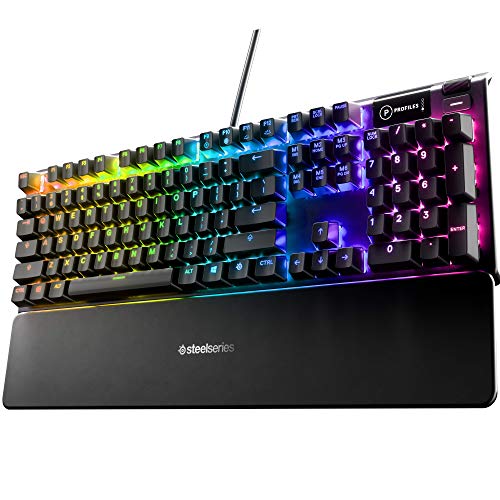 SteelSeries USB Apex 5 Hybrid Mechanical Gaming | Check price | |
 Razer BlackWidow V4 X Mechanical Gaming Keyboard | Check price | |
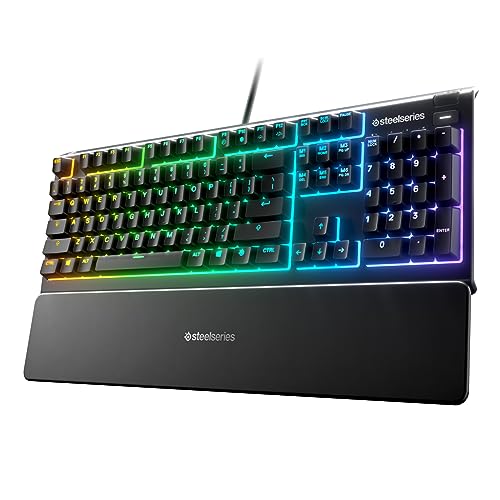 SteelSeries Apex 3 RGB Gaming Keyboard | Ip32 water resistant 10-zone RGB illumination Whisper quiet gaming switches | Check price |
 Redragon K668 108-Key Hot-Swap Wired RGB Gaming | 4 Extra Hotkeys, Full-Size 108-Key Anti-Ghosting - Dedicated… Swap Switches Without Soldering, Smooth and Quiet -… Vibrant RGB for a True eSports Vibe -… | Check price |
As an Amazon Associate we earn from qualifying purchases at no extra cost to you.
⚡ Save on Your Next PC — Amazon Prime
Prime members get fast free shipping on the systems above, plus early access to Prime Day & Black Friday PC deals. New members get a 30-day free trial.
Watch: Mechanical vs Membrane Keyboard: 2026 Guide — Video Review
Quick Verdict
Choose a mechanical keyboard like the Redragon K580 or AULA F75 Pro if you want tactile feedback, faster repeat actuation, and a board that lasts for tens of millions of keystrokes. Choose membrane, such as the SteelSeries Apex 3, if you prioritize quiet typing, spill resistance, and the lowest possible price for a competent gaming board.
Key Differences
- Typing feel: Mechanical switches give a distinct actuation point and consistent bounce-back, while membrane keys feel mushier as pressure spreads across the rubber dome.
- Sound: Mechanical boards range from clicky to soft depending on switch, whereas membrane keyboards are inherently quieter and better for shared spaces.
- Durability: Mechanical switches are rated for 50 to 100 million presses each, far outlasting the roughly 5 to 10 million of a typical membrane sheet.
- Price: Membrane is the budget king, while mechanical carries a premium that hot-swappable models like the AULA F75 Pro help narrow.
- Customization: Hot-swap mechanical boards let you change switches and keycaps freely; membrane keyboards are essentially fixed from the factory.
- Anti-ghosting: Both offer N-key rollover on gaming models, but mechanical boards tend to guarantee it more consistently across the whole board.
Mechanical Keyboards
Mechanical keyboards are the enthusiast standard, and models like the Redragon K580, Logitech G413 SE, and Razer BlackWidow V4 X show the range on offer. Each key sits on its own switch, so you feel a precise actuation point and get a crisp, repeatable response that rewards fast typists and competitive gamers alike. Switch variety lets you tune the experience, from silent linears for late-night sessions to tactile bumps or clicky feedback.
The other big win is longevity and repairability. Switches rated for 50 million-plus presses shrug off years of heavy use, and hot-swappable boards like the AULA F75 Pro let you replace a single failing switch or completely change the feel without soldering. You pay more upfront, but a good mechanical board is a component you keep across several PC builds.
Membrane Keyboards
Membrane keyboards remain the value and practicality choice, and hybrid gaming models such as the SteelSeries Apex 3 and Apex 5 prove they are far from obsolete. A single rubber-dome layer sits under the keys, keeping the design quiet, spill-resistant, and inexpensive to manufacture. For players who share a room, work in an open office, or simply want a capable board for the least money, that combination is genuinely compelling.
The compromises are feel and lifespan. The mushier keystroke lacks the crisp actuation point mechanical fans crave, and the rubber domes wear out sooner under intense daily use. Even so, water resistance ratings like the Apex 3’s IP32 and whisper-quiet operation give membrane a practical edge in exactly the situations where a loud, pricey mechanical board would be a liability.
Which Should You Buy?
- For competitive gaming feel: pick mechanical, because the precise actuation and consistent response give you cleaner, more confident inputs.
- For a tight budget: pick membrane like the SteelSeries Apex 3, because it delivers solid gaming features for the lowest cost.
- For quiet shared spaces: pick membrane or a silent linear mechanical, because both keep late-night typing from disturbing others.
- For long-term durability and customization: pick a hot-swap mechanical like the AULA F75 Pro, because it lasts for years and lets you tweak switches freely.
- For spill-prone desks: pick a water-resistant membrane board, because its sealed rubber layer survives accidents that would kill an exposed switch plate.
Frequently Asked Questions
Are mechanical keyboards actually better for gaming?
For most players, yes. The defined actuation point and consistent switch behavior make inputs feel more precise and reliable, and higher-end boards guarantee full anti-ghosting. Membrane boards can still game well, but they lack that tactile confidence.
Why are membrane keyboards quieter?
Because the keys press against a soft rubber-dome sheet rather than a spring-loaded switch. There is no click mechanism or bottoming-out clack, so membrane boards stay quiet enough for offices and shared rooms.
Do mechanical keyboards last longer?
Significantly. Mechanical switches are rated for 50 to 100 million presses each, while membrane sheets typically manage 5 to 10 million. A quality mechanical board can outlive several computers.
What does hot-swappable mean?
It means you can pull out and replace individual switches by hand, with no soldering. Boards like the AULA F75 Pro let you change the typing feel or fix a dead key in seconds, which membrane keyboards cannot do.
Final Verdict
Mechanical keyboards win on feel, durability, and customization and are the better long-term investment for anyone serious about gaming or typing. Membrane keyboards still earn their place through low price, quiet operation, and spill resistance, making them the smart pick for tight budgets and shared spaces. Match the board to your environment and priorities, and either can serve you well in 2026.