
The best low profile Hall effect keyboards combine adjustable magnetic switches with a genuinely slimmer typing position, but the right one depends on layout and connection type. Our best overall pick is the wired NuPhy Air75 HE ($129.95), which keeps a function row and dedicated arrows while offering up to 8,000Hz USB polling. The Keychron K3 HE ($119.99) is more versatile for buyers who also need 2.4GHz wireless and Bluetooth. For maximum mouse space, the NuPhy Air60 HE ($119.95) makes more sense; if you want a TKL layout, consider the Logitech G515 RAPID TKL. The six models below are actual low-profile magnetic keyboards, not ordinary low-profile mechanical boards relabeled for an HE roundup.
Quick verdict: Which low-profile magnetic keyboard should you buy?
Best overall: NuPhy Air75 HE — $129.95 at NuPhy. Its 75% layout is a sensible middle ground between game controls and everyday shortcuts. The manufacturer specifies 84 keys, a 0.1–3.3mm adjustable actuation range, and wired 8,000Hz polling. RTINGS independently found excellent latency behavior and extensive web-based customization. Trade-off: there is no wireless mode, even though other NuPhy Air keyboards have wireless connectivity.
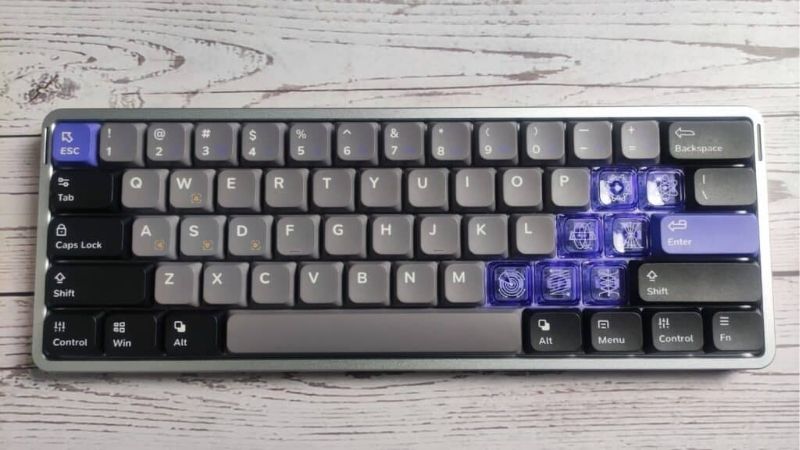
Best for wireless plus work: Keychron K3 HE — $119.99 at Keychron. It uses low-profile Ultra-Fast Lime magnetic switches and works over USB-C, 2.4GHz, or Bluetooth. Its 1,000Hz rate applies to wired and 2.4GHz operation; Bluetooth drops to 125Hz according to Keychron. This model is not a substitute for a wired 8K competitive keyboard if that specific feature is your priority.
Least expensive verified listing: MelGeek MADE68 Air — $75 on MelGeek’s US-dollar manufacturer storefront. The promotional listing covers a 68-key wired HE board with 8,000Hz USB polling. It is a last-chance sale with color- and destination-dependent availability, so confirm that the selected version can ship to your US ZIP code before relying on the price.
For a familiar TKL layout: Logitech G515 RAPID TKL — $169.99 at Logitech G. It preserves a navigation cluster and adds customizable magnetic switches through G HUB. The $199.99 Turtle Beach Command Series KB7 is an alternative for Windows gamers who specifically need integrated touchscreen controls and a wrist rest; its large footprint makes it a specialist choice rather than a compactness winner.
Six low-profile Hall effect keyboards compared
| Product | Price (USD, retailer, date) | Key verified specs | Best for / compatibility | Main drawback |
|---|---|---|---|---|
| NuPhy Air75 HE | $129.95, NuPhy US-dollar store, Oct. 27, 2026; base Magnetic Jade | 75%, 84 keys; low-profile Magnetic Jade; 0.1–3.3mm actuation, Rapid Trigger; 8,000Hz wired; no 2.4GHz/Bluetooth; 316.4 × 132.5mm, 12.8mm front, 702g; no battery | Best overall; Windows/macOS/Linux compatibility listed; NuPhy IO web configuration | USB wired only; legends are not stock shine-through |
| Keychron K3 HE | $119.99, Keychron US/global store, Oct. 27, 2026; ANSI black base listing | 75%; Ultra-Fast Lime low-profile magnetic; 0.2–2.9mm actuation, Rapid Trigger; 1,000Hz USB / 2.4GHz, 125Hz Bluetooth; 318.62 × 126mm, 22mm front incl. keycaps, 575g; 2,600mAh / up to 55h | Hybrid gaming and laptop work; Windows/macOS/Linux; Keychron Launcher | Lower peak polling than wired 8K models; selected color may backorder |
| NuPhy Air60 HE | $119.95, NuPhy US-dollar store, Oct. 27, 2026; base Magnetic Jade | 60%, 61 keys; low-profile Magnetic Jade; 0.1–3.3mm actuation, Rapid Trigger; 8,000Hz wired; no wireless; 297.2 × 107.2mm, 13.2mm front, 534g; no battery | FPS mouse clearance and small desks; Windows/macOS/Linux listed | No dedicated arrow cluster or function row |
| MelGeek MADE68 Air | $75.00, MelGeek manufacturer US-dollar storefront, Oct. 27, 2026; listed promotional price, US checkout availability not independently confirmed | 68 keys / ~65%; TTC KOM MINI low-profile magnetic; 0.1–2.8mm actuation; 8,000Hz wired, 16,000Hz advertised full-key scan; 310 × 111 × 29mm, ~630g; no battery | Feature-rich small wired board when $75 listing is purchasable; MelGeek HIVE configuration | Limited-sale inventory; manufacturer does not publish complete OS matrix on listing |
| Logitech G515 RAPID TKL | $169.99, Logitech G USA, Oct. 27, 2026; new black wired variant | TKL / 80%; low-profile magnetic analog, 0.1–2.5mm adjustable actuation, Rapid Trigger; wired USB only; numerical polling rate not published by manufacturer on reviewed page; 22mm height; no battery | Traditional TKL navigation layout; Logitech G HUB customization for compatible PCs | No wireless; short travel and heavier desktop software |
| Turtle Beach Command Series KB7 | $199.99, Turtle Beach USA, Oct. 27, 2026 | TKL; Titan low-profile Hall effect; 0.1–3.2mm actuation, Rapid Trigger; 8,000Hz wired; 4.3-inch touchscreen; 858g keyboard, 29mm chassis; no battery | Windows 10/11 gaming plus streaming controls; Swarm II software | Large overall footprint and added touchscreen complexity; direct USB connection required |
Prices were checked on Oct. 27, 2026 and can change; confirm the exact variant at checkout. Prices refer to new, manufacturer-listed items rather than bundled or refurbished offers. A manufacturer listing is not an independent confirmation of delivery to every US address, particularly for MelGeek’s limited-sale colors or Keychron’s mixed backorder status.
How we selected these six keyboards
We required three things: a magnetic/Hall-effect actuation system, an explicitly low-profile physical design, and an identifiable manufacturer-listed model. That excludes popular standard-height HE boards whose case has a visually low front edge but whose switches and keycaps are not designed as a low-profile system. It also excludes the otherwise appealing NuPhy Air75 V3, Logitech G515 LIGHTSPEED, and Turtle Beach KB5: those specific products use conventional mechanical switches rather than the magnetic models discussed here. Model suffixes are a buying requirement, not a cosmetic detail.
The comparison prioritizes real US-dollar asking prices, dimensions and layout, actuation adjustability, connection-specific polling rates, software ecosystem, and whether the keyboard works as a daily typing device. NuPhy, Keychron, MelGeek, Logitech, and Turtle Beach product pages supply the published specifications. RTINGS’ Air75 HE and G515 RAPID reviews provide independent context on input consistency and feel; those tests do not mean Geek Gaming Tricks tested the products. Manufacturer claims such as 0.125ms are not presented as end-to-end keypress latency measurements, because the USB report interval is only one part of the signal chain.
All six are appropriate subjects for a buying comparison, but the selection is not based on a single interchangeable benchmark chart. Different testers, firmware builds, switch settings, host operating systems, and USB settings can distort apparent speed rankings. We make choices based on verifiable capabilities and the situations in which they matter rather than declaring every 8K keyboard faster in game than every 1K model.
NuPhy Air75 HE: Best overall for gaming and daily typing
The Air75 HE is the most balanced starting point for a US buyer who explicitly wants both low height and competitive input customization. Its 84-key ANSI 75% layout retains dedicated arrows and function keys in a footprint noticeably shorter than a typical TKL. The manufacturer lists a 316.4mm body length, a 132.5mm width, a 12.8mm front height, and a 702g mass. Those numbers describe a low-front-edge desktop board rather than a featherweight travel accessory. For a fixed desk, that mass is a minor concern; for frequent transport, it is worth considering alongside the smaller Air60 HE.
The base configuration uses NuPhy’s Low-Profile Magnetic Jade switches, with a 0.1–3.3mm actuation setting range. Rapid Trigger adjusts the release and re-actuation behavior based on key movement, which can make repeated directional inputs feel more immediate when configured sensibly. NuPhy states 8,000Hz over a direct wired connection, not over Bluetooth. The keyboard has no wireless radio or rechargeable battery. Do not mistake it for an Air75 V2 or V3 merely because they share the Air family name and familiar silhouette.
For usability, the web-based NuPhy IO configuration is an advantage if you dislike a permanently installed gaming utility. You can tune actuation, remapping, and relevant rapid-input behavior in a supported browser with the keyboard connected. RTINGS’ independent review supports the case for this model: strong latency consistency, good construction, and customization depth were standout attributes. Its caution about keycap visibility matters too. Standard legends are not shine-through, so buying for dim-room work may require compatible accessory keycaps instead of assuming RGB solves visibility.
At $129.95, the Air75 HE is only $10 above the similarly shaped Keychron K3 HE’s $119.99 listing, but buys a higher maximum wired reporting rate and a different tuning ecosystem while giving up wireless completely. Compared with the $169.99 Logitech G515 RAPID TKL, it costs $40.04 less and is more compact, though Logitech preserves a separate navigation cluster. These are more useful trade-offs than chasing polling numbers in isolation.
Buy if: you game primarily at one desk and want a compact, dedicated-wired HE board with function keys. Skip if: you regularly switch between a desktop and tablet without cables or need backlit legends out of the box. Price perspective: at $129.95 it is a strong alternative to both the $119.99 K3 HE and the $169.99 G515 RAPID, provided wireless is not a requirement.
Keychron K3 HE: Best low-profile wireless Hall effect option
The Keychron K3 HE stands out because it does not force buyers to choose between a slim magnetic keyboard and the convenience of wireless. Its 75% ANSI layout, aluminum-and-wood body, double-shot PBT low-profile keycaps, and 575g weight support a mixed gaming-and-productivity setup. Keychron lists a 318.62 × 126mm footprint, a front edge approximately 22mm high including the keycaps, and an up-to-55-hour battery-life claim from laboratory testing. Actual battery time depends on backlight use, connection, settings, and charging conditions.
The Ultra-Fast Lime Low-Profile Magnetic switches provide adjustable actuation from 0.2 to 2.9mm with Rapid Trigger. Crucially, Keychron specifies up to 1,000Hz in USB wired mode and in its 2.4GHz dongle mode, but only 125Hz over Bluetooth. A laptop user can reasonably take Bluetooth for typing and switch to 2.4GHz or a cable for games. Advertising the board as ‘1K wireless’ without specifying the radio would be misleading.
Keychron Launcher handles remapping and HE configuration, and the manufacturer’s operating-system list includes Windows, macOS, and Linux. The keycaps are non-shine-through. Magnetic hot-swap is supported, but only for the compatible Keychron Ultra-Fast Lime low-profile magnetic switch family; ordinary low-profile mechanical switches and other magnetic footprints should not be assumed to fit. This matters to buyers counting on long-term repairability or custom switch replacements.
The $119.99 manufacturer listing offers an appealing combination of use cases compared with NuPhy’s wired-only Air75 HE at $129.95 and Air60 HE at $119.95. The ten-cent difference from Air60 HE is essentially irrelevant; the decisive choice is whether you prefer a full function row and wireless modes or a smaller, faster-reporting wired deck. Keychron’s product page has displayed conflicting stock wording for the selected black ANSI variant, so check the actual cart rather than treating a generic ‘in stock’ banner as proof that every color can ship immediately.
Buy if: your keyboard must move between a gaming PC, laptop, and occasional Bluetooth device. Skip if: your priority is a proven 8,000Hz wired option or unrestricted switch interchangeability. Price perspective: at $119.99, it undercuts the Air75 HE by $9.96 and the Logitech by $50, making its connectivity the main reason to choose it.
NuPhy Air60 HE: Best for mouse space and compact setups
Choose the Air60 HE when a small physical footprint matters more than having a self-contained navigation cluster. NuPhy lists 61 keys in a 60% ANSI arrangement, a 297.2 × 107.2mm body, a 13.2mm front height, and a 534g weight. Relative to the Air75 HE, it frees desk width and removes more of the keys that sit to the right of the main typing block. That can be especially useful for players who position their mouse close to their body or who travel with a compact gaming PC.
The core HE platform is familiar: Low-Profile Magnetic Jade or Jade Pro options, 0.1–3.3mm adjustable actuation, Rapid Trigger functionality, and wired 8,000Hz polling. Its operating-system compatibility list covers Windows, macOS, Linux, Android, and iOS at the basic keyboard level, but editing HE profiles is a different question from typing. Use the manufacturer-supported NuPhy IO environment and do not infer that every mobile platform can configure rapid-trigger parameters. No Bluetooth or 2.4GHz dongle comes with the model.
The biggest trade-off is not speed; it is missing dedicated keys. In a 60% layout, arrows and function keys move to secondary layers or shortcut combinations. This can be fine for an FPS-focused gaming station, especially once your preferred layer shortcuts become familiar. It is less convenient for spreadsheet work, development shortcuts, frequent screenshot commands, or games that lean heavily on function keys. The smaller board is not intrinsically faster than the Air75 HE, because both share the manufacturer’s claimed wired reporting ceiling.
At $119.95, the Air60 HE costs $10 less than the Air75 HE and four cents less than the K3 HE. Those differences are too small to justify sacrificing the keys you use every day. A buyer who merely likes the look of a miniature keyboard should first consider whether a 75% layout would remove most of the same mouse interference without compromising navigation.
Buy if: you play mouse-heavy shooters and already know you are comfortable with layers on a 60% board. Skip if: you rely on dedicated arrows, F-keys, or wireless convenience. Price perspective: the $119.95 price is a layout decision relative to the $119.99 K3 HE and $129.95 Air75 HE, not a meaningful savings play.
MelGeek MADE68 Air: Best low-price opportunity if the sale is available
MelGeek’s MADE68 Air fills the space between a 60% board and a more crowded 75% layout. Its 68-key layout keeps more navigation utility than a strict 60% arrangement while preserving generous mouse clearance. The company lists a 310 × 111 × 29mm chassis and an approximately 630g keyboard weight. With TTC KOM MINI low-profile magnetic switches and matching low-profile keycaps, this is a real compact HE design rather than a standard-height magnetic keyboard with a slim advertising photograph.
The published USB polling rate is 8,000Hz, alongside a 16,000Hz full-key scan specification. These two figures describe different operations and must not be added together or treated as a measured reaction time. The manufacturer lists 0.1–2.8mm adjustable actuation, Rapid Trigger, and its proprietary HIVE configuration system. MelGeek also explains that a 0.02mm protective dead zone exists at the bottom of travel for stability. Anyone expecting literal zero-dead-zone behavior everywhere in the travel range should read that distinction carefully.
The apparent bargain comes with unusually important buying conditions. MelGeek’s manufacturer storefront lists the MADE68 Air at $75, reduced from $84, as a limited ‘last chance’ offer. Other pages have shown color-level sold-out states even when category pages showed add-to-cart buttons. The price is expressed in US dollars and the retailer discusses US delivery, but an accessible checkout confirmation for a particular US ZIP code was not obtained in this research. This is a verified displayed price, not a guaranteed purchasable offer for all buyers.
At the displayed $75 it is $44.95 less than the Air60 HE and $44.99 below the K3 HE, enough to make it a sensible feature-focused alternative if the US checkout really works. However, you should not choose it purely from an old deal screenshot or assume broad local warranty handling. Confirm the color, shipping charge, return location, support process, and product configuration before purchase. The manufacturer’s product listing does not provide a complete operating-system support matrix, so buyers requiring specific macOS or Linux software behavior should confirm that separately.
Buy if: you can complete US checkout at the current $75 offer and want 68 physical keys with magnetic adjustability. Skip if: you need guaranteed availability or fully documented support for a particular non-Windows operating system. Price perspective: its listed $75 is the lowest in this comparison, but the practical alternative is the more straightforward $119.95 Air60 HE or $119.99 wireless K3 HE if the promotion cannot be purchased.
Logitech G515 RAPID TKL: Best familiar navigation layout
The magnetic G515 RAPID TKL is easy to misunderstand because Logitech sells similarly named G515 models that use conventional mechanical switches. The ‘RAPID’ suffix matters. This specific wired model uses low-profile magnetic analog switches and adds adjustable actuation from 0.1 to 2.5mm, Rapid Trigger, configurable opposing-key priority, and multi-point actions through Logitech G HUB. Its 22mm chassis height is one of its clearest ergonomic differences from typical full-height magnetic boards.
The tenkeyless layout retains arrows, function keys, and a more conventional navigation area while dropping the numpad. A player who frequently uses Delete, Insert, Page Up, or other keys without layers may find that worth the extra desk width. The keyboard is USB wired only. The manufacturer’s reviewed US product page does not publish a numeric polling rate for this model, so the comparison deliberately does not assign it an 8,000Hz figure based on other Logitech keyboards or unrelated G515 versions.
RTINGS’ independent review describes strong latency consistency and solid construction but points out that G HUB can be resource-intensive and that the shallow travel may not appeal to heavy typists. That is a useful reminder that a low case height is not equivalent to a comfortable key feel for everyone. Although adjustable actuation can be tuned to prevent accidental triggers, users who bottom out forcefully should try the shallow travel at a retailer when possible. The stock keycaps have legible RGB shine-through legends, unlike several compact competitors.
Logitech G’s current US page displays $169.99 for the new black model. Compared with the $129.95 Air75 HE, that is $40.04 extra primarily for the different layout, software ecosystem, and brand-specific experience rather than a verified speed lead. Turtle Beach’s $199.99 KB7 costs another $30 but adds specialized controls and an illuminated palm-rest setup. If you just want magnetic movement settings in the smallest possible package, neither TKL is the rational first choice.
Buy if: you want TKL navigation without abandoning Rapid Trigger, especially if you already use G HUB. Skip if: you want wireless use, a highly portable 60% board, or lightweight software. Price perspective: $169.99 sits between the smaller $129.95 NuPhy Air75 HE and the touchscreen-centric $199.99 Turtle Beach KB7.
Turtle Beach Command Series KB7: Best for gaming and streaming controls
The Command Series KB7 serves a different buyer from the minimalist NuPhy and Keychron models. Its defining feature is a 4.3-inch touchscreen for profiles, macros, apps, audio, system information, and streaming controls. It also includes physical action-bar controls, a volume dial, a detachable wrist rest, and expansion rails for compatible Command Series accessories. Someone who manages audio and scenes during gameplay may prefer those dedicated controls to a separate macro pad.
The KB7 is not trading away the underlying HE technology. Turtle Beach specifies Titan low-profile Hall effect switches with actuation adjustable from 0.1 to 3.2mm, Rapid Trigger, and 8,000Hz wired polling. The keyboard uses a low-profile chassis marketed at 29mm high and weighs 858g before its wrist rest. The manufacturer’s full dimensions with the rest attached are 399 × 256 × 31mm, so the everyday footprint can be much larger than the word ‘low-profile’ suggests. Slim height and small desk occupancy are two different claims.
It is also a Windows-focused product. The compatibility list covers Windows 10 and 11, and Swarm II is the supplied software ecosystem. The official requirements call for a direct connection through suitable USB-C or a two-port USB-A arrangement, not an unspecified hub. That matters for buyers whose gaming PC sits below the desk or whose docking station has limited upstream power and bandwidth. Check the cable arrangement before assuming an ordinary single USB-A port will power the complete touchscreen setup.
At the $199.99 US manufacturer price, the KB7 costs $30 more than the G515 RAPID TKL and $70.04 more than the Air75 HE. Those premiums buy dedicated display and control hardware, not a meaningful improvement to the fundamental 8K polling ceiling versus NuPhy. If you already own a Stream Deck-like control surface or never manage streams and macros, the added hardware is mostly cost and desk area. And do not confuse this model with the cheaper KB5: Turtle Beach’s own specifications identify the KB5 as low-profile mechanical, not Hall effect.
Buy if: a Windows gaming/streaming command surface genuinely replaces separate gear on your desk. Skip if: you use macOS/Linux, want a small travel keyboard, or only need adjustable WASD actuation. Price perspective: its $199.99 asks you to justify a $70.04 premium over Air75 HE and a $30 premium over G515 RAPID with actual use of the screen.
What Hall effect actually changes in a low-profile keyboard
Adjustable actuation is about control, not magic reaction speed
A conventional mechanical switch typically registers at a predetermined point on its travel. Hall effect sensing tracks magnetic position, making it possible to set an actuation threshold in supported software. A shallow actuation setting can feel lively for movement keys, but it also increases accidental activations if you rest your fingers heavily. A deeper threshold may be preferable for typing or for keys such as grenade, inventory, or push-to-talk where unintended presses are costly. The best setting is the one that you can control reliably, not necessarily the minimum number the manufacturer advertises.
Low-profile construction shortens the physical distance of the switch and changes typing posture, but manufacturers measure front height in different ways. NuPhy publishes case-edge measurements, Keychron specifies height including keycaps, and Logitech and Turtle Beach provide whole-chassis figures. Compare the terms and images before treating a 13mm listed front edge as proof that the complete board is uniformly thinner than a 22mm chassis.
Rapid Trigger differs from polling rate
Rapid Trigger dynamically adjusts when a key resets as you release it, making a second input possible without waiting for a fixed release threshold. USB polling describes how often the keyboard can send reports. At 8,000Hz the nominal interval between reports is 0.125ms, compared with 1ms at 1,000Hz, but neither is a measured end-to-end input latency. Sensor processing, firmware settings, host USB scheduling, game engine behavior, and display output all matter. A well-designed 1K wireless keyboard can feel more predictable than an aggressively configured 8K wired one that causes unintended inputs.
Do not chase maximum sample rates solely because marketing calls them ‘eight times faster.’ The numbers refer to reporting opportunities, not a promised eightfold reduction in human reaction time or whole-system delay. For practical purchasing, start with appropriate switch travel, responsive firmware, and reliable connection quality. If you choose a model with selectable polling modes, test them with your own games and restore a lower rate if you encounter instability.
SOCD and directional priority can conflict with game rules
Several HE software ecosystems offer features that prioritize one of two opposing inputs, sometimes called SOCD, Snap Tap, or directional key priority. They should not be confused with ordinary actuation adjustment. Valve’s official Counter-Strike 2 announcement of August 19, 2024 warned that certain hardware-assisted counter-strafing and other input automation could cause removal from official matches. If a game or tournament restricts automated movement resolution, disable the conflicting feature and confirm current rules before playing. Rapid Trigger and remapping can remain useful without relying on prohibited automation.
How to choose the right layout, connection, and software
Pick 60%, 65%, 75%, or TKL based on the keys you actually use
For a dedicated FPS station, the 60% Air60 HE saves space but demands layer familiarity. The 68-key MADE68 Air provides a compromise for buyers who want more compact navigation while retaining mouse clearance. The 75% Air75 HE and K3 HE preserve a dedicated function row and arrows, a combination that tends to be less disruptive when the same keyboard handles office work and game menus. TKL models such as the G515 RAPID and KB7 suit players who expect separate navigation keys and do not need a number pad. There is no objective ‘fastest layout’ because the difference is your hand placement and command access.
Choose wired for simplicity, wireless for workflow
Five of these six products are wired-only. That is not automatically a defect: a stationary gaming PC benefits from never charging a keyboard, and a direct cable is straightforward to troubleshoot. The K3 HE is the sole tri-mode choice in this shortlist. Its 2.4GHz dongle preserves Keychron’s 1,000Hz specification, while Bluetooth runs at 125Hz and is better suited to ordinary typing and device switching than competitive responsiveness. Check that your computer has an available port for the dongle and that your setup supports the required software for remapping.
Verify switch compatibility before buying replacements
‘Hot-swappable’ describes a replacement mechanism, not a universal socket. Keychron explicitly limits K3 HE magnetic switch replacements to its compatible Ultra-Fast Lime low-profile type. NuPhy advertises replaceable magnetic switches with the power off, and MelGeek says mixed-switch hybrid compatibility is not supported on the MADE68 Air. Do not install conventional MX mechanical switches or random Gateron magnetic switches into a low-profile HE PCB merely because they appear similarly shaped. Follow the exact model’s official compatibility instructions and disconnect power before removing switches.
Check software and service support before committing
NuPhy IO and Keychron Launcher operate through supported web configuration workflows; Logitech G HUB and Turtle Beach Swarm II represent their respective software environments. A keyboard may type on multiple operating systems while its calibration, firmware update, and advanced HE features require a narrower set of supported platforms or browsers. On shared work computers with managed USB access, web configuration and driver installation may both be restricted. Verify the software on your actual computer before exceeding a return window, and do not flash firmware merely for the sake of having a newer version. Use only the manufacturer’s correct model-specific file and instructions if an update is genuinely required.
A practical setup checklist after unboxing
- Identify the full model on the label and compare it with your order. Verify ‘HE,’ ‘RAPID,’ or ‘KB7’ where appropriate rather than relying on the broader series name.
- Connect the keyboard directly to your PC for initial testing. On the K3 HE, use a wired connection when setting up its profiles, then deliberately select 2.4GHz or Bluetooth after checking your desired behavior.
- Install or open only the official configuration tool for the exact model. Record the factory actuation and Rapid Trigger settings before changing them.
- Start with moderate movement-key sensitivity rather than the minimum. Test movement, stopping, inventory keys, and typing in a safe offline or practice environment; watch for unintended movement.
- Disable opposing-key automation if a game or competitive ruleset disallows it. Treat adjustable actuation and input-priority processing as separate settings.
- Confirm your selected wired or wireless reporting mode if the tool exposes it. Do not assume Bluetooth uses the same polling rate as USB or 2.4GHz.
- Save a separate everyday profile with a less sensitive actuation setting if typing errors increase. If instability appears after tuning, restore default settings using the official software instructions before attempting firmware recovery.
Success means that deliberate keys register consistently in your actual games, typing remains comfortable, and the keyboard behaves correctly after restarting your PC or changing connections. If the input feels oversensitive, increasing the actuation threshold is usually a safer first move than downloading unofficial firmware, changing obscure Windows settings, or disabling security protections. For hardware faults, document reproducible behavior and use the manufacturer warranty or seller return process.
Frequently asked questions
Are low-profile Hall effect keyboards better than standard-height HE keyboards?
Not inherently. Low-profile boards reduce front-edge height and often shorten the movement of the key, which some players find easier on their wrists or better for rapid repeated presses. Full-height magnetic keyboards may have a feel or key travel you prefer, and many offer equally capable actuation software. If ergonomics are the motivation, compare desk height, chair position, keyboard tilt, and keycap geometry—not just the switch label. If performance is the motivation, favor trustworthy latency testing over marketing polling numbers.
Can I use a low-profile Hall effect keyboard wirelessly?
Yes, but not every model in this category supports it. The Keychron K3 HE is a verified tri-mode choice with wired USB-C, 2.4GHz dongle, and Bluetooth. Keychron rates wired and 2.4GHz at 1,000Hz and Bluetooth at 125Hz. The NuPhy Air75 HE, NuPhy Air60 HE, MelGeek MADE68 Air, Logitech G515 RAPID TKL, and Turtle Beach KB7 models listed here are wired-only. Do not infer wireless support from another keyboard in the same brand’s low-profile lineup.
Does an 8,000Hz polling rate mean a keyboard has 0.125ms input latency?
No. Dividing one second by 8,000 gives a nominal 0.125ms interval between USB reports, not the full time from finger motion to a game responding on screen. Switch travel, magnetic sensing, firmware, the host, and the game’s update cycle all contribute. For comparisons between products, look for independent measurements made under consistent test conditions. An 8K label can be a legitimate specification without establishing a universal in-game advantage over a 1K model.
Will magnetic switches from one low-profile board fit another?
Usually not without checking exact compatibility. The Keychron K3 HE supports the specified Keychron Ultra-Fast Lime Low-Profile magnetic switches, and Keychron warns against assuming compatibility with other families. NuPhy Air HE and MelGeek MADE68 Air use other low-profile magnetic switch systems, and an ordinary mechanical switch does not magically work on a Hall effect PCB. Check the exact board revision, approved switch model, and manufacturer’s removal guidance before buying spares or experimenting with swaps.
Final thoughts
For most US PC gamers, choose the $129.95 NuPhy Air75 HE if a cable is acceptable and you want dedicated arrows and function keys with deep magnetic tuning. Pick the $119.99 Keychron K3 HE if wireless flexibility matters more than 8K wired polling, or the $119.95 Air60 HE if desk clearance outranks extra keys. The MelGeek MADE68 Air is compelling at its displayed $75 promotional price only after you confirm US checkout and availability. Spend $169.99 on the Logitech G515 RAPID TKL for a familiar navigation layout, or $199.99 on the Turtle Beach KB7 when its touchscreen genuinely serves your gaming and streaming workflow. None is the right purchase merely because it advertises the smallest actuation number.









